
 Web Development
 Data Science
 Python
 SQL
SQL JavaScript
 Artificial Intelligence
 IT & Software
 IT Certifications
 Hacking
 AWS
AWS Arduino
 DevOps
 3D Modeling
 Graphic Design
 Photoshop
 Drawing
 Digital Painting
 UX Design
 Business
 Data Analysis
 Communication Skills
 Project Management
 Leadership & Management
 Human Resources
 Digital Marketing
 Social Media Marketing
 Marketing
 SEO
SEO Google Analytics
 Branding
 Excel
Excel Office Productivity
 SAP
SAP PowerPoint
 Microsoft Access
 SharePoint
 Finance & Accounting
 Trading & Investing
 Accounting
 Bitcoin
 Personal Finance
 Video Editing & Animation
 Photography
 Adobe Premier Pro
 Adobe Lightroom
 Personal Development
 Productivity
 Career Development
 Life Coaching
 Health & Fitness
 Meditation & Mindfulness
 Yoga
Yoga Music
Music Music Production
 Guitar
 Piano
Piano Singing
 Language Learning
 Teaching & Academics
 Engineering
 Math
Math Lifestyle
3D Modeling and Texturing Interior Office in Autodesk Maya (Udemy.com)
A step by step guide to Modeling and Texturing an Office Interior in Autodesk Maya
Created by: Andrew Rees
Last updated December 2018
 What you will learn
- Model in-organic 3D objects such as Table, chair etc.,
- Texture in-organic 3D objects such as Table, chair etc.,
- Create simple lighting and render a interior office scene.
How it compares
Against the other 545 rated Udemy courses in 3D Modeling on CourseDuck:
- Rating4.2 out of 5higher than 10% of them
- Reviews188#329 of 546 by number of reviews
- Length2.4 hoursshorter than 81% of them
- Last updatedDecember 2018earlier than 84% of them
 Course Description
Course Description
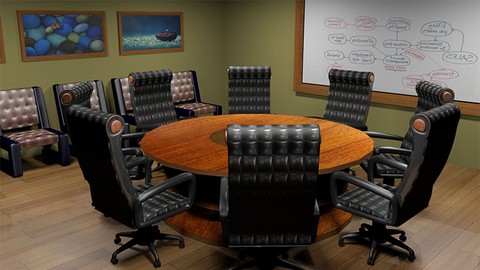
This is a basic to intermediate level course on Autodesk Maya for creating an office interior. As part of the Office Interior, we will create two types of chairs, two types of tables, a curtain, and some other items. We will create the model, texture all the models and finally create a render with simple lighting setup.
Build up your modeling and texturing skills in Maya the world’s best 3D Animation software with this Course.
Learn polygon modeling of various types of furniture
Learn texturing in Maya for different kinds of surfaces.
Learn Simple lighting techniques to render a fully lit interior
Learning Outcomes
Create various kinds of Inorganic polygon models in Autodesk Maya
Model the interior of an office building
Understand the process of texturing and apply file textures all the modeled objects
Render a final image of the interior created
Content and Overview
3D Modeling and Texturing Interior Office in Autodesk Maya has five sections.
Section 1:Start Here
Lecture 1:Introduction
Lecture 2:Workfiles
Section 2:Modeling
Lecture 3:Modeling Round Table
Lecture 4:Modeling Revolving Chair Part 01
Lecture 5:Modeling Revolving Chair Part 02
Lecture 6:Duplicating the Revolving Chair
Lecture 7:Wall Curten
Lecture 8:Small Chair
Section 3:Texturing
Lecture 9:Texturing the Table
Lecture 10:Texturing the Rolling Chair
Lecture 11:Texturing the Small Chair
Lecture 12:Texturing the rest of the models
Section 4:Lighting and Rendering
Lecture 13:Lighting and Rendering

 Udemy Discount
The discount is applied through our link. Open the course from here and Udemy's current promotional price is applied at checkout on most courses, no code to type.
Some courses are excluded from Udemy's promotions. If the price does not drop, clear your browser cookies and use the button again.
Instructor Details

- 4.2 Rating
 188 Reviews
Andrew Rees
My name is Andrew Rees
My passion is in creative arts including but not limited to drawing, sculpting and animating. I have received “The General Secretariat Award for Design and Development of e-Courses – 2015” A GCC level Award organized by University of Bahrain.
I have over 15 years of total work experience which includes both teaching and animation film production. My experience in production enabled me to make the students industry ready so that they won’t need additional training when they enter a job in Animation studio.
I have trained students from 4 different countries namely India, Mongolia, Jordan and Oman. So, I can understand the expectation of the students coming from various cultural background.
 More courses by Andrew Rees
More 3D Modeling courses

3D Printing with " Ultimaker CURA Slicer- Start to finish" (2025)
4.9 (192 Reviews)
 Provider: Udemy
 Time: 1h
$34.99

Girl and the Dog Creation in Zbrush for Intermediate Level (2020)
4.9 (173 Reviews)
- Provider: Udemy
- Time: 48.8h
$59.99



Blender Character Creator for Video Games (2026)
4.8 (9,160 Reviews)
- Provider: Udemy
- Time: 34.3h
$159.99

Master SOLIDWORKS 3D CAD using real-world examples (2022)
4.8 (2,451 Reviews)
- Provider: Udemy
- Time: 18.9h
$69.99
 Reviews

By Vinod Prakash Bingi on 8/23/2025
My certificate Downloading option not visible
By Rohith krishna on 10/12/2023
Great course on Maya.
By Ana Graciela Vassallo Fedotkin on 3/22/2022
An amazing course to learn the basics of Maya! I gained a lot of confidence with the course and found it very helpful! A highly recommended course for beginners to Maya!
By Deepak Bhadauria on 8/21/2020
Teaching is superb! This tutorial is amazing! Please made more tutorials.
By Tran T. Thao on 6/23/2020
It's great, I enjoyed doing it. I have a problem of rendering, when I render my works it come out all black and I can't see any image from my works. I don't know what happened, I followed the instruction but I couldn't result the problem. If there is a way to result this problem, I will be happy to do it. Thank you so much.
By Mithhil Almaula on 10/20/2019
The Good part about this course was his teaching method,it was so easy that anyone can learn and understand easily and another good part is that the course is free of cost.
By Daljit Singh Devgan on 8/23/2019
I Like it .It Was Awesome . Better and easy .
By Mohamed Ashik on 7/29/2019
Good course, good explanation but it would much more good if we could see what keys he is pressing
By Rotimi Israel on 6/12/2019
It was a great course that teaches the uses of primitives and transforms
By Pete Jepson on 2/18/2019
Great tips and real world application of Maya, covering some advance topics in a really easy to understand way through a great project. Enjoyed the course.
 Quality Score
No CourseDuck member has rated this course yet. Taken it? Give each part a thumbs up or down.
Overall Score : 84 / 100
- Video Duration:
 2.4h
2.4h - Price: $19.99
- Provider: Udemy
- Updated:
 December 2018
 - Level:
 Intermediate
 - Language:
 English
 - Certificate:
 Yes
Yes
30-day money-back guarantee on most paid courses
Udemy Coupon Price Tracker
