
 Web Development
 Data Science
 Python
 SQL
SQL JavaScript
 Artificial Intelligence
 IT & Software
 IT Certifications
 Hacking
 AWS
AWS Arduino
 DevOps
 3D Modeling
 Graphic Design
 Photoshop
 Drawing
 Digital Painting
 UX Design
 Business
 Data Analysis
 Communication Skills
 Project Management
 Leadership & Management
 Human Resources
 Digital Marketing
 Social Media Marketing
 Marketing
 SEO
SEO Google Analytics
 Branding
 Excel
Excel Office Productivity
 SAP
SAP PowerPoint
 Microsoft Access
 SharePoint
 Finance & Accounting
 Trading & Investing
 Accounting
 Bitcoin
 Personal Finance
 Video Editing & Animation
 Photography
 Adobe Premier Pro
 Adobe Lightroom
 Personal Development
 Productivity
 Career Development
 Life Coaching
 Health & Fitness
 Meditation & Mindfulness
 Yoga
Yoga Music
Music Music Production
 Guitar
 Piano
Piano Singing
 Language Learning
 Teaching & Academics
 Engineering
 Math
Math Lifestyle
Introduction to Autodesk Maya (Udemy.com)
Fundamental Ideas to start learning Autodesk Maya
Created by: Andrew Rees
Last updated June 2026
 What you will learn
- Create their first 3D scene in Autodesk Maya 2016
- Understand the basics of Maya 2016
- Understand the User Interface of Maya 2016
- Understand Primitives in Maya 2016
How it compares
Against the other 545 rated Udemy courses in 3D Modeling on CourseDuck:
- Rating4.6 out of 5higher than 56% of them
- Reviews551#136 of 546 by number of reviews
- Length1.9 hoursshorter than 87% of them
- Last updatedJune 2026more recently than 94% of them
 Course Description
Course Description
This is an introductory course to learn Autodesk Maya. This course is designed for anyone who wants to learn Autodesk Maya for the first time.
Build a strong foundation in Maya the world’s best 3D Animation software with this Course.
Learn the basic user interface of Autodesk Maya
Understand View port which is Autodesk Maya’s work area
Maya is a node based software. So, one lecture is dedicated for understanding Maya Nodes.
3D Animation and Application Learning Autodesk Maya will enable you to be able to create 3D content for a wide range of applications. By learning Maya you can create
Model and animate 3D Animation films
Model and animate 3D Advertisements
Model and animate 3D Games for a wide range of mediums including mobile apps.
Of course it is not possible to learn everything about Maya this one course. This course will help you to get started with Autodesk Maya 2016. This will be the first step in the journey of exploring Autodesk Maya.
Learning Outcomes
Understand the basics of Autodesk Maya
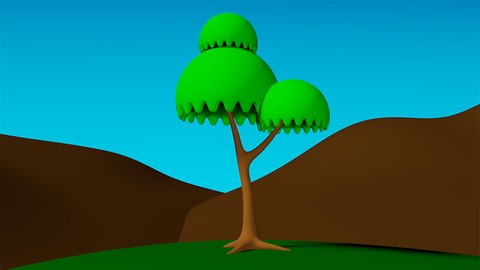
Model a simple tree and background
Understand the process of texturing and apply color to all the modeled objects
Render a final image of a tree and the background
Content and Overview
Introduction to Maya has six sections. Section 1,2 &3 covers some foundation for understanding Autodesk Maya. Section 4 explains the modeling of the tree and the background. Section 5 explains how to apply color (texturing) to the modeled objects. In section 6, we will create lights and render our final image.
Section 1: Introduction
Lecture1:Introduction
Lecture2:Maya User Interface
Lecture3:Viewports or the work area
Lecture4:What are nodes?
Section2: Getting Started
Lecture5:Understanding Maya Projects
Lecture6:Saving in Maya
Lecture7:Marking Menus & Hotbox
Lecture8:Wireframe mode and shaded mode
Lecture9:Creating Premitives
Section3: Working in Maya
Lecture10:Basic Transformations
Lecture11:Duplicating in Maya
Lecture12:Grouping and Parenting
Lecture13:Selections & Poly Components
Section4: Modeling
Lecture14:Extrude tool
Lecture15:Modeling Tree : Root and Trunk
Lecture16:Modeling Tree : Leafs
Lecture17:Modeling the mountain
Section5: Texturing
Lecture18:Hypershade Window
Lecture19:Texturing the Tree and the mountain
Section6: Lighting&Rendering
Lecture20:Understadning Maya Lights
Lecture21:Lighting and Rendering

 Udemy Discount
The discount is applied through our link. Open the course from here and Udemy's current promotional price is applied at checkout on most courses, no code to type.
Some courses are excluded from Udemy's promotions. If the price does not drop, clear your browser cookies and use the button again.
Instructor Details

- 4.6 Rating
 551 Reviews
Andrew Rees
My name is Andrew Rees
My passion is in creative arts including but not limited to drawing, sculpting and animating. I have received “The General Secretariat Award for Design and Development of e-Courses – 2015” A GCC level Award organized by University of Bahrain.
I have over 15 years of total work experience which includes both teaching and animation film production. My experience in production enabled me to make the students industry ready so that they won’t need additional training when they enter a job in Animation studio.
I have trained students from 4 different countries namely India, Mongolia, Jordan and Oman. So, I can understand the expectation of the students coming from various cultural background.
 More courses by Andrew Rees

3D Modeling and Texturing Interior Office in Autodesk Maya (2018)
4.2 (188 Reviews)
 Provider: Udemy
 Time: 2.4h
$19.99
More 3D Modeling courses

3D Printing with " Ultimaker CURA Slicer- Start to finish" (2025)
4.9 (192 Reviews)
- Provider: Udemy
- Time: 1h
$34.99

Girl and the Dog Creation in Zbrush for Intermediate Level (2020)
4.9 (173 Reviews)
- Provider: Udemy
- Time: 48.8h
$59.99



Blender Character Creator for Video Games (2026)
4.8 (9,160 Reviews)
- Provider: Udemy
- Time: 34.3h
$159.99

Master SOLIDWORKS 3D CAD using real-world examples (2022)
4.8 (2,451 Reviews)
- Provider: Udemy
- Time: 18.9h
$69.99
 Reviews

By Guillermo NoN on 12/9/2018
Una muy buena introducción a Maya, que sirve para dar los primeros pasos con este software de creación, pero también para refrescar conceptos. Un curso ideal si vienes de Cinema4D u otro software y quieres situarte con una interfaz diferente
By Aalok Sarma on 9/23/2018
Basic Maya navigation ....could've been better if instructor would've trained students to familiarize with shortcut keys more n more
By n t on 9/21/2018
Nice and quick introduction to Maya. It would be lovely if you summarize/make a crash course to rigging to but since it's just only "Introduction to..." tutorial, it's enough anyway.
By Rafael Gonzalez on 2/23/2018
This is a great course for beginners, really basic and explained well. I had not used Maya in a few years and it was a fresh of breath air. There is so much in this program and this is a step in the right direction, great job Andrew it was just what I needed.
By Charlotte Chua on 9/27/2017
Just what I was looking for these past few months! My 3D proffesor doesn't teach us Maya, or gives us a car modeling project. I've been so confused my entire life. Thankfully your course gave me the enough understanding of maya. I'm so glad I found this cours.e
By Krister Pohjanlehto on 8/6/2017
A good tutorial to Maya, i like it ! This rating, because some things could be explained just a bit further to get the bigger picture. Sometimes as well this teacher was very fast in his options choices, so had to double-check a few times "where he clicked?" But a super introduction otherwise, would definitely recommend.
By Dwayne Smith on 7/2/2017
I'm a complete Maya beginner, but was familiar with basic 3d concepts before this course. I didn't think i could get so much out of modeling a simple tree scene. However, after following these steps, Im much more confident and familiar with maya's basic tool set and workflow.
By Sajid Nadaf on 6/5/2017
There are a lot of things in Maya to learn. This course has explained much things, but I was expecting a little more explanation on many parts
By Dennis Maffei on 2/28/2017
This is the perfect course for everyone who is entering for the first time the Autodesk Maya world. It's free and clear, and it represents the best start to begin modeling in Maya 2016
By Nathan Summers on 12/22/2016
Easy to follow. He explains everything from the basic tools to creating a 3d model. Not only do you learn the basics of Maya, but you have a product at the end to show for your work. Great course!
 Quality Score
No CourseDuck member has rated this course yet. Taken it? Give each part a thumbs up or down.
Overall Score : 92 / 100
- Video Duration:
 1.9h
1.9h - Price: $19.99
- Provider: Udemy
- Updated:
 June 2026
 - Level:
 Beginner
 - Language:
 English
 - Certificate:
 Yes
Yes
30-day money-back guarantee on most paid courses
Udemy Coupon Price Tracker
