
 Web Development
 Data Science
 Python
 SQL
SQL JavaScript
 Artificial Intelligence
 IT & Software
 IT Certifications
 Hacking
 AWS
AWS Arduino
 DevOps
 3D Modeling
 Graphic Design
 Photoshop
 Drawing
 Digital Painting
 UX Design
 Business
 Data Analysis
 Communication Skills
 Project Management
 Leadership & Management
 Human Resources
 Digital Marketing
 Social Media Marketing
 Marketing
 SEO
SEO Google Analytics
 Branding
 Excel
Excel Office Productivity
 SAP
SAP PowerPoint
 Microsoft Access
 SharePoint
 Finance & Accounting
 Trading & Investing
 Accounting
 Bitcoin
 Personal Finance
 Video Editing & Animation
 Photography
 Adobe Premier Pro
 Adobe Lightroom
 Personal Development
 Productivity
 Career Development
 Life Coaching
 Health & Fitness
 Meditation & Mindfulness
 Yoga
Yoga Music
Music Music Production
 Guitar
 Piano
Piano Singing
 Language Learning
 Teaching & Academics
 Engineering
 Math
Math Lifestyle
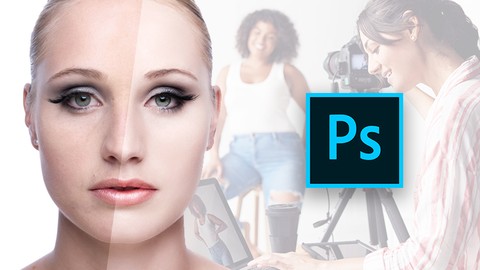
Adobe Photoshop Beauty Retouching - Good For Beginners (Udemy.com)
This Adobe Photoshop Beauty Course will teach a Beginner Photoshop user all essentials of Beauty Retouching
Created by: Manfred Werner
Last updated November 2019
 What you will learn
- Process Images in Camera Raw - Raw Conversions
- Create a high key look in Photoshop
- work with Shadows and Highlights
- Use dodge & burn methods for basic beauty retouching
- Work with blend modes and filters to get smooth beauty skin
- Create a beautiful glow look in Photoshop
- Tweak and adjust facial expressions / optimizing the body
- Apply new skin and understand all advanced beauty effects & filters.
- Do Final touch-ups, looks & styles
- Work with Plugins & creative filters
How it compares
Against the other 188 rated Udemy courses in Photoshop on CourseDuck:
- Rating4.4 out of 5higher than 37% of them
- Reviews73#149 of 189 by number of reviews
- Length1.6 hoursshorter than 89% of them
- Last updatedNovember 2019earlier than 53% of them
 Course Description
Great for Beauty Retouching beginners "Making Photoshop Fun & Easy"
All Lessons include step by step in video instructions!
Includes all Raw & Photoshop files which you can profit from - Instantly
Good to have some essential photoshop knowledge or experience.
Full & free lifetime access to the complete course
My approach is:
One thing I have learned through all the years of working with Adobe Photoshop is that knowing and understanding the essentials of adobe photoshop is just as fundamental as the heavier and trickier Photoshop techniques when it comes to honing your craft.
This Beauty Photoshop Retouching course is good for beginners. But it would be good if you have some to photoshop essentials knowledge of the Photoshop tools. This course does not cover any photoshop beginner tool explanations.
This photoshop course heads right into adobe Bridge & photoshop raw conversions. In the next part of the photoshop course, we head into Skin Retouching for Beauty skin. From here the following lectures will deal with the more advanced photoshop retouching techniques to really improve your beauty retouching skills and the pace at which you work.
You'll learn
How Process Images in Camera Raw - Raw Conversions
How to create a high key look in Photoshop.
How to work with Shadows and Highlights
How to use dodge & burn methods for basic beauty retouching.
How to work with blend modes and filters to get smooth beauty skin.
How to create a beautiful glow look in Photoshop
How to tweak and adjust facial expressions / optimizing the body.
How to be applying new skin and understand all advanced beauty effects & filters.
How to do final touch-ups, looks & styles
... and much, much more!
What sets this course apart:
I will teach you how to get into beauty retouching, so don't worry if you don't have prior experience with beauty retouching. We start slow and then build our way up.
Receive all work material (Raw's & Photoshop files) from the start and work along.
Many techniques, exercises, and work challenges.
The idea is to make photoshop retouching fun and easy! "Great to work along"
Instructor support within 24 Hours. "I do my best to answer every question"
One final note: My goal is to teach you photoshop, so don't stress about not having worked in photoshop before. "I do my best to make it simple & fun"
Thank you!

 Udemy Discount
The discount is applied through our link. Open the course from here and Udemy's current promotional price is applied at checkout on most courses, no code to type.
Some courses are excluded from Udemy's promotions. If the price does not drop, clear your browser cookies and use the button again.
Instructor Details
- 4.4 Rating
 73 Reviews
Manfred Werner
I Love Sharing & Teaching Online.
Here on Udemy, I'm an instructor that teaches Photoshop for beginners, but if you are more experienced, then take advantage of my free Photoshop courses. I’ve been teaching Photoshop & Retouching on Udemy since 2012.
In my personal capacity, I’m an owner of a Digital Media Agency where the core focus lays in Content Creation. I’ve been an active photographer and retoucher since 2010 and have worked on many advertising campaigns in Cape Town “South Africa” for clients like Mercedes, Zara, H&M, etc,
When I'm not working on campaigns, I'm producing online training courses & I have realized that it has become my passion to teach online, this may vary between Photoshop, Photography, Design or Business Content. In the next years, it is my goal to teach you how to become a better version of yourself with all kinds of skills. Most of which I have used to make my life better & to gain financial freedom.
Feel free to reach out to me on Udemy at any time, if you have questions about the courses or just want to say hi!
Thank you, Manni
 More courses by Manfred Werner
Photoshop Master Course: From Beginner to Photoshop Pro (2020)
4.5 (5,389 Reviews)
 Provider: Udemy
 Time: 12.7h
$15.99
Advanced Digital Photoshop Compositing - Combining 2 Images (2019)
4.2 (188 Reviews)
- Provider: Udemy
- Time: 2.2h
Free
Master Adobe Photoshop Color Grading & Retouching (2019)
4.3 (182 Reviews)
- Provider: Udemy
- Time: 2h
Free
Digital Photoshop Compositing For Advertising Campaigns (2019)
4.3 (148 Reviews)
- Provider: Udemy
- Time: 2.2h
Free
Photoshop Tools - Become An Expert In 10 Super Easy Steps (2015)
3.9 (120 Reviews)
- Provider: Udemy
- Time: 3.3h
$34.99
More Photoshop courses


Adobe Photoshop CC: For Complete Beginner (Sinhala Medium) (2026)
4.9 (110 Reviews)
- Provider: Udemy
- Time: 8.4h
$59.99

Adobe Photoshop CC – Essentials Training Course (2025)
4.8 (36,753 Reviews)
- Provider: Udemy
- Time: 11.6h
$189.99


47 Graphic Design Projects for Photoshop Beginners (2025)
4.8 (466 Reviews)
- Provider: Udemy
- Time: 7.9h
$99.99

Photoshop Efficiency - Techniques For Consistent Marketing (2025)
4.8 (144 Reviews)
- Provider: Udemy
- Time: 1.4h
$49.99
 Reviews

By Elizabeth Gokun on 8/30/2017
This course is really professional, interesting, no unnecessary talking, everything is right on point. I enjoyed it very much and learned so many useful things in just couple of hours. It is precious, Manni, thank you so much!
By Philippe Jacquot on 7/10/2016
Manfred is a good instructor, chapters and then workflow are well organized and some techniques are uncommon (Inverted High-pass ... )
By Annette Alexander on 8/5/2015
Great course, straight to the point.....not a lot of pointless chatter. I love that. I also like the fact that the instructor added the course photo for practice.
By Monique Nelson on 10/31/2014
The course takes one image and teaches you how you can apply beautiful retouching techniques to just about any portrait. It was very easy to follow, and I learned a lot of basic techniques as well as some of those all-important "secret sauce" tips that only an experienced professional can teach you!
By Damir Milanovic on 8/25/2013
Ich hätte mir noch mehr zu den Augen gewünscht und dass die RAW-Datei gleich dabei wäre.
By Thiago Rigonatti on 8/20/2013
Sometime, it's a little faster, but dont worry, pause it, take notes and you will have the best tutorial for beauty retouching ever!
By Baris Oztekin on 7/25/2013
Very fluent and easy to understand. Learned so many things in a blink of an eye! Thank you for this inspiring course! It's worth every penny...
By James Morgan on 5/30/2013
Yippee! It works again on the iPad. Thanks for fixing it! I love portrait photography and this is a fab set of tutorials.
By Steve Henderson on 5/3/2013
Does not play on iPad so total waste of money. Why was there no compatibility warning.
By Raphael rolland on 4/28/2013
I use photoshop for quite some time now for retouching, but i've always wondered how to do Highend Beauty retouch. I'm glad i found this course, i've learnt a lot. Thank you Manni!
 Quality Score
No CourseDuck member has rated this course yet. Taken it? Give each part a thumbs up or down.
Overall Score : 88 / 100
- Video Duration:
 1.6h
1.6h - Price: $19.99
- Provider: Udemy
- Updated:
 November 2019
 - Level:
 Beginner
 - Language:
 English
 - Certificate:
 Yes
Yes
30-day money-back guarantee on most paid courses
Udemy Coupon Price Tracker
