
 Web Development
 Data Science
 Python
 SQL
SQL JavaScript
 Artificial Intelligence
 IT & Software
 IT Certifications
 Hacking
 AWS
AWS Arduino
 DevOps
 3D Modeling
 Graphic Design
 Photoshop
 Drawing
 Digital Painting
 UX Design
 Business
 Data Analysis
 Communication Skills
 Project Management
 Leadership & Management
 Human Resources
 Digital Marketing
 Social Media Marketing
 Marketing
 SEO
SEO Google Analytics
 Branding
 Excel
Excel Office Productivity
 SAP
SAP PowerPoint
 Microsoft Access
 SharePoint
 Finance & Accounting
 Trading & Investing
 Accounting
 Bitcoin
 Personal Finance
 Video Editing & Animation
 Photography
 Adobe Premier Pro
 Adobe Lightroom
 Personal Development
 Productivity
 Career Development
 Life Coaching
 Health & Fitness
 Meditation & Mindfulness
 Yoga
Yoga Music
Music Music Production
 Guitar
 Piano
Piano Singing
 Language Learning
 Teaching & Academics
 Engineering
 Math
Math Lifestyle
Advanced Excel: Power Query, Power Pivot and DAX (Udemy.com)
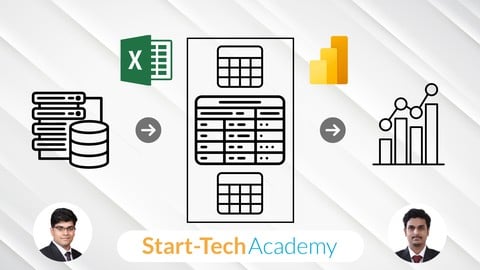
Master Data Import, Cleaning, Modeling, and Analysis Using Power Query, Power Pivot, and DAX in Excel
Created by: Start-Tech Academy
Last updated September 2026
 What you will learn
- Import and consolidate data from CSV, SQL, folders, and XML sources using Power Query
- Clean, transform, and shape raw data using Power Query’s powerful tools and editor
- Create data models and build relationships using Power Pivot for scalable analytics
- Use DAX formulas to perform advanced calculations with row and filter context understanding
- Analyze business trends using PivotTables and PivotCharts directly from your data model
- Apply real-world skills to automate reporting, enhance insights, and reduce manual work in Excel
How it compares
Against the other 459 rated Udemy courses in Office Productivity on CourseDuck:
- Rating4.6 out of 5higher than 67% of them
- Reviews471#222 of 460 by number of reviews
- Length4.4 hourslonger than 53% of them
- Last updatedSeptember 2026more recently than 93% of them
 Course Description
If you're a business analyst, data enthusiast, finance professional, or someone who works with data regularly, this course is for you. Are you struggling with messy datasets, building scalable data models, or trying to extract meaningful insights from raw numbers? Imagine having the ability to automate data preparation, build robust data models, and perform powerful calculations—all within Excel.
This course equips you with the tools and techniques to master Power Query, Power Pivot, and DAX, enabling you to clean, model, and analyze data like a pro. By blending foundational concepts with real-world practice, you'll gain the skills to handle complex datasets, create dynamic reports, and make informed decisions faster.
In this course, you will:
Learn how to import data from multiple sources, including CSVs, folders, SQL databases, and XML files.
Master Power Query for data cleaning, transformation, merging, appending, and reshaping your data with ease.
Build relationships and scalable data models using Power Pivot and understand concepts like cardinality, star schemas, and filter directions.
Create pivot tables and charts that bring your data stories to life.
Dive into DAX (Data Analysis Expressions) to perform advanced calculations, understand row/filter context, and create powerful measures.
Why focus on Power Query, Power Pivot, and DAX? These tools bring BI-level capabilities directly into Excel, saving you hours of manual work and enabling you to work smarter, not harder.
Throughout the course, you'll work on practical tasks like importing messy sales data, transforming and reshaping it, building relationships, and performing analytical calculations—all using Excel's built-in Power tools.
What makes this course unique?
Our hands-on, step-by-step approach means you won’t just learn the theory—you’ll apply it immediately. Whether you're preparing data for dashboards, building reports, or creating models for decision-making, this course gives you the real-world skills to stand out.
Plus, you’ll receive a certificate of completion to showcase your expertise in Power Query, Power Pivot, and DAX.
Ready to take your Excel skills to the next level and become a data pro? Enroll now and transform how you work with data.

 Udemy Discount
The discount is applied through our link. Open the course from here and Udemy's current promotional price is applied at checkout on most courses, no code to type.
Some courses are excluded from Udemy's promotions. If the price does not drop, clear your browser cookies and use the button again.
Instructor Details

- 4.6 Rating
 471 Reviews
Start-Tech Academy
Start-Tech Academy is a technology-based Analytics Education Company and aims at Bringing Together the analytics companies and interested Learners.
Our top quality training content along with internships and project opportunities helps students in launching their Analytics journey.
Founded by Abhishek Bansal and Pukhraj Parikh.
Working as a Project manager in an Analytics consulting firm, Pukhraj has multiple years of experience working on analytics tools and software. He is competent in MS office suites, Cloud computing, SQL, Tableau, SAS, Google analytics and Python.
Abhishek worked as an Acquisition Process owner in a leading telecom company before moving on to learning and teaching technologies like Machine Learning and Artificial Intelligence.
 More courses by Start-Tech Academy
Zero to Hero in Microsoft Excel: Complete Excel with Copilot (2026)
4.5 (46,660 Reviews)
 Provider: Udemy
 Time: 10.6h
$109.99

Zero to Hero in SQL: SQL for Data Analytics (2026)
4.6 (14,123 Reviews)
- Provider: Udemy
- Time: 10.4h
$129.99

Prompt Engineering Frameworks & Methodologies (2026)
4.5 (12,643 Reviews)
- Provider: Udemy
- Time: 3.2h
$19.99

HR Analytics using MS Excel for Human Resource Management (2026)
4.4 (11,556 Reviews)
- Provider: Udemy
- Time: 9.7h
$84.99


Data Analyst Skillpath: Zero to Hero in Excel, SQL & Python (2026)
4.5 (8,059 Reviews)
- Provider: Udemy
- Time: 24.4h
$109.99
More Office Productivity courses

AI-Powered Social Media Management: From Beginner to Pro (2025)
5.0 (211 Reviews)
- Provider: Udemy
- Time: 1.1h
$19.99

Microsoft Excel + AI: Go From Data Analysis to Visualization (2026)
4.9 (276 Reviews)
- Provider: Udemy
- Time: 3.8h
$10.99


Complete Introduction to Google Sheets Pivot Tables (2026)
4.8 (3,570 Reviews)
- Provider: Udemy
- Time: 2.9h
$64.99


Microsoft Excel - Managing Personal Finances with Excel (2024)
4.8 (810 Reviews)
- Provider: Udemy
- Time: 3h
$19.99
 Reviews

By Bryant F Miller on 8/14/2026
I found the course interesting and a good starting point for Power Pivot, Query, and DAX. The pace was reasonable, the information not overwhelming. Feel I am ready for a more complex course based on this information. Only reason I would not give this five stars is that I had a lot of trouble with the interviews. Even on two different networks, both hardwired, I could not keep the interviews loaded. They buffered and cut out. Maybe it was Udemy? Either way it was the only criticism I had for the course.
By Sie Kouame Kouadio on 6/4/2026
The explanation is clear with correct tone. Confident and not rush, which gives time to understand and follow. Great job.
By Antonioo Ferri on 2/1/2026
This course was very well presented and easy to follow. The explanations were clear and well organised, which made difficult topics easy to understand. The tutor was excellent and clearly passionate about teaching. Highly recommended.
By Kevin Cloward on 12/12/2025
I am enjoying this course. I am learning things in Excel I never knew how to do. I am learning things I did not know could be done in excel. It's a well-designed course.
By Aashish Yadav on 11/15/2025
slow and steady wins the race.. You have justified your commitment till now, given good basic knowledge till this stage of this course as i am on this stage now, will review it again after completing it
By Celso Oda on 10/25/2025
It was a good training to start on power query, power pivot and DAX. The topic is very broad, but the training was well structured to provide a initial glance on the resources.
By Udemy User on 10/19/2025
The course was good, but there weren't any instances where you were really tasked with working on data yourself besides the assignment and going along with the course
By Isabella Mahal on 8/26/2025
This course has taught me a lot about the Power BI set of tools in Excel. I really appreciated all the information at the beginning about when each tool was relevant to use. The instructor worked at a great pace and was very clear about his steps, which allowed me to follow along in my own Excel file. This helped the information stick in my head. The audio was very clear and all visuals that I needed were on screen. I am very appreciative of this course!
By John Taylor on 7/27/2025
I was not expecting much from this course although I know I have to get to grips with the subject of Power Query/Pivot and DAX . So I wanted a fairly, short overview and expected it to be rather dull. But this has been very focused and clear so far and I am looking forward to the rest of it.
By Prabhdeep Singh on 4/19/2025
Great Course for Building a Strong Excel Data Analysis Foundation I really enjoyed this course! The lessons were well-structured and easy to follow, even for someone like me who is still growing in data analytics. I especially appreciated the hands-on approach to working with Power Query, Power Pivot and DAX — it made complex concepts feel very approachable. The examples were practical and I now feel much more confident in importing, cleaning and modeling data in Excel. It would be great to see more real-world case studies or mini-projects added to apply all the skills in a business context. Overall, this course is a valuable resource and I’d recommend it to anyone looking to upskill in Excel for data analysis. Thank you for sharing your knowledge!
 Quality Score
No CourseDuck member has rated this course yet. Taken it? Give each part a thumbs up or down.
Overall Score : 92 / 100
- Video Duration:
 4.4h
4.4h - Price: $19.99
- Provider: Udemy
- Updated:
 September 2026
 - Level:
 All Levels
 - Language:
 English
 - Certificate:
 Yes
Yes
30-day money-back guarantee on most paid courses
Udemy Coupon Price Tracker
