
 Web Development
 Data Science
 Python
 SQL
SQL JavaScript
 Artificial Intelligence
 IT & Software
 IT Certifications
 Hacking
 AWS
AWS Arduino
 DevOps
 3D Modeling
 Graphic Design
 Photoshop
 Drawing
 Digital Painting
 UX Design
 Business
 Data Analysis
 Communication Skills
 Project Management
 Leadership & Management
 Human Resources
 Digital Marketing
 Social Media Marketing
 Marketing
 SEO
SEO Google Analytics
 Branding
 Excel
Excel Office Productivity
 SAP
SAP PowerPoint
 Microsoft Access
 SharePoint
 Finance & Accounting
 Trading & Investing
 Accounting
 Bitcoin
 Personal Finance
 Video Editing & Animation
 Photography
 Adobe Premier Pro
 Adobe Lightroom
 Personal Development
 Productivity
 Career Development
 Life Coaching
 Health & Fitness
 Meditation & Mindfulness
 Yoga
Yoga Music
Music Music Production
 Guitar
 Piano
Piano Singing
 Language Learning
 Teaching & Academics
 Engineering
 Math
Math Lifestyle
Character Modeling: Master the Anatomy of 3D Characters (Udemy.com)
Step by Step Guide to Create 3D Characters in Blender
Created by: Abdelilah Hamdani
Last updated July 2022
 What you will learn
- This is a Great Start to Learn Character Anatomy for Absolute Beginners
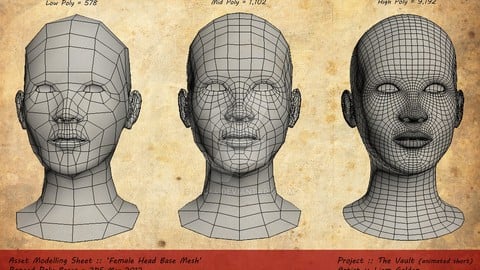
- You will Learn Face Character Anatomy
- You will Learn how to Create All Face Components: "Mouth" - "Chin" - Eyes - Nose - Head Turn
- Add Realistic Details to a Face of a Character
How it compares
Against the other 175 rated Udemy courses in Digital Painting on CourseDuck:
- Rating4.3 out of 5higher than 17% of them
- Reviews286#67 of 176 by number of reviews
- Length1.3 hoursshorter than 88% of them
- Last updatedJuly 2022more recently than 60% of them
 Course Description
Character Anatomy: A Great Start to Create Realistic 3D Characters the Right Way
This Course is for anyone who's struggling with character anatomy
If you end up with some weird shapes when creating characters, this course will be very useful for you
You will learn the right way to Create all face parts: Mouth - Chin - Eyes - Nose
Once you succeed at creating this you will be able to create any character that you want

 Udemy Discount
The discount is applied through our link. Open the course from here and Udemy's current promotional price is applied at checkout on most courses, no code to type.
Some courses are excluded from Udemy's promotions. If the price does not drop, clear your browser cookies and use the button again.
Instructor Details

- 4.3 Rating
 286 Reviews
Abdelilah Hamdani
I’m Abdelilah Hamdani, a 3D Designer and Instructor passionate about turning imagination into photorealistic worlds.
For over 12 years, I’ve been creating and teaching professional 3D projects — from environments and vehicles to characters and cinematic scenes — using Blender and modern game engines.
My mission is to make complex 3D workflows simple, structured, and practical for real production use.
I focus on teaching how to model, texture, light, and animate with precision — while building a strong understanding of how to bring assets into Unreal Engine and Unity for stunning results.
I believe the future belongs to creators who master both art and technology. Through my courses, I share everything I’ve learned to help artists achieve true photorealism, storytelling, and creative freedom in their 3D work.
 More courses by Abdelilah Hamdani

Achieve 3D Photorealism in Blender: Subway Challenge (2024)
4.6 (372 Reviews)
 Provider: Udemy
 Time: 7.1h
$69.99

Make a Cinematic Car Chase Short Film Animation in Blender (2025)
4.5 (370 Reviews)
- Provider: Udemy
- Time: 8.3h
$69.99

Master Character Design in Blender for Unity & Unreal Engine (2024)
4.5 (129 Reviews)
- Provider: Udemy
- Time: 7.4h
$79.99
More Digital Painting courses

Character Art School: Complete Coloring & Painting (2026)
4.8 (6,042 Reviews)
- Provider: Udemy
- Time: 19.5h
$34.99



Procreate Masterclass: Digital Drawing on the iPad (2023)
4.8 (1,744 Reviews)
- Provider: Udemy
- Time: 18.2h
$94.99


Digital painting with Krita 5.0 intermediate level (2022)
4.8 (271 Reviews)
- Provider: Udemy
- Time: 6.8h
$79.99
 Reviews

By King on 3/14/2026
You’ve improved my knowledge of this kind of modelling but not every step was explained. For example when you first used the plane and were moving the edges. There are points where they should stay in place or working in the front and side will become even more difficult. I had to really find out on my own what the issue could have been. The worst part was the ear. You didn’t zoom in enough when making the ear and kind of skimmed through it in my opinion. Your tutorial has improved my skills a LOT. I just think you can perform far better
By Sylvie Bélanger on 10/3/2021
Opérations complexes facile à réaliser en suivant ses instructions. Il a juste oublié de dire les bases de sélection dans Blender pour ceux qui ne les connaissent pas. Pourrait simplement ajouter un PDF avec les explications
By Brandy M Miller on 4/2/2021
Thanks to this course I was able to take what I learned and use it to create other models without the guides. Just wish it had included the rest of the anatomy.
By Shawn Power on 10/10/2020
Its a quick and to the point edge modelling tutorial. Instructor is clear and offers a good breakdown of the needed skills. Easy enough for anyone I think. Great job, surprising and useful.
By Codes on 9/27/2020
great explanation and easy to follow along, but it was hard to know some of the tool box features and shortcuts he was clicking on. I think my problem was that I have a newer version of blender than what he was using. Great lesson otherwise
By Jonathan Lesne on 7/24/2020
There are some explanations that are missing for me . Some process need more details. I mean why is it important to have a loop in the mouth, or in the eyes? Is there any link with the anatomy? Why to have those loops?
By Pablo Martínez on 6/6/2020
It's easy to follow, and explains in detail.
By Michael Wiltshire on 5/13/2020
Good for beginners, you will make a decent head with this tutorial, but also get a bit more comfortable using the software
By George Kostoglou on 3/13/2020
Had to pause the video a few times to see what options the instructor was clicking on as he would often move too fast and not explain his actions .... Even though he refers to each section as a lecture, ....there is no lecture . However if you observe his actions closely , you can accomplish the task.
By Shehroz Kashif on 10/31/2019
It was quit helpful, As i was doing maya course i needed to learn anatomy and this helped alot, Thank you!
 Quality Score
No CourseDuck member has rated this course yet. Taken it? Give each part a thumbs up or down.
Overall Score : 86 / 100
- Video Duration:
 1.3h
1.3h - Price: $39.99
- Provider: Udemy
- Updated:
 July 2022
 - Level:
 Beginner
 - Language:
 English
 - Certificate:
 Yes
Yes
30-day money-back guarantee on most paid courses
Udemy Coupon Price Tracker
