
 Web Development
 Data Science
 Python
 SQL
SQL JavaScript
 Artificial Intelligence
 IT & Software
 IT Certifications
 Hacking
 AWS
AWS Arduino
 DevOps
 3D Modeling
 Graphic Design
 Photoshop
 Drawing
 Digital Painting
 UX Design
 Business
 Data Analysis
 Communication Skills
 Project Management
 Leadership & Management
 Human Resources
 Digital Marketing
 Social Media Marketing
 Marketing
 SEO
SEO Google Analytics
 Branding
 Excel
Excel Office Productivity
 SAP
SAP PowerPoint
 Microsoft Access
 SharePoint
 Finance & Accounting
 Trading & Investing
 Accounting
 Bitcoin
 Personal Finance
 Video Editing & Animation
 Photography
 Adobe Premier Pro
 Adobe Lightroom
 Personal Development
 Productivity
 Career Development
 Life Coaching
 Health & Fitness
 Meditation & Mindfulness
 Yoga
Yoga Music
Music Music Production
 Guitar
 Piano
Piano Singing
 Language Learning
 Teaching & Academics
 Engineering
 Math
Math Lifestyle
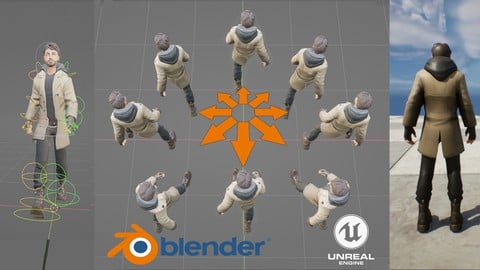
Complete game animators pipeline from Blender to engine (Udemy.com)
Learn 3D rigging, 3d character animation, and the full game animation pipeline from Blender to Unreal engine 5
Created by: Hamish Calthorpe
Last updated November 2024
 What you will learn
- The complete game character animation pipeline from Blender to Unreal
- How to make professional complete game ready animation sets for an in game character.
- Create a professional game ready animation rig from scratch.
- Tips and tricks on creating better walk cycles, and using animation layers to build up compeling movment.
- How to set up animation graphs, blend states and more in Unreal engine 5
- Create a game ready character that can walk, run, jump, strafe and more!
- Learn the correct way to set up a character rig, and correct export and import settings from Blender to Unreal engine.
- Compatible with all Blender 3.0 , 4.0 and 5.0 versions
How it compares
Against the other 545 rated Udemy courses in 3D Modeling on CourseDuck:
- Rating4.2 out of 5higher than 10% of them
- Reviews295#245 of 546 by number of reviews
- Length30.6 hourslonger than 94% of them
- Last updatedNovember 2024more recently than 73% of them
 Course Description
( Now includes Blender 4.0 and higher updates)
This course was created to help students or anybody learn the full game animators pipeline from Blender to Unreal. You will learn how to create a professional custom animation rig, and animate by hand, a full set of idle, transition and movement animations, and how to export correctly, and bring them all into the Unreal engine.
From there you will learn how to set up an animation graph and character blueprint, and create a custom character controller that will allow you to walk, run, crouch, jump and more. No experience required, the full process is walked through in easy to follow steps broken down into logical sections, each building on the last, with lots of tips and tricks to make your animations work correctly as a complete set as used in a modern AAA game.
No coding knowledge is required as everything will be created in Unreal's blueprint system using nodes, just simply follow along and build up the character controller bit by bit, and by the end of the course, you will have a fully playable character that can move around the game world, with the satisfaction and knowledge that you created the whole thing from scratch.
So lets get started!
* Credit to "BlendTek" for the use of the character mesh

 Udemy Discount
The discount is applied through our link. Open the course from here and Udemy's current promotional price is applied at checkout on most courses, no code to type.
Some courses are excluded from Udemy's promotions. If the price does not drop, clear your browser cookies and use the button again.
Instructor Details

- 4.2 Rating
 295 Reviews
Hamish Calthorpe
I have worked as an animator and designer for over 20 years, and currently hold a lead animators position for a games company in Liverpool.
I have been lucky enough to work on games from Sony, Epic and various independent studios. Over the years I have developed a solid pipeline for creating professional hand keyed creature and character animations for games engines, from rigging the mesh through to the final in game asset with bespoke animation graphs.
I created this course to help students understand the full pipeline required of a games animator, how to create a full set of direction animations, pose transitions, idles and more, and how to set up a professional animation graph with state machines ready to be hooked into a modern AAA game.
 More 3D Modeling courses

3D Printing with " Ultimaker CURA Slicer- Start to finish" (2025)
4.9 (192 Reviews)
 Provider: Udemy
 Time: 1h
$34.99

Girl and the Dog Creation in Zbrush for Intermediate Level (2020)
4.9 (173 Reviews)
- Provider: Udemy
- Time: 48.8h
$59.99



Blender Character Creator for Video Games (2026)
4.8 (9,160 Reviews)
- Provider: Udemy
- Time: 34.3h
$159.99

Master SOLIDWORKS 3D CAD using real-world examples (2022)
4.8 (2,451 Reviews)
- Provider: Udemy
- Time: 18.9h
$69.99
 Reviews

By Hennadii Kovryzhenko on 8/6/2026
BEWARE of buying this! By the time you realize who you're dealing with you might not be eligible for a refund, "because you've watched too much". This has to be one of the shittest courses I have ever taken (Udemy or others). The instructor is a complete and clueless idiot. He has no idea on how to operate Blender (the freaking guy is adding extra keyframes to an animation instead of using G-curves, for craps sake. His root motion implementation is just beyond retarded). He also does not give a damn about updating the course at all. You're having issues with pole targets? Well, that's because the so called "instructor" did not update the course based on student's common issues; you can sift through the Questions section and find a "solution" uploaded to Google Drive. Why not on some other platform that allows video playback? Maybe something like Udemy or I dunno. This clown will teach you 1001 bad practice that you'll have to spend years to eliminate. Avoid like the plague.
By Potato Physics on 6/15/2025
I have only made it through a few modules so far. Overall so far, it's a decent class, and I'm glad I got it. It seems to be pretty thorough so far, and I like the instructor's bio. It seems to be pretty thorough overall, and I am grateful that this class was made. That said, there were a few things I've found frustrating so far. 1) As a native English speaker, it is difficult to understand the instructor a lot of the time because his voice volume is too quiet and he kind of mumbles. I have to use subtitles for some of the lessons. 2) He constantly uses shortcut keys. This would be fine if he also showed us where to find things in the menus. I am having to figure out what he is actually doing with the shortcut keys to try to find them in the menus because the shortcut keys don't work for me a lot of the time, likely due to using a different version or possibly some of my settings being different. 3) He tells you what to do, but doesn't always tell you why you are doing it or what the purpose is for things that probably seem obvious to him, but not to me. This makes it difficult to comprehend what I am actually doing sometimes so that I can recreate the logic on other things.
By Anthony Mitchell on 1/5/2025
I loved everything about this course for what it is. Instructor is a very knowledgeable dude on the subject matter, I wouldn't have pieced this all together properly without this course. That being said, I'm a pedantic programmer, and a word of warning for anyone wanting to learn this course, there are a LOT of techniques used during the unreal portion of this course that can NOT be used within a multiplayer setting (which is stated many times, that this is not a coding class). I only want to thank Hamish for being amazing at this, I learned so so so many new techniques, and you just brought me to the end of my animation journey through blender, I had worked a long time previous to this learning the entire process of building characters in blender, but without you, they would have never came to life!
By Mirel Miljkovic on 12/12/2024
This was a fantastic course! Prior to this I took one of those "complete game character in Blender" courses and this was the perfect follow up for learning how to rig and animate my character and even put them into the engine. I went from only being able to make non-animated objects to making an advanced custom skeleton, rigging my character and making a full walk/run/idle/jump animation set - which also taught me the basics of blender animation, it feels easy to make things like dances, emotes and attacks now. Like others have said, the audio can be quiet at times and there can be a small amount of confusion around blender and unreal if you are completely new. But for me this is overshadowed by the shear amount of information in this course and the fact that the instructor is still around answering questions. Chances are if you are missing something, there is already an answer in the Q&A section.
By Marcel Blanárik on 10/27/2024
I personally think that it is too long a course for the fact that we are doing the animation of one character, sometimes it was a real pain and there is a discrepancy in some parts of the course. but I'm glad I finally finished it and have my own animations for my character and at the same time I've perfected my animation technique. I don't think there is a better course for Udemy, but this one could be better
By Alen Fdz on 10/11/2024
I have to say that this course is not easy to follow, as it covers a lot of ground and it expects quite a knowledge of Blender and Unreal. If you are like me (no experience in Unreal), you can easily screw up the setting, but this is hardly the instructor's fault. Also have to add that when I got stuck Hamish was very prompt to answer my queries and unblock me, showing quite a lot of patience :P If you are looking to take your animations to the next level and don't mind dealing with the nitty gritty details of Unreal, this course is defo for you
By M Smith on 7/25/2024
Pros: -Good Summary of the workflow -You get what's advertised Cons: -Very slow and low energy presentation. I had to run it at 1.5x just so I don't get bored and fall asleep. Ended up just playing it on my second monitor and let it run in the background. -Poor sound quality. Please filter breathing, static, and other 'mouth' noises that isn't just your voice. -Lack of explanation, reference. You just follow along, don't expect any theory. -Gets messy, lack of standardized organization in some parts. I would give it 5 stars if it wasn't for the poor presentation.
By Snake on 4/24/2024
If you want to learn how to animate in Blender for Unreal Engine but maybe you're worried about it being complicated or difficult this course is great, not only is it simplified into a step by step procedure with knowledge you can apply to any kind of animation you may want to create in the future, but Hamish is very responsive and usually replies to questions within an hour where he will do all that he can to help you solve whatever problem you are having while going through the course. Couldn't recommend it enough
By Philip Raymond Davies on 4/5/2024
Very good animation course, not just a walk/ run/jump tutorial but all the in-between anims as well, like sideways, backwards, diagonal etc. and the correct foot placement to ensure the feet do not cross over one another whilst blending between animations. What I found interesting was the way to use animation layers and the detailed instruction of exporting and setting up the anims in Unreal Engine. A very good course and one that I would recommend to anyone who wants to further develop their animation skills.
By Fotios Ioannidis on 10/18/2023
5 stars for this course are too few to rate! Why is that? Do I exaggerate and sound a little more enthusiastic than normal? Well let me explain. I am a hobbyist game developer. I have several courses and books on how to do things in blender but not one on how to make a rig compatible with game engines. How do artists make rigs and animations like the ones we download from Mixamo and other sources? Well this course got you covered. - We start with the rigging part where the tutor makes a rig and the control bones. I suggest you have a physical paper notebook to write down every step. There are many and its easy to lose your way. That's how rigging just goes. But the tutor explains very well. - The weight paint part is naturally more like a "feel" rather than steps and the tutor shows us some tricks on how to locate if any "rogue" vertice breaks your paint. Also explains some useful settings on the tools. - The animation part is huge and it speaks for itself in the promo video. I have done the idle part and I am very satisfied on how the tutor shows us how blender manages animations. I wanted to rate because it will take me several months to complete the course but I want people to read this review before I finish it. That's how much I am satisfied. For a game developer that looks to do his own animations for their models, this course is more than enough!
 Quality Score
No CourseDuck member has rated this course yet. Taken it? Give each part a thumbs up or down.
Overall Score : 84 / 100
- Video Duration:
 30.6h
30.6h - Price: $84.99
- Provider: Udemy
- Updated:
 November 2024
 - Level:
 All Levels
 - Language:
 English
 - Certificate:
 Yes
Yes
30-day money-back guarantee on most paid courses
Udemy Coupon Price Tracker
