
 Web Development
 Python
 SQL
SQL JavaScript
 Data Science
 Artificial Intelligence
 IT & Software
 IT Certifications
 Hacking
 Arduino
 AWS
AWS 3D Modeling
 Graphic Design
 Photoshop
 Drawing
 Digital Painting
 UX Design
 Business
 Data Analysis
 Communication Skills
 Project Management
 Leadership & Management
 E-Commerce
 Digital Marketing
 Social Media Marketing
 Marketing
 SEO
SEO Google Analytics
 Branding
 Office Productivity
 Excel
Excel Finance & Accounting
 Bitcoin
 Video Editing & Animation
 Photography
 Adobe Premier Pro
 Adobe Lightroom
 Personal Development
 Health & Fitness
 Music
Music Guitar
 Teaching & Academics
 Language Learning
 Engineering
 Lifestyle
Creating your first 3D Model with Nomad Sculpt (Udemy.com)
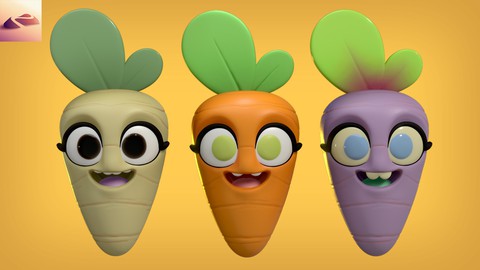
Beginner Character Design Tutorial creating a Cute Expressive Carrot
Created by: Dave Reed
Last updated April 2023
 What you will learn
- Canvas setup in Nomad Sculpt
- Adding Primitives (Simple shapes)
- Blocking out our 3D model
- Using Tools, Lighting and Post Process to make it perfect!
 Course Description
Get started with Character Design and Development by learning the basics of 3D and using Simple Shapes. After finding and using the best shapes for our design, we'll begin discovering how to manipulate and adjust them into the look we're after. In this case, a cute carrot. Even the most simple 3D sculpts can actually be quite complicated depending on how much fine detail you want to put in. The good thing is that is what makes 3D with Nomad Sculpt fun!
- We'll then move into adding eyes, eye lashes, and details to get it looking a bit more "real".
- Setting up our carrot with the most flattering lighting possible and then adding color. Feel free to experiment
with colors and textures! Remember, this is your art so you don't have to follow everything that I do. Rogues are welcome!
- Once we've finished with coloring and lighting we can start post processing and adjust the scene and character before export. Exporting or "Rendering" means you've successfully created your first 3D character! Or maybe it isn't your first, but I hope you learned some new tricks and ways of thinking throughout!
The ideas and ways of thinking are most of what I want to leave you with...shapes are very easy to make, so just think of everything as shapes or part of shapes. Shapes within shapes even. I've found that even the most complicated sculpts aren't so bad when I just break them down into one shape after another. Veggies for instance: A grape is pretty much a sphere. Banana is a stretched sphere. Cucumber slice is a cylinder. A snow cone is a cone with a sphere on top. As you continue to sculpt more and more you'll find the shapes much easier and your sculpting will get faster and faster.

 Udemy Discount
The discount is applied through our link. Open the course from here and Udemy's current promotional price is applied at checkout on most courses, no code to type.
Some courses are excluded from Udemy's promotions. If the price does not drop, clear your browser cookies and use the button again.
Instructor Details

- 4.7 Rating
 98 Reviews
Dave Reed
I'm a 2D & 3D illustrator living in Brooklyn, NY! I'm currently a content creator and also work behind the scenes on TV & Films. I've been creating art for over 30 years, and am a School of Visual Arts Alumni. I've recently discovered my passion for teaching, and have found that both creating are AND teaching at the same time is a power play for me. Looking forward to seeing you in class!
 More courses by Dave Reed
Introduction to 3D Modeling with Nomad Sculpt (2023)
4.7 (529 Reviews)
 Provider: Udemy
 Time: 1.8h
$69.99


More 3D Modeling courses

3D Printing with " Ultimaker CURA Slicer- Start to finish" (2025)
4.9 (192 Reviews)
- Provider: Udemy
- Time: 1h
$34.99

Girl and the Dog Creation in Zbrush for Intermediate Level (2020)
4.9 (173 Reviews)
- Provider: Udemy
- Time: 48.8h
$59.99


Blender Character Creator for Video Games (2026)
4.8 (9,160 Reviews)
- Provider: Udemy
- Time: 34.3h
$159.99

Master SOLIDWORKS 3D CAD using real-world examples (2022)
4.8 (2,451 Reviews)
- Provider: Udemy
- Time: 18.9h
$69.99
 Reviews

By Євгенія Сагай on 10/9/2025
I highly recommend this course for beginners! Dave explains everything simple and clearly. It is easy to follow. Modelling in Nomad is fun ^^,
By Yohann Pannetrat on 9/26/2025
Excellent cours ! Même s’il date de 2023, les différences entre Nomad 1.92 et 2.2 restent minimes, principalement au niveau de l’éclairage et de l’environnement. On peut donc tout à fait suivre ce cours avec la version 2.2 de Nomad Sculpt.
By Gerald Sumpter on 7/20/2025
The presenter is easy to follow along with. The pacing is very good as well.
By David Stewart on 3/25/2025
it was easy to follow, simple instructions and well explained. Much appreciated. i will certainly run through it again soon.
By Kyona Mennie on 3/21/2024
Nice and easy to follow
By Justin Walter on 12/28/2023
I am rushing to learn 3d modeling to help with my art business and this is all new to me and Dave is the first one that has made sense .
By Amanda Corazza Dias on 9/26/2023
Great course for beginners, easy to follow and learn, cant't wait to start with the others! :) My only suggestion to Dave would maybe be a course more focused on the software itself (all of the tools and functionalities of it) guess it would also be nice!
By Linhua Wu on 8/7/2023
I bought nomad months ago, and was frustrated to how to start. I feel I find right course to start. I am learning Blender, part of those is to sculpt. Nomad is my flat way to start with iPad.
By DAngelo Perrier on 8/4/2023
Very good walkthrough and tutorial. Only issue I had was the import environment step. I was getting errors trying to import the file from the provided resources. It may be an issue of different software versions between the tutorial and what I was using. In the end, I was still able to follow through the actual sculpting.
By Robert Castaneda on 7/28/2023
This is a pretty good way to get our feet wet with Nomad Sculpt. There were some discrepancies because I was using a newer version of Nomad Sculpt, but I was able to figure things out and finish the class.
 Quality Score
No CourseDuck member has rated this course yet. Taken it? Give each part a thumbs up or down.
Overall Score : 94 / 100
- Video Duration:
 1.6h
1.6h - Price: $10.99
- Provider: Udemy
- Updated:
 April 2023
 - Level:
 Beginner
 - Language:
 English
 - Certificate:
 Yes
Yes
30-day money-back guarantee on most paid courses
Udemy Coupon Price Tracker
