
 Web Development
 Data Science
 Python
 SQL
SQL JavaScript
 Artificial Intelligence
 IT & Software
 IT Certifications
 Hacking
 AWS
AWS Arduino
 DevOps
 3D Modeling
 Graphic Design
 Photoshop
 Drawing
 Digital Painting
 UX Design
 Business
 Data Analysis
 Communication Skills
 Project Management
 Leadership & Management
 Human Resources
 Digital Marketing
 Social Media Marketing
 Marketing
 SEO
SEO Google Analytics
 Branding
 Excel
Excel Office Productivity
 SAP
SAP PowerPoint
 Microsoft Access
 SharePoint
 Finance & Accounting
 Trading & Investing
 Accounting
 Bitcoin
 Personal Finance
 Video Editing & Animation
 Photography
 Adobe Premier Pro
 Adobe Lightroom
 Personal Development
 Productivity
 Career Development
 Life Coaching
 Health & Fitness
 Meditation & Mindfulness
 Yoga
Yoga Music
Music Music Production
 Guitar
 Piano
Piano Singing
 Language Learning
 Teaching & Academics
 Engineering
 Math
Math Lifestyle
Develop AutoCAD Plugins using VB.NET with Windows Forms (Udemy.com)
This course will teach you how to develop AutoCAD Plugins using VB.NET with Windows Forms.
Created by: Arnold Higuit
Last updated March 2021
 What you will learn
- Learn how to develop AutoCAD Plug-ins using Windows Forms by developing real world applications
- Learn how to design User Interfaces
- Learn about Event-Driven Programming
- Learn how to use different User Controls (Label, Textbox, Button, Listbox, ComboBox, GroupBox
- Learn how to code behind the Form (e.g. Events, Methods and Classes)
- Learn how to automate processing AutoCAD Drawings
- Develop multiple projects and be comfortable with programming AutoCAD using VB dot NET
How it compares
Against the other 545 rated Udemy courses in 3D Modeling on CourseDuck:
- Rating4.6 out of 5higher than 56% of them
- Reviews37#529 of 546 by number of reviews
- Length9.8 hourslonger than 66% of them
- Last updatedMarch 2021earlier than 64% of them
 Course Description
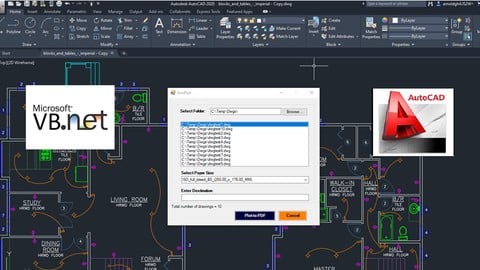
In this course, you will learn how to develop AutoCAD Plugins using VB.NET with Windows Forms. You will be presented 6 hands-on projects to learn from. By the time you finish this course, you will be able to create your own AutoCAD Plugins with User Interfaces that automate AutoCAD processes for your drawings.
The following Projects will be developed in this course:
1) DrawRectangle - This project is a very simple one but it gives you all the basic knowledge you need to know to use Windows Forms in your plugin.
2) AutomateUpdateLayer - This project will introduce you to processing multiple drawings and updating the layer for each drawing automatically based on the user input from the UI.
3) AutomaticBlockExtractor - This project will let you extract block information into a file. This also processes multiple drawing files in a selected folder.
4) AutomateUpdateTextstyles - This project will let you process multiple drawing files and update the text style of each drawing based on the information provided in the user interface.
5) MultiplePlotToPDF - This project will let you plot multiple drawings into a PDF. This will process individual drawing in the folder and convert it to PDF automatically.
6) MultiObjectExtractor - This project will process each drawing in a folder and extract each of the object (e.g. Line, Pline, MText, etc.) into a file automatically.
The source code is provided and included in this course and you can use and tweak it according to your requirement.

 Udemy Discount
The discount is applied through our link. Open the course from here and Udemy's current promotional price is applied at checkout on most courses, no code to type.
Some courses are excluded from Udemy's promotions. If the price does not drop, clear your browser cookies and use the button again.
Instructor Details

- 4.6 Rating
 37 Reviews
Arnold Higuit
A Sr. Software Developer and a Microsoft Certified Solutions Developer (MCSD) and Microsoft Certified Applications Developer (MCAD) with extensive knowledge on different technology in different industries.
I have worked on several companies ranging from Architectural, Engineering & Construction, Utilities, Marketing, Telecommunications, and now in Financial Corporation.
I have been exposed to many different Technologies and Frameworks and Programming Languages. Developing applications using C#, Java, AutoLISP, VB/VBA, GIS and CAD Applications. I also worked on many different Enterprise Databases (e.g. SQL Server, Oracle, Sybase).
 More courses by Arnold Higuit

Practical AutoLISP Programming - Beginner to Advanced (2025)
4.3 (677 Reviews)
 Provider: Udemy
 Time: 7.9h
$69.99

AutoCAD Programming Using C#.NET - Beginner Course (2026)
4.5 (435 Reviews)
- Provider: Udemy
- Time: 17.8h
$10.99

AutoCAD VBA Programming - Beginner course (2025)
4.5 (265 Reviews)
- Provider: Udemy
- Time: 3.7h
$44.99

Learn AutoCAD Programming using VB.NET - Hands On! (2020)
4.3 (145 Reviews)
- Provider: Udemy
- Time: 12.1h
$54.99
More 3D Modeling courses

3D Printing with " Ultimaker CURA Slicer- Start to finish" (2025)
4.9 (192 Reviews)
- Provider: Udemy
- Time: 1h
$34.99

Girl and the Dog Creation in Zbrush for Intermediate Level (2020)
4.9 (173 Reviews)
- Provider: Udemy
- Time: 48.8h
$59.99



Blender Character Creator for Video Games (2026)
4.8 (9,160 Reviews)
- Provider: Udemy
- Time: 34.3h
$159.99

Master SOLIDWORKS 3D CAD using real-world examples (2022)
4.8 (2,451 Reviews)
- Provider: Udemy
- Time: 18.9h
$69.99
 Reviews

By Francisco Garcia Sanchez on 9/9/2024
EXCELENTE EXPLICACION
By Cengiz Çebioğlu on 12/21/2023
Everything is great, so far :)
By Steven Graf on 6/9/2023
The link for downloading .Net has several things to choose from and the video doesn't say which one to choose.
By Андрей Афонин on 2/5/2022
Очень полезный для меня курс! Изучаю с удовольствием.
By Koranot Phumphuang on 9/13/2021
Easy to understand and very clear of learning.
By Mohammed Abdul Hameed on 2/19/2021
Crisp And Clear..! Its what i wanted to Push-start my skills.
By Alan Cooper on 9/25/2020
Great tutorial! Well explained.
By Fritz Piscalar on 9/17/2020
Ja der Kurs entsprach genau meinen Vorstellungen. Mit dem Programmcode und den Teilen daraus kann man einfach eigene Applikationen erstellen. Dies ist jetzt der 4te Kurs von Mr. Higuit, den ich belegte. Bis jetzt konnte ich alle Programme mit ACAD 2016 ans Laufen bringen. Die AutoCAD-API-Datei acmgd machte Probleme mit closeanddiscard() und mit dem ...documentmanager.open(). Ich musste die acmgd.dll von einer abgelaufenen AutoCAD-2019 Installation nehmen. Als Verweise also acmgd Acad2019, acdbmgd ACAD 2016, accoremgd ACAD 2016. Dies hat funktioniert. Die dlls kann man auf keinen Fall nicht direkt in den beiden AutoCAD-Versionen mischen! Nur die Verweise in Visual Studio. In zukünftigen Lehrgängen könnte man vielleicht mehr auf die direkte Anwendung des Objektkataloges gehen. Die Hinweise, die in den jeweiligen VisualStudio-Kontexten gegeben werden reichen manchmal nicht aus. Als Beispiel der Public Shared ReadOnly Property DocumentManager As Autodesk.AutoCAD.ApplicationServices.DocumentCollection Member von "Autodesk.AutoCAD.ApplicationServices.Core.Application Dabei ist hinter dem as der Typ (also die aufrufbaren Methoden, Properties etc) bezeichnet, das Member bezeichnet dann die Auflistung im Objektkatalog? Ich habe für die Kurse nur je 11 $ gezahlt. Diese sind jedoch auf jeden Fall den vollen Preis wert. Ich warte schon auf den nächsten Kurs. Vielen Dank nochmal.
By Ryan on 8/27/2020
Enjoying the pacing and information, examples, cleaning up code.
 Quality Score
No CourseDuck member has rated this course yet. Taken it? Give each part a thumbs up or down.
Overall Score : 92 / 100
- Video Duration:
 9.8h
9.8h - Price: $49.99
- Provider: Udemy
- Updated:
 March 2021
 - Level:
 Intermediate
 - Language:
 English
 - Certificate:
 Yes
Yes
30-day money-back guarantee on most paid courses
Udemy Coupon Price Tracker
