
 Web Development
 Data Science
 Python
 SQL
SQL JavaScript
 Artificial Intelligence
 IT & Software
 IT Certifications
 Hacking
 AWS
AWS Arduino
 DevOps
 3D Modeling
 Graphic Design
 Photoshop
 Drawing
 Digital Painting
 UX Design
 Business
 Data Analysis
 Communication Skills
 Project Management
 Leadership & Management
 Human Resources
 Digital Marketing
 Social Media Marketing
 Marketing
 SEO
SEO Google Analytics
 Branding
 Excel
Excel Office Productivity
 SAP
SAP PowerPoint
 Microsoft Access
 SharePoint
 Finance & Accounting
 Trading & Investing
 Accounting
 Bitcoin
 Personal Finance
 Video Editing & Animation
 Photography
 Adobe Premier Pro
 Adobe Lightroom
 Personal Development
 Productivity
 Career Development
 Life Coaching
 Health & Fitness
 Meditation & Mindfulness
 Yoga
Yoga Music
Music Music Production
 Guitar
 Piano
Piano Singing
 Language Learning
 Teaching & Academics
 Engineering
 Math
Math Lifestyle
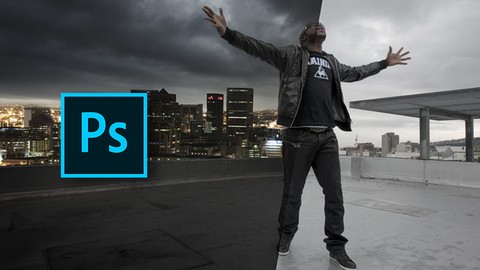
Digital Photoshop Compositing - Turn Day Into Night (Udemy.com)
Digital Photoshop Compositing - Anyone can do it, all secrets and tricks are revealed.
Created by: Manfred Werner
Last updated November 2019
 What you will learn
- You will learn how to photograph both images perfectly "In order to have a good starting point"
- You will learn how to work with raw images and raw conversions
- How to deep edge a person from one image and merge it back into the original image " This only requires one secret technique"
- You will learn how to do a complex manipulation "Combining an images into another"
- You will learn the best retouching shortcuts & techniques "Guaranteed"
- You will learn various photoshop techniques & effects
- You will learn how to work with a photoshop plugin "Super simple"
- You will learn how to integrate the well known dodge & burn method
- You will learn how to apply and image look & amazing color grades " This will take your image to the next level"
- You will learn how to control & build new light "This is very technical"
How it compares
Against the other 188 rated Udemy courses in Photoshop on CourseDuck:
- Rating4.5 out of 5higher than 52% of them
- Reviews95#141 of 189 by number of reviews
- Length2.8 hoursshorter than 69% of them
- Last updatedNovember 2019earlier than 54% of them
 Course Description
TURN DAY INTO NIGHT – INTERMEDIATE PHOTOSHOP COMPOSITING
- MORE THAN 140 STUDENTS HAVE ENROLLED ALREADY
- 3+ Hours of Photoshop compositing "Upgrade your PS Skills"
- 7+ 5 Star Reviews from a really happy & satisfied student
- No Prior Photoshop knowledge needed "Guaranteed"
- Includes all raw & psd files which you can profit from - Instantly
- Full & free lifetime access to the complete course
- All future & additional lectures will always be free of charge
- No illustrator or other software is needed "You only need Photoshop".
- Unconditional Udemy 30 day money-back guarantee - that's my personal promise of your success!
ARE YOU STRUGGLING WITH PHOTOSHOP COMPOSITING?
- AND NOT GETTING THE PERSPECTIVE RIGHT?
- AND NOT MANAGING TO MERGE THE SUBJECTS RIGHT?
- AND NOT GETTING THE COLOR & MODE RIGHT!
--------------------------- ” Then this course is for you ” -------------------------------
What This Course Entails:
I will teach you how to get into advanced level of Photoshop, so don’t worry if you don’t have prior experience with Photoshop. Follow my lead and I’ll teach you to be good at it! “Seriously”
All my Photoshop instructions form part of a comprehensive guide that can help you to accomplish your goals by applying these skills. During the lesson you get to eavesdrop as I work, giving you some insight as to how I work and what I do.
The idea is to make Compositing in Photoshop fun and easy! "Just Practice it "
Whether you have previous experience with Photoshop or not, it doesn't matter. Apply your knowledge for half an hour a day and you could be making huge improvements or even extra cash, just like me.
"And I'm not kidding when I say that you need nothing but Photoshop!"
All future extra lectures and upgrades are always included for free. Unconditional Udemy 30 day money-back guarantee - that's my personal promise of your success!
You'll learn:
- How to photograph both images perfectly "In order to have a good starting point"
- How to work with raw images and raw conversions
- How to deep edge a person from one image and merge it back into the original image " This only requires one secret technique"
- How to do a complex manipulation "Combining 2 images into 1"
- How to create various photoshop techniques & effects
- Learn the best retouching shortcuts & techniques "Guaranteed"
- Learn how to work with a photoshop plugin "Super simple"
- Learn how to integrate the well known dodge & burn method
- Learn how to apply and image look & amazing color grades " This will take your image to the next level"
- Learn how to control & build new light "This is very technical"
... and much, much more!
Intrigued yet? Then keep reading!
As with all my courses: the initial low price will increase after time. This one is currently $45 and it will soon upgrade to $90 so join in now! "You will have unlimited lifetime access at no extra cost" Not just that; all future additional lectures, bonuses, etc in this course are always free.
There's an unconditional, no-questions-asked full 30-day money-back guarantee! I'm known for always offering support in Udemy, so feel free to shout out if you're stuck or need assistance. "I'm here to help"
One final note:
My goal is to teach you all Photoshop tricks & secrets, so don't stress about not having worked in Photoshop before. "I do my best to make it simple, fun & informative"
I've crammed all my Photoshop knowledge into over 3+ hours of Photoshop tutorials!
TAfter going through this course you'll be able to apply your new Photoshop skills to Photoshop anything and make some extra cash along the way.
All you have to do is click on the "take this course" button on the top right corner. You have nothing to lose. In fact, you've got a lot to gain.
Thank you, Manni

 Udemy Discount
The discount is applied through our link. Open the course from here and Udemy's current promotional price is applied at checkout on most courses, no code to type.
Some courses are excluded from Udemy's promotions. If the price does not drop, clear your browser cookies and use the button again.
Instructor Details
- 4.5 Rating
 95 Reviews
Manfred Werner
I Love Sharing & Teaching Online.
Here on Udemy, I'm an instructor that teaches Photoshop for beginners, but if you are more experienced, then take advantage of my free Photoshop courses. I’ve been teaching Photoshop & Retouching on Udemy since 2012.
In my personal capacity, I’m an owner of a Digital Media Agency where the core focus lays in Content Creation. I’ve been an active photographer and retoucher since 2010 and have worked on many advertising campaigns in Cape Town “South Africa” for clients like Mercedes, Zara, H&M, etc,
When I'm not working on campaigns, I'm producing online training courses & I have realized that it has become my passion to teach online, this may vary between Photoshop, Photography, Design or Business Content. In the next years, it is my goal to teach you how to become a better version of yourself with all kinds of skills. Most of which I have used to make my life better & to gain financial freedom.
Feel free to reach out to me on Udemy at any time, if you have questions about the courses or just want to say hi!
Thank you, Manni
 More courses by Manfred Werner
Photoshop Master Course: From Beginner to Photoshop Pro (2020)
4.5 (5,389 Reviews)
 Provider: Udemy
 Time: 12.7h
$15.99
Advanced Digital Photoshop Compositing - Combining 2 Images (2019)
4.2 (188 Reviews)
- Provider: Udemy
- Time: 2.2h
Free
Master Adobe Photoshop Color Grading & Retouching (2019)
4.3 (182 Reviews)
- Provider: Udemy
- Time: 2h
Free
Digital Photoshop Compositing For Advertising Campaigns (2019)
4.3 (148 Reviews)
- Provider: Udemy
- Time: 2.2h
Free
Photoshop Tools - Become An Expert In 10 Super Easy Steps (2015)
3.9 (120 Reviews)
- Provider: Udemy
- Time: 3.3h
$34.99
More Photoshop courses


Adobe Photoshop CC: For Complete Beginner (Sinhala Medium) (2026)
4.9 (110 Reviews)
- Provider: Udemy
- Time: 8.4h
$59.99

Adobe Photoshop CC – Essentials Training Course (2025)
4.8 (36,753 Reviews)
- Provider: Udemy
- Time: 11.6h
$189.99


47 Graphic Design Projects for Photoshop Beginners (2025)
4.8 (466 Reviews)
- Provider: Udemy
- Time: 7.9h
$99.99

Photoshop Efficiency - Techniques For Consistent Marketing (2025)
4.8 (144 Reviews)
- Provider: Udemy
- Time: 1.4h
$49.99
 Reviews

By Ellis Garner on 4/22/2025
very informative and gave me great insight into each tool
By Prabhjot Singh on 9/26/2021
best at free of cost
By Sadia Tanjin on 11/17/2020
Just started to learn!!!
By Brandy Boyett on 6/18/2020
It’s super easy to follow and doesn’t move along too fast.
By fatman - just a noob learning pentesting on 4/20/2020
Confirms everything that I already know.
By Steve Downes on 4/17/2020
Good amount of detail, some parts burn and dodge are difficult to see but that is where you need to try them yourself. Overall very good.
By Mike Getchew on 4/6/2020
still good im enjoy
By Afri Dwi Yulianto on 12/14/2019
Sangat membantu
By Kyle Edwards on 11/18/2013
This course does a good job in showing you how to change backgrounds and make it look authentic; blending it in, in terms of fading with other background elements that you're keeping, dealing with that tell-tale outline around the foreground that screams "Photoshop", and how to balance the colours, tones and positioning so that everything looks like it belonged there from the start.
By Money Puri on 4/29/2021
 Quality Score
No CourseDuck member has rated this course yet. Taken it? Give each part a thumbs up or down.
Overall Score : 90 / 100
- Video Duration:
 2.8h
2.8h - Price: Free
- Provider: Udemy
- Updated:
 November 2019
 - Level:
 All Levels
 - Language:
 English
 - Certificate:
 No
No
Udemy Coupon Price Tracker
