
 Web Development
 Data Science
 Python
 SQL
SQL JavaScript
 Artificial Intelligence
 IT & Software
 IT Certifications
 Hacking
 AWS
AWS Arduino
 DevOps
 3D Modeling
 Graphic Design
 Photoshop
 Drawing
 Digital Painting
 UX Design
 Business
 Data Analysis
 Communication Skills
 Project Management
 Leadership & Management
 Human Resources
 Digital Marketing
 Social Media Marketing
 Marketing
 SEO
SEO Google Analytics
 Branding
 Excel
Excel Office Productivity
 SAP
SAP PowerPoint
 Microsoft Access
 SharePoint
 Finance & Accounting
 Trading & Investing
 Accounting
 Bitcoin
 Personal Finance
 Video Editing & Animation
 Photography
 Adobe Premier Pro
 Adobe Lightroom
 Personal Development
 Productivity
 Career Development
 Life Coaching
 Health & Fitness
 Meditation & Mindfulness
 Yoga
Yoga Music
Music Music Production
 Guitar
 Piano
Piano Singing
 Language Learning
 Teaching & Academics
 Engineering
 Math
Math Lifestyle
How to Use Adobe Animate for Graphic Design (Udemy.com)
An Easy Way to Create Vector Art
Created by: Siobhan Twomey
Last updated December 2021
 What you will learn
- You will learn how to create vector graphics
- You'll learn all the drawing and painting tools in Animate
- You'll learn how to create graphics for logo designs
- You'll learn how to create icons
- You'll also learn how to use advanced effects and gradients
How it compares
Against the other 413 rated Udemy courses in Graphic Design on CourseDuck:
- Rating4.6 out of 5higher than 65% of them
- Reviews23#407 of 414 by number of reviews
- Length2.3 hoursshorter than 77% of them
- Last updatedDecember 2021earlier than 77% of them
 Course Description
Adobe Animate combines the power of Adobe Illustrator with the ease of Adobe Photoshop.
If you are a designer or digital artist looking for a quick and easy way to create vector art, this course is for you. You don't need to learn Adobe Illustrator. This course will teach you everything you need to know about Adobe Animate in order to create stunning graphics and complex designs, easily. Adobe Animate is a powerful design tool and is much easier to grasp than Adobe Illustrator.
If you're more familiar with Photoshop, and you find Illustrator to be complex and process-driven, then Animate offers you the best solution to create vector art.
And, if you are very comfortable with Adobe Illustrator, then this course will teach you how to switch over to Animate so that you can master the drawing and painting tools as a preliminary to learning motion design. Because in Adobe Animate you can sketch your ideas, design your artwork and animate it all in one program without having to export over to After Effects.
Adobe Animate can handle sketching, design, as well as animation. This class focusses on getting you up to speed with the design aspect of the software.
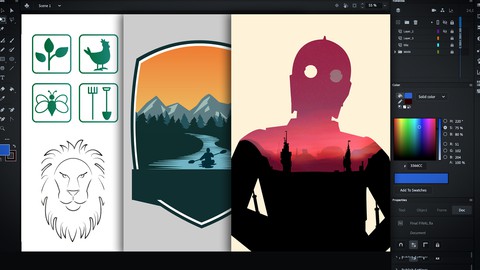
In this class you’ll learn everything you need to know how to make stunning and beautiful graphics for logo design, icon design, badges, posters and illustration.
First of all i’m going to give you an overview of the workspace and tools, and how to set up your workspace for designing. THen we’ll put to practical use all of the tools in 4 fun projects.
You’ll start out creating a super simple set of icons with simple shapes and lines.
Then you’ll develop slightly more complex work with 2 graphics for a logo.
In the 3rd project build an even more sophisticated and intricate graphic and learn how to use gradients and masks.
In the final project, you’ll get to recreate a beautiful movie poster based on an iconic design. This project will teach you how to make a double exposure effect as well as how to import bitmaps, use effects and blending modes.
Finally I’ll show you the capabilities that Animate has to handle type and to cusomtise your own unique fonts.
People often think of Adobe Animate has having 2 sides - it’s either either web development, or it’s Animation. But there’s a third, and powerful side to Animate - and that is it’s capability as a graphic design tool. I’m really excited to share this with you and to give you the option to create graphics quickly and easily.

 Udemy Discount
The discount is applied through our link. Open the course from here and Udemy's current promotional price is applied at checkout on most courses, no code to type.
Some courses are excluded from Udemy's promotions. If the price does not drop, clear your browser cookies and use the button again.
Instructor Details

- 4.6 Rating
 23 Reviews
Siobhan Twomey
My background spans the disciplines of drawing, painting, filmmaking and animation. I studied Film in Dublin, and spent a semester on a scholarship at the Tisch School of the Arts, NYU in New York. I later studied drawing and animation. Since 2005, I have worked in studios in Vancouver and Dublin as a professional Background Designer and Environment Artist. I've also worked as a storyboard artist, concept artist, and I have directed a number of short animated films.
All in all, I've worked for over 15 years as an Artist, Illustrator and Animation Professional. I've provided artwork for studios whose clients include Disney UK, Sony Pictures Animation, HMH Publishing, to name a few.
I also have an ongoing painting and drawing practice, and I paint portraits on commission, and exhibit my work in galleries. My passion is to teach others the whole spectrum of art skills that I've learned and developed over the course of my career.
 More courses by Siobhan Twomey

Learn to Storyboard for Film or Animation (2024)
4.8 (2,727 Reviews)
 Provider: Udemy
 Time: 2.2h
$12.99
Learn How to Animate: 2D Animation for Beginners (2025)
4.6 (1,873 Reviews)
- Provider: Udemy
- Time: 1.6h
$10.99
Concept Art Masterclass - Landscapes and Environments (2025)
4.6 (1,249 Reviews)
- Provider: Udemy
- Time: 4.5h
$99.99
More Graphic Design courses

Adobe InDesign - From Basics to Professional Level Designs (2024)
4.9 (320 Reviews)
- Provider: Udemy
- Time: 11.4h
$84.99

Shop Drawing & Details-Autodesk Revit 2025- for BIM Modelers
4.9 (300 Reviews)
- Provider: Udemy
- Time: 30.9h
$10.99

The Adobe Illustrator CC Mastery Course: Basics to Pro + AI (2026)
4.9 (268 Reviews)
- Provider: Udemy
- Time: 30.8h
$19.99


Software Architecture & System Design Practical Case Studies (2026)
4.8 (2,584 Reviews)
- Provider: Udemy
- Time: 4h
$15.99

Graphic Design Masterclass: Design 40+ Projects in Photoshop (2025)
4.8 (668 Reviews)
- Provider: Udemy
- Time: 16.5h
$109.99
 Reviews

By Anupam Mondal on 3/12/2025
need more tutorials at this prize. i really lost my money to purchase this course. thats very small time course. if you add more tutorials in this course then its superb
By Matt Greenslade on 9/26/2023
Really good intro to Animate. Get the drawing skills down first with this excellent course and then move on to Siobhan's animation courses confident about creating shapes and images.
By Min on 2/3/2023
Easy to understand.
By Jacques Lise on 8/20/2021
Oui, merci beaucoup
By Pierre Sevigny on 8/12/2021
I am not a fan of Adobe Illustrator either, so I love that opportunity of using Animate as more that creating animations! Many thanks Siobhan, again a great and formative class of yours. I really learned.
By B Hester on 8/11/2021
Loved this course! Easy to follow along, useful tips, and am able to jump right in and start creating. Super!!
By Marna Ruach on 8/10/2021
I already feel confident in Adobe Animate, this is very easy to follow. I'm excited for the rest of the course.
 Quality Score
No CourseDuck member has rated this course yet. Taken it? Give each part a thumbs up or down.
Overall Score : 92 / 100
- Video Duration:
 2.3h
2.3h - Price: See price on Udemy
- Provider: Udemy
- Updated:
 December 2021
 - Level:
 Beginner
 - Language:
 English
 - Certificate:
 Yes
Yes
30-day money-back guarantee on most paid courses
Udemy Coupon Price Tracker
