
 Web Development
 Python
 JavaScript
 SQL
SQL Artificial Intelligence
 Data Science
 IT & Software
 Hacking
 AWS
AWS Arduino
 3D Modeling
 Graphic Design
 Photoshop
 Drawing
 UX Design
 Blender
 Business
 Data Analysis
 Shopify
 Digital Marketing
 Social Media Marketing
 Marketing
 SEO
SEO Google Analytics
 Branding
 Excel
Excel Office Productivity
 Finance & Accounting
 Bitcoin
 Video Editing & Animation
 Photography
 Adobe Premier Pro
 Adobe Lightroom
 Personal Development
 Health & Fitness
 Music
Music Guitar
 Teaching & Academics
 Language Learning
 Engineering
 Lifestyle
Master Motion Tracking with Cinema 4D (Udemy.com)
Learn how to track, matchmove inside Cinema 4D
Created by: Lionel VICIDOMINI
Last updated February 2023
 What you will learn
- Tracking, matchmoving in Cinema 4D
- Also learn Object Tracking, Planar Tracking, Object assisted tracking
 Course Description
3D Tracking , Matchmoving, Camera Tracking...
What does it all mean exactly ?
I’m Lionel VICIDOMINI, a Maxon Certified Instructor, Maxon Master Trainer and Motion Designer based in Paris, France.
Matchmoving is the entry door to the world of special effects (VFX), where you can integrate 3D objects into your live action shot.
In this Cinema 4D tutorial you will learn how to master the 3D tracker integrated within this wonderful software.
In this training you will learn :
What are 3D Tracking, Matchmoving exactly ? In a first chapter you will learn the tricks that make a good track, how to shoot your own videos and how to avoid the most common mistakes.
How to use the fully automatic tracker
Calibrate you scene in order to give it a sense of scale and orientation, making it easy to place objects
In-depth review of the interface of the tracker
How to deal with the track view, how to sort, filter and refine your features to obtain a better solve
How to make a manual tracking, where you decide which features to follow
Learn the Lens Distortion workflow which can prevent the tracker from solving a shot
Object tracking : how to replace props in the scene with your own 3D objects
3D reconstruction, which allow you to extract a point cloud from your footage, enabling you to completely recreate the scene in 3D
How to track a shot filmed on a standing tripod
Planar tracking, where you extract from the scene a flat surface to apply corner pin deformation
Object-assisted tracking : this feature allow you to use fewer features by using a 3D object you orient to your scene
All my trainings are not only videos showing you what button to push, I'll explain to you how the software actually works so that you can truly master the tool.
This training is granular, meaning you don't necessarily need to follow the whole course in order to learn how to do a simple track.
Each chapter deal with a different topic or technique, for those you really want to know everything in depth.
The 3D tracker is bundled with Cinema 4D Studio since R16, meaning you need to have at least this release, but it's better to have at least the R18 if you want to use all the features.
All footage used in the course are free to download along with the exercice files, and I'm always happy to help if you have any question !

 Udemy Discount
The discount is applied through our link. Open the course from here and Udemy's current promotional price is applied at checkout on most courses, no code to type.
Some courses are excluded from Udemy's promotions. If the price does not drop, clear your browser cookies and use the button again.
Instructor Details

- 4.8 Rating
 88 Reviews
Lionel VICIDOMINI
Lionel VICIDOMINI is a Certified Maxon Instructor, Maxon Master Trainer, Adobe Certified Instructor, french motion designer, based in Paris, working for advertisement and television.
As an instructor he has taught Cinema 4D, Blender and After Effects for 15 years in several prestigious schools and training centers in Paris. He also works directly for Maxon for which he conducted several online webinars.
Lionel uses Cinema 4D, Blender and After Effects extensively for his work and like to intricate the 2D and 3D world seamlessly. He is the translator of the french UI of Cinema 4D.
He is also one of the administrator of the french site Motion Café which boasts 60k followers.
 More courses by Lionel VICIDOMINI


Cinema 4D Complete : Vol. 2. All about Modeling! (2022)
4.7 (424 Reviews)
 Provider: Udemy
 Time: 22.4h
$74.99

Cinema 4D Complete : Vol. 3 Unleash the power of Mograph! (2022)
4.7 (226 Reviews)
- Provider: Udemy
- Time: 19.2h
$69.99

Cinema 4D Complete : Vol. 4 All about Simulations (2024)
4.7 (102 Reviews)
- Provider: Udemy
- Time: 8.6h
$84.99
More 3D Modeling courses


From Zero to Houdini - Beginner's Guide to Procedural 3D (2025)
4.9 (45 Reviews)
- Provider: Udemy
- Time: 12.2h
$19.99

Blender Character Creator for Video Games (2026)
4.8 (9,160 Reviews)
- Provider: Udemy
- Time: 34.3h
$159.99

Master SOLIDWORKS 3D CAD using real-world examples (2022)
4.8 (2,451 Reviews)
- Provider: Udemy
- Time: 18.9h
$69.99

Curso Lumion 9/10, do básico ao avançado (2025)
4.8 (980 Reviews)
- Provider: Udemy
- Time: 11.2h
$19.99

 Reviews

By ali hasan AL-hasni on 4/9/2024
so far very informative but worried about the program because i have the newer version
By Antonio Generoso on 4/2/2024
A great course about tracking in Cinema 4D! The instructor explains everything in details. I have discovered so many functions in Cinema 4D and I am looking forward to using them in my next project.
By Basil Iskandrian on 5/27/2023
In depth explanation of tracking principals applied to all the various C4D tracking capabilities with real world applications.
By Erik Wijnands on 5/23/2023
goed te volgen en duidelijk qua materiaal
By Brian Smith on 5/2/2023
A little bit of a challenge applying to 2023.2, but great instruction from Lionel - the why as well as the how!
By Andrea Ciatti on 8/10/2022
Corso molto complesso bisogna avere già una base solida di Cinema 4D. Lionel è un professionista. Consiglio tutti i suoi corsi della serie. 10++
By RAMKUMAR V on 3/16/2022
i learn lot from this lesson thank you
By Rob Hendriks on 3/28/2021
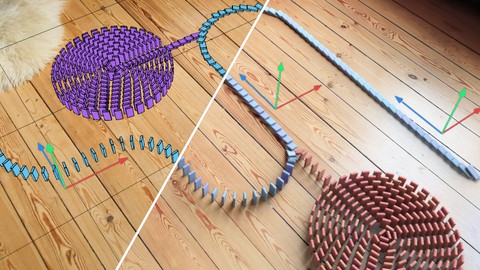
Gives a good start on motion tracking. There is a video's on YouTube on the domino stones so together you might complete the scene. Same with last one
By Erno Csoka on 2/15/2021
If someone wants to know everything about motion tracking, this course is priceless. You will learn everything. It worth every penny.
By Christian Rehrmann on 1/14/2021
Very good tutorial for motion tracking. I have used motion tracking many times before but now I understand how it really works. Thanks for the great tutorial.
 Quality Score
No CourseDuck member has rated this course yet. Taken it? Give each part a thumbs up or down.
Overall Score : 96 / 100
- Video Duration:
 5.2h
5.2h - Price: $69.99 Track Price 11.99 Track Price
- Provider: Udemy
- Updated:
 February 2023
 - Level:
 Beginner
 - Language:
 English
 - Certificate:
 Yes
Yes
30-day money-back guarantee on most paid courses
Udemy Coupon Price Tracker
