
 Web Development
 Data Science
 Python
 SQL
SQL JavaScript
 Artificial Intelligence
 IT & Software
 IT Certifications
 Hacking
 AWS
AWS Arduino
 DevOps
 3D Modeling
 Graphic Design
 Photoshop
 Drawing
 Digital Painting
 UX Design
 Business
 Data Analysis
 Communication Skills
 Project Management
 Leadership & Management
 Human Resources
 Digital Marketing
 Social Media Marketing
 Marketing
 SEO
SEO Google Analytics
 Branding
 Excel
Excel Office Productivity
 SAP
SAP PowerPoint
 Microsoft Access
 SharePoint
 Finance & Accounting
 Trading & Investing
 Accounting
 Bitcoin
 Personal Finance
 Video Editing & Animation
 Photography
 Adobe Premier Pro
 Adobe Lightroom
 Personal Development
 Productivity
 Career Development
 Life Coaching
 Health & Fitness
 Meditation & Mindfulness
 Yoga
Yoga Music
Music Music Production
 Guitar
 Piano
Piano Singing
 Language Learning
 Teaching & Academics
 Engineering
 Math
Math Lifestyle
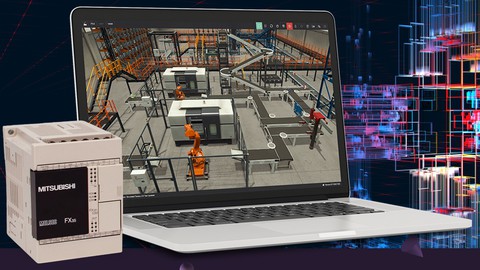
Mitsubishi GX Works 2 with Factory I/O PLC Training (Udemy.com)
Using GX Works 2 software with PLC Simulation, MX OPC Server and Factory I/O, Intermediate level.
Created by: Sunderasen Thangarajan
Last updated May 2024
 What you will learn
- Learn the requirement of the software we going to learn.
- Download and Install GX Works 2 Software, MELSEX MX OPC Server & Factory I/O.
- Mitsubishi PLC Addressing
- Create a project and understand how it works with Mitsubishi PLC simulations.
- Download, Upload, Save and copy programs with simulation PLC.
- Utilize advanced troubleshooting tools online with Factory IO and GX Work 2.
- Formulate a control strategy for creating PLC programs.
- Fully document a PLC program.
- Link the PLC Program with MELSEC MX OPC Server by creating Tags.
- Link the OPC Server with FACTORY I/O and create scene.
- Practice with 5 type of scenes from Factory IO with PLC programming Projects
How it compares
Against the other 335 rated Udemy courses in Engineering on CourseDuck:
- Rating4.4 out of 5higher than 39% of them
- Reviews157#253 of 336 by number of reviews
- Length5.8 hourslonger than 54% of them
- Last updatedMay 2024earlier than 50% of them
 Course Description
Training Course Objectives:
This training program for Mitsubishi Intermediate PLC Programming using Simulation link with MELSEC MX OPC Server communicate using Factory I/O course provides a deep understanding of Mitsubishi PLCs programming capabilities using OPC Server as communications. Control strategies and programming will be reviewed. Data Movement, Floating Point Math, Shift, Compare, Distribute, Collection, Transfer, and other instructions will be covered. After that, we will use the MX OPC Server to link with Factory IO and do some scenes.
Training Course Aims:
Upon completion of this course, the students will be able to:
Able to install GX Works 2 software and test run simulations.
Construct, test and run PLC programs using instructions in GX Works 2,
Download, Upload, Save and copy programs.
Download and Install MX OPC Server (Demo Version).
Able to create links and tags MX OPC Server with GX Works 2.
Download and Install Factory I/O.
Able to Link Factory I/O projects with MX OPC Server.
Utilize advanced troubleshooting tools online through Factory I/O.
Learn basic operation using Factory IO and learn how to link with MX OPC Server.
Do 3 to 4 Basic to Intermediate lever projects.
Utilize advanced troubleshooting tools.
Recommended Audience:
Electricians, Technicians, Engineers, Maintenance Personnel, Control Engineers, Individuals who need to be able to understand the intermediate capabilities of Mitsubishi PLCs.
Prerequisites:
Basic computer skills are required.
OS Requirement: Windows 7 Profesional, Windows 8 Pro or Windows 10 Pro | 32 Bit.
Basic knowledge in PLC and Ladder Logic is needed.
Installed GX Works 2 (Will guide you to download the software).
Installed MELSEC MX OPC Server 6.01 or 6.02 (Will guide you to download the software).
Installed Factory I/O full or demo package. (Will guide you to download the software).
Basic Electricity.
Trainer’s Introduction:
Mr. Sunderasen (TSoon) has more than 32 years of industry experience in PLC and HMI programming as a Project Engineer in Singapore. Trained in Australia as an Electrical and Instrument Engineer, he then got his formal PLC and Robotics Training from Ngee Ann Poly Singapore. Mr.TSoon has worked in an OEM company for machine fabrication as a programmer and has commissioned machines in Germany, Thailand, India, China, Philippines, and Malaysia. Throughout his years of industry experience, he has undergone specialized training and massive exposure towards different PLC systems, i.e. Siemens (Siemens Singapore), Allen Bradley (Rockwell Singapore), Omron (Precision Singapore), Adept Robot (Adept Singapore), and GE Fanuc (TDS Singapore). He has also vast experience in Building Management systems, integrating HVAC, Security, Fire Fighting System, Electrical and Utilities into one centralized monitoring station.

 Udemy Discount
The discount is applied through our link. Open the course from here and Udemy's current promotional price is applied at checkout on most courses, no code to type.
Some courses are excluded from Udemy's promotions. If the price does not drop, clear your browser cookies and use the button again.
Instructor Details

- 4.4 Rating
 157 Reviews
Sunderasen Thangarajan
Mr. Sunderasen (TSoon) has more than 25 years of industry experience in PLC and HMI programming as a Project Engineer in Singapore. Trained in Australia as an Electrical and Instrument Engineer, he then got his formal PLC and Robotics Training from Ngee Ann Poly Singapore. Mr.TSoon has worked in an OEM company for machine fabrication as a programmer and has commissioned machines in Germany, Thailand, India, China, Philippines, and Malaysia. Throughout his years of industry experience, he has undergone specialized training and massive exposure towards different PLC systems, i.e. Siemens (Siemens Singapore), Allen Bradley (Rockwell Singapore), Omron (Precision Singapore), Adept Robot (Adept Singapore), and GE Fanuc (TDS Singapore). He has also vast experience in Building Management systems, integrating HVAC, Security, Fire Fighting System, Electrical and Utilities into one centralized monitoring station.
 More Engineering courses


Do it Yourself - Automotive Electrical Diagnosis - Beginner (2026)
4.8 (1,897 Reviews)
 Provider: Udemy
 Time: 2.1h
$12.99

ROS 2 for Beginners Level 2 - TF | URDF | RViz | Gazebo (2025)
4.8 (1,869 Reviews)
- Provider: Udemy
- Time: 13.8h
$10.99

Advanced Kalman Filtering and Sensor Fusion (2021)
4.8 (1,033 Reviews)
- Provider: Udemy
- Time: 8.3h
$84.99

Digital Electronics: Robotics, learn by building module II (2020)
4.8 (942 Reviews)
- Provider: Udemy
- Time: 13.1h
$14.99

 Reviews

By Shahidh Aheel on 11/17/2024
The course went quite well and I would have been more satisfied if the logic had been explained in the Factory IO Ladder programming
By Hue Jun Yeen on 5/21/2024
good course, though, the program files can't be downloaded (plc ladder programs for factory I/O)
By Gerardo Antonio Rojas Solís on 4/24/2024
He aprendido muchos temas interesantes sobre los PLC, formando una buena base desde la cuál comenzar a programarlos. El material es bueno y abundante, sin embargo está todo en inglés.
By Esteban Pinales Cibrian on 7/17/2023
Me parece muy acertado iniciar con un panorama de los origenes e inicios de los PLC
By Wilson Pablo de Almeida Paiva on 4/26/2023
Hi, according to my point of view, the rating request would come near the end of the course progress , NOT AFTER THE FIRST 3 LESSONS. That was my reason I gave you just one star in my rating. But guess what "I did not evaluate correctly" according to your replay... Sorry, but that was the reason FOR REAL! I do not like leasons where the simple slides reading would be consider "good enough" or "reasonable". I DO NO CONSIDER IT GOOD ENOUGH, do you undersand? But, once you edited your protest and gave a tone more reasonable I decided o change my rating, just because you did that firts... But I reafirme it: ASK FOR A COURSE RATING AFTER JUST 3 LESSONS MAKE NO SENSE!!! THE EVALUATION REQUEST SHOULD COME NEAR THE COMPLETION OF THE COURSE, NO IN THE BEGINNING (Especially if the rating request come just after 3 boring lessons where consists merely in slides reading...) The platform invited me to evaluate after just 3 lessons! again MAKE NO SENSE! Anyway, hope you be more happy after my new rating. Peace!
By Armand Smith on 3/3/2023
In lecture 3, it is VERY hard to hear the instructor. So far, basics have been covered.
By Christopher D lykins on 8/15/2022
Very good introduction. English is very good.
By Ramadhani Yuda Pratama on 8/8/2022
Understandable explanation, it was easy for me as a beginner in PLC to catch up with the materials.
By Nontanut Chitsiriparat on 7/15/2021
the lecture is great easy to follow but the sound quality is kinda poor, and there's melody and noise in some of the videos makes it harder to listen
By A I Reid on 4/26/2021
I love the basics this course starts with, making it suitable for people of all levels.
 Quality Score
No CourseDuck member has rated this course yet. Taken it? Give each part a thumbs up or down.
Overall Score : 88 / 100
- Video Duration:
 5.8h
5.8h - Price: $49.99
- Provider: Udemy
- Updated:
 May 2024
 - Level:
 Intermediate
 - Language:
 English
 - Certificate:
 Yes
Yes
30-day money-back guarantee on most paid courses
Udemy Coupon Price Tracker
