
 Web Development
 Data Science
 Python
 SQL
SQL JavaScript
 Artificial Intelligence
 IT & Software
 IT Certifications
 Hacking
 AWS
AWS Arduino
 DevOps
 3D Modeling
 Graphic Design
 Photoshop
 Drawing
 Digital Painting
 UX Design
 Business
 Data Analysis
 Communication Skills
 Project Management
 Leadership & Management
 Human Resources
 Digital Marketing
 Social Media Marketing
 Marketing
 SEO
SEO Google Analytics
 Branding
 Excel
Excel Office Productivity
 SAP
SAP PowerPoint
 Microsoft Access
 SharePoint
 Finance & Accounting
 Trading & Investing
 Accounting
 Bitcoin
 Personal Finance
 Video Editing & Animation
 Photography
 Adobe Premier Pro
 Adobe Lightroom
 Personal Development
 Productivity
 Career Development
 Life Coaching
 Health & Fitness
 Meditation & Mindfulness
 Yoga
Yoga Music
Music Music Production
 Guitar
 Piano
Piano Singing
 Language Learning
 Teaching & Academics
 Engineering
 Math
Math Lifestyle
Modelling the Shogun in Cinema4D use the bonus shaders! (Udemy.com)
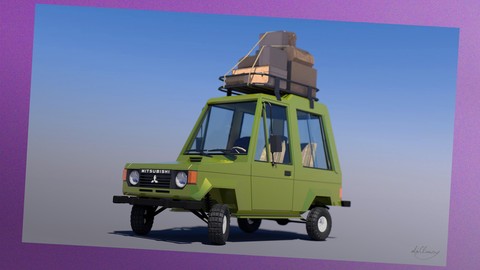
Creating a a super cute low poly car with using the reference picture and my new bonus shaders!
Created by: Peter Nagy
Last updated April 2020
 What you will learn
- Create super cute lowpoly car!
- Learn about modelling real cars as tiny toy car!
How it compares
Against the other 44 rated Udemy courses in Cinema 4D on CourseDuck:
- Rating4.2 out of 5higher than 22% of them
- Reviews28#39 of 45 by number of reviews
- Length3.9 hourslonger than 50% of them
- Last updatedApril 2020more recently than 68% of them
 Quality Score
Overall Score : 84 / 100
 Course Description
If you are in love modelling cars and also love low poly modelling, try this course and make a cute classic Mitsubishi Shogun /Pajero, Montero/ in Cinema 4D!
The course is for those, who are already familiar a little bit with Cinema 4D, not a beginner course, but you will do!
What do you need for the course?
In the course I've used Cinema 4D.
(FYI: Actually with this method you can model similar toy car in other 3D software too.)
Structure of the course
- Using the reference picture to start modelling. / This is my modified picture for this course /
- Create the main silhouette of the car using simple 2d polygons.
- Jump from 2D look to 3D model.
- Modeling the lamps.
- Create the radiator grille and the doors.
- Adding bumpers and wheels to the car.
- The windows, mirrors and the springs.
- Detailing the lamps./ Parts of the lamps /
- Creating the interior, the seats and the dashboard.
- Steering wheel and gear lever.
- The roof and the Mitsubishi logo.
- Quick rendering with some basic materials.
- Bonus lecture, / Create the roof rack and use the bonus baggages /
- New Bonus procedural Shaders for the project!
In this course you will get some baggages for the complete journey!
So in the and of this course you will get the knowledge to create your
favorite car as tiny toy car!
Come and join the course and create a super cute low poly car! Who this course is for:
- This course is for you if you want to take the leap to lowpoly car modelling.
- This course is for you if you want to learn some of my tips and tricks of creating a cute car.
- Please do not take this course if you are a master of 3d modelling.
- You might learn a few tricks, but someone with your skill level might need more.

 Udemy Discount
The discount is applied through our link. Open the course from here and Udemy's current promotional price is applied at checkout on most courses, no code to type.
Some courses are excluded from Udemy's promotions. If the price does not drop, clear your browser cookies and use the button again.
Instructor Details

- 4.2 Rating
 28 Reviews
Peter Nagy
Hello! My name is Peter. I'm an illustrator, motion designer and photographer.
I live in Budapest, Hungary.
I work as motion designer at a leading commercial television channel in Hungary.
I create digital paintings and illustrations in Photoshop and Illustrator with a Wacom tablet. I love traditional pastel and comic art too.
One of the most important things for me is to create atmospheric scenes with impressionistic lights and a lovely story.
 More courses by Peter Nagy

Create atmospheric digital art from your pencil sketch (2018)
4.6 (305 Reviews)
 Provider: Udemy
 Time: 3.4h
$59.99
More Cinema 4D courses

Cinema 4D - Looping 3D Animation for Instagram and GIF (2019)
4.8 (152 Reviews)
- Provider: Udemy
- Time: 1.8h
$39.99

Cinema 4D Complete : Vol. 2. All about Modeling! (2022)
4.7 (424 Reviews)
- Provider: Udemy
- Time: 22.4h
$74.99


Cinema 4D Complete : Vol. 3 Unleash the power of Mograph! (2022)
4.7 (226 Reviews)
- Provider: Udemy
- Time: 19.2h
$69.99

Cinema 4D Masterclass: The Ultimate Guide for Beginners (2021)
4.6 (3,843 Reviews)
- Provider: Udemy
- Time: 7.8h
$79.99

Professional Lighting Techniques in Cinema 4D (2020)
4.6 (185 Reviews)
- Provider: Udemy
- Time: 1.9h
$64.99
 Reviews

By Rodrigo Castillo
I think its a good way to start modeling. The music along the lessons its very frustrating, so i think the videos, can be better without music, the way that the teacher modeling is good... a little bit confusing because some tools aren´t the same in actual versions of Cinema but if you have some knowledge of the tools you can follow up the instructor. I think its a good course for understanding how to model with polygons and cut tools.
Good Course!
By Dgerda
Good instructor.
By Juan Carlos Alcoser
cool stuff
By Hunter Mooney
It's great so far!
As a somewhat C4D beginner, this course has really helped me learn a lot very quickly. I like that you are right to the point on what to do, no fluff. I've had several eureka! moments this course as a result of your teaching method.
I would either get rid of the background music or lower it. I feel like I'm stuck in a Mass Effect loading screen at times, haha.
I'm currently halfway done building the model. Anxious to reach the final lesson!
Thank you for creating this helpful tutorial.
By Scott Dintelman
No reference picture and explanation of why Peter is doing what he's doing. Music plays the whole time and is distracting. This is not a course. This is a walk-through. There are unanswered questions on the board. If you are desperate and low on funds, this might help you. Otherwise, don't waste your time.
- Video Duration:
 3.9h
3.9h - Price: $39.99
- Provider: Udemy
- Updated:
 April 2020
 - Level:
 Beginner
 - Language:
 English
 - Certificate:
 Yes
Yes
30-day money-back guarantee on most paid courses
Udemy Coupon Price Tracker
