
 Web Development
 Data Science
 Python
 SQL
SQL JavaScript
 Artificial Intelligence
 IT & Software
 IT Certifications
 Hacking
 AWS
AWS Arduino
 DevOps
 3D Modeling
 Graphic Design
 Photoshop
 Drawing
 Digital Painting
 UX Design
 Business
 Data Analysis
 Communication Skills
 Project Management
 Leadership & Management
 Human Resources
 Digital Marketing
 Social Media Marketing
 Marketing
 SEO
SEO Google Analytics
 Branding
 Excel
Excel Office Productivity
 SAP
SAP PowerPoint
 Microsoft Access
 SharePoint
 Finance & Accounting
 Trading & Investing
 Accounting
 Bitcoin
 Personal Finance
 Video Editing & Animation
 Photography
 Adobe Premier Pro
 Adobe Lightroom
 Personal Development
 Productivity
 Career Development
 Life Coaching
 Health & Fitness
 Meditation & Mindfulness
 Yoga
Yoga Music
Music Music Production
 Guitar
 Piano
Piano Singing
 Language Learning
 Teaching & Academics
 Engineering
 Math
Math Lifestyle
PCB Design Using KiCad (Udemy.com)
Express way to learn KiCad with single layer and two-layer design examples to understand the PCB design flow.
Created by: Eshanav Systems
Last updated March 2022
 What you will learn
- Drawing circuit schematics
- PCB Layout: Single & Two-layer design
- Creation of Gerber files
- Library part creation
- BOM generation
- ERC and DRC
How it compares
Against the other 335 rated Udemy courses in Engineering on CourseDuck:
- Rating4.3 out of 5higher than 28% of them
- Reviews83#302 of 336 by number of reviews
- Length3.2 hoursshorter than 69% of them
- Last updatedMarch 2022earlier than 67% of them
 Course Description
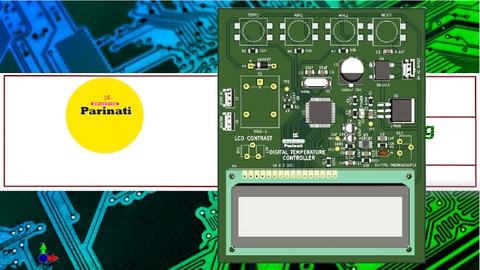
This short course on KiCad gives basic idea about usage of open-source software tool KiCad for the creation of electronic schematic diagrams and PCB artwork. This course enables you to design your PCBs with its precise yet simple explanations for a beginner to understand the concepts and guidelines of PCB design.
The course introduces the KiCad tool for schematic entry and PCB layout design of single-layer and two-layer boards with examples for each. You will understand the various stages of design validation using ERC and DRC checks to result in more reliable PCBs. The method used in the course gives you a pleasant learning experience without beating around the bushes. To the point, precise and effective instructions and yet short video lessons are the highlights of the course. The lessons on schematic symbol, footprint creation and differential pairs are added to give you an insight of the practical design challenges. So even with a busy life schedule, you can get a hold of PCB design fundamentals using widely used Opensource KiCad Tool in a matter of few hours.
Instructor has more than a decade of PCB design experience on a variety of EDA tools such as PCBCAD, Eagle, KiCad, OrCAD and Express PCB.

 Udemy Discount
The discount is applied through our link. Open the course from here and Udemy's current promotional price is applied at checkout on most courses, no code to type.
Some courses are excluded from Udemy's promotions. If the price does not drop, clear your browser cookies and use the button again.
Instructor Details

- 4.3 Rating
 83 Reviews
Eshanav Systems
Eshanav Systems is a Bengaluru-based company offering innovative training and development solutions in Embedded Systems, PCB Design, IoT Software, and Hardware Prototyping. We empower students and professionals through practical learning, certified online courses, and real-time project experience.
We work closely with colleges, startups, and enterprises to bridge the skill gap in today’s tech world.
 More Engineering courses


Do it Yourself - Automotive Electrical Diagnosis - Beginner (2026)
4.8 (1,897 Reviews)
 Provider: Udemy
 Time: 2.1h
$12.99

ROS 2 for Beginners Level 2 - TF | URDF | RViz | Gazebo (2025)
4.8 (1,869 Reviews)
- Provider: Udemy
- Time: 13.8h
$10.99

Advanced Kalman Filtering and Sensor Fusion (2021)
4.8 (1,033 Reviews)
- Provider: Udemy
- Time: 8.3h
$84.99

Digital Electronics: Robotics, learn by building module II (2020)
4.8 (942 Reviews)
- Provider: Udemy
- Time: 13.1h
$14.99

 Reviews

By Emmanuel chibuike on 9/8/2026
it wasn't what i expected, i thought i was paying for a newer version of kicad course turns out it is an older version...
By Anil Vishwakarma on 1/23/2023
course is good, have to explain about via uses, soldermask to send PCB for febrication.
By Julia Garbe on 6/26/2021
This course is a perfect introduction to designing schematics and PCBs! I learned a lot in a short amount of time and it was extremely concise and practical. Thank you!
By Amith on 12/22/2020
The presenter explained clearly and the information was useful without being repetitive. The only issue is the background music, I wish they didn't have it at all.
By H P Sanjana on 9/22/2020
VERY INTERESTING AND EXPLAINED VERY WELL
By Andrew Kinniburgh on 6/10/2020
Good course. You need to have a basic understanding of KiCad to get the most from it. Am learning lots.
By Richard Coleman on 4/2/2020
The teaching is very effective. I'm definitely getting my money's worth. There need to be more instruction on how to submit files generated in Assignment 1 above.
By Alejandro Said on 12/2/2019
Excellent course. It gets you fast to the important features of the software.
By DARSHAN MAKAVALLI MARIDEVEGIWDA on 12/2/2019
This class is very informative , I learnt many thing in this class and for me this class is very usefull.
By Kushal Kumar P on 11/1/2019
learnt a good basics of kicad
 Quality Score
No CourseDuck member has rated this course yet. Taken it? Give each part a thumbs up or down.
Overall Score : 86 / 100
- Video Duration:
 3.2h
3.2h - Price: $69.99
- Provider: Udemy
- Updated:
 March 2022
 - Level:
 Beginner
 - Language:
 English
 - Certificate:
 Yes
Yes
30-day money-back guarantee on most paid courses
Udemy Coupon Price Tracker
