
 Web Development
 Data Science
 Python
 SQL
SQL JavaScript
 Artificial Intelligence
 IT & Software
 IT Certifications
 Hacking
 AWS
AWS Arduino
 DevOps
 3D Modeling
 Graphic Design
 Photoshop
 Drawing
 Digital Painting
 UX Design
 Business
 Data Analysis
 Communication Skills
 Project Management
 Leadership & Management
 Human Resources
 Digital Marketing
 Social Media Marketing
 Marketing
 SEO
SEO Google Analytics
 Branding
 Excel
Excel Office Productivity
 SAP
SAP PowerPoint
 Microsoft Access
 SharePoint
 Finance & Accounting
 Trading & Investing
 Accounting
 Bitcoin
 Personal Finance
 Video Editing & Animation
 Photography
 Adobe Premier Pro
 Adobe Lightroom
 Personal Development
 Productivity
 Career Development
 Life Coaching
 Health & Fitness
 Meditation & Mindfulness
 Yoga
Yoga Music
Music Music Production
 Guitar
 Piano
Piano Singing
 Language Learning
 Teaching & Academics
 Engineering
 Math
Math Lifestyle
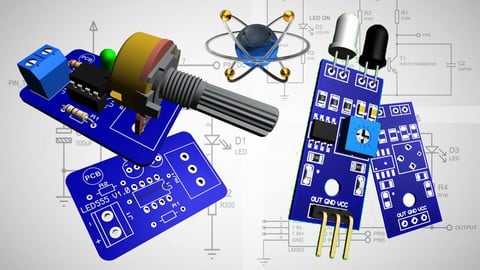
PCB Design with Proteus (Udemy.com)
Learn to Design Printed Circuit Board with Proteus | PCB Design
Created by: Daniel Haro
Last updated April 2021
 What you will learn
- Design a printed circuit board with Proteus
- Design a PCB with 1 or 2 Layers
- Understand the complete process to design a PCB
- Create schematic symbols & Libraries
- Create Footprint & Libraries
- Add the 3d Model, Find New 3d Models
- How to route the PCB & Autoruoting
- Get the manufacturer files (Gerber, PDF)
- Understand PTH and SMD components
- Understand Proteus Software for PCB Design
How it compares
Against the other 335 rated Udemy courses in Engineering on CourseDuck:
- Rating4.7 out of 5higher than 88% of them
- Reviews245#210 of 336 by number of reviews
- Length6.1 hourslonger than 56% of them
- Last updatedApril 2021earlier than 72% of them
 Course Description
In this course We are going to cover all the necessary aspect to design a high quality printed circuit board. This is a step by step course.
We are going to start in the squematic circuit then the PCB layout and get the 3d visualization, also We are going to learn how to get the output files like PDF and Gerber files.
Let's get started¡¡¡
We will cover the complete process to design a PCB with Proteus, and see the below subjects
1. The use of Proteus as PCB Desing Software
Proteus is not just an Virtual Electronic Laboratory with different modules, in this course We are using Proteus as PCB Design software, since it has a powerful and dynamic interface.
We will learn:
- How to navegate in the Proteus interface.
- Understand the working methodology in Proteus.
- The different files that We will create (Schematic & Footprint Library)
2. The Schematic & Schematic Library
In Proteus We can create an Schematic Library, where we are going to collect all our Projects schematic symbols. It is better to separate our Projects symbols from the Proteus Library Symbols. So in this way We can be sure about the components We are using, in additional when we are going to share our Project File everything will be well separated and idetificated.
We will learn:
- How to create the schematic library.
- How to create new schematic symbols.
- How to use the schematic symbols from Proteus Library.
- How to modify the schematic symbols from Proteus Library.
- How to add the new symbols into our schematic library.
- How to identify our schematic library and where to find it.
- Complete our Schematic Diagram.
3. PCB Layout & Footprint Library
Once we complete our schematic diagram, We are going to pass to the PCB Layouy interface. Where we finally will make the layout of our project. After we complete this step, we can get all the out files to create our pcb.
We will learn:
- How to create the Footprint Library.
- How to create new Footprints and add them into our library.
- How to modify the Footprint from Proteus Library.
- How to identify our Footprint library and where to find it.
- How to use the Autorouting option.
- How to route our PCB ( 1 & 2 layers pcb)
- Understand the PCB Layout terminology.
4. Visualization 3D
Proteus offers the 3d Visualization, which we can consider necesary, it will be kind of confirmation between our models and the real component. We add easly the 3d models and get our 3d PCB that we can share.
We will learn:
- How to add 3d models.
- How to Switch to the 3d view.
- How to set the 3d pcb (Colors, visual options, Copper, 3d models)
- Where to find new 3d models.
- Which extension for 3d model we need to use.
- Export our 3d pcb.
5. Manufacturer Files
The manfacturer files are the final files that we need to get from our Project, and with them we are going to create the pcb in real. Process will provide these information after we complete the layout of our pcb.
We will learn:
- How to get the Gerber Files.
- How to get the PDF files (Top and Bottom Copper layer )
- How to order our PCB from PCB factory.

 Udemy Discount
The discount is applied through our link. Open the course from here and Udemy's current promotional price is applied at checkout on most courses, no code to type.
Some courses are excluded from Udemy's promotions. If the price does not drop, clear your browser cookies and use the button again.
Instructor Details

- 4.7 Rating
 245 Reviews
Daniel Haro
I am an experienced Electronic and Industrial Automation Technician with well developed skills and experience in groundwork. I worked at PLC programming, microcontrollers programming (Arduino and PIC) and PCB design with profesional softwares.
I am a Electronic Lover since I remember. I currently develop projects in the area of electronics, PCB design and robotics.
 More Engineering courses


Do it Yourself - Automotive Electrical Diagnosis - Beginner (2026)
4.8 (1,897 Reviews)
 Provider: Udemy
 Time: 2.1h
$12.99

ROS 2 for Beginners Level 2 - TF | URDF | RViz | Gazebo (2025)
4.8 (1,869 Reviews)
- Provider: Udemy
- Time: 13.8h
$10.99

Advanced Kalman Filtering and Sensor Fusion (2021)
4.8 (1,033 Reviews)
- Provider: Udemy
- Time: 8.3h
$84.99

Digital Electronics: Robotics, learn by building module II (2020)
4.8 (942 Reviews)
- Provider: Udemy
- Time: 13.1h
$14.99

 Reviews

By Anil Kumar Chaplot on 12/14/2025
Yes, really very good course and definitely now I need to practice on this on behalf of these two examples explained in this course. I also want suggestion about the course of circuit design?
By John Rothwell on 11/13/2024
Very good. Clear and precise. English is fine and I understood all references. Halfway through and the quality and efficiency of the lesson is still fist class.
By Cagdas Akdemir on 7/5/2022
It was a good course for me as a beginner. Yet i get the feeling, proteus has more advanced features. By the way, language aint much of a problem. I love the way he pronounces package :)
By Govind S Nair on 7/25/2021
With the help of this course I am now able to design prototypes of PCB for circuits I design. Earlier this was not possible for me as it would involve me to approach a PCB designer who would charge a good amount for the same. With your help I will be able to make PCB designs that look and work like what a professional designer would make. Hopefully, I can hone my skills and take up design works myself one day. Tanks a Ton!!!
By Phanidhar Kumar Maddirala on 6/29/2021
Very good introductory course on PCB design using Proteus. A person with zero knowledge of using Proteus can take this course and get an idea as to how to use it effectively. Thank you!!
By Kushal mishra on 6/23/2021
Excellent content with all the information that I needed, which helped me to learn Proteus. Thank you sir for creating such a good content for us.
By Luis Eduardo Arenas Deseano on 5/7/2021
Esta muy bueno el curso aunque me gustaría que hubiera una versión en español y que se incluyera la parte de la simulación de los componentes y con mas ejercicios de practica
By Abdul Wahab Bandarkar on 12/20/2020
The instructor went into all the details of PCB design using Proteus and showed all its features. Very helpful course and now I am much more confident about the software. Thank you very much.
By William Ojotule Idakwo on 5/21/2020
A great introduction to PCB design using Proteus Software. The course is easy to follow and understand. The instructors intonation might be difficult to understand at first but as you progress, it becomes much easier. Overall, it is an amazing course!
By Myat Kaung on 10/4/2018
Well Lectures are good but the instructor accent is not quite clear.And the subtitles are not correct.
 Quality Score
No CourseDuck member has rated this course yet. Taken it? Give each part a thumbs up or down.
Overall Score : 94 / 100
- Video Duration:
 6.1h
6.1h - Price: $49.99
- Provider: Udemy
- Updated:
 April 2021
 - Level:
 Beginner
 - Language:
 English
 - Certificate:
 Yes
Yes
30-day money-back guarantee on most paid courses
Udemy Coupon Price Tracker
