
 Web Development
 Data Science
 Python
 SQL
SQL JavaScript
 Artificial Intelligence
 IT & Software
 IT Certifications
 Hacking
 AWS
AWS Arduino
 DevOps
 3D Modeling
 Graphic Design
 Photoshop
 Drawing
 Digital Painting
 UX Design
 Business
 Data Analysis
 Communication Skills
 Project Management
 Leadership & Management
 Human Resources
 Digital Marketing
 Social Media Marketing
 Marketing
 SEO
SEO Google Analytics
 Branding
 Excel
Excel Office Productivity
 SAP
SAP PowerPoint
 Microsoft Access
 SharePoint
 Finance & Accounting
 Trading & Investing
 Accounting
 Bitcoin
 Personal Finance
 Video Editing & Animation
 Photography
 Adobe Premier Pro
 Adobe Lightroom
 Personal Development
 Productivity
 Career Development
 Life Coaching
 Health & Fitness
 Meditation & Mindfulness
 Yoga
Yoga Music
Music Music Production
 Guitar
 Piano
Piano Singing
 Language Learning
 Teaching & Academics
 Engineering
 Math
Math Lifestyle
3ds Max: Easily Create Stunning Realistic 3d Environments (Udemy.com)
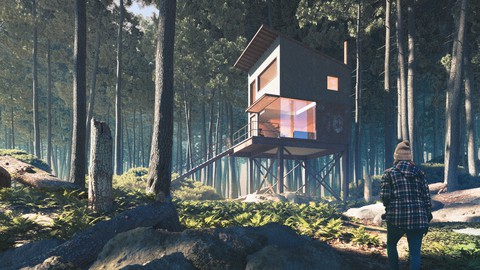
Learn pro tools and workflows to quickly step up your renderings to the next level with photo realistic 3d environments
Created by: Adam Zollinger
Last updated September 2025
 What you will learn
- Create a photorealistic 3d environment quickly with professional tools
- Master the use of environment building tools like Forest Pack and Quixel Megascans
- Use V-Ray to add to your environment with atmosphere, displacement and other essential settings
- Increase your ability to achieve photorealism in any exterior scene
How it compares
Against the other 545 rated Udemy courses in 3D Modeling on CourseDuck:
- Rating4.6 out of 5higher than 56% of them
- Reviews107#437 of 546 by number of reviews
- Length4.1 hoursshorter than 64% of them
- Last updatedSeptember 2025more recently than 81% of them
 Course Description
NOTES
Some professional models will be provided for free to students, specifically the architecture and everything that is inside (furniture), and the basic terrain base.
30 day money back guarantee on any purchase (through Udemy)
Course will be updated with additional projects in the future
DESCRIPTION
Welcome to "3ds Max: Easily Create Stunning Realistic 3d Environments," the ultimate course for aspiring 3D artists, game developers, architects, and interior designers looking to bring their creative visions to life with stunning 3d environments.
In this comprehensive Udemy course, you will embark on an exciting journey into the world of 3D environment design using Autodesk 3ds Max, one of the industry's leading software packages. Whether you are a beginner or have some prior experience with 3D modeling and animation, this course will empower you with the knowledge and skills to create breathtaking virtual worlds to enhance your renderings and add the final touches of realism.
In order to build realistic environments, students will see various tools and workflows demonstrated, including 3ds Max tools and some additional plugins.
Here are just some of the tools that we will discuss in-depth in the course:
V-Ray
Forest Pack PRO
Quixel Suite (Megascans, Bridge and Mixer)
Students will use these tools specifically to quickly create a 3d environment that is fully photorealistic, complete with photoscanned models, scatters, photoscanned materials, professional models and atmospherics. Students will also go over a professional post-processing workflow for environment scenes.
WHAT TO EXPECT
This is not an overivew course for 3ds Max (I have another course for that), but rather a course about unlocking 3ds Max using 3rd party tools to quickly create amazing 3d environments. Students will be surprised at how easily they can improve their scenes with proper knowledge of the tools and workflow. Below is a basic outline of what to expect:
Basic modeling of terrain in 3ds Max
Forest Pack PRO - all the settings you need to know to have complete control over your scene
Quixel Bridge - use Bridge to quickly and seamlessly import photoscanned content into your scene
Importing professionally made models into your scene to add realism (i.e. Evermotion models)
Quixel Mixer (coming soon) - Use Mixer to create photorealistic materials for your environment scene with photoscanned content
Atmospherics with both 3ds Max and V-Ray techniques
V-Ray Render Settings
Professional post-processing in Photoshop - add more atmosphere with V-Ray Zdepth channel, use Camera Raw filter, etc.
There is no better course on the internet for developing these specific skills, and they are essential to a professional workflow, and realistic looking renderings. Don't overlook these advancements in rendering tools and technology.
Join the course today, and take your renderings to the next level.
All course purchases get you lifetime, on-demand access to all course content, present and future.
THE INSTRUCTOR
Adam is an industry professional, working in architectural visualization for over 15 years. He is the founder of Learn Arch Viz, a website dedicated to teaching the world the skills necessary to be good arch viz artists.
Learn ArchViz currently has 16 courses and over 100K students on Udemy, and has become one of the premiere training resources on the web for all things archviz.

 Udemy Discount
The discount is applied through our link. Open the course from here and Udemy's current promotional price is applied at checkout on most courses, no code to type.
Some courses are excluded from Udemy's promotions. If the price does not drop, clear your browser cookies and use the button again.
Instructor Details

- 4.6 Rating
 107 Reviews
Adam Zollinger
Trusted by over 150,000 Udemy students | 4.5+ Instructor Rating | 3D Artist & Educator
Specializing in 3ds Max, V-Ray, Unreal Engine, and Photoreal Rendering
Adam Zollinger is an award-winning 3D artist with over two decades of professional experience. He works primarily in the architectural visualization industry and has created high-end graphics for architecture, games, mobile apps, and more.
He has courses and expertise expert in:
3ds Max
V-Ray
Unreal Engine 5
Photoshop
Twinmotion
Lumion
D5 Render
After Effects
...and various other industry-standard tools and plugins
Adam is self-taught and passionate about sharing what he's learned. His courses are designed to help you master powerful tools and workflows—without spending years figuring it all out on your own.
“I mostly work in the architectural visualization industry—this is a career I taught myself from the ground up. My goal is to help you get there faster.”
Join hundreds of thousands of students around the world learning from Adam’s experience—and start building your own professional-quality 3D projects today.
 More courses by Adam Zollinger

3ds Max + V-Ray: Master the PRO Archviz Workflow In 6 Hrs (2025)
4.4 (4,757 Reviews)
 Provider: Udemy
 Time: 24.8h
$22.99
Photoshop CC: The Essentials of Photoshop In Just 2 hrs (2025)
4.2 (2,357 Reviews)
- Provider: Udemy
- Time: 2.5h
Free
Master 3ds Max: Learn PRO 3D Modeling and Rendering Fast! (2025)
4.3 (2,080 Reviews)
- Provider: Udemy
- Time: 12.6h
$16.99

3ds Max & Vray: Master Interior Archviz Projects Quickly (2025)
4.4 (1,026 Reviews)
- Provider: Udemy
- Time: 9.8h
$12.99

Unreal Engine 4: Project Based VR Course for Arch Viz in UE4 (2025)
4.4 (898 Reviews)
- Provider: Udemy
- Time: 8.2h
$14.99

Unreal Engine for ArchViz | Unreal Engine PRO in 6 Hrs (2025)
4.2 (779 Reviews)
- Provider: Udemy
- Time: 13.2h
$84.99
More 3D Modeling courses

3D Printing with " Ultimaker CURA Slicer- Start to finish" (2025)
4.9 (192 Reviews)
- Provider: Udemy
- Time: 1h
$34.99

Girl and the Dog Creation in Zbrush for Intermediate Level (2020)
4.9 (173 Reviews)
- Provider: Udemy
- Time: 48.8h
$59.99



Blender Character Creator for Video Games (2026)
4.8 (9,160 Reviews)
- Provider: Udemy
- Time: 34.3h
$159.99

Master SOLIDWORKS 3D CAD using real-world examples (2022)
4.8 (2,451 Reviews)
- Provider: Udemy
- Time: 18.9h
$69.99
 Reviews

By Robin Douglas on 12/8/2023
Very detailed knowledge of the software from Adam. You can learn a lot from this course. Have done all his courses and this has the same standard of knowledge and practical application as the others.
By Hector Allier on 8/18/2020
Excellent course Adam! Right what is expected on how to generate 3d natural environments with this handy tools. Appreciate the effort and shared resources and knowledge! Hope you publish new courses soon.
By Mark Buckley on 7/7/2020
Could use a little more explanation about XRef and the materials
By Sneha Desai on 7/3/2020
Very detailed and thank you for showing different ways to achieve things in 3DS Max- Vray.
By Mohammed Ali on 7/2/2020
instector teach us new information I never expect got it.
By Pablo Barbieri on 6/1/2020
It's my 3rd course with Adam and I find this one a great introduction to CGI environment production with 3dsmax and vray. A perfect platform from where you can only get better. You start to understand how to use Quixel Megascans in your workflow with a full proyect that goes from sketch to final production. A very nice course, although you need some previews knowledge. Kudos to Adam
By Manuel Kenfack on 5/26/2020
j'ai trouvé ce tutoriel très intéressent
By Enrico Bazzo on 3/3/2020
Good course! I expected a little bit more about the V-ray fog volumetrics topic as it can easily get heavy on the rendering time without some proper settings tweaking (at least for me), otherwise it was very helpful for the Quixel Suite and Forest Pack interaction.
By Hugh Ringling on 2/14/2020
Instructor is clear and concise. Very easy to follow for me.
By Unknown User on 2/10/2020
Awesome Course! Maybe you could extend the terrain modelling a little bit, so that you have more examples how to implement larger landscapes. But I was able to learn the techniques and can now build on them! Highly recommended! This course can only be recommended, I am absolutely delighted.
 Quality Score
No CourseDuck member has rated this course yet. Taken it? Give each part a thumbs up or down.
Overall Score : 92 / 100
- Video Duration:
 4.1h
4.1h - Price: $59.99
- Provider: Udemy
- Updated:
 September 2025
 - Level:
 Beginner
 - Language:
 English
 - Certificate:
 Yes
Yes
30-day money-back guarantee on most paid courses
Udemy Coupon Price Tracker
