
 Web Development
 Data Science
 Python
 SQL
SQL JavaScript
 Artificial Intelligence
 IT & Software
 IT Certifications
 Hacking
 AWS
AWS Arduino
 DevOps
 3D Modeling
 Graphic Design
 Photoshop
 Drawing
 Digital Painting
 UX Design
 Business
 Data Analysis
 Communication Skills
 Project Management
 Leadership & Management
 Human Resources
 Digital Marketing
 Social Media Marketing
 Marketing
 SEO
SEO Google Analytics
 Branding
 Excel
Excel Office Productivity
 SAP
SAP PowerPoint
 Microsoft Access
 SharePoint
 Finance & Accounting
 Trading & Investing
 Accounting
 Bitcoin
 Personal Finance
 Video Editing & Animation
 Photography
 Adobe Premier Pro
 Adobe Lightroom
 Personal Development
 Productivity
 Career Development
 Life Coaching
 Health & Fitness
 Meditation & Mindfulness
 Yoga
Yoga Music
Music Music Production
 Guitar
 Piano
Piano Singing
 Language Learning
 Teaching & Academics
 Engineering
 Math
Math Lifestyle
Arduino for Beginners with Grove (Udemy.com)
The perfect course for beginners who want to learn electronics and programming without worrying about wires.
Created by: Dr. Peter Dalmaris
Last updated December 2020
 What you will learn
- Arduino programming
- Sensors to measure temperature, humidity, atmospheric pressure, light intensity, sound.
- How to use buttons, LED and potentiometer.
- How to use a graphics OLED screen.
- How to combine components and create interesting gadgets.
How it compares
Against the other 295 rated Udemy courses in Arduino on CourseDuck:
- Rating4.7 out of 5higher than 90% of them
- Reviews43#258 of 296 by number of reviews
- Length5.4 hourslonger than 52% of them
- Last updatedDecember 2020earlier than 76% of them
 Course Description
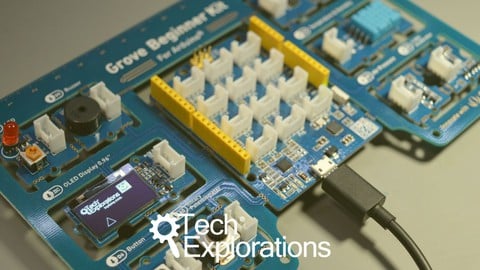
This course will introduce you to the Arduino by teaching you how to use all of the hardware that comes with the innovative Grove Beginner Kit for Arduino.
The Grove Beginner Kit consists of a single printed circuit board which contains an Arduino board and many common sensors and actuators.
This Kit is ideal for beginners who want to learn electronics and programming without worrying about wires and loose connections.
The main objective of this course is to teach you how to use all of the hardware that is included in the Grove Beginner Kit for Arduino in addition to a few extra components.
For each component, you will learn how to use it on its own, and then how to combine it with other components to create interesting gadgets and experiments.
The innovation of the Grove Beginner Kit is that while all of its hardware comes as distinct modules, they are already connected to the included Arduino via traces on the printed circuit board.
This means that you do not need to do any wiring at all.
The various sensors and actuators, even the bitmap display, are already connected and ready to use.
As a result, in this course, you will not need to do any wiring to use any of the components on the Grove Beginner Kit printed circuit board. This will save you a lot of time without affecting the quality of your learning.
Thanks to the Grove kit from Seeed Studio, you learning will be better because you will be able to concentrate on the software programming part, and on being creative.
This course is practical.
You will learn by completing a series of mini-projects.
Each mini-project is small enough so that you can complete it in a single session.
Most mini-projects guide you through a series of improvements so that you can gently learn new knowledge based on knowledge that you gained in previous steps.
This ensures that there will be no gaps in knowledge, and no frustration.

 Udemy Discount
The discount is applied through our link. Open the course from here and Udemy's current promotional price is applied at checkout on most courses, no code to type.
Some courses are excluded from Udemy's promotions. If the price does not drop, clear your browser cookies and use the button again.
Instructor Details

- 4.7 Rating
 43 Reviews
Dr. Peter Dalmaris
Peter Dalmaris is an educator, electrical engineer, electronics hobbyist, and Maker. Creator of online video courses on DIY electronics and author of three technical books, and has recently released his book Maker Education Revolution.
As a Chief Tech Explorer since 2013 at Tech Explorations, the company he founded in Sydney, Australia, Peter’s mission is to explore technology and help educate the world.
Tech Explorations offers educational courses and Bootcamps for electronics hobbyists, STEM students and STEM teachers.
A life-long learner, Peter’s core skill is in explaining difficult concepts through video and text. With over 15 years of tertiary teaching experience, Peter has developed a simple yet comprehensive style in teaching that students from all around the world appreciate.
His passion for technology and in particular for the world of DIY open source hardware has been a dominant driver that has guided his personal development and his work through Tech Explorations.
Peter’s current online courses have helped over 150,000 people from around the world to be better Makers.
For more information on Peter's work, please go to his web site, techexplorations dot com.
 More courses by Dr. Peter Dalmaris

Arduino Step by Step: Getting Started (2024)
4.7 (8,714 Reviews)
 Provider: Udemy
 Time: 21.4h
$159.99

PCB design with KiCad - updated for KiCad 9 (2026)
4.6 (3,737 Reviews)
- Provider: Udemy
- Time: 31.9h
$79.99




More Arduino courses


Learn to Build a Computer (PC) in 2026 - all types!
4.9 (245 Reviews)
- Provider: Udemy
- Time: 6.1h
$74.99

Raspberry Pi For Beginners - 2026 Complete Course
4.8 (3,105 Reviews)
- Provider: Udemy
- Time: 10.6h
$89.99

Ultimate Guide to Raspberry Pi : Tips, Tricks and Hacks (2023)
4.8 (2,363 Reviews)
- Provider: Udemy
- Time: 5.2h
$69.99

Mastering Microcontroller: STM32-LTDC, LCD-TFT, LVGL (MCU3) (2026)
4.8 (487 Reviews)
- Provider: Udemy
- Time: 8.1h
$79.99
Arduino Step by Step: Getting Started (2024)
4.7 (8,714 Reviews)
- Provider: Udemy
- Time: 21.4h
$159.99
 Reviews

By Stephanie Timmer on 1/28/2023
I am excited about ths course!
By Michele Pessolano on 11/5/2022
Well structured course. Peter explains the basic concepts and even the complex ones in a clear and correct way. Thank you.
By Auke van der Leij on 5/27/2022
I've really enjoyed this course. Also this course gives you very clear instructions. Thank you very much Peter!
By Eric Giordano on 1/10/2022
j'ai découvert une nouvelle approche de l'apprentissage sur l'arduino je suis content
By Greg Gehrke on 12/5/2021
Just very well done. Easy to understand. Fun!
By Paul C. Ekezie on 12/3/2020
It's awesome. Perfect match for me.
By Clive Wilby on 10/5/2020
I really enjoyed the course as it showed me how to use available resource such as datasheets and libraries and how to mine just the information I needed without all the 'bells and whistle' that would just confuse me at this stage in my learning. Thanks for giving me a great start and inspiring me to think up some new ideas. Very well narrated and explained
By Alexander Friebel on 10/2/2020
Der Kurs ist sehr veständlich und einfach nachvollziehbar. Für Anfänger bestens geeignet.
By ILYAS JAMOURI on 12/8/2025
By Edward Victor Van Vleck on 6/5/2025
 Quality Score
No CourseDuck member has rated this course yet. Taken it? Give each part a thumbs up or down.
Overall Score : 94 / 100
- Video Duration:
 5.4h
5.4h - Price: $69.99
- Provider: Udemy
- Updated:
 December 2020
 - Level:
 Beginner
 - Language:
 English
 - Certificate:
 Yes
Yes
30-day money-back guarantee on most paid courses
Udemy Coupon Price Tracker
