
 Web Development
 Data Science
 Python
 SQL
SQL JavaScript
 Artificial Intelligence
 IT & Software
 IT Certifications
 Hacking
 AWS
AWS Arduino
 DevOps
 3D Modeling
 Graphic Design
 Photoshop
 Drawing
 Digital Painting
 UX Design
 Business
 Data Analysis
 Communication Skills
 Project Management
 Leadership & Management
 Human Resources
 Digital Marketing
 Social Media Marketing
 Marketing
 SEO
SEO Google Analytics
 Branding
 Excel
Excel Office Productivity
 SAP
SAP PowerPoint
 Microsoft Access
 SharePoint
 Finance & Accounting
 Trading & Investing
 Accounting
 Bitcoin
 Personal Finance
 Video Editing & Animation
 Photography
 Adobe Premier Pro
 Adobe Lightroom
 Personal Development
 Productivity
 Career Development
 Life Coaching
 Health & Fitness
 Meditation & Mindfulness
 Yoga
Yoga Music
Music Music Production
 Guitar
 Piano
Piano Singing
 Language Learning
 Teaching & Academics
 Engineering
 Math
Math Lifestyle
Blender 4 Essentials: 3D Modeling, Texturing, and Rendering (Udemy.com)
Learn all the essential 3D skills with Blender in under 24 hours, including 3D modeling, UV mapping, and lighting.
Created by: Widhi Muttaqien
Last updated June 2025
 What you will learn
- The fundamentals of Blender, including the UI, navigation, and object transformation.
- Various 3D modeling techniques.
- How to create materials and apply PBR textures.
- UV map creation and editing using different techniques.
- All available lighting techniques in Blender using the Cycles rendering engine.
- Camera creation and manipulation.
- In-depth Cycles render settings.
- Non-destructive post-processing using the Compositor.
How it compares
Against the other 545 rated Udemy courses in 3D Modeling on CourseDuck:
- Rating4.7 out of 5higher than 75% of them
- Reviews67#496 of 546 by number of reviews
- Length14.6 hourslonger than 79% of them
- Last updatedJune 2025more recently than 78% of them
 Course Description
This course was originally 3 courses combined into 1. In the first course, you will learn all the fundamentals of Blender and then move on to 3D modeling techniques. In the second course, you will learn how to use materials, PBR textures, and UV mapping. And, in the third course, you will learn all aspects related to the Cycles rendering engine, including lighting, camera, render settings, and post-processing. I have carefully crafted the curriculum so that students can gain the skills gradually with no friction at all. After this course, in sha Allah, you will be able to create sophisticated 3D models, apply complex textures through UV editing, and be able to optimize Cycles to render high quality images.
About the instructor
My name is Widhi Muttaqien, founder of Expose Academy, Expose Studio and Edutalenta. For more than 20 years, I have created thousands of 3D renderings, for architectural, interior, and master plan projects. I have worked with many clients all over the world. I have clients on almost every continent in the world. Besides doing projects, I have also been teaching 3D and computer graphics academically at various schools since the year 2000. In short, I have real-world professional expertise in 3D and teaching experience.
The curriculum
You will learn a lot in this course. In short, the course has nine chapters, not including the introduction chapter.
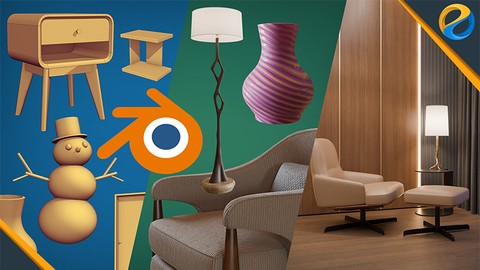
In the first chapter, you will learn all the fundamentals of working with Blender, such as the UI, navigation, viewport settings, object creation, selection, and so on. In the second chapter, we will focus on different object transformation techniques, and also the snapping features. In the third chapter, you will learn 3D modeling techniques. These include loop selection, extrude, inset, bevel, bridge, spin, and so on. You will model a lot of 3D objects along the way. By the end of the third chapter you should be able to model a modern curved nightstand product.
In the fourth chapter, you will learn all the basics of working with materials in Blender. From assigning and managing materials. Learn some CG fundamentals such as color models and color codes. Learn the differences between "Metal" and "Dielectric" materials. And learn all the features and potentials of the “Principled BSDF” shader. By the end of the chapter, you will have hands-on projects composing materials for a nightstand product and also some architectural objects.
Next, in chapter 5, you will learn the fundamentals of shader and texture. You will understand the difference between procedural and image textures, and know how and when to use both. We will then cover PBR textures in detail. At the end of the chapter, you will have hands-on projects where you create texture for a vase model completely procedural. After that, you will create materials for a snowman model, also completely procedural.
In chapter 6, you will learn UV mapping in depth. You will learn different techniques of UV mapping and know how to use them and when to use them against different scenarios. You will also learn UV editing such as tweaking, splitting, stitching, UV sculpting, straightening, and so on. By the end of the chapter, you will have 4 hands-on projects. First, you will add a texture to a side table product. Then you will work on the previous nightstand model, but this time with a wood texture. And then you will add textures to this floor lamp 3D model. And finally, you will work on UV mapping a lounge chair product.
In the seventh chapter, you will learn how to use various light sources inside Blender. We will start with the world background and the sky texture. Then, you will learn how to use HDR or EXR files. And then learn to use light objects, such as point light, sunlight, spotlight, and area light. You will also learn how to create caustic effects, learn how to make lighting more realistic using IES files, and learn how to make material emit light using the “Emission” shader.
Next, in chapter 8, you will learn how to easily set up cameras using different manipulation techniques. Then, you will learn the ins and outs of Cycles render settings such as samples, denoising, clamping, color spaces, view transform, white balance, and so on.
In the final chapter, you will learn how to perform post-processing to the rendered result using the “Compositor”. Everything is done non-destructively via nodes. And then, you will learn how to easily isolate pixels for compositing using “Cryptomatte”. Besides the small exercises throughout the course, you will be given a final project at the end. Basically, you will create product renderings of a lounge chair set in 3 different styles. First, with a transparent background but with shadows that can fit into any color or background. Second, with a 3D environment and an evening sky. And third, using the same 3D environment, but now with a day or afternoon sky.
So join now and master all the essentials 3D skills using Blender!

 Udemy Discount
The discount is applied through our link. Open the course from here and Udemy's current promotional price is applied at checkout on most courses, no code to type.
Some courses are excluded from Udemy's promotions. If the price does not drop, clear your browser cookies and use the button again.
Instructor Details

- 4.7 Rating
 67 Reviews
Widhi Muttaqien
Widhi is the CEO of Expose Academy and the founder of several other creative-based companies. He has a bachelor's degree in information technology and a master's degree in business management and information system. Besides doing business he is also an academic lecturer in the computer graphics field.
With more than 20 years of experience in the CG industry, he finished hundreds of projects with clients from all over the globe. He has been producing thousands of CG images and animations. His deep passion for computer graphics leads him to dive into digital painting, 3D visualization, animation, game development, web design, video, and motion graphic.
 More courses by Widhi Muttaqien
Digital painting with Krita 5.0 for beginners (2022)
4.6 (3,072 Reviews)
 Provider: Udemy
 Time: 7.5h
$89.99

Adobe Illustrator Advanced Vector Artwork (2020)
4.8 (1,988 Reviews)
- Provider: Udemy
- Time: 8.3h
$14.99
3D Visualization For Beginners: Interior Scene with 3DS MAX (2021)
4.5 (1,673 Reviews)
- Provider: Udemy
- Time: 12.9h
$13.99

Microsoft Excel dari dasar hingga pakar (2025)
4.8 (1,527 Reviews)
- Provider: Udemy
- Time: 17.4h
$11.99


Photoshop and Illustrator speed illustration workflow (2019)
4.7 (787 Reviews)
- Provider: Udemy
- Time: 12.1h
$64.99
More 3D Modeling courses

3D Printing with " Ultimaker CURA Slicer- Start to finish" (2025)
4.9 (192 Reviews)
- Provider: Udemy
- Time: 1h
$34.99

Girl and the Dog Creation in Zbrush for Intermediate Level (2020)
4.9 (173 Reviews)
- Provider: Udemy
- Time: 48.8h
$59.99



Blender Character Creator for Video Games (2026)
4.8 (9,160 Reviews)
- Provider: Udemy
- Time: 34.3h
$159.99

Master SOLIDWORKS 3D CAD using real-world examples (2022)
4.8 (2,451 Reviews)
- Provider: Udemy
- Time: 18.9h
$69.99
 Reviews

By Mohamed Rayyan on 3/29/2026
As an animation graduate, I found this course to be a valuable refresher. Despite my background in 3ds Max, the clear and well-structured explanations made learning the new software straightforward and effective.
By Augustine Esenabhalu on 10/4/2025
Very direct, feels comprehensive. I've looked at other courses, this one feels more serious and legit.
By C T on 10/2/2025
Good so far but early days yet. The captions have trouble with the presenters pronunciation at times so careful listening is also required. If things continue to be presented as thoroughly and clearly as they have been so far I will be very happy with the course.
By Roman Narizhnyy on 7/28/2025
Very well structured and covers all the basic concepts needed for a good start.
By Yanuar Putra Kharisma on 7/12/2025
really good, straight to the point delivering the 3d lesson, appreciate it.
By Deon Thiart on 7/5/2025
Every tutorial is packed with information, explained in such an easy to understand way! Brilliant course!
By Reza rezqya akbar on 7/2/2025
for the basic it's good and easy to learn. Not focusing on keyboard shortcut. But give a handy tools for picking the object / tools default on blender.
By Andrian setyo on 6/26/2025
so far, following the instructions from the mentor is quite clear, and can still be understood quickly
By Tri Budi Laksono on 6/22/2025
penjelasan intro yang cukup detil..terutama untuk perkenalan mentor dan juga awal introduce untuk software blender ini
By Kukuh Basuki on 6/22/2025
The course material is incredibly well-structured, and the way it's delivered is crystal clear. It kept me engaged from start to finish! I'm genuinely excited to explore more courses from this instructor... Highly recommended for anyone looking to learn effectively and efficiently!
 Quality Score
No CourseDuck member has rated this course yet. Taken it? Give each part a thumbs up or down.
Overall Score : 94 / 100
- Video Duration:
 14.6h
14.6h - Price: See price on Udemy
- Provider: Udemy
- Updated:
 June 2025
 - Level:
 Beginner
 - Language:
 English
 - Certificate:
 Yes
Yes
30-day money-back guarantee on most paid courses
Udemy Coupon Price Tracker
