
 Web Development
 Data Science
 Python
 SQL
SQL JavaScript
 Artificial Intelligence
 IT & Software
 IT Certifications
 Hacking
 AWS
AWS Arduino
 DevOps
 3D Modeling
 Graphic Design
 Photoshop
 Drawing
 Digital Painting
 UX Design
 Business
 Data Analysis
 Communication Skills
 Project Management
 Leadership & Management
 Human Resources
 Digital Marketing
 Social Media Marketing
 Marketing
 SEO
SEO Google Analytics
 Branding
 Excel
Excel Office Productivity
 SAP
SAP PowerPoint
 Microsoft Access
 SharePoint
 Finance & Accounting
 Trading & Investing
 Accounting
 Bitcoin
 Personal Finance
 Video Editing & Animation
 Photography
 Adobe Premier Pro
 Adobe Lightroom
 Personal Development
 Productivity
 Career Development
 Life Coaching
 Health & Fitness
 Meditation & Mindfulness
 Yoga
Yoga Music
Music Music Production
 Guitar
 Piano
Piano Singing
 Language Learning
 Teaching & Academics
 Engineering
 Math
Math Lifestyle
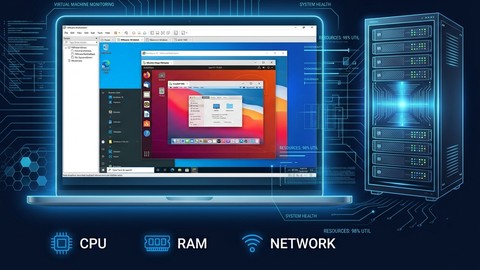
Build a VMware vSphere Home Lab with VMware Workstation (Udemy.com)
Master virtualization on your PC — install, configure & run virtual machines with VMware Workstation Player , real Lab
Created by: Fettah Ben
Last updated August 2026
 What you will learn
- Install VMware Workstation Player from scratch
- Configure Bridge, NAT, and custom virtual networks
- Build VMs for ESXi 6.5 and vCenter Server
- Create and customize virtual machines (CPU, RAM, disk)
- Enable Intel VT-x / AMD-V for nested virtualization
- Launch a working vSphere home lab on your own PC
How it compares
Against the other 50 rated Udemy courses in VMware on CourseDuck:
- Rating4.4 out of 5higher than 10% of them
- Reviews1,113#21 of 51 by number of reviews
- Length2 hoursshorter than 86% of them
- Last updatedAugust 2026more recently than 88% of them
 Course Description
Run enterprise software on your own laptop — for free.
This course teaches you VMware Workstation Player from the ground up. You'll learn how virtualization works, how to configure your PC's hardware to support it, and how to create and manage professional-grade virtual machines — all without touching a single real server.
By the end, you'll have built a complete vSphere home lab running ESXi and vCenter Server inside Workstation Player — the same enterprise virtualization stack used by IT teams at organizations worldwide.
Step-by-step, you'll:
Verify your CPU supports virtualization (Intel VT-x or AMD-V) and enable it in BIOS
Download and install VMware Workstation Player.
Create virtual machines and tune their CPU, RAM, disk, and network settings
Understand the difference between Bridge, NAT, and custom networking
Install ESXi and vCenter Server as nested VMs
Launch a fully working vSphere lab you can use to study and practice
No server hardware required. This is designed for IT students, self-learners, and professionals who want real hands-on experience with enterprise virtualization — right on the PC they already own. Whether you're preparing for a VMware certification or building your IT career foundation, this lab is your starting point.
Who this course is for:
IT beginners who want hands-on virtualization experience · Students studying for VMware VCP or CompTIA exams · Sysadmins who need a safe lab environment to test configurations · Business professionals exploring enterprise IT without buying hardware

 Udemy Discount
The discount is applied through our link. Open the course from here and Udemy's current promotional price is applied at checkout on most courses, no code to type.
Some courses are excluded from Udemy's promotions. If the price does not drop, clear your browser cookies and use the button again.
Instructor Details

- 4.4 Rating
 1,113 Reviews
Fettah Ben
Hello, I’m Fettah Ben — an IT professional with over 18 years of hands-on experience in infrastructure management, virtualization, data protection, and disaster recovery.
Throughout my career, I’ve worked with small businesses, large enterprises, and government environments—helping them design, secure, and optimize reliable IT infrastructures.
My expertise includes:
- Backup & disaster recovery solutions (Veeam, Nakivo, Acronis)
- Virtualization platforms (VMware & Nutanix)
- Cloud technologies (Microsoft Azure)
I’ve been involved in real-world projects ranging from daily operations to complex production deployments, giving me a deep understanding of what actually works in the field.
My Teaching Approach
I specialize in turning complex IT concepts into simple, practical, and easy-to-understand lessons.
In my courses, you’ll find:
- Step-by-step explanations
- Real-world scenarios
- Hands-on demonstrations
- Clear and structured learning paths
My goal is simple:
Help you gain job-ready skills that you can apply immediately in real environments.
My Mission
I’m passionate about helping IT professionals around the world:
- Learn faster
- Build confidence
- Grow their careers
 More courses by Fettah Ben

The Complete VMware vSphere: Beginner to Advanced (2026)
4.7 (4,526 Reviews)
 Provider: Udemy
 Time: 12.6h
$13.99
The Complete Nutanix Private Cloud Solution Bootcamp. (2026)
4.2 (2,078 Reviews)
- Provider: Udemy
- Time: 9.5h
$11.99

PowerShell Scripting & Automation: The Complete Hands-On (2026)
4.8 (1,750 Reviews)
- Provider: Udemy
- Time: 9.6h
$11.99

The Complete VMware vSphere: Enterprise Features (2026)
4.3 (1,185 Reviews)
- Provider: Udemy
- Time: 12.7h
$13.99
Python Fundamentals: Beginner's Guide to Coding with Python (2025)
4.4 (731 Reviews)
- Provider: Udemy
- Time: 4.7h
$44.99
More VMware courses

Complete VMWare vSphere ESXi and vCenter Administration (2026)
4.7 (14,620 Reviews)
- Provider: Udemy
- Time: 11.3h
$99.99
The Complete VMware vSphere: Beginner to Advanced (2026)
4.7 (4,526 Reviews)
- Provider: Udemy
- Time: 12.6h
$13.99

VMware vSphere 6.0 Part 1 - Virtualization, ESXi and VMs (2018)
4.7 (4,409 Reviews)
- Provider: Udemy
- Time: 8.9h
$69.99

Clear and Simple VMware vSphere 6.7 Professional VCP-DCV (2024)
4.7 (2,338 Reviews)
- Provider: Udemy
- Time: 12.9h
$10.99

Clear and Simple VMware vSAN 6.7 (Virtual SAN) (2023)
4.7 (2,283 Reviews)
- Provider: Udemy
- Time: 3.1h
$11.99

Clear and Simple VMware Certified Associate (RetiredVCA-DBT) (2024)
4.7 (2,240 Reviews)
- Provider: Udemy
- Time: 6.5h
$13.99
 Reviews

By Alexios Marmarinos on 6/15/2025
A great introductory course for anyone new to virtualization. The instructor explains the basics clearly, making it easy to follow without any prior experience. Covers installation, VM creation, and basic networking/storage setup. Definitely recommended if you're just starting out and want a solid foundation before moving on to more advanced topics.
By Maarten Merchier on 11/30/2024
The course does what it promises. But I had a hard time understanding what the instructor was saying because of the accent. Still, that alone would give me still 4/5 stars. But because the subtitles are a lot of times really bad translated, I only gave 3/5 stars.
By Dan Gorski on 10/3/2023
This VMware Workstation course is a gem! It's concise, well-structured, and packed with hands-on labs. I learned more in this course than I did in months of self-study. If you're into virtualization, don't miss it!
By Gabriel Yunes on 5/7/2020
As an IT professional aiming to enhance my virtualization skills, I enrolled in the "Mastering VMware Workstation" course, and I must say it exceeded my expectations in every aspect. The course, taught by industry expert Fettah Ben, provides a comprehensive and hands-on approach to mastering VMware Workstation.
By Joel De Jesus Castillo on 9/3/2019
I appreciate the free information and I would recommend to add at the end of the class the demonstration of the web console of the ESXi installation, this way a user can validate the lessons learned in the class.
By Saul Sandoval on 8/28/2018
Your own adventurer course for the world of virtualization. Great tutorial for people looking to dive deeper into the virtualization world, and gain a better understanding of setup across multiple platforms and software. Always Remember outside of your test environment.
By Tony Garcia on 8/18/2018
The course is free and was good for not paying. Accurate information. I would buy other courses from instructor. I would love to see in the payed version Workstation Pro used not Player. Just a suggestion. Thank you. Great job
By Jean Pierre Carlon Acosta on 7/23/2018
I have read several books that cover the subject of setting up a Vmware home lab. This course is the only one that has actually walked me through the process in an easy-to-understand manner.
By Alex Contreras on 6/3/2018
For someone new to virtual machines or looking for a guide to setting up a home lab, this course really helps put the pieces together while explaining the thought process behind such changes. This is good because it provides a foundation for future expansion/troubleshooting of said lab. Furthermore, the lab assembled in this course is great for people looking to get their feet wet in security. It is also scalable, so you can add Windows Active Directory, More clients, Various web servers, etc. etc. in the future.
By Steve Monroy on 4/1/2018
Over the years I have played with Vbox, VMware, and Hyper-V, but now I have been trying to get more serious with developing a "real" virtual lab environment. I was able to land a free VMware license through my school and was exited to unleash the full power of Workstation! However, to my disappointment, I found VMware to be extremely complicated to use. No joke, I spent hours just trying to figure out how to set up the correct Home Lab with no results. This course helped me to do it easily.
 Quality Score
No CourseDuck member has rated this course yet. Taken it? Give each part a thumbs up or down.
Overall Score : 88 / 100
- Video Duration:
 2h
2h - Price: See price on Udemy
- Provider: Udemy
- Updated:
 August 2026
 - Level:
 All Levels
 - Language:
 English
 - Certificate:
 Yes
Yes
30-day money-back guarantee on most paid courses
Udemy Coupon Price Tracker
