
 Web Development
 Python
 SQL
SQL JavaScript
 Data Science
 Artificial Intelligence
 IT & Software
 IT Certifications
 Hacking
 Arduino
 AWS
AWS 3D Modeling
 Graphic Design
 Photoshop
 Drawing
 Digital Painting
 UX Design
 Business
 Data Analysis
 Communication Skills
 Project Management
 Leadership & Management
 E-Commerce
 Digital Marketing
 Social Media Marketing
 Marketing
 SEO
SEO Google Analytics
 Branding
 Office Productivity
 Excel
Excel Finance & Accounting
 Bitcoin
 Video Editing & Animation
 Photography
 Adobe Premier Pro
 Adobe Lightroom
 Personal Development
 Health & Fitness
 Music
Music Guitar
 Teaching & Academics
 Language Learning
 Engineering
 Lifestyle
Free Blender Crash Course! (Udemy.com)
Start now to create your 3D Scenes!
Created by: Gustavo Rosa
Last updated September 2020
Our take
Based on the ratings of 5,989 students, a sample of their written reviews and the syllabus, as the course stood in September 2020. No course pays to be reviewed.
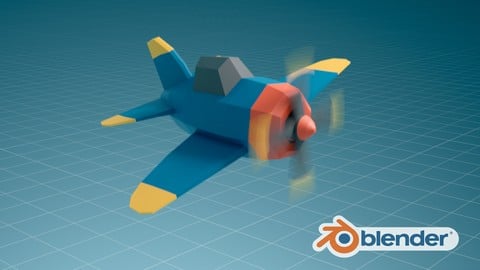
A free, 2.6 hour introduction to Blender from Gustavo Rosa, a 3D artist who has taught modeling and animation for over 15 years. The 15 lectures walk through the interface, basic polygonal modeling, simple materials and lights, and a bit of animation, all in service of one small project: a flying plane scene you build and render from scratch. It is aimed squarely at people who have never opened Blender and want to see whether 3D is for them before paying for anything.
Reviewers, nearly 6,000 of them, give it 4.6 stars, and the praise is consistent: he explains every click and shortcut, the pace is easy to follow, and finishing a rendered animation in an afternoon is satisfying. One even calls it as good as the paid courses. The complaints are small but real. One reviewer finds the opening tour of basic commands drags and could be shorter. Another struggled with the instructor's accent, so sample a lecture before settling in. And the course was last updated in 2020, with Blender 2.8 listed as the requirement, so menus and buttons will not always match a current install.
Treat it as a taster, not a curriculum. There are no quizzes, exercises or certificate, and one section cannot cover topics like sculpting, UV unwrapping or rigging. The paid courses listed beside it, such as the Complete Blender Creator with its stated Blender 4.3 compatibility, are built for going further. But as a free, two and a half hour test of whether 3D clicks for you, it does the job well, and over 120,000 people have enrolled on that basis.
Pros
- Completely free, and one reviewer calls it as good as the paid courses
- One finished project: a flying plane scene modeled, lit, animated and rendered in about 2.6 hours
- Explains every shortcut and click at a pace beginners say is easy to follow
- Instructor has 15 plus years teaching 3D modeling and animation, and it shows in the explanations
Cons
- Last updated in 2020 for Blender 2.8 or newer, so the interface will not match a current release exactly
- The opening tour of basic commands runs long for one reviewer, and another struggled with the accent
- Single section, no quizzes, exercises or certificate; it is a taster, not a curriculum
This is my first Blender project, and I found it easy to follow. It's perfect for any beginner who's thinking about learning Blender.
Genuinely beginner: only a computer that runs Blender 2.8 or newer and basic computer skills are assumed.
 What you will learn
- Introduction to the Blender Interface
- Introduction to Polygonal Modeling
- Introduction to Animation
- Creating Basic Materials
- Creating Basic Lights
- Creating a Flying Plane Scene Animation
Course content
1 section · 15 lectures · 2.6 hours of video
- 1Introduction 1 free preview15 lectures · 2.6 hours
Who it is for
The instructor says it suits
- Designers
- Animators
- People interested in learning 3D
What you need before you start
- A computer that supports OpengGL 3.3
- A computer with Blender 2.8 or superior instaled
- Basic computer understanding
 Course Description
The Free Blender Crash Course is designed to give you a first contact with the 3D scene creation universe and with Blender.
Blender is free open source software and is currently one of the world's leading 3D scene creation tools. In this course you will have a first contact with the Blender interface and learn the basics of modeling, materials, lighting and animation. And throughout the course you will produce from scratch a simple flying plane scene.
So sign up now and start your journey to become a 3D artist right now.

 Udemy Discount
The discount is applied through our link. Open the course from here and Udemy's current promotional price is applied at checkout on most courses, no code to type.
Some courses are excluded from Udemy's promotions. If the price does not drop, clear your browser cookies and use the button again.
Instructor Details

- 4.6 Rating
 5,989 Reviews
Gustavo Rosa
My name is Gustavo Rosa and I am a 3D Artist.
Over the years I have delivered several jobs as a freelancer for different kinds of clients. I also have been working as a 3D Modeling and Animation teacher for over 15 years.
A few years ago i decided to use all this knowledge to create online courses so that I can help more people learn how to enter the amazing world of 3D Scene Creation.
Formation:
Post Degree in Computer Graphics and Multimedia at the University of the Rio de Janeiro State - UERJ.
Over 10 years of experience teaching in universities.
Over 15 years of experience teaching 3D Modeling and Animation.
Over 15 years of experience working as a freelancer delivering 3D jobs for several clients.
 More courses by Gustavo Rosa

Blender Total! From Basic to Advanced 3D! (2025)
4.8 (2,407 Reviews)
 Provider: Udemy
 Time: 21.3h
$109.99
More Blender courses

Low Poly Landscapes: Blender Bite Sized Course (2025)
4.9 (1,704 Reviews)
- Provider: Udemy
- Time: 6.2h
$99.99

Absolute Beginners 3D character in Blender course (2022)
4.9 (1,133 Reviews)
- Provider: Udemy
- Time: 14.5h
$94.99


Complete Blender Creator: 3D Modelling (Compatible with 4.3) (2026)
4.8 (69,132 Reviews)
- Provider: Udemy
- Time: 13.8h
$199.99

The Ultimate Blender 3D Sculpting Course (2026)
4.8 (3,904 Reviews)
- Provider: Udemy
- Time: 37.2h
$119.99
Blender Total! From Basic to Advanced 3D! (2025)
4.8 (2,407 Reviews)
- Provider: Udemy
- Time: 21.3h
$109.99
 Reviews

By Malik Momin on 7/18/2026
Great course...explained very well...any one can learn blender with the help of this course. Thank you very much for this amazing blender course.
By Nassim Ghrissi on 7/1/2026
Thank you so much for this course—I absolutely love it! This is my first Blender project, and I found it easy to follow. It's perfect for any beginner who's thinking about learning Blender. Thank you for making the learning process so enjoyable!
By Sudhirjoil on 6/28/2026
To The point best brief course everybody should take it is fun also creating plane and till the final rendering you are hooked to this course very good knowledge of the person explaining and good pace of teaching
By Adeel Ahmed on 6/9/2026
this course is absolute fine for beginners and I love that it is free
By Simon Bergmansson on 5/1/2026
Great introduction. There was a lot of concepts I already understood intuitively, but that's to be expected in a beginner course. If you know nothing about navigating interfaces like blender, then this course is perfect.
By Adewumi Tobiloba on 4/29/2026
Very Informative and easy to follow. He gave information about the tools being used beyond the functions used in this course. I was beginning to think to myself " This course is good value for money" then i remembered it is free.
By Manuela Schebera on 4/2/2026
Der Dozent führt sehr strukturiert und nachvollziehbar in die Grundlagen von Blender ein. Er hat ein schönes Projekt gewählt, um die wichtigsten und am häufigsten genutzten Funktionen zu zeigen. Er gibt ausreichend Zeit ihm zu folgen, gibt immer wieder Wege und Shortcuts zur den Funktionen an und zeigt bis zum letzten Video die Auswirkungen von Funktionen im Vergleich und weist auf mögliche Schwierigkeiten hin, in die man vielleicht gekommen ist und wie man da raus kommt. Insgesamt ein sachlich sehr gutes Seminar. Ich würde mir weitere Seminare dieses Trainers ansehen.
By Oliver on 3/22/2026
Absolutely incredible, especially for a free course! I'd never touched Blender before today, so to not only be introduced to the software but to have made a full 10 second animation after just a couple hours is beyond cool!
By Aidan Hartnell on 1/23/2026
Absolutely Amazing. I love courses that actually not only teaches you stuff, but gives you a task for them to follow along and practice with! There are barely any cuts so you can follow every step with no confusion. One of the best course I have ever done! 10/10
By John Hayes on 1/18/2026
Good course, but outdated and no way to ask questions. Things work differently in Blender now. Menus are very different. You'll be fine until the Animation part, when things will just not work like in the course.
 Quality Score
No CourseDuck member has rated this course yet. Taken it? Give each part a thumbs up or down.
Overall Score : 92 / 100
- Video Duration:
 2.6h
2.6h - Price: Free
- Provider: Udemy
- Updated:
 September 2020
 - Level:
 Beginner
 - Language:
 English
 - Certificate:
 No
No - Lectures:15 in 1 section
- Students:121,400
- Subtitles:1 language
Udemy Coupon Price Tracker
