
 Web Development
 Data Science
 Python
 SQL
SQL JavaScript
 Artificial Intelligence
 IT & Software
 IT Certifications
 Hacking
 AWS
AWS Arduino
 DevOps
 3D Modeling
 Graphic Design
 Photoshop
 Drawing
 Digital Painting
 UX Design
 Business
 Data Analysis
 Communication Skills
 Project Management
 Leadership & Management
 Human Resources
 Digital Marketing
 Social Media Marketing
 Marketing
 SEO
SEO Google Analytics
 Branding
 Excel
Excel Office Productivity
 SAP
SAP PowerPoint
 Microsoft Access
 SharePoint
 Finance & Accounting
 Trading & Investing
 Accounting
 Bitcoin
 Personal Finance
 Video Editing & Animation
 Photography
 Adobe Premier Pro
 Adobe Lightroom
 Personal Development
 Productivity
 Career Development
 Life Coaching
 Health & Fitness
 Meditation & Mindfulness
 Yoga
Yoga Music
Music Music Production
 Guitar
 Piano
Piano Singing
 Language Learning
 Teaching & Academics
 Engineering
 Math
Math Lifestyle
Master Fashion Retouching in Photoshop (Udemy.com)
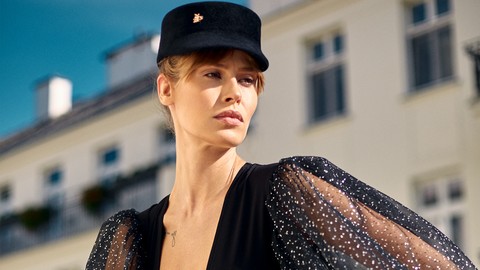
Learn Amazing Fashion Retouching Techniques in Photoshop - Master non-destructive retouch, lights, and color grading!
Created by: Marcin Mikus
Last updated June 2018
 What you will learn
- You will learn how to process images in Camera Raw
- You will learn how to process images in Capture One
- You will learn how to retouch skin non-destructively
- You will learn how to create luminosity masks
- You will learn how to adjust contrasts using masks
- You will learn how to work with lights on each and specyfic colors
- You will learn how to tone the image selectively for shadows and highlights
- You will learn how to do color correction on your images
- You will learn how to do final touch ups to polish your image and make sure hue, saturation and luminosity values are perfect
How it compares
Against the other 188 rated Udemy courses in Photoshop on CourseDuck:
- Rating4.1 out of 5higher than 9% of them
- Reviews227#98 of 189 by number of reviews
- Length2.3 hoursshorter than 79% of them
- Last updatedJune 2018earlier than 76% of them
 Course Description
Fashion images are something more than just a picture. It takes much more effort to master it - fashion is an art, and that’s how you should be treating retouch of such an images.
This course gives you all you need to make a creative step up and learn non destructive retouching and color processing techniques in Photoshop.
My name in Marcin Mikus I am professional commercial, fashion and beauty retoucher as well as photoshop educator with over 5 years of experience. You can easily google my name and find acces to my retouching work and publication I have had as well as find more about my educational side - focused around retouching.
In this course I will walk you through whole process of retouching fashion images - working on few different image examples.
Of Course I will start with raw conversion in camera raw - base of every retouching. For those who are not using camera raw - just like me - I also prepared lesson teaching you raw conversion in Capture One - the software of my choice.
After showing you everything what you need to know about raw processing we will jump into photoshop and start from the skin retouching.
In this part I will show you how to clean skin professionaly using basic tools - only one right way to clean up your images. What is the difference between them and to what you need to pay attention. Of course I couldn’t miss Dodge & Burn Process - the superior technique when it comes to non-destructive skin retouching technique.
In the next section you will learn everything you need to know about contrasts - and It will give you huge boost of information and you wil fully master working with masks. I will show you how to create very precise masks to define perfect line between shadows and highlights. After this I will show you how to get control over every part of the image - even such a small details like shoes! And work with the lights on each and specyfic area.
Using knowledge from masks we will move into color tonning and color corrections. Using advanced masing we will be doing color corrections with understanding of color theories - so you know you won’t be just putting colors randomly - but the way to make the entire composition look amazing.
At the end of the course we will jump to my final steps where I polish the images - incuding hue, saturation and luminosity values of the Image.
Except all of the video lesson You will get my new actions prepared jsut for this course!
Enjoy,
Marcin

 Udemy Discount
The discount is applied through our link. Open the course from here and Udemy's current promotional price is applied at checkout on most courses, no code to type.
Some courses are excluded from Udemy's promotions. If the price does not drop, clear your browser cookies and use the button again.
Instructor Details

- 4.1 Rating
 227 Reviews
Marcin Mikus
I'm open minded and creative photoshop retoucher and photoshop educator with over 7 years of experience in the field. I specialize mainly in fashion, beauty, commercial and portrait retouching. Choosing me as your teacher guarantee that you will get prefessional knowledge and practice from the real photoshop expert, who works every day with images that can be found in magazines, lookbooks and fashion campaigns and peoples social media.
I've been teaching Photoshop for the last seven years. I spend almost every day with photoshop and in time I was able to gain more and more knowledge about right ways of teaching Photoshop. After few Years I felt it's the right time to come out with Premium Courses on udemy. Where I can share some amazing ideas and make Photoshop fun!
During my retouching career I have been internationaly published in various Fashion and Beauty magazines like Nasty, Numero, Ellegant, L'oficiel and many more!
 More courses by Marcin Mikus
Professional Retouching Course in Photoshop (2021)
4.5 (1,884 Reviews)
 Provider: Udemy
 Time: 9.2h
$13.99

Master Advanced High End Beauty Retouching in Photoshop (2020)
4.4 (798 Reviews)
- Provider: Udemy
- Time: 7.5h
$13.99
Mastering Advanced Color Grading in Photoshop (2017)
4.2 (641 Reviews)
- Provider: Udemy
- Time: 3.9h
$94.99
Photoshop for Photographers - Beginner to Professional (2019)
4.0 (574 Reviews)
- Provider: Udemy
- Time: 7.8h
$59.99
Adobe Lightroom Classic CC - Od Zera do Profesjonalisty (2020)
4.4 (388 Reviews)
- Provider: Udemy
- Time: 5h
$19.99
Photoshop Dla Fotografów - Od Zera do Profesjonalisty! (2019)
4.4 (387 Reviews)
- Provider: Udemy
- Time: 7.4h
$19.99
More Photoshop courses


Adobe Photoshop CC: For Complete Beginner (Sinhala Medium) (2026)
4.9 (110 Reviews)
- Provider: Udemy
- Time: 8.4h
$59.99

Adobe Photoshop CC – Essentials Training Course (2025)
4.8 (36,753 Reviews)
- Provider: Udemy
- Time: 11.6h
$189.99


47 Graphic Design Projects for Photoshop Beginners (2025)
4.8 (466 Reviews)
- Provider: Udemy
- Time: 7.9h
$99.99

Photoshop Efficiency - Techniques For Consistent Marketing (2025)
4.8 (144 Reviews)
- Provider: Udemy
- Time: 1.4h
$49.99
 Reviews

By Karl Howard on 3/5/2021
great professional insights but Marcin's 'Beginner to Professional Retouching in Photoshop' course is a lot more in depth and i highly recommend that one
By Louis E. Hightower, Jr. on 12/2/2019
Many excellent topics were covered in this course. However way too much to remember. It would help if there were also some written references documented for the various steps taken in Photoshop.
By Malek Alrshaidat on 10/9/2019
It was good with nice simple techniques but I believe it's better to explain more about the techniques than repeat the same thing more and more. Thanks
By Alex L on 9/26/2019
A helpful cource with some great and very useful techniques. Also appreciated the resources (the actions pack and the D&B brush). I have a bit of experience working with PS, most of the time I was able to watch the videos on increased speed. Some of the topics could be explained a little bit better. Nonetheless great course, Thanks a lot for sharing the skills, Marcin! Looking forward to the next one.
By Philippe Caron on 8/22/2019
oui tres bien, je suis francophone mais la diction anglaise est parfaite et pas trop rapide, en plus le sous titrage en anglais améliore la compréhension. donc je suis à l'aise
By Angela Marie Hoener on 7/18/2019
A great revision of Marcin's techniques, totally solid. Expected to see fabric reconstruction & perhaps more PS latitude as often seen in fashion editorials.
By Paul Tova on 11/20/2018
It was a great course, i learned a lot. Great teacher. I gave it a 4 stars because, i fell like the teacher was rushing sometime during the tutorial, so sometime i had to pause and go back. For example the part of the Toning Image the teacher was all over the place. The most fundamental part of the course (Dodge and Burn) the teacher did not put too much important on it. However i will definitively buy all your courses. You have a lot of potential. Most have course definitively.
By BroHDSu on 8/21/2018
I love ur course. But file of the actions is too weight. So i can use it anymore. Anyway, ur course is amazing. I love it! Thanks you
By Jasmeet Singh on 3/8/2018
I've done the Beauty Retouching and Master Curves Courses before and I'm grateful that I bought these courses. These courses are applicable to the real world and I can see a future where I can too be a retouch artist.
By Alessandro Marotta on 2/18/2018
Great course for fashion retouching. Bravo!! There's only one little problem....it was more good if the videos were in full hd 1080p, that's it. Thanks for your job.
 Quality Score
No CourseDuck member has rated this course yet. Taken it? Give each part a thumbs up or down.
Overall Score : 82 / 100
- Video Duration:
 2.3h
2.3h - Price: $39.99
- Provider: Udemy
- Updated:
 June 2018
 - Level:
 All Levels
 - Language:
 English
 - Certificate:
 Yes
Yes
30-day money-back guarantee on most paid courses
Udemy Coupon Price Tracker
