
 Web Development
 Data Science
 Python
 SQL
SQL JavaScript
 Artificial Intelligence
 IT & Software
 IT Certifications
 Hacking
 AWS
AWS Arduino
 DevOps
 3D Modeling
 Graphic Design
 Photoshop
 Drawing
 Digital Painting
 UX Design
 Business
 Data Analysis
 Communication Skills
 Project Management
 Leadership & Management
 Human Resources
 Digital Marketing
 Social Media Marketing
 Marketing
 SEO
SEO Google Analytics
 Branding
 Excel
Excel Office Productivity
 SAP
SAP PowerPoint
 Microsoft Access
 SharePoint
 Finance & Accounting
 Trading & Investing
 Accounting
 Bitcoin
 Personal Finance
 Video Editing & Animation
 Photography
 Adobe Premier Pro
 Adobe Lightroom
 Personal Development
 Productivity
 Career Development
 Life Coaching
 Health & Fitness
 Meditation & Mindfulness
 Yoga
Yoga Music
Music Music Production
 Guitar
 Piano
Piano Singing
 Language Learning
 Teaching & Academics
 Engineering
 Math
Math Lifestyle
Microsoft ACCESS Database Hands-on Training with Exercises (Udemy.com)
Quick Learn MS ACCESS for beginners from scratch to design and develop real-world Database applications.
Created by: Dr. Mazhar Hussain
Last updated March 2024
 What you will learn
- At the end of this Course, you will be able to create real-world DATABASE Applications in MS Access from scratch.
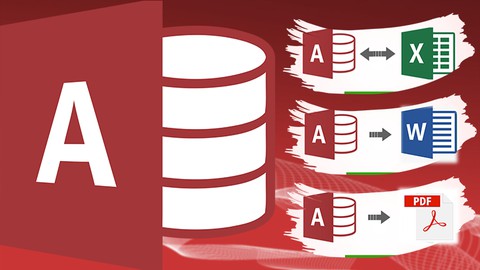
- You will learn how to import data from Excel to Access.
- You will learn how to define Tables, Attributes and Datatypes.
- You will learn the use of Lookup wizard, Validation rule and Input mask.
- You will learn how to establish Relationships between tables.
- You will learn how to create customized Forms for data entry into tables.
- You will learn how to write Queries to retrieve data as you want from tables.
- You will learn how to generate Reports from tables and queries to present the data in attractive and informative layout.
- You will learn how to export data from Access to PDF, Excel, Word etc.
How it compares
Against the other 47 rated Udemy courses in Microsoft Access on CourseDuck:
- Rating4.3 out of 5higher than 10% of them
- Reviews138#38 of 48 by number of reviews
- Length1.5 hoursshorter than 95% of them
- Last updatedMarch 2024earlier than 55% of them
 Course Description
Welcome to the Microsoft Access Database Course! This course is designed for beginners and intermediate learners who want to acquire essential skills in managing data using MS Access. Microsoft Access is a powerful and versatile database management system that is widely used in various industries and organizations. By mastering Access, you will acquire essential skills in managing data and be able to streamline and automate tasks, resulting in increased efficiency and productivity.
Whether you work in business, government, education, or any other field that requires data management, Microsoft Access can help you manage your data more efficiently and effectively. For businesses, Microsoft Access can be used to manage customer information, track sales and inventory, generate reports, and automate tasks. With Access, businesses can make informed decisions based on accurate and up-to-date information. In education, Access can be used to manage student information, track attendance, and generate reports. With Access, educators can monitor student progress and identify areas where additional support is needed. In government, Access can be used to manage and analyze data related to public services, track voting patterns, and manage budgets. With Access, government agencies can make data-driven decisions that benefit the public.
Microsoft ACCESS is an information management tool, or relational database, that helps you store data that can easily be accessed, managed, modified, updated, controlled, and analyzed. ACCESS can also overcome the limitations found when trying to manage large amounts of information in Excel or other spreadsheet applications. You will be able to learn Microsoft ACCESS Components: Tables, Forms, Queries, and Reports. Each has its own special function to allow the user to manage information in MS ACCESS. A Table allows the user to store a collection of data about a specific topic like Customers or Orders. Relationships can be established among the tables to access and manage the data easily. A Form allows a user to enter/change/update data to tables. A Query allows the user to view, change, manipulate, and analyze data in different ways like combining data from two different tables (Customers and Orders) to create a user’s own custom view (London Orders for April). A Report is an effective way to output your data in a printed format in the way you want it.
In this course, you will learn how to import data from Excel to Access and create tables with proper attributes and datatypes. You will also learn how to use the Lookup wizard, Validation rule, and Input mask to ensure data integrity and accuracy.
Establishing relationships between tables is crucial in any database system, and in this course, you will learn how to create and manage relationships to build efficient databases.
Customized forms are an essential component of any database system, and you will learn how to create forms for efficient data entry into tables.
Writing queries is an integral part of managing a database, and in this course, you will learn how to write queries to retrieve data as you want from tables. You will also learn how to generate reports from tables and queries to present data in an attractive and informative layout.
Exporting data from Access to PDF, Excel, Word, and other formats is an essential skill in data management, and you will learn how to export data from Access to various formats.
This course is specifically designed for beginners with no prior experience in database management. We understand that learning a new skill can be challenging, which is why this course provides hands-on training, real-world applications, exercises, and a final project to help you build your confidence and expertise in Microsoft Access. Throughout the course, you will be given practical, real-world examples and exercises that will guide you through the process of creating a fully functional database application using Microsoft Access. You will have the opportunity to work with various database components such as tables, forms, queries, and reports and learn how to use them effectively to manage and analyze your data.
The final project is designed to test your knowledge and showcase your skills. You will be given a real-world scenario and will be required to build a database application from scratch. This will give you the opportunity to apply the skills and knowledge you have learned throughout the course and to gain valuable experience in building a practical and effective database application.
By the end of this course, you will be equipped with the skills and knowledge necessary to create a real-world database application in Microsoft Access from scratch. Join us today and take the first step towards mastering Microsoft Access!

 Udemy Discount
The discount is applied through our link. Open the course from here and Udemy's current promotional price is applied at checkout on most courses, no code to type.
Some courses are excluded from Udemy's promotions. If the price does not drop, clear your browser cookies and use the button again.
Instructor Details

- 4.3 Rating
 138 Reviews
Dr. Mazhar Hussain
Dr. Mazhar Hussain holds a PhD Degree in Computer Science with specialization in Computer Vision & Deep Learning from University of Catania, Italy. Dr. Mazhar Hussain is currently in the role of Deep Learning and Computer Vision Engineer. He has extensive teaching experience at University Higher Education level and Online over a decade. He has published several research papers on Deep Learning in well-reputed Journals and Conferences. He believes on comprehensive practical trainings with stunning support for his students where all his courses are 100% hands-on with step-by-step problem-based learning, demos and examples.
Dr. Mazhar Hussain is teaching Computer Science courses at University of Catania, Italy. He also taught at the National University of Computer and Emerging Sciences, Pakistan and Online since a decade. He has been teaching courses in:
· Artificial Intelligence (AI)
· Machine Learning (ML)
· Deep Learning (DL)
· Computer Vision (CV)
· Data Science (DS)
· Programming (Python, C++, Java)
· Databases especially in SQL SERVER, MYSQL, ORACLE, and MS ACCESS
 More courses by Dr. Mazhar Hussain

Modern Computer Vision & Deep Learning with Python & PyTorch (2026)
4.3 (364 Reviews)
 Provider: Udemy
 Time: 12.1h
$10.99

Deep Learning for Image Segmentation with Python & Pytorch (2026)
4.4 (274 Reviews)
- Provider: Udemy
- Time: 3.7h
$10.99
SQL BootCamp: Learn SQL DATABASE Queries with SQL SERVER (2026)
4.2 (190 Reviews)
- Provider: Udemy
- Time: 3.3h
$11.99

Deep Learning for Object Detection with Python and PyTorch (2026)
4.1 (178 Reviews)
- Provider: Udemy
- Time: 3.7h
$10.99

YOLOv8: Video Object Detection with Python on Custom Dataset (2026)
4.3 (145 Reviews)
- Provider: Udemy
- Time: 3.2h
$10.99

Video Segmentation with Python using Deep Learning Real-Time (2026)
4.3 (106 Reviews)
- Provider: Udemy
- Time: 2.7h
$10.99
More Microsoft Access courses

Microsoft Access Networking 2: Maximum Security (2022)
4.9 (312 Reviews)
- Provider: Udemy
- Time: 2.2h
$64.99

Workshop 5: Access VBA, Design and Advanced Methods (2024)
4.9 (182 Reviews)
- Provider: Udemy
- Time: 2.2h
$64.99

Microsoft Access 2016 Master Class: Beginner to Advanced
4.8 (14,398 Reviews)
- Provider: Udemy
- Time: 7.2h
$11.99

Microsoft Access VBA: Automating Import of Excel Files (2021)
4.8 (543 Reviews)
- Provider: Udemy
- Time: 2.5h
$64.99

Workshop 3: Access VBA, Design and Advanced Methods (2024)
4.8 (212 Reviews)
- Provider: Udemy
- Time: 2.3h
$74.99

Workshop 4: Access VBA, Design and Advanced Methods (2024)
4.8 (208 Reviews)
- Provider: Udemy
- Time: 2.4h
$74.99
 Reviews

By Tim Slade on 3/19/2026
Unfortunately I found it very hard to understand his accent, I appreciate this is his 2nd language so it is possible more a failing on mine than his, and the presentation style was very flat and extremely basic, even for me. Did not help me to achieve what I wanted to achieve. Tried to get my money back but was not successful
By Caleb Logsdon on 10/30/2023
Overall, the course gives you a very good but basic foundation. It doesn't bog down with a lot of complex or overly dense data sets which allows you to really focus on what is being covered and the operations on how to achieve what is needed. The course instructor was understandable although there were a few times I had to rewind to make sure I understood the word but not really an issue. The course flowed well but could have used a little better planning beforehand with a script or solid concept per section.
By Peter Johnson on 12/20/2021
Good course structure, clear english and delivered efficiently with practical exercises. I really like this course and recommend to those who want to start career in MS Access database.
By Edward Rene Acosta on 7/25/2021
Course was great and very helpful. Will recommend to others.
By Stephanie Vasquez on 7/23/2021
Very good starting class with good overview of features.
By Faith Osazuwa on 6/2/2021
Well, it is sounding interesting at this beginning. We hope it will continue to be engaging as we progress in the course.
By Shin Jara on 5/20/2021
I love this course! Very easy and simple to understand. The explanation is clear. Thank you!
By Benjamin Adam Gersten on 4/4/2021
Section 7 was the worst so far. good elsewise
By Jose Villanueva Casillas on 2/24/2021
nice , right to the point , no chit chat , good examples¡¡¡¡¡
By Talha Ahmed on 2/13/2021
This was amazing ms access course with step by step teacher interactive sessions, very well explained. I really liked about it was the focus on the foundations from scratch to expert. It is packed full with amazing content and most interesting thing was the exercises that are designed intelligently with real life scenarios that made learning fast. The concepts were immediately applicable in my day to day career. I really enjoyed the course with challenging exercises. Thank you Mazhar, It was great learning experience to learn with you.
 Quality Score
No CourseDuck member has rated this course yet. Taken it? Give each part a thumbs up or down.
Overall Score : 86 / 100
- Video Duration:
 1.5h
1.5h - Price: $34.99
- Provider: Udemy
- Updated:
 March 2024
 - Level:
 Beginner
 - Language:
 English
 - Certificate:
 Yes
Yes
30-day money-back guarantee on most paid courses
Udemy Coupon Price Tracker
