
 Web Development
 Data Science
 Python
 SQL
SQL JavaScript
 Artificial Intelligence
 IT & Software
 IT Certifications
 Hacking
 AWS
AWS Arduino
 DevOps
 3D Modeling
 Graphic Design
 Photoshop
 Drawing
 Digital Painting
 UX Design
 Business
 Data Analysis
 Communication Skills
 Project Management
 Leadership & Management
 Human Resources
 Digital Marketing
 Social Media Marketing
 Marketing
 SEO
SEO Google Analytics
 Branding
 Excel
Excel Office Productivity
 SAP
SAP PowerPoint
 Microsoft Access
 SharePoint
 Finance & Accounting
 Trading & Investing
 Accounting
 Bitcoin
 Personal Finance
 Video Editing & Animation
 Photography
 Adobe Premier Pro
 Adobe Lightroom
 Personal Development
 Productivity
 Career Development
 Life Coaching
 Health & Fitness
 Meditation & Mindfulness
 Yoga
Yoga Music
Music Music Production
 Guitar
 Piano
Piano Singing
 Language Learning
 Teaching & Academics
 Engineering
 Math
Math Lifestyle
PCB Design with EasyEDA – Free Online Tool (Udemy.com)
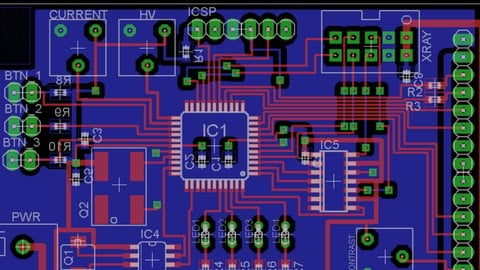
Design professional PCBs using EasyEDA – schematic capture, layout and direct PCB ordering
Created by: Amit Rana
Last updated February 2026
 What you will learn
- Be able to create single and double sided PCB Designs
- Understand PCB CAD tools
- Understand Gerber file and export gerber file for production
- Order online PCBs for the designs you create
- Be an awesome electronics designer in very low time!!!
How it compares
Against the other 335 rated Udemy courses in Engineering on CourseDuck:
- Rating4.4 out of 5higher than 39% of them
- Reviews362#171 of 336 by number of reviews
- Length3.3 hoursshorter than 68% of them
- Last updatedFebruary 2026more recently than 77% of them
 Course Description
PCB Design with EasyEDA – Free Online Tool
If you want to design professional printed circuit boards without investing in expensive software, this course is designed for you.
EasyEDA is a powerful, cloud-based PCB design tool that allows you to create schematics, design boards and even order PCBs directly from within the platform.
By the end of this course, you will be able to:
Create complete schematics in EasyEDA
Design single-sided and double-sided PCB layouts
Use component libraries effectively
Apply routing techniques and design rules
Generate manufacturing-ready files
Order PCBs directly from EasyEDA
This course is beginner-friendly and assumes no prior PCB design experience.
What You Will Learn
Understanding PCB design workflow
Creating schematics using EasyEDA
Managing components and libraries
Board layout and routing techniques
Design rule checks
Generating Gerber files
Using EasyEDA’s integrated PCB ordering system
Why EasyEDA?
EasyEDA is a free, cloud-based CAD tool used by hobbyists, students and startups around the world.
It offers:
Large shared component libraries
Short learning curve
No software installation required
Integrated PCB fabrication services
It is especially suitable for beginners, students and small hardware teams.
What This Course Will Do For You
Build confidence in PCB design
Enable you to convert ideas into real hardware
Help you design boards for hobby or academic projects
Prepare you for more advanced PCB tools in the future
Who This Course Is For
Electronics beginners
Students learning circuit design
Hardware hobbyists
Startups looking for a free PCB design solution
Who This Course Is Not For
Experienced PCB designers seeking multilayer industrial design techniques
Designers looking for EMI/EMC deep-dive content
Instructor
Hi, I’m Amit Rana — engineer, embedded systems developer and trainer.
With over 18 years of experience in electronics design and embedded systems, I focus on simplifying hardware design concepts and making them accessible for beginners.
A significant portion of this course is available as free preview lectures so you can evaluate the teaching style before enrolling.
30-Day Money Back Guarantee
Your enrollment is completely risk-free. If the course does not meet your expectations, Udemy offers a 30-day full money-back guarantee.
Enroll today and start designing your own PCBs using EasyEDA.

 Udemy Discount
The discount is applied through our link. Open the course from here and Udemy's current promotional price is applied at checkout on most courses, no code to type.
Some courses are excluded from Udemy's promotions. If the price does not drop, clear your browser cookies and use the button again.
Instructor Details

- 4.4 Rating
 362 Reviews
Amit Rana
Learn from a Technology Director Shaping the Future of Smart Buildings and IoT
Embark on a transformative learning journey with Amit Rana, a dynamic Technology Consulting Director at JLL , where he spearheads strategic technology initiatives and drives innovation within the realm of smart buildings, enterprise architecture, and the Internet of Things. With over 17 years immersed in the tech industry, Amit brings a wealth of practical knowledge and a visionary approach to his engaging Udemy courses. His daily work involves navigating the complexities of cutting-edge technologies and translating them into impactful business solutions for a global leader in real estate services.
 More courses by Amit Rana

IoT with Raspberry Pi & Microsoft Azure (2026)
4.4 (1,283 Reviews)
 Provider: Udemy
 Time: 10.5h
$15.99

The Art and Science of PCB Design with Autodesk Eagle (2026)
4.1 (1,082 Reviews)
- Provider: Udemy
- Time: 3.6h
$11.99
Embedded Systems with Arduino – 20+ Projects (2026)
4.4 (178 Reviews)
- Provider: Udemy
- Time: 7.7h
$54.99
ESP32 for IoT – Build Real World Projects (2026)
4.5 (175 Reviews)
- Provider: Udemy
- Time: 5.8h
$59.99
AVR Atmega32 Embedded Systems – Learn Embedded C (2026)
4.4 (135 Reviews)
- Provider: Udemy
- Time: 7.7h
$59.99
More Engineering courses


Do it Yourself - Automotive Electrical Diagnosis - Beginner (2026)
4.8 (1,897 Reviews)
- Provider: Udemy
- Time: 2.1h
$12.99

ROS 2 for Beginners Level 2 - TF | URDF | RViz | Gazebo (2025)
4.8 (1,869 Reviews)
- Provider: Udemy
- Time: 13.8h
$10.99

Advanced Kalman Filtering and Sensor Fusion (2021)
4.8 (1,033 Reviews)
- Provider: Udemy
- Time: 8.3h
$84.99

Digital Electronics: Robotics, learn by building module II (2020)
4.8 (942 Reviews)
- Provider: Udemy
- Time: 13.1h
$14.99

 Reviews

By Jeff Webb on 11/27/2021
Great introducion to Easy EDA!!! I liked the USB to TTL tutorial; that was a nice suprise for me because that was one thing I was intrested in. Can get a good understanding in less than 1/2 a day. Thanks!!!
By Thomas Schultz on 8/15/2021
This course is what I expected, the teacher was clear, perfect for beginners, and I would recommend the course. EasyEDA is a good choice. As pointed out in the class (lecture 16), EasyEDA was updated. Lecture 16 was helpful at a high level; much of the workflows are the same; however, the discussion needed to go further. EasyEDA Standard V6.4.20.6 (build date 06-July-2021) no longer supports single-sided boards. This fact made it challenging to follow along in the single-sided board design section of the class. Also, SMD (surface mounted devices) is the default with EasyEDA, which is not always ideal for single-sided board designs. Selecting TH packages is possible, but it is an extra step. Perhaps the course should start with two-layer boards designs. And one other thing, the custom components lecture needed more precision and a smoother workflow to ensure good custom component's quality.
By Pradeep Pokhrel on 2/16/2021
He is making understanding easier and trying to use much tool as possible... I had zero knowledge before on this subject matter now I feel much confident and I think this will help me understanding other pcb designing software tools by self learning... thank you for such affordable content...
By Konstantinos Margaritis on 6/4/2020
It was a good course, it has cleared up some doubts and questions I had about PCB design, and it gives a good overview about PCB design in EasyEDA. I would like a more advanced series to continue on this topic. It doesn't get a perfect score because some videos were abruptly closed before the speaker actually finished his sentence and there were some cases where he made some mistakes/typos in the schematic/pcb probably to finish the lesson in time, but unfortunately these are visible. Other than that it was a very good course. Looking forwared to the next series.
By Rishabh Krishna Gullapalli on 4/27/2020
Sure is. I've Learned a Lot about PCB Making and I hope to further learn more in Designing PCB's so that I can do Amazing Projects. Lots of Love to Udemy for giving an Amazing Course Like this and I am looking forward to learn different Subjects as well.
By Robo Bug on 3/31/2020
this is the best course for learning pcb design. and 4 star because the instructors way of speaking and presenting thins was not at all good but it is the best course on udemy if you want to start learning to design pcbs
By Mark Twain on 1/2/2020
The instructor style (frequent stops mid sentence, coughs, flying over the screen looking for a menu option, doing/undoing steps, moving his photo around to the screen, etc) is distracting to say the least. He certainly never re-recorded anything even when clearly below adequate and even though the whole course is 3 hours of video.. The projects are examples only with no real-life practical applications to the student. Overall, one wants to just go thru the videos and learn whatever one can, but certainly not repeat anything. The course was recorded on EasyEDA V5.3 in Feb 2018, so already out of date by almost 2 years (as of Jan 2020). It was not difficult to figure out the new navigation, as it actually became easier in the new software. Why I completed the course but did not ask for a refund? I learnt a few things just watching the videos and did complete the 1st project on my own. For what I paid, it was a fair deal. Maybe I could have learnt the same things on the EasyEDA website and/or YouTube, which is my next stop.
By Suneel kumar on 3/24/2019
Ya it was a nice and clean explanation to learn about this course. At the end of every course provide us some information how this is used in job oriented fields that means how the work will going on procedure like that. It is just a request only. Really nice.
By Kristen Hill on 3/2/2019
This has been a great journey so far. And I feel strongly satisfied with the course and the way trainer explained, every nitty gritty of the topic covered in this tutorial. I just took this course to have an idea about PCB design now I am able to engage in this course a lot
By Abraham Ninian Ejin on 1/10/2019
Useful for absolute beginners who wants to get started with PCB design! It would be great if there was a summary of the general practices/good practices of designing a PCB. Maybe, standards in naming components or how to optimize the arrangements/positioning of the components together. Nevertheless, I believe that this was a good purchase on my part and I hope the instructor will keep up with the good work.
 Quality Score
No CourseDuck member has rated this course yet. Taken it? Give each part a thumbs up or down.
Overall Score : 88 / 100
- Video Duration:
 3.3h
3.3h - Price: $64.99
- Provider: Udemy
- Updated:
 February 2026
 - Level:
 Beginner
 - Language:
 English
 - Certificate:
 Yes
Yes
30-day money-back guarantee on most paid courses
Udemy Coupon Price Tracker
