
 Web Development
 Data Science
 Python
 SQL
SQL JavaScript
 Artificial Intelligence
 IT & Software
 IT Certifications
 Hacking
 AWS
AWS Arduino
 DevOps
 3D Modeling
 Graphic Design
 Photoshop
 Drawing
 Digital Painting
 UX Design
 Business
 Data Analysis
 Communication Skills
 Project Management
 Leadership & Management
 Human Resources
 Digital Marketing
 Social Media Marketing
 Marketing
 SEO
SEO Google Analytics
 Branding
 Excel
Excel Office Productivity
 SAP
SAP PowerPoint
 Microsoft Access
 SharePoint
 Finance & Accounting
 Trading & Investing
 Accounting
 Bitcoin
 Personal Finance
 Video Editing & Animation
 Photography
 Adobe Premier Pro
 Adobe Lightroom
 Personal Development
 Productivity
 Career Development
 Life Coaching
 Health & Fitness
 Meditation & Mindfulness
 Yoga
Yoga Music
Music Music Production
 Guitar
 Piano
Piano Singing
 Language Learning
 Teaching & Academics
 Engineering
 Math
Math Lifestyle
Raspberry Pi: Make a Workbench Computer (Udemy.com)
Build a touch-screen driven application and control appliances and devices using a Raspberry Pi
Created by: Dr. Peter Dalmaris
Last updated August 2022
 What you will learn
- Create graphical applications on the Raspberry Pi
- Understand the basics of controlling mains appliances using relays
- Learn how to use a low-cost relay board to control large loads with your Raspberry Pi
- Understand how to use a relay board to control large loads with your Raspberry Pi
- Control DC devices
- Use the camera to take snapshots, interval snapshots and videos.
- Create a Python application that allows you to control external devices and appliances, and interact with sensors
- Manipulate still images and video taken by the Raspberry Pi camera
- Design a driver circuit for the external relays
- Control mains appliances safely
- Create an enclosure for your mains controller circuit
- Setup a remote working environment for your Raspberry Pi
- Design a printed circuit board for the relay circuit
How it compares
Against the other 295 rated Udemy courses in Arduino on CourseDuck:
- Rating4.4 out of 5higher than 50% of them
- Reviews315#103 of 296 by number of reviews
- Length11 hourslonger than 81% of them
- Last updatedAugust 2022earlier than 60% of them
 Course Description
** UPDATED SEPTEMBER 1, 2022 **
In this update I’ll show you how to update the bench computer so that it runs on the latest currently available version of the Raspberry Pi operating system, which is version 11, nicknamed “Bullseye”, along with the Python interpreter that comes with Bullseye, which is version 3.9.2.
The new content includes 15 new lectures (2 new hours of instruction) in two sections.
I have not changed the bench computer hardware in this update.
---------------------------------
** UPDATED JANUARY 31, 2018 **
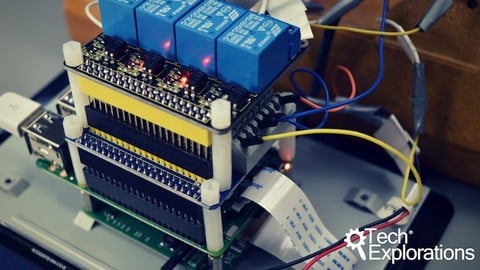
The latest update includes a whole new section in which you will learn how to build your Raspberry Pi Bench Computer using a low cost relay board instead of the (hard to find) Piface Relay+. You will also learn how to use a GPIO breakout board that makes it very easy to secure wires to your Raspberry Pi.
---------------------------------
This Raspberry Pi project course will show you how to integrate a variety of components into a gadget that you can use to automate your work bench.
I call it "The Bench Computer".
With the Bench Computer, you will be able to control any device and appliance on your electronics work bench, like turn on and off your bench lights, soldering iron and fume extractor.
The Bench Computer provides a great framework on which you can build your own home automation projects Out of the box, you will be able to control anything with a simple on/off switch, like lights, fans, heaters etc.
I have designed this course to help you get started. What you get the Bench Computer to do is entirely up to you!
Here are the main components (software and hardware) that you will learn about by taking this course:
The Raspberry Pi (I use a Raspberry Pi 3 Model B for historical reasons, you can also use a Raspberry Pi 4).
The Raspberry Pi 7-inch touchscreen.
The Raspberry Pi Camera v2.
The Piface Relay+ HAT (contains the small relays used to control 12V devices) OR a Keyestudio 4 Channel Relay board.
A GPIO board breakout.
Larger external relays used for controlling mains appliances like lights and your soldering iron.
Python 3 and the Tkinter framework for building the application.
Things that you want to control, like low-power 12V LED strips and fans, and mains appliances like a soldering iron.
Scroll further down for a list of learning objectives for this course.
All code is available on Github, and is free to download and use as you wish.
A list of parts is available in the first section of the course (free to view).
In 11 hours of video content and over 70 lectures, you will learn the necessary skills for interfacing you Raspberry Pi with your workbench.

 Udemy Discount
The discount is applied through our link. Open the course from here and Udemy's current promotional price is applied at checkout on most courses, no code to type.
Some courses are excluded from Udemy's promotions. If the price does not drop, clear your browser cookies and use the button again.
Instructor Details

- 4.4 Rating
 315 Reviews
Dr. Peter Dalmaris
Peter Dalmaris is an educator, electrical engineer, electronics hobbyist, and Maker. Creator of online video courses on DIY electronics and author of three technical books, and has recently released his book Maker Education Revolution.
As a Chief Tech Explorer since 2013 at Tech Explorations, the company he founded in Sydney, Australia, Peter’s mission is to explore technology and help educate the world.
Tech Explorations offers educational courses and Bootcamps for electronics hobbyists, STEM students and STEM teachers.
A life-long learner, Peter’s core skill is in explaining difficult concepts through video and text. With over 15 years of tertiary teaching experience, Peter has developed a simple yet comprehensive style in teaching that students from all around the world appreciate.
His passion for technology and in particular for the world of DIY open source hardware has been a dominant driver that has guided his personal development and his work through Tech Explorations.
Peter’s current online courses have helped over 150,000 people from around the world to be better Makers.
For more information on Peter's work, please go to his web site, techexplorations dot com.
 More courses by Dr. Peter Dalmaris

Arduino Step by Step: Getting Started (2024)
4.7 (8,714 Reviews)
 Provider: Udemy
 Time: 21.4h
$159.99
PCB design with KiCad - updated for KiCad 9 (2026)
4.6 (3,737 Reviews)
- Provider: Udemy
- Time: 31.9h
$79.99

More Arduino courses


Learn to Build a Computer (PC) in 2026 - all types!
4.9 (245 Reviews)
- Provider: Udemy
- Time: 6.1h
$74.99

Raspberry Pi For Beginners - 2026 Complete Course
4.8 (3,105 Reviews)
- Provider: Udemy
- Time: 10.6h
$89.99

Ultimate Guide to Raspberry Pi : Tips, Tricks and Hacks (2023)
4.8 (2,363 Reviews)
- Provider: Udemy
- Time: 5.2h
$69.99

Mastering Microcontroller: STM32-LTDC, LCD-TFT, LVGL (MCU3) (2026)
4.8 (487 Reviews)
- Provider: Udemy
- Time: 8.1h
$79.99
Arduino Step by Step: Getting Started (2024)
4.7 (8,714 Reviews)
- Provider: Udemy
- Time: 21.4h
$159.99
 Reviews

By Neville Cross on 6/19/2023
Has a good structure explaining from easy to complex. There are a few items that have become outdated, but it has been taking care in new videos. If something does not work, look for the updated contend. I think that creating a relay board from scratch is an overkill for this project. There is plenty of relays boards to choose from. But it is very interesting.
By PIERO DI STEFANO on 8/13/2020
Great course Peter. Thank you doing this. I've been studying Python for a while and I am an electronic technician who use to play with Pic Micros. You started a spark here! I bought my Rasp Pi 4 when I started your course with all the other parts like screen, hats etc. I love it. I can write a Python script and get it running on the spot. And it's super fast, almost as fast as my laptop. Thank you again for your work, you have been an inspiration.
By Donald McRoberts on 11/19/2018
Well done! Am impressed that you take the time to make it very clear that working with mains requires great care. This course has given me lots of ideas for controlling things around my home. It looks like I will be purchasing additional Rpi's in the future to play with. Thanks again to Peter. You most certainly are a great trainer and have produced a wonderful series of lectures!
By Larry Ciecior on 6/6/2018
I have taken a number of courses from Peter. I have not been disappointed in knowing that when I complete the course, I will know more than when I started. Peter provides you with the programs and the explanation of what they do so you make changes to meet your needs. Will look for more courses to take from Peter. He is an excellent instructor.
By Roger Bergeron on 2/27/2018
I knew all the electrical knowledge before attending this course but I was lacking some trick on the software side. Some stuff like the Init file on Raspbian Jessie, the TKinker subject will help me to save time on my the future project. We can say when a course help a beginner to easy understand all the topics and allow a more advance user to still learns tricks, the purpose of the course is achieve.
By Lee Mager on 2/12/2017
I thoroughly enjoyed the course. A couple of times it went a bit fast, but I was able to rewind, review the material, and catch up. I've built the bench computer and will be demonstrating it at my next radio club meeting. It's the first really useful thing I've done with the Raspberry Pi. I've got several ideas for things to add to it. Thanks, Peter
By Peter Jeffryes on 11/18/2016
The Piface relay plus module seems to be unobtainable
By Samir El Arishy on 9/27/2016
Since you are using not so common box, the video on fitting the RP should be much shorter.
By Gail Lipfert on 9/5/2016
Not only is this course is enormous fun, I have made a big jump in knowing how to use the Raspberry Pi. This is the best Udemy course I have ever taken. Peter Dalmaris is an excellent teacher who pays close attention to his students. He has designed a well-thought out course around a cool project. The instruction is clear and detailed and so far, everything has worked. Unfortunately, the parts required are not cheap. Check out the free videos where he describes all the parts needed. If you are interested in learning about the Pi, I highly recommend this course.
By Doug Mobley on 8/24/2016
Instruction is clear and understandable and what is needed for a new-comer to the RPi. At this point, I haven't learned anything new, as I am a fairly experienced Raspberry Pi user (but not in the interfacing department which is where I expect to learn). I am doing the whole course for completeness. I have taken two other of Peter's courses and found them very good.
 Quality Score
No CourseDuck member has rated this course yet. Taken it? Give each part a thumbs up or down.
Overall Score : 88 / 100
- Video Duration:
 11h
11h - Price: $79.99
- Provider: Udemy
- Updated:
 August 2022
 - Level:
 Beginner
 - Language:
 English
 - Certificate:
 Yes
Yes
30-day money-back guarantee on most paid courses
Udemy Coupon Price Tracker
