
 Web Development
 Data Science
 Python
 SQL
SQL JavaScript
 Artificial Intelligence
 IT & Software
 IT Certifications
 Hacking
 AWS
AWS Arduino
 DevOps
 3D Modeling
 Graphic Design
 Photoshop
 Drawing
 Digital Painting
 UX Design
 Business
 Data Analysis
 Communication Skills
 Project Management
 Leadership & Management
 Human Resources
 Digital Marketing
 Social Media Marketing
 Marketing
 SEO
SEO Google Analytics
 Branding
 Excel
Excel Office Productivity
 SAP
SAP PowerPoint
 Microsoft Access
 SharePoint
 Finance & Accounting
 Trading & Investing
 Accounting
 Bitcoin
 Personal Finance
 Video Editing & Animation
 Photography
 Adobe Premier Pro
 Adobe Lightroom
 Personal Development
 Productivity
 Career Development
 Life Coaching
 Health & Fitness
 Meditation & Mindfulness
 Yoga
Yoga Music
Music Music Production
 Guitar
 Piano
Piano Singing
 Language Learning
 Teaching & Academics
 Engineering
 Math
Math Lifestyle
Rigging with Joysticks 'n Sliders in After Effects (Udemy.com)
Learn Joysticks n Sliders to Rig your character’s Face and anythings you want and improve your motion graphics.
Created by: Motion Guru
Last updated December 2024
 What you will learn
- How to use all of Joysticks ‘n Sliders Script
- How to design the head of the character
- How to rig the head and facial components in two different ways
- How to rig the objects like car
- How to use expressions in the rigging
- How to rig a the character's face that has more details and poses
- How to rig a car professionally and create 3D modes for it
- And you will have the full support of an instructor who loves teaching
How it compares
Against the other 118 rated Udemy courses in Adobe After Effects on CourseDuck:
- Rating4.6 out of 5higher than 67% of them
- Reviews184#55 of 119 by number of reviews
- Length4.2 hourslonger than 61% of them
- Last updatedDecember 2024more recently than 77% of them
 Course Description
In the first chapter of this course we will introduce the Joystick script and explain its tools.
We will first explain the tools of the joystick panel and how they work and then we'll talk about Sliders panel tools, so that in the next few chapters that we'll be doing the project and rigging the face, no more ambiguity about the tools of this script.
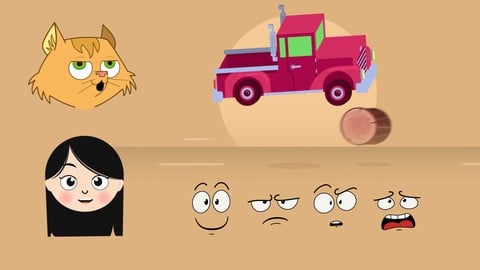
In the second chapter we will start with the design of the girl's head and then how to rig it.
in the third chapter of this course you'll learn another way to rig a character which is suitable for cases the charachter's face has more details or you need more poses of your character's head
and in the fourth chapter we'll talk about how to rig a car an create 3D modes for it, to understand that Joystick script is not just for the head and facial rigging but also for other objects.
Here some of the techniques you will Learn:
you will learn how to use this script professionally for rigging,
you’ll learn how to use expressions in your rigging process,
you'll learn how to rig your character's head in two useful ways
and how to rig your character's head using joysticks panel
and how to rig your character's head using switch panel.
How to rig a 3d car with joystick script in after effects.
and many other techniques of rigging!
This is a very practical course, That will give you the Practical knowledge of Rigging in Joysticks ‘n Sliders and Adobe After Effects.
With our 30-day 100% money back guarantee, there is nothing holding you back from jumping in right now and trying the course out.
Go ahead and click the enroll button, and start rigging your character for your next Project.
So, I'll see you inside!

 Udemy Discount
The discount is applied through our link. Open the course from here and Udemy's current promotional price is applied at checkout on most courses, no code to type.
Some courses are excluded from Udemy's promotions. If the price does not drop, clear your browser cookies and use the button again.
Instructor Details
- 4.6 Rating
 184 Reviews
Motion Guru
Motion Guru graphics team with 10 years of experience in the production of motion graphics and visual effects in 2D and 3D
A collection that specializes in motion graphics education
No bull** tutorials on animation and motion design (to save your valuable time)
We hope you enjoy our comprehensive and professional tutorials.
Enjoy the best Motion Graphics tutorials online.
 More courses by Motion Guru
After Effects Motion Graphics | Motion Hero (2025)
4.5 (1,114 Reviews)
 Provider: Udemy
 Time: 13.4h
$10.99
Rigging a Character with Duik Bassel in After Effects (2024)
4.0 (263 Reviews)
- Provider: Udemy
- Time: 4.7h
$49.99
Full Character Rigging in After Effects | Knowing Everything (2023)
4.5 (258 Reviews)
- Provider: Udemy
- Time: 5.1h
$10.99

Complete Course of After Effects: Learn From an Expert (2020)
4.2 (166 Reviews)
- Provider: Udemy
- Time: 10.8h
$59.99
Complete course of making 3D motion graphics in Cinema4D (2022)
3.7 (129 Reviews)
- Provider: Udemy
- Time: 15.8h
$44.99
After Effects Expressions | Expression Magic (2024)
4.7 (20 Reviews)
- Provider: Udemy
- Time: 7.1h
$74.99
More Adobe After Effects courses

Motion Design & Animation Principles in Adobe After Effects (2025)
4.8 (1,594 Reviews)
- Provider: Udemy
- Time: 5.8h
$99.99


Futuristic HUD Motion Graphics in After Effects (2018)
4.7 (664 Reviews)
- Provider: Udemy
- Time: 1.5h
$69.99

Course Design - How to Create Impressive Text Animations (2017)
4.7 (207 Reviews)
- Provider: Udemy
- Time: 2.7h
$74.99

After Effects Masterclass: The Ultimate Guide for Beginners (2020)
4.7 (198 Reviews)
- Provider: Udemy
- Time: 9h
$74.99

 Reviews

By Paul Storm on 7/4/2024
I have only just started this course, but the tutors explanations are very good, as to how you install and use the Joysticks/Sliders plug-in. Thankfully, on one of his other courses, he provides the plug-in for free. He also explains why you use the tool and which to use for what type of animation. Totally recommend this course and his other courses too.
By Tim Fogarty on 8/3/2022
This is a great course -- maybe even a life changer! So much information about how to do the most intricate aspects of character animation. It would have taken me a loooong time to learn these techniques on my own. I am so happy and pleased that I am learning these skills! Thank you !!!!!
By Peter M on 6/13/2022
Content is good. Hard to understand voiceover. Backing music is unnecessary. Ripple effect on mouse click is really annoying, especially as the mouse moves around so fast all the time.
By Dawid Kahts on 10/21/2021
This is the most comprehensive course on Joysticks and Sliders that I could find anywhere. The instructor has expert knowledge on the subject and apart from learning how to use J'nS properly, he also adds some very handy expression tips. This in not a course for beginner AE users, It is intermediate-advanced level. Although the instructor is not a native English speaker and it can be challenging to understand him at times, I did not have any major problems with comprehending the course content.
By Pedro Joyse González Caro on 10/14/2021
Bastante útil para animaciones con motion graphics. Bien explicado; notable el conocimiento y control del instructor en la materia.
By john Baker on 1/11/2021
Very in depth knowledge about facial rigging explained in a step by step manner. The instructor does a very well job by not skipping over any detail. After this course you will be able to rig by yourself almost any character's head.
By Hasan Key on 1/3/2021
Very good and really engaging, each and every second of this tutorial showcases the instructor's proficiency on the "JoySticks" script!!
By Lena Smith on 11/13/2020
One of the best courses, the teacher really explains very well the properties and posibilities of "Joysticks 'n Sliders" and all the process is very well explained. A very well devoloped guide to learn and enjoy "Joysticks".
By DFAStudio on 6/4/2020
Nice variation in use of Joystick. however the volume on most of the videos is quite low and there are a few videos that have overlapping voices.
By JohnDeep on 4/28/2020
Rigging the head in two ways was great ; the car rigging was also very good. I became very familiar with the extensions during this Course. thanks
 Quality Score
No CourseDuck member has rated this course yet. Taken it? Give each part a thumbs up or down.
Overall Score : 92 / 100
- Video Duration:
 4.2h
4.2h - Price: See price on Udemy
- Provider: Udemy
- Updated:
 December 2024
 - Level:
 All Levels
 - Language:
 English
 - Certificate:
 Yes
Yes
30-day money-back guarantee on most paid courses
Udemy Coupon Price Tracker
