
 Web Development
 Data Science
 Python
 SQL
SQL JavaScript
 Artificial Intelligence
 IT & Software
 IT Certifications
 Hacking
 AWS
AWS Arduino
 DevOps
 3D Modeling
 Graphic Design
 Photoshop
 Drawing
 Digital Painting
 UX Design
 Business
 Data Analysis
 Communication Skills
 Project Management
 Leadership & Management
 Human Resources
 Digital Marketing
 Social Media Marketing
 Marketing
 SEO
SEO Google Analytics
 Branding
 Excel
Excel Office Productivity
 SAP
SAP PowerPoint
 Microsoft Access
 SharePoint
 Finance & Accounting
 Trading & Investing
 Accounting
 Bitcoin
 Personal Finance
 Video Editing & Animation
 Photography
 Adobe Premier Pro
 Adobe Lightroom
 Personal Development
 Productivity
 Career Development
 Life Coaching
 Health & Fitness
 Meditation & Mindfulness
 Yoga
Yoga Music
Music Music Production
 Guitar
 Piano
Piano Singing
 Language Learning
 Teaching & Academics
 Engineering
 Math
Math Lifestyle
SketchUp for Web from Basic to Advanced (Udemy.com)
The complete guide to using SketchUp free version from the very basics to being able to create 3D house models
Created by: Widhi Muttaqien
Last updated January 2022
 What you will learn
- Master all the tools available in SketchUp for Web
- Mastering 3D modeling techniques from basic to advanced
- Set materials and textures, and even create your own custom materials
- Create a 3D house model from start to finish
How it compares
Against the other 545 rated Udemy courses in 3D Modeling on CourseDuck:
- Rating4.6 out of 5higher than 56% of them
- Reviews115#423 of 546 by number of reviews
- Length6.9 hourslonger than 53% of them
- Last updatedJanuary 2022earlier than 57% of them
 Course Description
In this online course, you will learn SketchUp Free or also known as SketchUp for Web. You will start from the very basic and then move up gradually to the advanced level. The curriculum is carefully crafted so you will learn SketchUp in the most effective and efficient way. In less than 7 hours, in sha Allah, you will be able to master all the available tools and use them to create a 3D house design from start to finish.
What you will learn
There are so many things you will learn in this online course. There are just too many to explain in this description text. To see the details, you can scroll down to the curriculum section. But, just for a quick summary. This online course consists of 9 chapters, apart from the introduction chapter.
In the first chapter, you will learn the interface of SketchUp Free as well as its basic features. You will learn to import 3D models from the 3D warehouse. Then learn how to do navigation, and use different types of "views". Next, you'll learn how to use the "scenes" feature. And then we will discuss how to change the appearance of the 3D models using "Styles". After that, we will discuss various commands related to files. And also learn how to create a "custom shortcut".
In the second chapter, we will discuss basic 3D modeling techniques. We'll start by learning the line tool. Then discuss the concepts and features of "inference" in SketchUp. After that, we will discuss the "Rectangle" tool. And then discuss one of the most important tools in SketchUp, called the "push-pull" tool. Also in this chapter, we will discuss various object selection techniques. And techniques for deleting objects. Finally, we will cover how to use the "offset" tool.
The third chapter is a practice chapter. First, we will model a "planter box" object. Then create a 3D model of a cabinet. After that, we will try to create a 3d model of a pet house.
In the fourth chapter, we will focus on object manipulation and object management techniques available in SketchUp Free. There are many things that we will discuss in this chapter. Some of them are, object transformation, from the basic to advanced techniques. Then, learn how to use "tags" to manage 3D objects more easily and quickly. Next, you will learn various duplication techniques. Then learn how to group objects either with the basic "group" method or with the more advanced method using "component".
In the fifth chapter, we will discuss various advanced modeling techniques. You will learn how to use "Rotated rectangle". Learn the ins and outs of the "circle" tool and the "polygon" tool. Then learn the concepts and techniques of smoothing 3D object surfaces. Then, you will learn how to use the "Freehand" tool as well as the "Arc" tool. And then create 3D text objects. And finally, learn to use the "follow me" tool.
The sixth chapter is a special chapter for 3D modeling exercises. We will make use of the advanced techniques discussed earlier. We will start by modeling a coffee table. Then learn to model a classic gate. Then learn how to model a "square pillar". Next, we will discuss the techniques for creating a double-sided door. Starting by making the door frame, then the door leaf. And finally, we'll create the doorknob. Next, you will learn how to model a book. The last project in chapter six is creating a stair and its railing. You will learn a simple yet effective method for defining the stair steps without doing complex calculations manually.
The seventh chapter focuses on discussing measurement and annotation techniques. Here you will learn the "Tape measure" tool, and then also the "protractor" tool. Next, you will learn different methods for assigning labels such as for dimensions or simply for adding comments. Then, we'll cover how to create cutouts of our 3D model using the "section plane". And finally, you will learn how to create "custom axes".
In chapter eight, you will learn to use materials and textures. In addition to learning to use the materials provided by SketchUp, you will also learn to create your own materials and textures. After that, we will discuss various methods of manipulation for textures that are already attached to 3d object surfaces. We will cover both flat surfaces and also curved surfaces.
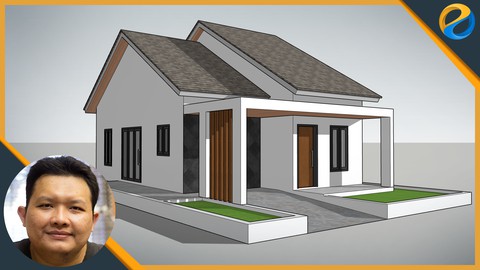
In the last chapter, or chapter nine. We will create the final project which is a house. We'll start by importing the reference image. Then model the walls. Add windows and doors. Then create the floor, the surrounding area, and also the carport. We will create the roof which will be a double-stacking type. Then make a large canopy that covers the terrace and carport area. Finally, we'll add ornaments for the house facade. In sha Allah, you will be able to create a house 3D model from start to finish if you follow this course from start to finish.
So, don't wait any longer. Join this online course now! and improve your skill in the Architectural field.

 Udemy Discount
The discount is applied through our link. Open the course from here and Udemy's current promotional price is applied at checkout on most courses, no code to type.
Some courses are excluded from Udemy's promotions. If the price does not drop, clear your browser cookies and use the button again.
Instructor Details

- 4.6 Rating
 115 Reviews
Widhi Muttaqien
Widhi is the CEO of Expose Academy and the founder of several other creative-based companies. He has a bachelor's degree in information technology and a master's degree in business management and information system. Besides doing business he is also an academic lecturer in the computer graphics field.
With more than 20 years of experience in the CG industry, he finished hundreds of projects with clients from all over the globe. He has been producing thousands of CG images and animations. His deep passion for computer graphics leads him to dive into digital painting, 3D visualization, animation, game development, web design, video, and motion graphic.
 More courses by Widhi Muttaqien

Digital painting with Krita 5.0 for beginners (2022)
4.6 (3,072 Reviews)
 Provider: Udemy
 Time: 7.5h
$89.99

Adobe Illustrator Advanced Vector Artwork (2020)
4.8 (1,988 Reviews)
- Provider: Udemy
- Time: 8.3h
$14.99

3D Visualization For Beginners: Interior Scene with 3DS MAX (2021)
4.5 (1,673 Reviews)
- Provider: Udemy
- Time: 12.9h
$13.99

Microsoft Excel dari dasar hingga pakar (2025)
4.8 (1,527 Reviews)
- Provider: Udemy
- Time: 17.4h
$11.99


Photoshop and Illustrator speed illustration workflow (2019)
4.7 (787 Reviews)
- Provider: Udemy
- Time: 12.1h
$64.99
More 3D Modeling courses

3D Printing with " Ultimaker CURA Slicer- Start to finish" (2025)
4.9 (192 Reviews)
- Provider: Udemy
- Time: 1h
$34.99

Girl and the Dog Creation in Zbrush for Intermediate Level (2020)
4.9 (173 Reviews)
- Provider: Udemy
- Time: 48.8h
$59.99



Blender Character Creator for Video Games (2026)
4.8 (9,160 Reviews)
- Provider: Udemy
- Time: 34.3h
$159.99

Master SOLIDWORKS 3D CAD using real-world examples (2022)
4.8 (2,451 Reviews)
- Provider: Udemy
- Time: 18.9h
$69.99
 Reviews

By Tifany Manion on 5/15/2026
I learned a lot of different methods for using SketchUp Web and it was very informative. At times, it was a bit fast and I got lost and had to rewatch parts, especially during the modeling projects portions.
By Arturo Espinosa Islas on 2/2/2026
Excelente, como siempre los cursos con Widhi estan muy bien estructurados, son muy amenos, en definitiva quieres aprender a usar SketchUp toma este curso. :)
By David Aiken on 1/23/2025
A good course which gradually builds from basic operations to a house.
By Ian Peacock on 2/26/2024
Good progress so far.
By Fredrik Takaliwungan on 10/5/2023
Akhirnya dengn mengikut Materi ini, saya sudah bisa Buat Layout untuk Rumah Sendiri, terimakasih sebelumya Pak,
By Larry Obisi on 2/27/2023
I am finding the course quite useful. And the tutor is great in explaining things in great details
By Afsfin Rahmanou on 9/26/2022
I had no idea sketchup is so powerful and customizable! Great lessons and nice, professional attitude!
By Christina Bologna on 9/21/2022
This course helped me understand and use the basics of SketchUp and introduced me to more advanced features.
By Matthew Willis on 9/17/2022
It was great. Exactly what I needed to get into Sketchup to plan my woodworking/carpentry projects.
By Eric Boysen on 6/16/2022
The course is very easy to follow. I'm learning a lot from the detailed explanations and modeling.
 Quality Score
No CourseDuck member has rated this course yet. Taken it? Give each part a thumbs up or down.
Overall Score : 92 / 100
- Video Duration:
 6.9h
6.9h - Price: See price on Udemy
- Provider: Udemy
- Updated:
 January 2022
 - Level:
 All Levels
 - Language:
 English
 - Certificate:
 Yes
Yes
30-day money-back guarantee on most paid courses
Udemy Coupon Price Tracker
