
 Web Development
 Data Science
 Python
 SQL
SQL JavaScript
 Artificial Intelligence
 IT & Software
 IT Certifications
 Hacking
 AWS
AWS Arduino
 DevOps
 3D Modeling
 Graphic Design
 Photoshop
 Drawing
 Digital Painting
 UX Design
 Business
 Data Analysis
 Communication Skills
 Project Management
 Leadership & Management
 Human Resources
 Digital Marketing
 Social Media Marketing
 Marketing
 SEO
SEO Google Analytics
 Branding
 Excel
Excel Office Productivity
 SAP
SAP PowerPoint
 Microsoft Access
 SharePoint
 Finance & Accounting
 Trading & Investing
 Accounting
 Bitcoin
 Personal Finance
 Video Editing & Animation
 Photography
 Adobe Premier Pro
 Adobe Lightroom
 Personal Development
 Productivity
 Career Development
 Life Coaching
 Health & Fitness
 Meditation & Mindfulness
 Yoga
Yoga Music
Music Music Production
 Guitar
 Piano
Piano Singing
 Language Learning
 Teaching & Academics
 Engineering
 Math
Math Lifestyle
ESP32 For Arduino Makers (Udemy.com)
Use this powerful microcontroller to turbo-boost your Arduino projects
Created by: Dr. Peter Dalmaris
Last updated August 2025
Our take
Based on the ratings of 1,051 students and a sample of their written reviews. No course pays to be reviewed.
This is a bridge course for people who already make things with an Arduino Uno and have hit its limits on memory, speed or pins. The syllabus covers the ESP32 modules and dev kits, setting up the Arduino IDE for the board, then GPIO, displays, sensors, motors, flash storage, Wi-Fi, classic Bluetooth and BLE. It runs about 8 hours. The requirements are firm: Uno sketches, I2C and serial basics, and ideally Peter Dalmaris's own Arduino Step by Step course first.
Reviewers like the teaching. They credit Dalmaris with clear, detailed explanations, a staged pace and good support material such as code, links and documentation. One student says the many hands-on examples build the confidence to experiment alone. The complaints are mostly about overlap and pace. A reviewer who took his Arduino courses found some projects repetitive. Another felt there was too much basic Arduino content despite the stated prerequisites, and called the circuit explanations confusing, with a schematic that was sometimes wrong. One more says the speaking pace could be quicker.
The course has a 4.7 rating from 1,045 reviews and was last updated in 2025. Many of the sampled reviews date from 2019 and 2020, so they say little about the newer material. If you know the Uno and want a patient first pass at the ESP32, it fits well. One reviewer who already works with ESP32-CAM and ESP-EYE boards was hoping the later sections would be more useful, so anyone at that level should look for something more advanced.
Pros
- Slow, staged pacing that reviewers say keeps beginners from feeling stressed
- Many hands-on mini-projects covering GPIO, Wi-Fi, Bluetooth, BLE, DAC and touch sensors
- Code, links and documentation come with the lessons, which reviewers call good support material
- Gets past the ESP32 setup headaches quickly so the real learning starts sooner
Cons
- Some projects repeat Arduino basics, especially for anyone who took Peter's earlier Arduino courses
- One reviewer found the circuit explanations confusing, with a schematic that was sometimes wrong
- Slow delivery and an introductory scope may bore anyone who has already used ESP32 boards
The huge amount of hands on examples give you confidence to follow along and experiment on your own.
Labeled Intermediate, but it assumes Uno sketches plus I2C and serial basics, so true beginners should start elsewhere first.
 What you will learn
- Learn about the ESP32 and what makes it an excellent choice for Arduino Makers.
- Learn about the differences and similarities between the ESP32 and the Arduino.
- Learn about the variants of the ESP32 module.
- Learn about the features ESP32 development kit.
- Learn how to use the ESP32 in place of the Arduino to do things such as controlling LEDs, reading button and potentiometer states, drive displays and motors.
- Learn how to use the ESP32 more advanced capabilities, like its flash memory (as a file system), the digital to analog and analog to digital converters.
- In the end, become confident in using the ESP32 in your projects.
- Learn how to use the ESP32 to enable your project to communicate with the Internet.
- Learn how to use the ESP32 to enable your project to communicate with Bluetooth devices (classic and BLE).
How it compares
Against the other 295 rated Udemy courses in Arduino on CourseDuck:
- Rating4.7 out of 5higher than 90% of them
- Reviews1,051#35 of 296 by number of reviews
- Length8.1 hourslonger than 67% of them
- Last updatedAugust 2025more recently than 67% of them
 Quality Score
Overall Score : 94 / 100
 Course Description
Course updated in August 2025
I have updated this course to support the ESP32-S3-DevKitC-1 N16R8 development board, using the latest Arduino IDE (2.2.x) and ESP32 Arduino Core Library (v3.2.1). I have also added new lectures in section four to provide you with the necessary information so that you can work with the newer ESP32-S3 module and devkits.
I have revised all example sketches for compatibility with this modern hardware and software environment. The complete set of updated scripts is available on GitHub, with most lessons offering both a simple version (ideal for quick testing) and a comprehensive version (including extended functionality and inline documentation). Each script contains detailed comments describing software behavior and hardware wiring instructions. New videos are in development to demonstrate the updated setup and highlight the new capabilities of the ESP32-S3 platform.
Course updated in July 2022
We updated this course so that all experiments work with the ESP32 Dev Kit v4 (based on the ESP32-WROOM-32E) and the ESP32 Arduino Core library 2.0.3.
All sketches and schematics have been tested and updated, links for external resources checked for validity, and several lecture videos were updated to reflect these development.
The updated course is tested to work with the ESP32 development kit version 4, ESP32 Arduino Core version 2.0.3, and the Arduino IDE 1.8.19.
About this course
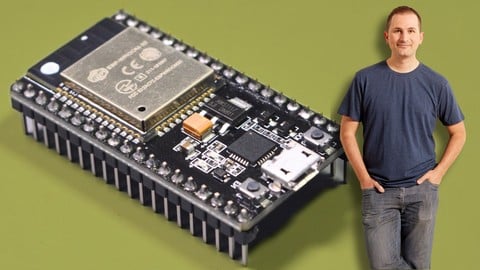
The ESP32 is a powerful microcontroller.
It integrates Wifi and Bluetooth, many GPIOs, analog input and output capabilities, many device interconnection protocols, a fast dual-core processor.
All that, at a low price.
And best of all: you can use your existing Arduino knowledge and skill to turbo-charge your projects.
Especially if you have already learned how to use the Arduino Uno in your projects, it is likely that you have hit a hardware limitation.
Perhaps your projects needed more memory, more speed, or more pins.
With the ESP32, you can get a lot more capacity to build more interesting projects, almost for free.
However, the ESP32 is not a plug-in replacement for the Arduino.
While it shares much of the Arduino’s programming and GPIO interface, you still need to learn the basics before you can deploy it.
This is the purpose of this course.
In this course you will learn:
What is the ESP32.
What are the various modules with that name, and how these modules are available to us in the form of development kits.
What are the differences and similarities between the ESP32 and the Arduino.
How can we use what we know from the Arduino to make things based on the ESP32.
How can we use the ESP32 GPIOs to work with simple components like LEDs and buttons, but also to drive peripherals like displays, sensors (including the integrated ones) and motors.
How can we set up the familiar Arduino IDE so that we can write programs for the ESP32.
How to store data in non-volatile memory.
How to communicate with near field devices and the Internet.
In this course, I have also included numerous mini-projects to demonstrate how to use capabilities such as GPIO read and write, classic Bluetooth, Bluetooth Low Energy, Wifi, digital to analog conversion, touch sensors, and more.
Larger projects will also show you how to create simple Internet of Things and Bluetooth applications, to name a few.
If you are ready to learn more, please be sure to watch the lectures in this introductory section to find our more.

 Udemy Discount
The discount is applied through our link. Open the course from here and Udemy's current promotional price is applied at checkout on most courses, no code to type.
Some courses are excluded from Udemy's promotions. If the price does not drop, clear your browser cookies and use the button again.
Instructor Details

- 4.7 Rating
 1,051 Reviews
Dr. Peter Dalmaris
Peter Dalmaris is an educator, electrical engineer, electronics hobbyist, and Maker. Creator of online video courses on DIY electronics and author of three technical books, and has recently released his book Maker Education Revolution.
As a Chief Tech Explorer since 2013 at Tech Explorations, the company he founded in Sydney, Australia, Peter’s mission is to explore technology and help educate the world.
Tech Explorations offers educational courses and Bootcamps for electronics hobbyists, STEM students and STEM teachers.
A life-long learner, Peter’s core skill is in explaining difficult concepts through video and text. With over 15 years of tertiary teaching experience, Peter has developed a simple yet comprehensive style in teaching that students from all around the world appreciate.
His passion for technology and in particular for the world of DIY open source hardware has been a dominant driver that has guided his personal development and his work through Tech Explorations.
Peter’s current online courses have helped over 150,000 people from around the world to be better Makers.
For more information on Peter's work, please go to his web site, techexplorations dot com.
 More courses by Dr. Peter Dalmaris

Arduino Step by Step: Getting Started (2024)
4.7 (8,714 Reviews)
 Provider: Udemy
 Time: 21.4h
$159.99
PCB design with KiCad - updated for KiCad 9 (2026)
4.6 (3,737 Reviews)
- Provider: Udemy
- Time: 31.9h
$79.99

More Arduino courses


Learn to Build a Computer (PC) in 2026 - all types!
4.9 (245 Reviews)
- Provider: Udemy
- Time: 6.1h
$74.99

Raspberry Pi For Beginners - 2026 Complete Course
4.8 (3,105 Reviews)
- Provider: Udemy
- Time: 10.6h
$89.99

Ultimate Guide to Raspberry Pi : Tips, Tricks and Hacks (2023)
4.8 (2,363 Reviews)
- Provider: Udemy
- Time: 5.2h
$69.99

Mastering Microcontroller: STM32-LTDC, LCD-TFT, LVGL (MCU3) (2026)
4.8 (487 Reviews)
- Provider: Udemy
- Time: 8.1h
$79.99
Arduino Step by Step: Getting Started (2024)
4.7 (8,714 Reviews)
- Provider: Udemy
- Time: 21.4h
$159.99
 Reviews

By Carlos Franco on 8/27/2026
I´m liking very much the course, it´s being very useful to improve my ESP32 knowledge and review the use of some hardware I was familiar only with Arduino. I highly recommend it. It´s very well documented and updated .
By Martin Vuyk Loperena on 10/4/2023
This course is amazing. Thank you for explaining everything so simply and showing stuff working. Thanks to this I got an idea of what to do for my Mechatronics Eng. Thesis. Of course real life is more complicated, but this course really covers most use case's fundamentals.
By Peter Glass on 2/10/2022
Great introduction to the ESP32. For those of us who have taken Peter's earlier courses, this picks up where Peter left off after Arduino: Getting Serious. This is a fast-paced course that dives right into the hardware and software, just scratching the surface of many uses of the ESP32 to control modules, with plenty of room for exploration after each lecture ends. This was a nice way to step over to the ESP32 after a lot of experience with the Arduino and definitely made me want to keep learning and experimenting.
By Al Mac on 1/31/2021
All the topics covered are interesting and directly applicable. If you want to implement a ESP32 you will find relevant examples and source code to hack for your own purposes. I have a ESP32-cam and have made a temp and humidity sensor in my basement which I can access with WIFI or BLE. Thank you.
By Mario Prates Castanho on 12/28/2020
Very good! To improve, I would only sugest to explain in more details the tecnical aspects of the different functions on the gpios, and an example of sending data to a database (mysql or sql server) and a network of some modules. I liked very much to have made this course and it improved my compreencion of the matter.
By Erik Hout on 11/15/2020
Course is nicely divided into understandable parts. The best thing is the many links to very detailed resources, if you want to dive into the subject a bit more. Pace is kind of slow.
By Tim Shoemaker on 11/8/2020
Good intro
By Jason Corriveau on 11/8/2020
So far, great. Was forced into working on this for a challenge at work, and your course helps me understand what is going on. Thanks!
By Krishna Nair on 10/19/2020
Good introductory course for ESP32
By Juan Jos Luengo Duque on 10/15/2020
It's OK, let's see the rest.
By Daniel D Williams on 9/23/2020
This course is paced slowly so the beginner does not get stressed. Its a good foundation course for the ESP32 dev board. I found a few minor errors, but overall, this is good quality material.
By Forrest Erickson on 9/16/2020
The pace was a bit slower than I anticipated and I was surprised how many videos I had to watch before we got to loading the Arduino IDE. If I had been warned I would have felt better. Reflecting I probably do benefit from all of the ESP32 feature overview before we get into the weeds with the IDE. Like I say if I had been warned I would have felt better about the pacing.
My ESP32 is on order, but from what I have watched so far I have also managed to install the board manager for the esp8266 and have run the blink example on my NODEMCU with the esp8266. So good job.
Just finished the section 5 number 28. I 61 years old physicist and am a self taught programmer so I often cannot remember where I ran into some programing conventions. I would have considered using a variable g_interuptCounter to signal that this is a global.
This series has not spoken about variable scope. Perhaps it is covered in the Arduino classes suggested to be taken before this series. Saying where to go to learn about variable scope will help some students.
I have also jumped ahead and done the section 10 videos because the pacing through the section 5 sensors was feeling slow. I am going back to them now while I let what I learned in section 10 ferment. I noticed there is no mention of MOSQUITTO which I very much want to master.
BTW, Very Good idea letting the students update the review.
- Video Duration:
 8.1h
8.1h - Price: See price on Udemy
- Provider: Udemy
- Updated:
 August 2025
 - Level:
 Intermediate
 - Language:
 English
 - Certificate:
 Yes
Yes
30-day money-back guarantee on most paid courses
Udemy Coupon Price Tracker
