
 Web Development
 Python
 SQL
SQL JavaScript
 Data Science
 Artificial Intelligence
 IT & Software
 IT Certifications
 Hacking
 Arduino
 AWS
AWS 3D Modeling
 Graphic Design
 Photoshop
 Drawing
 Digital Painting
 UX Design
 Business
 Data Analysis
 Communication Skills
 Project Management
 Leadership & Management
 E-Commerce
 Digital Marketing
 Social Media Marketing
 Marketing
 SEO
SEO Google Analytics
 Branding
 Office Productivity
 Excel
Excel Finance & Accounting
 Bitcoin
 Video Editing & Animation
 Photography
 Adobe Premier Pro
 Adobe Lightroom
 Personal Development
 Health & Fitness
 Music
Music Guitar
 Teaching & Academics
 Language Learning
 Engineering
 Lifestyle
Digital Painting Series Ep0. Dragon Bust (Udemy.com)
Learn to paint step by step. From amateur to master.
Created by: Austin Batchelor
Last updated August 2018
 What you will learn
- Follow step by step to create their own digital paintings
 Course Description
You’ll learn every step to creating an awesome digital painting so you can go from beginner to expert!
The Digital Painting Series will show you how to create advanced art that will stand up as professional work. This course will enhance or give you skills in digital painting, or your money back.
Each course in the digital painting series is your track to obtaining digital painting skills like you always knew you should have! Whether for your own projects or to create art as a professional.
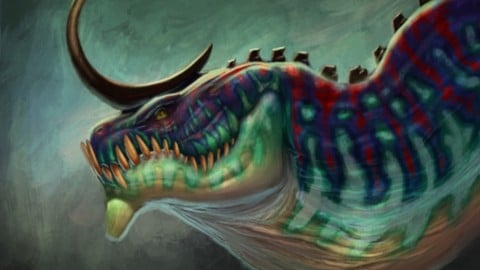
Each course in the series covers on painting demo that goes step by step through how to create a digital painting. Each one will have a bonus lecture at the end where I share a quick tip or trick to help you with your painting skills. This course is the first one in the series and is free for anyone to take! It will cover how to paint a colorful dragon bust and the bonus section goes over how to paint gemstones. So what else is in it for you?
You’ll gain instant access to all 3 sections of the course.
The course is setup to quickly take you through step by step my process of creating a digital painting.
Don’t believe me? I offer you a full money back guarantee within the first 30 days of purchasing the course.
All at your fingers tips instantly.
The course starts with the basics. We'll start with an underdrawing or sketch and prepare it for painting.
Next you’ll learn how to paint in grayscale in order to get accurate values and prep the image for color.
Once you’ve learned that we'll go over how to add color to bring your painting to life.
Then you are going to learn how to use layers and different blend modes as well making image adjustments to your painting
Lastly is the bonus section that goes over how to paint sparkling gemstones.
What else will you get?
- Personal contact with me, the course tutor
- Lifetime access to course materials
- Full length painting demo
This all comes under one convenient easy to use platform. Plus you will get fast, friendly, responsive support on the Udemy Q&A section of the course or direct message.
I will be here for you every step of the way!
So what are you waiting for? Sign up now and change your art world today!

 Udemy Discount
The discount is applied through our link. Open the course from here and Udemy's current promotional price is applied at checkout on most courses, no code to type.
Some courses are excluded from Udemy's promotions. If the price does not drop, clear your browser cookies and use the button again.
Instructor Details

- 4.7 Rating
 749 Reviews
Austin Batchelor
A C R E A T I V E
I'm Austin Batchelor. I'm a working professional creative in the game industry. I work as a concept artist and freelance illustrator. I've worked in-house at an animation studio but currently, work from home. As an instructor, I strive to provide the best learning experience possible for my students by creating clear content and maintaining a personable demeanor.
 More courses by Austin Batchelor
The Digital Painting MEGA Course: Beginner to Advanced (2022)
4.5 (5,292 Reviews)
 Provider: Udemy
 Time: 16h
$149.99
Ultimate Guide to Digital Sketching: Beginner to Advanced (2019)
4.4 (3,781 Reviews)
- Provider: Udemy
- Time: 5.5h
$89.99
Digitally Painting Light and Color: Amateur to Master (2019)
4.7 (2,263 Reviews)
- Provider: Udemy
- Time: 5.2h
$94.99
Photorealistic Digital Painting From Beginner To Advanced. (2019)
4.6 (2,170 Reviews)
- Provider: Udemy
- Time: 5.4h
$59.99

More Digital Painting courses

Character Art School: Complete Coloring & Painting (2026)
4.8 (6,042 Reviews)
- Provider: Udemy
- Time: 19.5h
$34.99



Procreate Masterclass: Digital Drawing on the iPad (2023)
4.8 (1,744 Reviews)
- Provider: Udemy
- Time: 18.2h
$94.99


Digital painting with Krita 5.0 intermediate level (2022)
4.8 (271 Reviews)
- Provider: Udemy
- Time: 6.8h
$79.99
 Reviews

By Jee on 2/10/2022
Definitely a worthwhile course because he teaches me more of what I can do with procreate. It's a very powerful tool to begin with and even though this course is a beginners course, the end result is way more professional look than what I'd expect.
By Jordan Novelli on 6/20/2021
This course is excellent for learning how to properly shade, highlight and color any art work. This course really helped me better understand just how many layers go into making a great art work. I followed along using the resource available and shaded and colored from start to finish. Even though this piece isn't 100% my work it gave me confidence booster that I was able to at least create something similar to the instructors art. I loved this course!
By Lee Kilvington on 5/3/2020
Very detailed course with plenty of information. Designed as a single study for one image so was quite short as would be expected but I will be looking at others in this series to help improve my digital artwork and build on my new knowledge from this course.
By Arne Twigt on 4/10/2020
While I appreciate this course was free, I have to subtract 1 star because of the lack of explanation when using certain features (masking/brushes/etc), which makes it harder to follow than it could be. But that's probably because I'm a true Noob at this. I do recommend this course for anyone who wants to paint a dragon - I never thought I'd be able to draw/paint like this!
By Jose Cabrera on 4/4/2020
The course was amazing and fun. Sometimes I had trouble seeing what brush and setting changes were used but overall really found this course useful. If you want a detailed run through of creating a digital painting with detailed colouring techniques and workflow, this course is for you.
By Andrzej Knop on 4/18/2019
Austin again taught me a lot of stuff, once more I was able to create something from a scratch and it does help me to build my confidence when drawing. I should mention that I'm a beginner, so every single finished drawing that satisfies me, pushes me forward with my progression. Thank you Austin :)
By Harpreet Singh on 1/6/2019
Austins way of teaching is really good. he really focuses on the skills and techniques needed for digital artists. I learned a lot regarding the professional way of digital painting and composition, picking the right colours for my art. I really recommend this course.
By Laura Vara on 1/2/2019
I was always told that I did excessive detail in my drawings. That it wasn't good. However, what I notice now in some amazing work like such I've been learning here, is; that the more detail, the more fantastic and realistic a piece will end up. Thanks.
By Andrew Leigh on 9/26/2018
Very good course showing how to build up a 3D texture using shading and lighting. I liked the way he explained the use of different blend modes. The only criticism is that at times it was hard to see where exactly Austin was painting as there was no cursor showing. All in all a good course.
By Angelika Hendrick on 8/14/2018
I liked the course and I believe the steps given can be applied to many drawings more or less. Using this as an example for trying to learn to use the software and the explanations given for using the selected tools and why he applied the tools, layer types and certain techniques was excellent. A note on the app: I wish the captions would have been better. Also Udemy app would be much better if one could use split screen (same applies to Procreate). This would make notes taking much easier.
 Quality Score
No CourseDuck member has rated this course yet. Taken it? Give each part a thumbs up or down.
Overall Score : 94 / 100
- Video Duration:
 2.2h
2.2h - Price: Free
- Provider: Udemy
- Updated:
 August 2018
 - Level:
 Beginner
 - Language:
 English
 - Certificate:
 No
No
Udemy Coupon Price Tracker
