
 Web Development
 Data Science
 Python
 SQL
SQL JavaScript
 Artificial Intelligence
 IT & Software
 IT Certifications
 Hacking
 AWS
AWS Arduino
 DevOps
 3D Modeling
 Graphic Design
 Photoshop
 Drawing
 Digital Painting
 UX Design
 Business
 Data Analysis
 Communication Skills
 Project Management
 Leadership & Management
 Human Resources
 Digital Marketing
 Social Media Marketing
 Marketing
 SEO
SEO Google Analytics
 Branding
 Excel
Excel Office Productivity
 SAP
SAP PowerPoint
 Microsoft Access
 SharePoint
 Finance & Accounting
 Trading & Investing
 Accounting
 Bitcoin
 Personal Finance
 Video Editing & Animation
 Photography
 Adobe Premier Pro
 Adobe Lightroom
 Personal Development
 Productivity
 Career Development
 Life Coaching
 Health & Fitness
 Meditation & Mindfulness
 Yoga
Yoga Music
Music Music Production
 Guitar
 Piano
Piano Singing
 Language Learning
 Teaching & Academics
 Engineering
 Math
Math Lifestyle
Rigging with Houdini 18.5 - KineFX (Udemy.com)
Learn to create custom, game ready animation rigs in Houdini 18.5 with KineFX
Created by: Richard Banks
Last updated July 2021
 What you will learn
- Learn to create a custom game ready animation rig in Houdini
How it compares
Against the other 43 rated Udemy courses in Houdini on CourseDuck:
- Rating4.6 out of 5higher than 58% of them
- Reviews243#12 of 44 by number of reviews
- Length12.4 hourslonger than 83% of them
- Last updatedJuly 2021more recently than 67% of them
 Quality Score
Overall Score : 92 / 100
 Course Description
Updated for Houdini 18.5 KineFX
**** Volume 02 ****
This update includes over 4 hours of new video introducing the new Houdini rigging workflow KineFX.
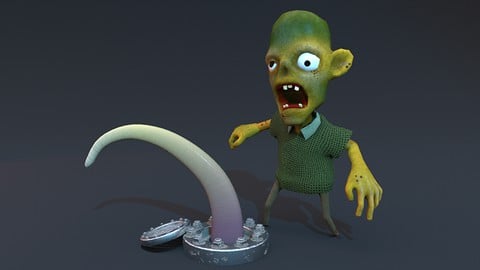
We will create 2 complete game ready rigs using the new KineFX tools, a tentacle and a zombie; introducing the new workflows along the way.
Not a single step is skipped, we go from zero to fully rigged, skinned and animated assets, with versatile, animator friendly user interfaces.
This course is ideal for beginner animators or someone who is looking to translate their rigging knowledge from another 3D package and leverage the awesome power of Houdini in their game development projects.
**** Volume 01 ****
Learn to create an animation ready zombie character rig with Houdini.
In this course we cover the fundamentals of the role of the Technical Animator or Rigger. We will create, node by node, a game ready animation rig ready to deploy into the Unity Game Engine. Along the way we will cover the fundamental concepts of rigging inside Houdini, and create a range of reusable rigging tools using Python and Houdini Digital Assets.
After completion you will have an animation ready zombie asset - and for Houdini Indie users we will explore exporting the finalized rig into Unity for testing.
Not a single step is skipped, we go from zero to a fully rigged, skinned and animated asset, with a versatile user interface.
This course is ideal for beginner animators or someone who is looking to translate their rigging knowledge from another 3D package and leverage the awesome power of Houdini in their game development projects.

 Udemy Discount
The discount is applied through our link. Open the course from here and Udemy's current promotional price is applied at checkout on most courses, no code to type.
Some courses are excluded from Udemy's promotions. If the price does not drop, clear your browser cookies and use the button again.
Instructor Details

- 4.6 Rating
 243 Reviews
Richard Banks
Hi I'm Richard,
I'm a Lecturer in Games Technical Art and an Independent Game Developer. I've been a Houdini user since version 9 and I'm always keen to share it's power and unique workflow with anyone who is interested! Also a big fan of Unity, Unreal, Maya and Substance Designer
 More courses by Richard Banks

More Houdini courses

Vehicle Modeling in Houdini 16.5 - SciFi Dropship (2019)
4.8 (1,214 Reviews)
 Provider: Udemy
 Time: 10.3h
Free

Houdini 16.5 - Procedural Prop Modeling - Ammo Crate (2020)
4.8 (206 Reviews)
- Provider: Udemy
- Time: 3.2h
$64.99
Master Houdini FX: Create Stunning Visual Effects rigs (2025)
4.7 (642 Reviews)
- Provider: Udemy
- Time: 18.8h
$89.99
 Reviews

By Igor Severić on 9/8/2021
Fun and excellent projects. Only what's missing is rigging of the eyes and feet's. But luckily if this is what you are missing, SideFX has their own KiniFX tutorial which also covers IK feet rigs and Eyes, while not hands, so these two make a nice combo. Also, instructor is a nice speaking person and its easy to follow. Definetly will purchase next tutorial about KiniX. Thanks
By Andrew David Byrnes on 9/2/2021
Very good. Audio could use a bit of refinement but content is good and he explains as much as you need if you're experienced in another 3D software already. Might be hard to follow for a beginner but I think if you're learning Houdini you probably have some background in another 3D application anyway. Thanks for the course!
By Tomáš Klein on 5/15/2020
Really nice course, I am really glad, as a software developer that I find out some programming and how to create own tools for rigging. Yes, code could be better (little optimization), but I think many people, which come here are not programmers, so for them, It will be perfectly understandable. From point of view of the Houdini and general explanation of nodes and so on, I think it was perfect. Thanks for the awesome course. I am for sure gonna his other Houdini courses.
By Georgios Kourakos on 3/20/2020
I've taken few courses in the past on other software e.g (blender, max) about rigging, but never felt after finishing them that I could actually be able to do any rigging at all. This course gave me a whole different perspective. It maybe be that houdini is truly amazing or the instructor is very good, explaining with the right amount of detail or both. I was also surprised that I was able to follow along without getting lost too frequently. Totally recommend if you want to learn rigging.
By Marc Albrecht on 12/14/2019
Sehr oberflächlich, es werden quasi nur Shelf-Tools benutzt, Erklärungen beschränken sich auf das Allernotwendigste. Die Hälfte des Kurses muss man dem Tutor beim Eintippen von Scripten zuschauen, was sich leicht auf fünf Minuten hätte reduzieren lassen (die Scripte sind ja sinnvoll, nur ist das hier kein Kurs über das Eintippen von Scripten). Was fehlt sind Constraints, tiefergehende Erklärungen von IK/FK (inklusive Blends zwischen beiden), Surface-Selection für Animationen, corrective morphs und so weiter - quasi alles, was zum Riggen eigentlich dazugehört, wenn man über das Anklicken von Shelftools hinausgehen will. Der Stil des Tutorials an sich ist nett, aber es fehlt einfach zu viel, um den Preis zu rechtfertigen.
By Matthew Wagar on 12/2/2019
As someone who is coming from a Maya and coding background, I've gotta say this tutorial was pretty top notch. It covers everything said in the trailer, and is extremely clear about every feature and workflow. I really appreciated the Python section, and I'm excited to use Python in the future. Everything coded was very straight forward, and well commented. In terms bone setup, at first it was very informational and useful, and got to be pretty repetitive. A majority of these bone placement videos just used the Bones tool, Bone tool, and carefully placing Null transforms. I understand that's the nature of rigging, but for a Rigging course I was hoping for more variety in tools and workflows in this section. After that, the capturing, animation and export into Unity sections were clear and easy to do. I learned a lot and I feel confident to jump into Houdini and make my own rigs now!
By Rene Damm on 11/30/2019
IMO this course is a perfect fit for Houdini with its approach of customizing the existing tooling in Houdini (just the stuff the software is meant for) and showing how to apply both the built-in and the custom tooling. Also, all around it seems like a course stemming from own personal use and experience in the trenches. Really happy with the material and the way it is presented. No needless polishing (like e.g. stupidly scripting every single sentence in advance) but great structure, great delivery, and good pace.
By Brett Kahr on 9/30/2019
Very thorough and well presented. It includes a wealth of useful information and the python scripting is an invaluable bonus. It doesn't cover a few areas that I'd hoped for like custom foot and hand controls but I could probably figure most of them out now based on what I've learned from the course.
By Mark Straw on 9/9/2019
Outstanding. I'll be using the rig helper on every project. Group lists for showing/hiding groups in the viewport and network view is invaluable. 5 stars for content. That said, there are course questions under the Q&A tab - not many - that have not been answered. This is discouraging to students thinking of asking a question. My suggestion for a follow up course is for advanced facial rigging. I can't work out whether to go with blend shapes or bone rigging. The Houdini facial auto rig didn't work on my character. Hopefully SideFX has improvements in facial auto rig in Houdini 18.
By Qassem Ali on 5/20/2019
I am now able to rig and animate my model in Houdini after attending this amazing tutorial with Richard. I've deployed my model in game engines, Unity and UE4 successfully. All thanks to Richard and his added value and tips. Richard was able to close the rigging and animating chapter in Houdini. I believe many artists will feel free to immigrate to Houdini after attending this course. The tutor is easy going during the course and made rigging in Houdini very simple. In fact, Houdini will become the prime application for rigging now. Thank you Richard for your great work and support.
- Video Duration:
 12.4h
12.4h - Price: $69.99
- Provider: Udemy
- Updated:
 July 2021
 - Level:
 Beginner
 - Language:
 English
 - Certificate:
 Yes
Yes
30-day money-back guarantee on most paid courses
Udemy Coupon Price Tracker
