
 Web Development
 Data Science
 Python
 SQL
SQL JavaScript
 Artificial Intelligence
 IT & Software
 IT Certifications
 Hacking
 AWS
AWS Arduino
 DevOps
 3D Modeling
 Graphic Design
 Photoshop
 Drawing
 Digital Painting
 UX Design
 Business
 Data Analysis
 Communication Skills
 Project Management
 Leadership & Management
 Human Resources
 Digital Marketing
 Social Media Marketing
 Marketing
 SEO
SEO Google Analytics
 Branding
 Excel
Excel Office Productivity
 SAP
SAP PowerPoint
 Microsoft Access
 SharePoint
 Finance & Accounting
 Trading & Investing
 Accounting
 Bitcoin
 Personal Finance
 Video Editing & Animation
 Photography
 Adobe Premier Pro
 Adobe Lightroom
 Personal Development
 Productivity
 Career Development
 Life Coaching
 Health & Fitness
 Meditation & Mindfulness
 Yoga
Yoga Music
Music Music Production
 Guitar
 Piano
Piano Singing
 Language Learning
 Teaching & Academics
 Engineering
 Math
Math Lifestyle
Genealogy Photo Editing, Care and Repair (Udemy.com)
Photo & Document Preservation, Repair, Scanning & Editing: Edit Your Old Photos and Give Them New Life
Created by: Michele Boyer
Last updated September 2019
 What you will learn
- Store photos and documents using the right packaging and storage materials
- Preserve their photos and documents from the elements
- Know how to scan photos and documents for the best quality image
- Save scanned photos and documents to the best formats for their intended use
- Understand formats, dpi, resolution, and file size
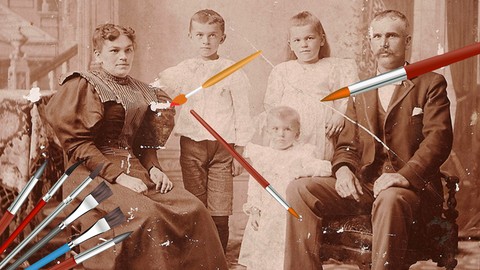
- Know how to edit and repair the most common types of damage to old photos and documents
- Turn faded photos into bright black & whites or sepia pictures
- Repair cracks, stains, and blotches
- Make a photocopy look almost like a photo
How it compares
Against the other 19 rated Udemy courses in Affinity Photo on CourseDuck:
- Rating4.1 out of 5higher than 10% of them
- Reviews26#18 of 20 by number of reviews
- Length1.5 hoursshorter than 100% of them
- Last updatedSeptember 2019earlier than 89% of them
 Quality Score
Overall Score : 82 / 100
 Course Description
Environment is one of the biggest causes of damage, and you'll learn why the basement or attic is the worst choice for storing your fragile paper items.
Before we can begin repairing and editing your photos or documents, you will need to digitize them. You'll learn how to use a scanner, camera, smartphone or hand-held scanner for digitizing.
Then you'll need some image editing software to repair the damage to your digitized images. We'll review some different software packages, and you'll get links to several. Some are freeware and some paid. You can download the freeware, or demos of the paid versions, and use them for this course.
With these tools you'll be ready to start repairing your photos. There are tutorials to show you how to make different corrections and which tools to use. The course includes several images that you can practice on until you learn to use the editing tools and are confident enough work on your own photos.
As usual, my courses come with a detailed textbook that contains all of the links I refer to, and other downloads that you can use for the exercises or further study.
Sign up above, and I'll see you in class.
Who this course is for:
- Anyone who works with old, fragile documents and photos that have sentimental or monetary value
- You'll need some sort of scanner or camera to make a working copy of your photo or document
- You'll need a hundred or more megabytes of disc storage for the digitally scanned documents you'll create
- You are trying to preserve, scan, repair or edit your photos and documents
- You want to learn some editing techniques that make your photos look new
- You want to learn the best scanning settings to use

 Udemy Discount
The discount is applied through our link. Open the course from here and Udemy's current promotional price is applied at checkout on most courses, no code to type.
Some courses are excluded from Udemy's promotions. If the price does not drop, clear your browser cookies and use the button again.
Instructor Details

- 4.1 Rating
 26 Reviews
Michele Boyer
I began working on my genealogy in 1985, picking up where my Mom left off. Soon, I learned that my cousin had picked up where his Mom left off, so we combined our trees and discoveries. My first challenge was a brick wall: who were my maternal great-grandparents and why did they put their children in an orphanage.
My next challenge was a family legend about how the Hearst empire took ownership of my great-great-uncle's Homestake Mines. While the legends were far more exciting than the facts, it turned out to be a very interesting story, anyway.
Since then, we've uncovered the truth behind family legends and revealed our ancestors adventurous lives so thoroughly that we just published one biography in a local history publication, and are planning a few more writings.
Through research contacts, I was invited to start genealogy clubs and teach genealogy through local history museums and community education programs. When searching for further education on family history research I discovered there were no ancestry related courses on Udemy, and thought there just needed to be a few.
I am adapting my classroom courses to Udemy's online format.
Through genealogy I've met relatives whose ancestors helped locate the Homestake mines, relatives all over the world with whom I've developed relationships, and learned much more about my family that I couldn't have known otherwise,
Please join one of my courses to embark, literally, on "the adventure of your life.
 More Affinity Photo courses

Beginner to Wow - Affinity Photo Version 2 (2022)
4.9 (420 Reviews)
 Provider: Udemy
 Time: 4.8h
$69.99
Affinity Photo for Beginners | Updated for Version 2 (2022)
4.8 (698 Reviews)
- Provider: Udemy
- Time: 6.8h
$84.99

GIMP 2.10 Masterclass: From Beginner to Pro Photo Editing (2025)
4.6 (4,118 Reviews)
- Provider: Udemy
- Time: 40.8h
$15.99

Affinity Photo: Master Photo Editing in Affinity Photo 2 (2026)
4.6 (1,333 Reviews)
- Provider: Udemy
- Time: 19.3h
$84.99

 Reviews

By Johan Marynissen
a bit too basic for my needs
By Sharon Marsh
Good introduction to photo editing. Good examples
By Bob MacKinnon
This is wonderful. I wish this course had been available 50 years ago. So much of my family's history has faded away (both memories and images). Thanks for presenting this information in a so clear and logical a fashion.
By Pamela Call Johnson
Nice course. The teacher has nice energy, but needs to tell the lectures more without reading so much. The demonstrations were nice. Not quite what I wanted.
By James
The best course I have done and found in photo repair and restoration. The tutor knows and explains and teaches more than most so-called experts.
If you are serious about photo restoration and repair, I seriously recommend this course.
The way this great course is put together, makes learning this subject extremely easy.
By Michael Thomas
Great course!
By Mary Haberstroh
Very useful information on repairing images using a photo editing program.
- Video Duration:
 1.5h
1.5h - Price: $29.99
- Provider: Udemy
- Updated:
 September 2019
 - Level:
 Intermediate
 - Language:
 English
 - Certificate:
 Yes
Yes
30-day money-back guarantee on most paid courses
Udemy Coupon Price Tracker
