
 Web Development
 Data Science
 Python
 SQL
SQL JavaScript
 Artificial Intelligence
 IT & Software
 IT Certifications
 Hacking
 AWS
AWS Arduino
 DevOps
 3D Modeling
 Graphic Design
 Photoshop
 Drawing
 Digital Painting
 UX Design
 Business
 Data Analysis
 Communication Skills
 Project Management
 Leadership & Management
 Human Resources
 Digital Marketing
 Social Media Marketing
 Marketing
 SEO
SEO Google Analytics
 Branding
 Excel
Excel Office Productivity
 SAP
SAP PowerPoint
 Microsoft Access
 SharePoint
 Finance & Accounting
 Trading & Investing
 Accounting
 Bitcoin
 Personal Finance
 Video Editing & Animation
 Photography
 Adobe Premier Pro
 Adobe Lightroom
 Personal Development
 Productivity
 Career Development
 Life Coaching
 Health & Fitness
 Meditation & Mindfulness
 Yoga
Yoga Music
Music Music Production
 Guitar
 Piano
Piano Singing
 Language Learning
 Teaching & Academics
 Engineering
 Math
Math Lifestyle
GoPro for Beginners: How to Shoot & Edit Video with a GoPro (Udemy.com)
The complete guide to shooting and editing video with any GoPro camera. Learn the camera & how to edit in GoPro Studio.
Created by: Phil Ebiner
Last updated February 2021
 What you will learn
- Use any GoPro camera
- Choose the right settings for their situation
- Shoot better video with a GoPro camera
- Use GoPro mounts and accessories
- Edit videos using GoPro Studio
- Export and share GoPro videos online
How it compares
Against the other 293 rated Udemy courses in Video Editing & Animation on CourseDuck:
- Rating3.7 out of 5higher than 1% of them
- Reviews234#131 of 294 by number of reviews
- Length1.4 hoursshorter than 84% of them
- Last updatedFebruary 2021earlier than 68% of them
 Course Description
You have a GoPro, and now need to learn how to shoot with it, and then edit great videos, right?
It's so great to have you here. WE LOVE GOPROS!
This online GoPro course will teach you how to shoot and edit amazing videos with a GoPro camera.
This course is designed to teach you the ins and outs of using a GoPro camera, even if you have little to no experience with them. While there are plenty of video courses, it's hard to find a comprehensive course that takes you from shooting to editing GoPro videos.
Master the settings and options in your GoPro camera to create extraordinary images.
- Master shooting with the manual settings
- Choose the quality settings, frame rate, and field of view right for your project
- Use the right accessories and mounts to get the shots you've dreamt of
- Learn how to edit professional quality videos with GoPro Studio
Improve Your Video Creation Techniques & Edit Great Videos
Regardless of the type of GoPro you are using (Hero to Hero 4), this course will teach you the basics of using the GoPro. Dive into the menu to learn all of the settings. Shoot better-looking videos with amazing tips on GoPro cinematography.
My Promise to You
I'll be here for you every step of the way. If you have any questions about the course content or anything related to this topic, you can always post a question in the course or send me a direct message.
I want to make this the best course on how to shoot and edit GoPro video. So if there is any way I can improve this course, just tell me and I'll make it happen.
This course includes an entire course on how to edit videos in GoPro Studio:
- Import videos and pull the best selects
- Edit together a sequence of beautiful clips
- Add titles, transitions, and music to improve your video
- Make your video look better with color correction and grading techniques
- Use style presets that make your videos AWESOME
- Export HD video for online sharing
If you want to learn how to make great videos with a GoPro camera, this is the only course you need.
Enroll today, and we'll see you in the course.
With our 30-day 100% money back guarantee, there is nothing holding you back from jumping in right now and trying the course out.
Go ahead and click the enroll button, and I'll see you in lesson 1!
Cheers,
Phil

 Udemy Discount
The discount is applied through our link. Open the course from here and Udemy's current promotional price is applied at checkout on most courses, no code to type.
Some courses are excluded from Udemy's promotions. If the price does not drop, clear your browser cookies and use the button again.
Instructor Details

- 3.7 Rating
 234 Reviews
Phil Ebiner
I’m Phil Ebiner, an educator, photographer, filmmaker, and founder of Video School and Photography & Friends. Through my online courses and creative community, I’ve helped millions of students around the world learn practical skills in photography, video production, design, and more. My goal is to make creative skills feel accessible, useful, and encouraging, whether you’re picking up a camera for the first time or looking to take your work to the next level.
My teaching style is clear, supportive, and hands-on. I break complex topics into simple steps, explain the “why” behind each technique, and share real-world examples you can immediately apply. As a photographer and filmmaker, I believe great creative work is not just about gear or settings, but about storytelling, intention, observation, and connection. My goal is to help you feel confident, inspired, and capable of bringing your own creative ideas to life.
 More courses by Phil Ebiner
Photography Masterclass: Your Complete Guide to Photography (2026)
4.7 (78,808 Reviews)
 Provider: Udemy
 Time: 121.3h
$119.99
Adobe Premiere Pro Masterclass: Video Editing in Premiere (2025)
4.6 (46,724 Reviews)
- Provider: Udemy
- Time: 26.9h
$139.99

Digital Marketing Masterclass 2026: AI Marketing Course
4.4 (27,321 Reviews)
- Provider: Udemy
- Time: 66.8h
$124.99
Adobe Photoshop Masterclass with Photoshop + AI Updates (2026)
4.6 (22,629 Reviews)
- Provider: Udemy
- Time: 12.4h
$109.99
After Effects CC Masters: VFX, Motion Graphics, Animation+ (2024)
4.5 (15,653 Reviews)
- Provider: Udemy
- Time: 27.9h
$119.99

YouTube Masterclass: Your Complete Guide to YouTube Success (2026)
4.7 (13,768 Reviews)
- Provider: Udemy
- Time: 8.8h
$16.99
More Video Editing & Animation courses

Learn to Storyboard for Film or Animation (2024)
4.8 (2,727 Reviews)
- Provider: Udemy
- Time: 2.2h
$12.99


Fire Starter Sessions Video Workshop with Danielle LaPorte (2017)
4.8 (1,205 Reviews)
- Provider: Udemy
- Time: 3.7h
$11.99

The Ultimate Color Grading Bootcamp in DaVinci Resolve (2026)
4.8 (947 Reviews)
- Provider: Udemy
- Time: 8.7h
$19.99

The Complete Talking Head Video Production Masterclass (2026)
4.8 (319 Reviews)
- Provider: Udemy
- Time: 17.6h
$59.99

The Complete iMovie Course - from Beginner to Advanced 2026!
4.7 (2,021 Reviews)
- Provider: Udemy
- Time: 11.1h
$10.99
 Reviews

By Daniel Padilla on 7/11/2021
This was a good course. My GoPro is a newer version so some of the stuff didn't apply to my GoPro. It is still a good course though. It gave me a sense of what I can do with the GoPro. It gave a good run down of the editing, that is a part that I have trouble on. So i'll have to keep reserching the editing part. But overall, it was good!
By Shirlene Hillard on 1/4/2021
i was really disappointed didn't realize it was on a GoPro 3 making this video very old. I have a Go pro 7 Hero that was totally different. also the main thing I wanted to learn was the editing however the GoPro editing app no longer works so Im back to square one. If it was more up to date He did a great job explaining things and I would have really enjoyed it and gotten something out of it.
By Thomas Thornhill on 5/12/2020
This video course is so outdated. I have a GoPro Hero 5 which is totally different, but I was able to find the various features mentioned. My big problem is the editing software which is why I got the course. It is no longer available to the course is useless to me. I have some of Phil's other courses (photography) which I do like.
By Jorja E Hernandez on 9/25/2018
Phil is a great instructor however, the main reason I took this course was to learn GoPro Studio and it's no longer available for download. So while the information was great and can probably be generally applied to other editing software it leaves a beginner a bit adrift. That said, the course was certainly worth the fee and I thank Phil for all the work he's put into this presentation.
By Alberto Faleschini on 9/4/2018
The first part is probably a bit too basic (a video on how to turn on the camera and how to delete the photos is quite useless... that info can be find on the user manual). The interesting part comes with the tutorial on how to edit and correct your videos with the GoPro application. One last problem is the camera used for the tutorial is quite outdated.
By Michael Amann on 1/3/2018
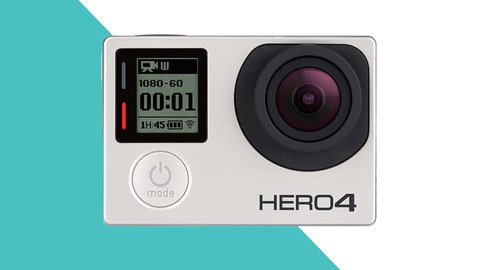
Updated again with 4 stars (from 3): Price tag has been altered. Original review: This is a GOOD course but you will not learn much (anything) that is not also described in the manual. However, Phil and his brother are doing a great job at explaining everything to you in a way that is both interesting and entertaining. The course provides all you need to know and will give you a very fist, nice overview on how the camera works. You will be able to use it right away when you get your hands on one! However, some stuff that could be improved in my opinion: Resolutions: For me it was a real eye opener to hear that different resolutions work better in different situations. Up until now I always thought higher/more is better! This course made me try things out by myself and ended up making me a better filmmaker with the GoPro camera. Thanks for that! I wished the course spent a little more time on this topic because I believe it to be quite essential to the camera. Menu Browsing Section: This is outdated. The menus look different on my Hero 4 Black. I also seem to have more options than what's explained in the course (It's a bit misleading putting a Hero 4 on the course image and then using a Hero 3 to explain the functions of the camera.
By Caroline Carlson on 8/27/2017
Really need updated instruction on Hero 5 model. This is what I found, course info indicated Hero 4, but videos are of Hero 3, which is even older than my camera. Good instruction on how to use all the settings for the camera. I did not give a rating of 5 because I don't use GoPro Studio (I use Premiere Pro CC), so I did not need 1/3 or so of the course. I may yet go back and look at using it for the future however, as you do provide a thorough instruction style. Thank you!
By Frank Perry on 11/15/2016
I bought a GoPro a year ago and have never used it because I didn't know how to, even the accessories were confusing and not to mention how do I edit any movies I make. The course has given me the knowledge to go for it and use it and I now can't wait to get out there and try using the knowledge gained from the great course.
By John Moore on 3/3/2016
this is a great course I have had my Gopro 3 for a few years now and have not come close to understanding and using it. The instruction on the basics are well done and using the GoPro editing will help me with that also. I plan to review this course multiple times Thanks. What is the next course?
By Alvin Mierau on 2/27/2016
As a former instructor of film and digital photography for many years (not video) I was immediately impressed with the high quality of the lectures as presented in this course material. The knowledge gained from this course got me through several difficult sections I had with the GoPro Studio 2.5 manual. I highly recommend this course for new comers to the GoPro world.
 Quality Score
No CourseDuck member has rated this course yet. Taken it? Give each part a thumbs up or down.
Overall Score : 74 / 100
- Video Duration:
 1.4h
1.4h - Price: $34.99
- Provider: Udemy
- Updated:
 February 2021
 - Level:
 Beginner
 - Language:
 English
 - Certificate:
 Yes
Yes
30-day money-back guarantee on most paid courses
Udemy Coupon Price Tracker
