
 Web Development
 Data Science
 Python
 SQL
SQL JavaScript
 Artificial Intelligence
 IT & Software
 IT Certifications
 Hacking
 AWS
AWS Arduino
 DevOps
 3D Modeling
 Graphic Design
 Photoshop
 Drawing
 Digital Painting
 UX Design
 Business
 Data Analysis
 Communication Skills
 Project Management
 Leadership & Management
 Human Resources
 Digital Marketing
 Social Media Marketing
 Marketing
 SEO
SEO Google Analytics
 Branding
 Excel
Excel Office Productivity
 SAP
SAP PowerPoint
 Microsoft Access
 SharePoint
 Finance & Accounting
 Trading & Investing
 Accounting
 Bitcoin
 Personal Finance
 Video Editing & Animation
 Photography
 Adobe Premier Pro
 Adobe Lightroom
 Personal Development
 Productivity
 Career Development
 Life Coaching
 Health & Fitness
 Meditation & Mindfulness
 Yoga
Yoga Music
Music Music Production
 Guitar
 Piano
Piano Singing
 Language Learning
 Teaching & Academics
 Engineering
 Math
Math Lifestyle
Hard Surface Character Sculpting in ZBrush (Udemy.com)
Learn to create robots like hard surface design character with Zbrush and Keyshot.
Created by: Nexttut Education Pvt.Ltd.
Last updated December 2019
Our take
Based on the ratings of 181 students, a sample of their written reviews and the syllabus, as the course stood in December 2019. No course pays to be reviewed.
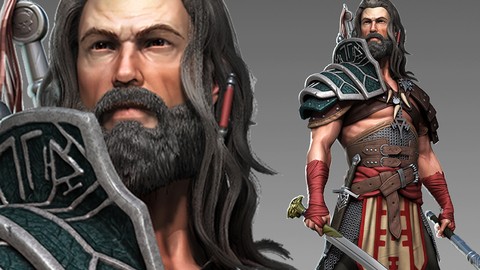
This is a single-project course. Richie Jon Mason, publishing through Nexttut Education, builds one sci-fi robot character in ZBrush in real time. He reshapes a base mesh, blocks out panels, adds under armor and fabric joints, then outer armor and weapons, before a pose, a Keyshot render and a Photoshop composite. It runs 7.7 hours over 42 lectures, and 33 of those lectures, about 6.5 hours, are the sculpt itself. The stated level is intermediate, and the requirements list ZBrush basics.
Reviewers like the workflow. One says it gave them a repeatable process for hard surface work, and another who started with only the basics says they made a mech in a week. Of 181 ratings, 165 are four or five stars. The complaints are just as consistent. The audio level jumps around, and some students had to push their system volume to the maximum. One two-star reviewer found the delivery too fast, with unclear speech and little explanation of why each button gets pressed. Another called it very repetitive.
The course was last updated in December 2019, though reviewers as late as 2023 still call it worth the money. It is narrower than a general ZBrush class: a project to follow rather than a tool-by-tool lesson. Recommended for people who learn by copying a full build and can put up with rough sound. Anyone who needs ZBrush explained from scratch should start elsewhere.
Pros
- One full robot built start to finish, from base mesh to Keyshot render and Photoshop composite
- Real-time, step-by-step sculpting with no speed-ups, so the process is easy to repeat
- Reviewers say it makes ZBrush hard surface work feel intuitive, even coming from Maya
- 165 of 181 ratings are four or five stars
Cons
- Audio volume fluctuates and is quiet at times, the most common complaint in the low-star reviews
- Fast, repetitive delivery that often says which button to press without explaining why
- Last updated December 2019, and it assumes you already know ZBrush basics
Exactly what I was looking for. I know how to navigate the software but struggled on how to use it. This for the first time introduced an actual workflow that is easy to repeat and makes very simple sense.
Intermediate in name. It expects ZBrush basics, though one reviewer with only the basics says they built a mech in a week.
 What you will learn
- Hard surface character sculpting methods
- Posing Characters
- Rendering with Keyshot
Course content
6 sections · 42 lectures · 7.7 hours of video 1 article
- 1Introduction 2 free previews3 lectures · 7 min
- 2Sculpting the Character 1 free preview33 lectures · 6.5 hours
- 3Posing the Character1 lecture · 14 min
- 4Keyshot Rendering3 lectures · 37 min
- 5Composition in Photoshop1 lecture · 17 min
- 6Conclusion & Wrap up1 lecture · 1 min
Who it is for
The instructor says it suits
- Intermediate Zbrush users who wants to improve their hard surface character sculpting skill and create awesome looking robots or scifi characters.
What you need before you start
- Zbrush Basics
How it compares
Against the other 545 rated Udemy courses in 3D Modeling on CourseDuck:
- Rating4.6 out of 5higher than 56% of them
- Reviews181#340 of 546 by number of reviews
- Length7.7 hourslonger than 57% of them
- Last updatedDecember 2019earlier than 77% of them
 Course Description
Do you want to improve your hard surface character sculpting skill and create awesome looking robots or scifi characters ?
Well if so this course is definitely for you !
Welcome to Nexttut educations hard surface character sculpting in Zbrush course .
INSTRUCTOR : My name is Richie Jon mason . I am a self taught 3D artist in the past I have worked for 3D artist and 3D world magazine, Nissan. I was also a 3D artist at Guerilla games . Currently working on 3D print and game design with Dragonpunk
GOAL OF THE COURSE : At the end of the course , you will be able sculpt hard surface characters using zbrush and keyshot with confidence, you will be able to create a hard surface character from scratch and use the techniques to go on and create your own models !
YOU WILL LEARN :
Taking an existing Zbrush mesh and editing it to suit our needs
Sculpt overall shape of our character
Adding under Armor
Working with fabrics for joints
Creating outer Armor
Using transpose to change overall shape
Posing The character
Getting it ready to send to Keyshot
And rendering in keyshot then bringing the files into Photoshop
First we will look through Zbrush for a base mesh to work on then we will roughly sculpt out the panel placements . We’ll go over each piece individually creating Armor and fabrics, once we’re happy with that we’ll move over and start creating the weapons and then before moving to keyshot we will go though the model and prepare it ready for keyshot .
Once we have it into keyshot we will start adding materials and find the best render settings then move the images into Photoshop for our final composite image
IDEAL STUDENTS : I made this course for intermediate Zbrush users but any one can download zbrush and keyshot and just start creating with only what Zbrush comes with. All default settings all real time no speed ups no skipping . Completely step by step.
So enrol now and start creating Hard surface character model today.

 Udemy Discount
The discount is applied through our link. Open the course from here and Udemy's current promotional price is applied at checkout on most courses, no code to type.
Some courses are excluded from Udemy's promotions. If the price does not drop, clear your browser cookies and use the button again.
Instructor Details

- 4.6 Rating
 181 Reviews
Nexttut Education Pvt.Ltd.
Welcome to Nexttut Education, Myself Nalini Kanta Jena, I am the founder and director of Nexttut Education. I have been teaching and working in the game industry since 2008.
I have been teaching here on Udemy since 2017 and have created few bestseller courses. student seems to love my work and I love them as well. Everything was fine but except one problem and that is student's growing demand to create various courses for them. I realize that I can never fulfill such massive number of request to create different courses so that is when Nexttut Education took it's shape.
We only create courses with highly talented professionals who has at least 5+ years off experience working in the film and game industry.
The single goal of Nexttut Education is to help students to become a production ready artist and get jobs wherever they want. We are committed to create high quality professional courses for 3d students. If you are a student learning from any local institution or a 3d artist who has just started working in the industry or an artist who has some years of experience, you have come to the right place.
We love you and your feedback. Please give us feedback on how we can make better courses for you and how we can help you in any ways.
thank you for reading :)
Regards,
Director
Nalini kanta jena
 More courses by Nexttut Education Pvt.Ltd.
More 3D Modeling courses

3D Printing with " Ultimaker CURA Slicer- Start to finish" (2025)
4.9 (192 Reviews)
 Provider: Udemy
 Time: 1h
$34.99

Girl and the Dog Creation in Zbrush for Intermediate Level (2020)
4.9 (173 Reviews)
- Provider: Udemy
- Time: 48.8h
$59.99



Blender Character Creator for Video Games (2026)
4.8 (9,160 Reviews)
- Provider: Udemy
- Time: 34.3h
$159.99

Master SOLIDWORKS 3D CAD using real-world examples (2022)
4.8 (2,451 Reviews)
- Provider: Udemy
- Time: 18.9h
$69.99
 Reviews

By G prachini on 8/2/2023
The other reviews aren't lying. This is 100% worth the money and if I'm being honest, its worth more. I love you.
By Corey Knapp on 4/7/2023
Exactly what I was looking for. I know how to navigate the software but struggled on how to use it. This for the first time introduced an actual workflow that is easy to repeat and makes very simple sense. 10/10.
By Sarthak Kapade on 1/31/2023
This gives me a new perspective of using Zbrush especially with hard surface models...one of the best hard surface stuff for zbrush on the internet
By Hakan M on 1/4/2022
A great training set. You can model very difficult-looking 3D models very easily with the new techniques you will learn. I really liked it... I think you should not miss this training set.
By Pravin Roberts on 10/13/2021
Overall I enjoyed the course, but very very repetitive. It does help in getting quite thorough with the process. However, the instructor could have included a few more tricks, especially setting up custom menus and actions to make the repetitive bit go faster. Also audio was not the best at times and I had to crank up my system volume to max.
By Ionut Luchian on 8/16/2021
I went in knowing almost nothing about ZBrush. Only the basics really. Now I made a mech in 1 week. That's more than I expected from the course honestly.
By Jason S on 2/22/2021
Extremely inconsistent sound issues and recording. Made it very hard to understand at times without setting volume to maximum, and even then I still had trouble.
By Alfonso Romero on 8/7/2020
Great Course, Learned a lot about how to overcome my apprehensiveness to try Hard Surface Sculpting. I'd recommend this course to anyone, Cheers!
By Vijay Babu on 8/4/2020
I say this is the best hard surface course out there. I used to hate doing hard surface models but this course totally changed my perspective,
By Ron R on 8/3/2020
Richie takes a simple and straight forward technique to show Hard surface modeling with the available tools in Zbrush. I did learn a few tips and techniques from this tutorial. I highly recommend this tutorial.
 Quality Score
No CourseDuck member has rated this course yet. Taken it? Give each part a thumbs up or down.
Overall Score : 92 / 100

- Video Duration:
 7.7h
7.7h - Price: $10.99
- Provider: Udemy
- Updated:
 December 2019
 - Level:
 Intermediate
 - Language:
 English
 - Certificate:
 Yes
Yes - Lectures:42 in 6 sections
- Students:1,627
- Subtitles:1 language
30-day money-back guarantee on most paid courses
Udemy Coupon Price Tracker
