
 Web Development
 Data Science
 Python
 SQL
SQL JavaScript
 Artificial Intelligence
 IT & Software
 IT Certifications
 Hacking
 AWS
AWS Arduino
 DevOps
 3D Modeling
 Graphic Design
 Photoshop
 Drawing
 Digital Painting
 UX Design
 Business
 Data Analysis
 Communication Skills
 Project Management
 Leadership & Management
 Human Resources
 Digital Marketing
 Social Media Marketing
 Marketing
 SEO
SEO Google Analytics
 Branding
 Excel
Excel Office Productivity
 SAP
SAP PowerPoint
 Microsoft Access
 SharePoint
 Finance & Accounting
 Trading & Investing
 Accounting
 Bitcoin
 Personal Finance
 Video Editing & Animation
 Photography
 Adobe Premier Pro
 Adobe Lightroom
 Personal Development
 Productivity
 Career Development
 Life Coaching
 Health & Fitness
 Meditation & Mindfulness
 Yoga
Yoga Music
Music Music Production
 Guitar
 Piano
Piano Singing
 Language Learning
 Teaching & Academics
 Engineering
 Math
Math Lifestyle
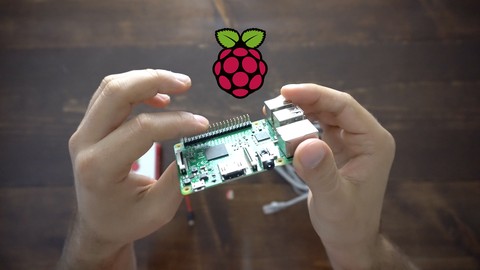
Homebaked | Raspberry Pi + Django Home Server (Udemy.com)
Build a Home / Local Networked Server with a Django-powered Web application to create a local-network-only app.
Created by: Justin Mitchel
Last updated November 2016
Our take
Based on the ratings of 363 students, a sample of their written reviews and the syllabus, as the course stood in November 2016. No course pays to be reviewed.
Justin Mitchel's course is a 4.2 hour walkthrough of setting up a Raspberry Pi 3, installing Raspbian Jessie, reaching it over SSH, configuring Apache2 with mod_wsgi, and deploying a Django 1.10 project to it. Most of the time goes to one build, a time clock app, which takes 155 of the 253 minutes. The pitch talks about home automation, but the syllabus shows no sensors, relays or wiring. It is a local web server project, and it expects Python and some Django already.
Students who rate it highly say the presentation is clear and the instructor knows the material. Of 363 reviews, 170 are five stars and 105 are four. The recurring complaint is speed. Reviewers say he moves through commands quickly with little explanation, which beginners find hard to follow, and one wanted direct links. Some of the low ratings come from people who expected electronics. One asked where the automation part was. Another found the Django side too thin to teach Django and the Pi side no better than the Pi getting started guide.
The material was last updated in November 2016, so Django 1.10, Jessie and the Pi 3 are all old. The description says the ideas carry over to newer versions, but expect to check commands against current docs. With 43,622 students and a 3.9 rating, it is a decent short pick if you want a Django deployment exercise on a Pi. Skip it if you want hardware control or a first lesson in Django.
Pros
- Short at 4.2 hours, with most of it spent on one hands-on Django project
- Covers the whole path: install the OS, SSH in, set up Apache2 with mod_wsgi, deploy Django
- Reviewers call the instructor knowledgeable and the presentation clear
- When context is given, it is explained very well, says one reviewer
Cons
- Last updated in 2016, built on Django 1.10 and Raspbian Jessie
- Fast pace with little explanation, which trips up beginners
- No electronics or real home automation despite the pitch
A great course for sure, The instructor is very knowledgeable and the instructions are clear.
Labeled All Levels, but reviewers say it needs Python, some Django and basic Linux command line first.
 What you will learn
- Local Networked Server using Raspberry Pi 3 Model B
- Django-powered web application
- Setup Apache2 on a Linux system (useful for other Linux systems)
- Create a Home Automation Hub with a Raspberry Pi and Python
- Install an OS on a Raspberry Pi (OS: Raspbian Jessie; a Linux Debian distro for Pi)
Course content
7 sections · 36 lectures · 4.2 hours of video
- 1Welcome to Homebaked 4 free previews4 lectures · 18 min
- 2OS for Raspberry Pi 2 free previews3 lectures · 10 min
- 3Raspberry Pi - SSH, IP, Updates, and Installations3 lectures · 15 min
- 4Setup Apache 2 & Basic Django Project3 lectures · 27 min
- 5Django Pi Time (Django Project) 4 free previews18 lectures · 2.6 hours
- 6Django Project to Raspberry PI4 lectures · 28 min
- 7Thank you1 lecture · 1 min
Who it is for
The instructor says it suits
- Anyone interested in Home Automation + Internet of Things (iot)
- Entrepreneurs
- Python/Django Users
- Beginners to Advanced Technical Users (we do it all step-by-step)
What you need before you start
- Basic Python
- Basic Django (see first Django Video)
- Need access to a Home/Local Network (firewalls could cause issues)
- Recommended Equipment (see video)
How it compares
Against the other 295 rated Udemy courses in Arduino on CourseDuck:
- Rating3.9 out of 5higher than 5% of them
- Reviews363#87 of 296 by number of reviews
- Length4.2 hoursshorter than 57% of them
- Last updatedNovember 2016earlier than 97% of them
 Course Description
We're on the cusp of controlling every item within our house using code, the internet, and a small computer. Microcontrollers are inexpensive computers (like $35 inexpensive) that can be hacked on to create your very own web application for your local network.
This is huge. Let's not understate this in any measure. You, yes you, can write some basic code and control every electronic piece in your house? That's pretty awesome.
Now, we're still a little ways away before every electronic item is connected to the Internet but once it is, you'll be able to use what you learned here to control these items at will.
The technology we use is:
- Raspberry Pi 3 Model B
- Django 1.10
- Python 3
- Apache2 & mod_wsgi (for the Web Server)
What we do in this course can likely be used with different versions of Django and to any new versions of Raspberry Pi that may come out so keep that in mind too.
Let's do this!

 Udemy Discount
The discount is applied through our link. Open the course from here and Udemy's current promotional price is applied at checkout on most courses, no code to type.
Some courses are excluded from Udemy's promotions. If the price does not drop, clear your browser cookies and use the button again.
Instructor Details

- 3.9 Rating
 363 Reviews
Justin Mitchel
It all started with an idea. I wanted freedom... badly. Freedom from work, freedom from boredom, and, most of all, the freedom to choose. This simple idea grew to define me; it made me become an entrepreneur.
As I strived to gain freedom, overtime I realized that with everything that you do you can either (1) convince someone, somehow, to do it with you or (2) figure out how to do it yourself.
Due to a lack of financial resources (and probably the ability to convince people to do high quality work for free), I decided to learn. Then learn some more. Then some more. My path of learning website design started a long time ago. And yes, it was out of need not desire. I believed I needed a website for a company that I started. So I learned how to do it. The company died, my skills lived on... and got better and better.
It took me a while after learning web design (html/css) to actually start learning programming (web application, storing "data", user logins, etc). I tinkered with Wordpress, believing it could be a "user" site, but I was mistaken. Sure there are/were hacks for that, but they were hacks/work-arounds and simply not-what-wordpress-was-indended-to-be. Wordpress is for blogs/content. Plain and simple.
 More courses by Justin Mitchel

30 Days of Python | Unlock your Python Potential (2016)
4.3 (7,508 Reviews)
 Provider: Udemy
 Time: 9.4h
$16.99

Python eCommerce | Build a Django eCommerce Web Application (2017)
4.3 (3,072 Reviews)
- Provider: Udemy
- Time: 33.1h
$11.99
Try Django 2.2 - Web Development with Python 3.6+ (2019)
4.4 (2,586 Reviews)
- Provider: Udemy
- Time: 4.3h
Free
Try Django 1.11 // Python Web Development (2017)
4.5 (1,897 Reviews)
- Provider: Udemy
- Time: 8.1h
Free
Try Django 1.9 | Build a Blog and Learn Python's #1 Library (2016)
4.3 (1,784 Reviews)
- Provider: Udemy
- Time: 20.1h
Free
More Arduino courses


Learn to Build a Computer (PC) in 2026 - all types!
4.9 (245 Reviews)
- Provider: Udemy
- Time: 6.1h
$74.99

Raspberry Pi For Beginners - 2026 Complete Course
4.8 (3,105 Reviews)
- Provider: Udemy
- Time: 10.6h
$89.99

Ultimate Guide to Raspberry Pi : Tips, Tricks and Hacks (2023)
4.8 (2,363 Reviews)
- Provider: Udemy
- Time: 5.2h
$69.99

Mastering Microcontroller: STM32-LTDC, LCD-TFT, LVGL (MCU3) (2026)
4.8 (487 Reviews)
- Provider: Udemy
- Time: 8.1h
$79.99

Arduino Step by Step: Getting Started (2024)
4.7 (8,714 Reviews)
- Provider: Udemy
- Time: 21.4h
$159.99
 Reviews

By Christopher Toney on 4/1/2020
I like how detailed the videos are, but would be nice to have some direct links. Starting off was good, but he moves though a lot of commands really fast, while they're not difficult to execute. It is difficult to keep up, cause he's moving so fast.
By Marcel Marx on 2/27/2019
Ich bin da eher ein schlechtes Beispiel, weil ich Systemnadministrator bin und schon ein gewisses Vorwissen besitze. Ich würde nicht soviel theoretisch erzählen, sondern kurz erklären und dann ran an die Praxis
By Anonymized User on 2/24/2019
Danke für dieses sehr Qualitative Video, ich befasse mich seit neusten Stärker mit Server, momentan habe ich ein Debian9 Server und würd gerne eine Raspberry Pi erlernen. Durch das Video habe ich noch mehr lust dadrauf bekommen.
By Ronie Paulucio Porfirio on 1/7/2019
Where is the electronic part? The course promisses automation, but it only covers the django/raspberry pi instalation and finishes without the real automation stuff. It doesn't even give us a link to the continuation course part.
By Angelo J. Gero on 1/6/2019
A background in Python and some previous exposure to Django is recommended. Since the instructor uses the command line, some exposure to command line Linux is also recommended. Overall a good course.
By Anand Prabhakar on 10/1/2018
I loved this course very much...the content i wanted to learn is all i got to learn in this course .....very very good course&instructor is very experienced... Thank you sir..
By Souriya Phompida on 6/7/2017
The course is more focus on Django, and so little on Respi. The Django sample project is quite fun to work with but it cannot be used to teach you Django as it is not deep enough and at the same time not provide Django fundamental, it assume you already know Django fundamentals. If you come here to learn about respi, then there is just little for you, you will only learn how to install respi, get it connect to network and remote to it, and all of that can be found in respi geting start guide. If you are here for Django, you will only get one hand-on small project. If you are new to Django, this is not for you as it does not include Django fundamentals (instructor does point you to where you can get the Django fundamental knowledge of Django), if you are experience Django, the sample also not serve you as it is just small and rather simple. As for me, I am mainly here for Respi, so the content present in this course is considered light for me. Somehow, the instructor is very good and qualify (I have multiple courses of his). I just complain about the content of the course not the quality of the instructor.
By Uzan on 12/1/2016
Je suis satisfait de ce cours , bien que j'aurais préferé des sous-titres Français mais bon l'anglais de cet "Enseignant" est tres bon donc j'ai globalement compris son cours autre chose certaine manipulation technique je pense aurait merité qu'on s'y arrete pour les effectuer
By Mike Neumann on 11/22/2016
Pros: You will come away with the sense that you can set up a very cheap server to practice real-world deployment challenges, or at least get a good start on addressing those challenges. I like Justin's teaching style - all by example with just enough references to come back to later. Cons: Justin is a challenge to keep up with; he clearly has tons of experience with django and his tools. My only criticism is that quite often I find myself rewinding videos just to see what he typed before he switched screens.
By Andres Vicente on 11/7/2016
this is an excellent course. The instructor is very optimistic and he cares about the students.the video has a good quality. I am so proud of this one because it will expand my knowledge.
 Quality Score
No CourseDuck member has rated this course yet. Taken it? Give each part a thumbs up or down.
Overall Score : 78 / 100
- Video Duration:
 4.2h
4.2h - Price: $49.99
- Provider: Udemy
- Updated:
 November 2016
 - Level:
 All Levels
 - Language:
 English
 - Certificate:
 Yes
Yes - Lectures:36 in 7 sections
- Students:43,600
- Subtitles:1 language
30-day money-back guarantee on most paid courses
Udemy Coupon Price Tracker
