
 Web Development
 Data Science
 Python
 SQL
SQL JavaScript
 Artificial Intelligence
 IT & Software
 IT Certifications
 Hacking
 AWS
AWS Arduino
 DevOps
 3D Modeling
 Graphic Design
 Photoshop
 Drawing
 Digital Painting
 UX Design
 Business
 Data Analysis
 Communication Skills
 Project Management
 Leadership & Management
 Human Resources
 Digital Marketing
 Social Media Marketing
 Marketing
 SEO
SEO Google Analytics
 Branding
 Excel
Excel Office Productivity
 SAP
SAP PowerPoint
 Microsoft Access
 SharePoint
 Finance & Accounting
 Trading & Investing
 Accounting
 Bitcoin
 Personal Finance
 Video Editing & Animation
 Photography
 Adobe Premier Pro
 Adobe Lightroom
 Personal Development
 Productivity
 Career Development
 Life Coaching
 Health & Fitness
 Meditation & Mindfulness
 Yoga
Yoga Music
Music Music Production
 Guitar
 Piano
Piano Singing
 Language Learning
 Teaching & Academics
 Engineering
 Math
Math Lifestyle
Introduction To 3d Modelling in Plasticity (Udemy.com)
Create awesome looking 3d product models in Plasticity.
Created by: Nexttut Education Pvt.Ltd.
Last updated June 2024
 What you will learn
- Surface modeling and solid modeling methods
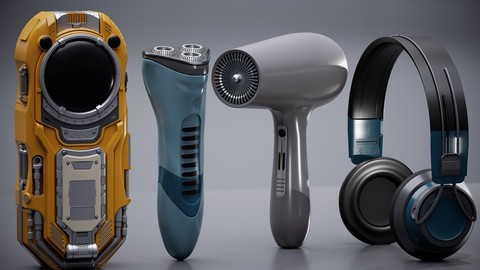
- Modelling a Headphone
- Modelling a Hair Dryer
- Modelling a Shaver
How it compares
Against the other 545 rated Udemy courses in 3D Modeling on CourseDuck:
- Rating4.1 out of 5higher than 5% of them
- Reviews109#436 of 546 by number of reviews
- Length19.7 hourslonger than 86% of them
- Last updatedJune 2024more recently than 69% of them
 Course Description
Do you want to learn this awesome CAD software called Plasticity ?
Then I welcome you to “ Introduction To Plasticity” course.
About Me:
My name is Arash Aref and I have been teaching 3d for some time. I love making 3d environments, with focus on 3d Real-time Game Environments. I also love creating props and lighting the environments.
By the End Of This Course, You Will Be Able To:
You'll be able to use Plasticity to create 3d models.
You will learn some techniques on Solid Modeling and Surface Modeling.
You will be able to create different objects in plasticity.
What You Will Learn:
Intro to the software
How to use the software
Learn techniques on both surface modeling and solid modeling
Tangency and surface continuity
G0 G1 G2 G3
Course Project Overview:
We will start with the software itself, learning how to customize the UI based on your preferences. After getting familiar with the software itself, we lean basic techniques to create simple objects and then gradually increase the difficulty and create more complex objects as we go forward. We discuss Solid Modeling and create a Sci-Fi Communication Device using the technique, and review what we learned in the intro chapter. In the Surface Modeling chapter, we focus more on creating curved objects that are difficult to create with Solid Modeling. We create a Headphone, Shaver, And a Hair Dryer to practice the Surface Modeling. We cover concepts like Tangency and Continuity to improve our final result.
Who is This Course For?
This course is good for those who want to learn a CAD based software.
Who is Not The Ideal Student For This Course?
Basically, everybody who wants to learn CAD modelling can use this.
What Are The Requirements Or Prerequisites For Taking This Course?
Having a basic 3d Knowledge will help.
Join Me Now:
So if you want to learn CAD modeling, then join me now, and take your skills to the next level. Don't forget that investing in yourself will pay for the rest of your life. Hope to see you in the course.

 Udemy Discount
The discount is applied through our link. Open the course from here and Udemy's current promotional price is applied at checkout on most courses, no code to type.
Some courses are excluded from Udemy's promotions. If the price does not drop, clear your browser cookies and use the button again.
Instructor Details

- 4.1 Rating
 109 Reviews
Nexttut Education Pvt.Ltd.
Welcome to Nexttut Education, Myself Nalini Kanta Jena, I am the founder and director of Nexttut Education. I have been teaching and working in the game industry since 2008.
I have been teaching here on Udemy since 2017 and have created few bestseller courses. student seems to love my work and I love them as well. Everything was fine but except one problem and that is student's growing demand to create various courses for them. I realize that I can never fulfill such massive number of request to create different courses so that is when Nexttut Education took it's shape.
We only create courses with highly talented professionals who has at least 5+ years off experience working in the film and game industry.
The single goal of Nexttut Education is to help students to become a production ready artist and get jobs wherever they want. We are committed to create high quality professional courses for 3d students. If you are a student learning from any local institution or a 3d artist who has just started working in the industry or an artist who has some years of experience, you have come to the right place.
We love you and your feedback. Please give us feedback on how we can make better courses for you and how we can help you in any ways.
thank you for reading :)
Regards,
Director
Nalini kanta jena
 More courses by Nexttut Education Pvt.Ltd.


More 3D Modeling courses

3D Printing with " Ultimaker CURA Slicer- Start to finish" (2025)
4.9 (192 Reviews)
 Provider: Udemy
 Time: 1h
$34.99

Girl and the Dog Creation in Zbrush for Intermediate Level (2020)
4.9 (173 Reviews)
- Provider: Udemy
- Time: 48.8h
$59.99



Blender Character Creator for Video Games (2026)
4.8 (9,160 Reviews)
- Provider: Udemy
- Time: 34.3h
$159.99

Master SOLIDWORKS 3D CAD using real-world examples (2022)
4.8 (2,451 Reviews)
- Provider: Udemy
- Time: 18.9h
$69.99
 Reviews

By Karl Ludviksson on 8/5/2026
The presentation is clear and at the right pace and seems to cover most of the things I am after. I am sure that I shall get there in the end if I practice and then re-watch those topics of the course about which I am still unsure.
By Thad Broom, AIA Emeritus on 4/28/2026
Instructor very clear. Less mouse movement while talking would be appreciated.
By Matthew D Toniolo on 2/9/2026
I am loving the course. Clear explanations, right to the point. Tutorial covers all of the basics, then progresses to much more complicated non-trivial examples. I feel like I'll be able to construct pretty much any hard surface prop that I need with this software after mastering the instructor's techniques. The course is a little dated (uses earlier version of the software, and I am currently on v2025.3), but has not been a problem. I printed out the keyboard shortcut cheat sheet from the Plasticity website. Helps to have that handy while learning.
By Udemy User on 5/20/2025
In this lesson, I think the instructor made it hard to follow by not hiding all the other elements that have been created in previous lessons.
By Chad Thurlow on 5/9/2025
Moves too fast and relies on keyboard commands for windows too much. Plasticity runs on different platforms, please keep that in mind.
By Greg Peart on 1/31/2025
This is exactly the course I needed for Plasticity, it is very comprehensive and very well taught. I was finding Plasticity quite different to Blender, so I got this course and I am feeling very confident and my modelling is improving greatly, and using Plasticity Bridge to live view and export to Blender is just so good. Thank you!
By Mike Dodds on 12/21/2024
There are continual errors that have not been edited out. This makes it very difficult to follow along, and also is making learning the correct techniques challenging because of being shown the wrong way over and over. I'd got frustrated to the point of requesting a refund, but Udemy believe I've viewed too much of the course. I'm on the 6th video...
By Tolga Serdar Erdem on 10/25/2024
I'm currently in my 6th lesson, everything is going well, there is no part I don't understand, I definitely feel like I'm learning. The teacher makes many mistakes while explaining, but I think this is better. Because it makes the course more friendly. Even if the teacher makes a mistake, he explains it very well and shows it in detail. I think you can definitely get results if you do all the exercises along with the course. I will update my review when I finish the course.
By Kj Moore on 8/24/2024
this has been overall the best course I have seen for this program. Plus it at a good beginner speed.
By Gustavo dutra on 8/20/2024
You definitely learn something here. however. It most definitely could be better. He does mistakes a lot and leaves some bad practices along the way. You need to know what to learn here.
 Quality Score
No CourseDuck member has rated this course yet. Taken it? Give each part a thumbs up or down.
Overall Score : 82 / 100
- Video Duration:
 19.7h
19.7h - Price: See price on Udemy
- Provider: Udemy
- Updated:
 June 2024
 - Level:
 Beginner
 - Language:
 English
 - Certificate:
 Yes
Yes
30-day money-back guarantee on most paid courses
Udemy Coupon Price Tracker
