
 Web Development
 Data Science
 Python
 SQL
SQL JavaScript
 Artificial Intelligence
 IT & Software
 IT Certifications
 Hacking
 AWS
AWS Arduino
 DevOps
 3D Modeling
 Graphic Design
 Photoshop
 Drawing
 Digital Painting
 UX Design
 Business
 Data Analysis
 Communication Skills
 Project Management
 Leadership & Management
 Human Resources
 Digital Marketing
 Social Media Marketing
 Marketing
 SEO
SEO Google Analytics
 Branding
 Excel
Excel Office Productivity
 SAP
SAP PowerPoint
 Microsoft Access
 SharePoint
 Finance & Accounting
 Trading & Investing
 Accounting
 Bitcoin
 Personal Finance
 Video Editing & Animation
 Photography
 Adobe Premier Pro
 Adobe Lightroom
 Personal Development
 Productivity
 Career Development
 Life Coaching
 Health & Fitness
 Meditation & Mindfulness
 Yoga
Yoga Music
Music Music Production
 Guitar
 Piano
Piano Singing
 Language Learning
 Teaching & Academics
 Engineering
 Math
Math Lifestyle
Learn How to Make Trading Card Game Menus With Unity 3D (Udemy.com)
A full guide on menus and collection management in trading card games with Unity 3D.
Created by: Sandor Kiss
Last updated December 2019
 What you will learn
- Create beautiful custom cards and creatures for your game.
- Show enlarged previews when you are hovering over a card or a creature.
- Enable card rotation and design a custom card back.
- Highlight cards that your players can play and creatures that can attack this turn with glows around their border.
- 2 different ways to drag cards in trading card games: just dragging cards onto the battlefield area to play them, or dragging onto a specific target to cast spell or attack with creatures.
- Show targeting gizmo with an arrow and a target icon when attacking with creatures or casting spells.
- Create adaptive layouts for your player`s hand and table areas. We are not using pre-determined places for cards. All the creatures and cards will always remain centered.
- Make a Hearthsone-styled mana pool with 10 mana crystals. Players start the game with 0 mana and in the start of each turn they will receive 1 mana crystal.
How it compares
Against the other 183 rated Udemy courses in Unity on CourseDuck:
- Rating3.9 out of 5higher than 2% of them
- Reviews159#128 of 184 by number of reviews
- Length7.5 hoursshorter than 61% of them
- Last updatedDecember 2019earlier than 69% of them
 Course Description
This course provides a full guide on trading card game menus. In the video Lectures we cover only the process of making menus, collection browsing, deck building, pack opening, etc… But the battle mechanics part is also included into the Unity project that is provided with the course. So, you`ll have an opportunity to play the game with the cards that you create yourself or even use this application as a foundation for your own trading card game.
The material in this course is divided into 5 Sections. Section 1 features a short introduction to the course.
Since the Unity project that we are developing in this course can be treated as an extension of the course that we have made earlier about card game battle mechanics, in Section 2 we will make a recap of the techniques that we use in both courses to store cards in the project. You will learn about ScriptableObjects and ScriptableObject assets and how you can use them to store cards in your project. We`ll take a look at a very useful script CardCollection.cs that will be used in the project to filter the cards in our collection and get certain sub-sets of cards that satisfy certain criteria. In the last Lecture of Section 2 we`ll do some UI work in Unity and assemble the general layout of our menu scene.
Section 3 will be entirely dedicated to buying and opening booster packs with cards. It makes sense to make the card pack opening part early in the course because it`s both the most exciting part of the project and at the same time the most isolated from other code. We`ll create a separate screen for the shop / pack opening area and explore all the scripts that make it possible to buy and open card packs. We`ll cover advanced topics like: drag and drop code for the unopened packs, using DOTween to automate movement of unopened packs and cards that we get from packs, displaying hover over effects, generating cards of certain rarity based on customizable probability coefficients. By the end of this Section we`ll have a fully functioning pack opening screen for this project.
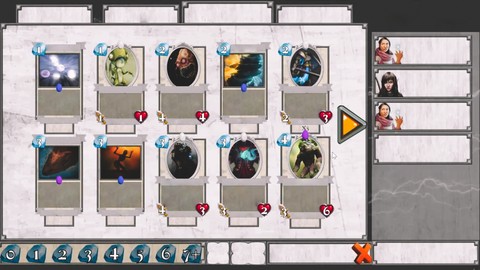
In Section 4 we will start making the collection screen – the most complicated screen in the menus for any trading card game. Our goal for this Section is to be able to launch the game and see the cards laid out in a grid on the collection screen, be able to use pagination buttons and switch pages in the collection, be able to use all the custom filters (mana, keyword, belonging to one of the character classes) to filter the card collection and display certain sub-sets of our collection.
In the final section of this course we will continue exploring our collection screen and cover more advanced objects that are featured on the screen: crafting screen that allows us to craft new cards for one of the in-game currencies, scrollable lists with deck icons and card icons that will be displayed on the side of our deck building screen. We will discuss the topic of transferring data between the scenes and being able to use the deck that your players have pre-configured in the battle scene. In the final lecture of the course I`ll demonstrate how you can set up a game against a simple AI opponent. We saved the project a couple of times while we were making the course and you`ll have these saved projects available for download. I would recommend to download the final project first, check out how it works and start your exploration of this app from the final version. All the art assets that are used to create cards, creatures, hero powers and other game elements are free for commercial use. You can find detailed info on art and scripting assets and links to some other useful resources in the Credits file that you can download with this course (included in the root of the Assets folder in any of the saved projects).

 Udemy Discount
The discount is applied through our link. Open the course from here and Udemy's current promotional price is applied at checkout on most courses, no code to type.
Some courses are excluded from Udemy's promotions. If the price does not drop, clear your browser cookies and use the button again.
Instructor Details

- 3.9 Rating
 159 Reviews
Sandor Kiss
Hi, I'm Sandor!
I am passionate entrepreneur and performance marketer with ten thousands happy students.
Let me tell you my story...
At the age of 16, I founded my first online business. After being a full-time CPA marketer for more than 5 years, I decided to shift gears and use my skills to build companies.
Ever since, I have been lucky enough to do what I love the most: entrepreneurship, travelling the world, pushing my comfort zone and discovering things that I couldn't learn in the classroom.
One year ago, I decided to take the next step and share my knowledge with those who are ready to start their own business. This decision brought me to Udemy, where I am able to combine my biggest talents: entrepreneurship, marketing and teaching.
My teaching philosophy on Udemy is simple: I am crafting trainings that I wish I had available to me when I started my first company.
My courses serve a very important goal: helping you to transform your life and becoming a successful entrepreneur and marketer.
I've seen the impact a solid business can have on someone's life. That's why I can only encourage you not to miss out on this opportunity.
As of today, I've sold more than 800,000 trainings, established multiple successful online businesses and coached hundreds of students.
 More courses by Sandor Kiss

The Complete Personal Development Course - 22 Courses in 1 (2024)
4.6 (6,505 Reviews)
 Provider: Udemy
 Time: 53.8h
$129.99

Home Business: The Complete CPA Marketing Course (2018)
4.1 (1,762 Reviews)
- Provider: Udemy
- Time: 6.2h
$10.99

Learn To Code Trading Card Game Battle System With Unity 3D (2023)
4.0 (1,309 Reviews)
- Provider: Udemy
- Time: 15.7h
$13.99

Amazon FBA: Complete Guide To Start Your Own Home Business (2019)
4.5 (998 Reviews)
- Provider: Udemy
- Time: 4.5h
$10.99

The Complete Fitness & Health Masterclass - 21 Courses in 1 (2020)
4.7 (683 Reviews)
- Provider: Udemy
- Time: 23h
$84.99

The Complete Business & Marketing Course - 23 Courses in 1 (2021)
4.3 (680 Reviews)
- Provider: Udemy
- Time: 42.6h
$14.99
More Unity courses

Learn to make an Awesome Builder-Defender game in Unity! (2021)
4.9 (1,909 Reviews)
- Provider: Udemy
- Time: 10.1h
$79.99


RPG Core Combat Creator: Learn Intermediate Unity C# Coding (2025)
4.8 (11,337 Reviews)
- Provider: Udemy
- Time: 27.6h
$149.99

Learn To Code By Making a 2D Platformer in Unity (2017)
4.8 (2,597 Reviews)
- Provider: Udemy
- Time: 13.1h
$13.99

Learn Blender 3D Modeling for Unity Video Game Development (2026)
4.8 (2,152 Reviews)
- Provider: Udemy
- Time: 11.7h
$149.99

Learn To Create A Roguelike Game In Unity (2020)
4.8 (1,234 Reviews)
- Provider: Udemy
- Time: 19.4h
$16.99
 Reviews

By Steven Halliwell on 5/7/2024
It is a good course and I have learnt alot from it. I have only given it 4 stars due to the style of the course, I would have like to done the scripting alongside the tutor to learn the scripts as I go, rather than dumping them in the project and then watching a video on what they do. However due to the complexity and length of some of the scripts, I do understand why it was this way, it would have probably taken weeks or months to complete this course. Also there is a bit of jiggery pokery you have to do if using the most up-to-date unity engine as this one has been done in an early version where TMPro was not a feature and you either have to use text or chane the scripts/links to tmp. Overall though a very good course, especially if you have created already the card previous card game and you do learn quite a bit.
By Mateus Garcia on 10/6/2019
Thanks soo much, that help me! That's my first 100% Class, i gona make my first game, and i hope is gona be good because of you, sorry if i speak wrong, i from Brasil. You are the Best! :D
By Adam Tekiela on 3/17/2019
You do not learn anything here, he is basically sharing his source code with you. you are also not starting the project from the beginning, you are downloading the project which he already finish and going through the steps with him, feels like lullaby to me. Thanks for the source code though. Surely I will need it in the future. No need to watch sessions at all.
By Zheyuanzhou DM on 12/17/2018
I will not recommend anyone buy this course. First, All codes has written and instructor only read the codes line by line. Second the version is 5.4 and the tutorial likes to copy their made in other scene so many canvas size is different not match what we want. Third, very boring teaching style only one voice read the book. Forth, never talk the connection deeply with all scripts. Very disappointed in Udemy
By ReEnergize on 9/26/2018
Very good course about making a TCG menu. Shame it's mostly an example of doing one, not the tutorial how you can do it in many different ways. 90% of those lectures are about descibing a pre-made menu, but the tutor is doing it slowly, step-by-step, showing exactly how every single object work. Worth, if you're looking for a very good course how to build menu according to professional but still scheme.
By Lloyd Bickford on 5/25/2018
This instructor has done very well on this course, and answers every question a student asks. There is not one unanswered question. I have taken some Xamarin courses, but this course meets my needs, and exceeds my expectations for what I am after that I may not go back to Xamarin. This (and his card battle course) are excellent, and I highly recommend both of the courses for anyone looking to make a card battle game.
By Leonardo Catão de Lima Rozsas on 5/10/2018
The course should have a warning that states the first course game is outdated and this should be where we start downloading the final project, i lost so much time updating what i made to the first course to fit this course A good point is that the teacher answer the questions fast enough, he help develop the project, but this course is more fit to people with more skill in c#, and it's really hard for begginers with basic knowledge of c#.
By Paul Fernandez on 4/15/2018
At first, because the instructor does not build the scripts from scratch with you, I had a mediocre opinion. However after pushing through from the end project as he recommends, I am able to make notes using // to truly understand the scripts as he explains them. I actually now find method more efficient, because I am not having to type each line of script and then make notes. Great learning method! I appreciate you explaining each line thoroughly and each part of the inspector so the user truly understands and can manipulate/alter the code afterwards.
By AngryBird on 3/17/2018
I thought the previous course was 5 stars however in this course the instructor does skip some sections and copies a lot of components from his pre-made scene. The first course was comprehensive and i enjoyed making all the components along with the instructor. Is it a good course? Yes. Would I recommend it? Yes. I think the instructor is fantastic. The instructor is very responsive and has responded to questions despite the course being produced a long time ago.
By Anna Mallia on 12/1/2017
Top tier course, probably the best I have ever taken. I am halfway through the course but very impressed about the quality of this training.
 Quality Score
No CourseDuck member has rated this course yet. Taken it? Give each part a thumbs up or down.
Overall Score : 78 / 100
- Video Duration:
 7.5h
7.5h - Price: $49.99
- Provider: Udemy
- Updated:
 December 2019
 - Level:
 All Levels
 - Language:
 English
 - Certificate:
 Yes
Yes
30-day money-back guarantee on most paid courses
Udemy Coupon Price Tracker
