
 Web Development
 Data Science
 Python
 SQL
SQL JavaScript
 Artificial Intelligence
 IT & Software
 IT Certifications
 Hacking
 AWS
AWS Arduino
 DevOps
 3D Modeling
 Graphic Design
 Photoshop
 Drawing
 Digital Painting
 UX Design
 Business
 Data Analysis
 Communication Skills
 Project Management
 Leadership & Management
 Human Resources
 Digital Marketing
 Social Media Marketing
 Marketing
 SEO
SEO Google Analytics
 Branding
 Excel
Excel Office Productivity
 SAP
SAP PowerPoint
 Microsoft Access
 SharePoint
 Finance & Accounting
 Trading & Investing
 Accounting
 Bitcoin
 Personal Finance
 Video Editing & Animation
 Photography
 Adobe Premier Pro
 Adobe Lightroom
 Personal Development
 Productivity
 Career Development
 Life Coaching
 Health & Fitness
 Meditation & Mindfulness
 Yoga
Yoga Music
Music Music Production
 Guitar
 Piano
Piano Singing
 Language Learning
 Teaching & Academics
 Engineering
 Math
Math Lifestyle
Learn the ART of ZBrush (Udemy.com)
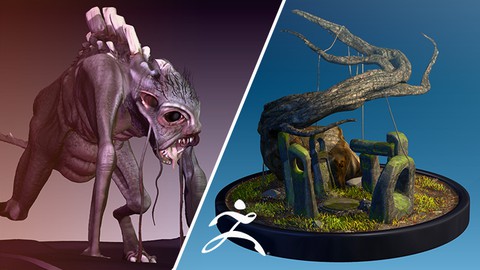
Learn to sculpt environment props, objects and creatures in ZBrush.
Created by: Kevin Oxland
Last updated February 2021
 What you will learn
- Learn to Use ZBrush in a professional capacity, with emphasis on environment objects, props and creatures.
How it compares
Against the other 545 rated Udemy courses in 3D Modeling on CourseDuck:
- Rating4.6 out of 5higher than 56% of them
- Reviews184#338 of 546 by number of reviews
- Length25.4 hourslonger than 91% of them
- Last updatedFebruary 2021earlier than 66% of them
 Course Description
Bringing ZBrush into your art pipeline is now more important than ever before. With the launch of new hardware and ever increasing rendering power and tools, like the new Unreal Engine 5, ZBrush sits in a sweet spot that let's you create art for this market of current and next-generation video games like never before.
This course assumes you know nothing about ZBrush, that you've never used it, and I will guide you through all of it's quirks and gems from start to finish. ZBrush is renowned for use in character creation, but it is used for so much more than that. I am an environment artist primarily, but I create creatures and props too and I use ZBrush for all of my endeavors in art creation for video games.
Not only will you learn how to use ZBrush, but I will take you though the stages to prepare your models for export to various packages like Substance Painter, Unity / Unreal and 3DS Max etc. and show you how you can tighten your pipeline and include ZBrush so it will bring the quality of your art to another level.
You will learn all the tools in Zbrush that will allow you to do; detail sculpting, concept sculpting, low-poly modeling, optimize your models, paint your models, texture your models, create grass and hair, retopologize, create UVs, prepare and export your models and much, much more. I will give you challenges throughout the course, and test what you have learned with little fun quizzes along the way.
If you take this course, I promise you, you will be proficient in Zbrush by the end of it and you will be able to create anything your creative juices will allow. If you are not happy with it, we offer a 30 day, money back guarantee. So why wait. You have nothing to lose and everything to gain.
I'll see you in there.
Kevin...

 Udemy Discount
The discount is applied through our link. Open the course from here and Udemy's current promotional price is applied at checkout on most courses, no code to type.
Some courses are excluded from Udemy's promotions. If the price does not drop, clear your browser cookies and use the button again.
Instructor Details

- 4.6 Rating
 184 Reviews
Kevin Oxland
I designed, wrote and sold my first game on the Commodore 64 and have spent 30 years working in the video games industry as an artist, designer and writer.
I have developed games from the 8 bit Commodore 64 era through the 16 bit Amiga and consoles, like the SNES and SEGA Megadrive, right up to current day hardware.
I have worked for some of the top game companies like Ocean Software, Virgin Interactive Entertainment and Westwood Studios, and I've worked on many high profile products such as 'The Lion King' and 'Pinocchio' for Disney, Vita Pets and EyePet for Sony among many others. My current studio also worked on some key titles like 'Little Big Planet' and 'Motorstorm' for Sony, to name a few.
I now work in the industry as a Creative Director, working with the latest software and hardware for all current consoles, mobile devices and PC.
 More courses by Kevin Oxland

More 3D Modeling courses

3D Printing with " Ultimaker CURA Slicer- Start to finish" (2025)
4.9 (192 Reviews)
 Provider: Udemy
 Time: 1h
$34.99

Girl and the Dog Creation in Zbrush for Intermediate Level (2020)
4.9 (173 Reviews)
- Provider: Udemy
- Time: 48.8h
$59.99



Blender Character Creator for Video Games (2026)
4.8 (9,160 Reviews)
- Provider: Udemy
- Time: 34.3h
$159.99

Master SOLIDWORKS 3D CAD using real-world examples (2022)
4.8 (2,451 Reviews)
- Provider: Udemy
- Time: 18.9h
$69.99
 Reviews

By John Dow on 1/6/2024
It is an excellent course, that helps tie down important concepts from previous courses's this would be like the 2 or 3rd course to take to drill down the basics and understand where you would seek out more advanced courses. I love the presentation, pacing, and the way the material Is explained without guessing with uncertainty of "oh i think...i get it" like i had with the previous courses. Ties it all up in a nice bow tie.
By Ellie A on 9/3/2023
This is the best ZBrush tutorial I have found so far. If you are a complete beginner, I highly recommend going through this from start to finish. It is long, but it is worth following all the way through to get a complete understanding of all the tools and features. I've struggled to get myself to learn ZBrush for a while now, since it is quite a bit different from other 3D programs I've used. This course is exactly what I needed.
By Anna Farman on 3/24/2022
Kevin is a real artist. His teachings are very detailed and of high quality. This course is good for beginners and intermediates alike. He started off with the very basics, slowly building your Zbrush skill to the point where you can comfortably create your own sculpt. Definitely worth taking. Thank you so much for the awesome course!
By Tahir Hasanzadeh on 11/9/2021
Whole course is very slow and long. Lecturer puts there 25-30 min lectures especilally at the first 8 sections where he gives 5 min of usefull information and 20 min of doodling around with brushes. Whole course could have been fit into 3 hours (and I am not talking about timelapse vids i hate them too). Also too many "Oops" moments by lecturer during lesson makes me feel like he is not very efficient with programm himself. Could have been 4 stars if delivery and passing was ok, but as it is now 2/5
By Suzanne Matheson on 10/21/2021
This course was a good match for me. Presently, I'm a 2D Natural Sciences Illustrator seeking to apply my skills to 3D art. Ten years ago I took a full-pipeline course in Maya, then more recently took a couple of super introductory courses in ZBrush to get the lay of the land. The instructor of 'Learning the ART of ZBrush' spoke and moved through the material at a pace that was easy to keep up with. He provided several opportunities for various approaches to sculpting. This course gives a sound foundation for moving into more advanced learning. I highly recommend it.
By Peter Zick on 7/5/2021
When I decided to move from modeling and sculpting with Blender to learning to use ZBrush, I needed a good course to walk me through the tools and techniques to get up to speed. This was the perfect course for me to get a feel for how the software works and where to find things, and it got me to a point where I could do what I needed quickly and easily.
By Caswell on 4/24/2021
Well i have recently taken an anatomy class which is intermediate im more or less intermediate with sculpting but not with zbrush itself so i needed a basic class for review and some... when this instructor said he was teaching it from the basics thats what he meant baby steps simple to many instructors they will say they are basic but they are not that simple, and sometimes talk to fast person who knows little or nothing needs it broken down and in baby steps and nice and slow! i won't say brush is "hard" no program or idea can be"hard"thats all in your mind! but i will say this everything else and zbrush can start out simple where you can understand it......this instructor is starting out the right way so far! for a class that claims to start from the begging assuming that you barely no what zbrush is let alone what it can do for you and your art! so far so good!
By Susanne Ehlers on 1/4/2021
Dear Kevin, today I finished your course "Learn the Art of ZBrush". YEAH! From the beginning to the end, I was fascinated by the course. You explained all the details and kept repeating the processes until everything was perfectly clear. With patience you teach a lot of expert knowledge. Your great enthusiasm for ZBrush was present at all times. Many, many thanks! Thanks to you, I will definitely continue to work intensively with this wonderful software. Personally, I would be very happy if you would update this course once in a while. There is one fundamental question I currently have regarding ZBrush and I hope you can explain it in more detail or tell me in which of the course sections this topic was dealt with ... I haven't found it (again): ZBrush offers so many different ways to save anything. Be it a project, a document, a tool (you explained saving a tool perfectly) or even the material and of course the Quick Save function.But what are the biggest differences? For example, when do you save your work as a DOCUMENT and when as a FILE? What does the different saving options lead to? If you have the time to go into this in more detail, I would be very grateful! (I'll put this question also in the designated "Question and Answer Section") And now i'll start with your "The Art of Substance" course. :-D
By Jonas Van Looy on 11/11/2020
I have very mixed feelings about a lot of courses on udemy, i find it hard to listen to certain voices for a long time, and manage to get stuck on small unexplained issues that i cannot forget about until i either solve them or get them explained to me. That being said, this course has none of these issues, this teacher explains everything starting from how to tie your shoelaces, to launching a car into orbit. He has a very pleasant voice and draws you in with his explanations. It also helps that the course is very well structured and covers a lot of ground, definitely more aimed at beginners, but introduces you to very advanced stuff as well. The ONE thing i would change would be adding the bison and such as downloadable files. While i fully understand that these aren't added so you can't skip lessons, I managed to lose my bison twice due to using a laptop from my workplace, that likes to monitor and delete files.
By Manjunath Janardhan on 10/31/2020
I had to stop using ZBrush 15 months back due to complex nature and no instructor thought me basics so it was hard to follow. This course made me comeback to ZBrush and now feeling very easy to sculpt. Instructor teaches basics very well and take you to the next level step by step. Very easy to follow along. Highly recommend this course.
 Quality Score
No CourseDuck member has rated this course yet. Taken it? Give each part a thumbs up or down.
Overall Score : 92 / 100
- Video Duration:
 25.4h
25.4h - Price: $74.99
- Provider: Udemy
- Updated:
 February 2021
 - Level:
 Beginner
 - Language:
 English
 - Certificate:
 Yes
Yes
30-day money-back guarantee on most paid courses
Udemy Coupon Price Tracker
