
 Web Development
 Data Science
 Python
 SQL
SQL JavaScript
 Artificial Intelligence
 IT & Software
 IT Certifications
 Hacking
 AWS
AWS Arduino
 DevOps
 3D Modeling
 Graphic Design
 Photoshop
 Drawing
 Digital Painting
 UX Design
 Business
 Data Analysis
 Communication Skills
 Project Management
 Leadership & Management
 Human Resources
 Digital Marketing
 Social Media Marketing
 Marketing
 SEO
SEO Google Analytics
 Branding
 Excel
Excel Office Productivity
 SAP
SAP PowerPoint
 Microsoft Access
 SharePoint
 Finance & Accounting
 Trading & Investing
 Accounting
 Bitcoin
 Personal Finance
 Video Editing & Animation
 Photography
 Adobe Premier Pro
 Adobe Lightroom
 Personal Development
 Productivity
 Career Development
 Life Coaching
 Health & Fitness
 Meditation & Mindfulness
 Yoga
Yoga Music
Music Music Production
 Guitar
 Piano
Piano Singing
 Language Learning
 Teaching & Academics
 Engineering
 Math
Math Lifestyle
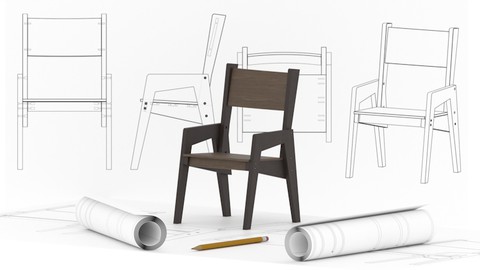
Model a Chair in Blender: Assembly Sheet Render (Udemy.com)
Model a chair in Blender 4, then an assembly sheet: explode view, SVG, dimensions, FreeStyle.
Created by: Thomas McDonald
Last updated August 2026
 What you will learn
- Create high-quality 3D models with accuracy and efficiency
- Master the Blender modifier stack to optimize your designs
- Produce both realistic and stylized renders using advanced rendering techniques
- Manage cameras, lights, and materials for stunning visual effects
- Export models as SVG files for cross-platform use
- Utilize bolt assets and freestyle rendering for custom artistic enhancements
How it compares
Against the other 413 rated Udemy courses in Graphic Design on CourseDuck:
- Rating4.5 out of 5higher than 49% of them
- Reviews24#405 of 414 by number of reviews
- Length3.1 hoursshorter than 70% of them
- Last updatedAugust 2026more recently than 93% of them
 Course Description
You want a solid modelling project that is not a house or a character. This course is a chair in Blender 4, then an assembly sheet of that chair.
Model and assemble the chair, render it, and build the sheet: explode view, SVG export, dimensions, FreeStyle lines, annotations. Updated August 2026.
What we build
A chair in Blender 4
An assembly sheet (explode view, SVG, dimensions, FreeStyle, annotations)
Who this is for People who want product-style modelling and a drawing of how it goes together.
Who this is not for 3D printing (Zero to Hero) or architectural houses.
What you’ll learn
Model and assemble a chair in Blender 4
Render the chair
Build an assembly sheet with explode view, SVG, dimensions, and FreeStyle
Requirements
A computer that can run Blender 4 (free)
Three-button mouse recommended
Who it’s for
Beginners and intermediates who want modelling-for-render and a simple assembly drawing
Whether you’re aiming to excel in game design, animation, or 3D visualization, *Blender 4 Mastery* equips you with industry-standard skills. Perfect for aspiring 3D artists, designers, or hobbyists, this course offers expert insights and real-world projects to thrive in 2025’s creative landscape.
Enrol now and start creating professional 3D models today!

 Udemy Discount
The discount is applied through our link. Open the course from here and Udemy's current promotional price is applied at checkout on most courses, no code to type.
Some courses are excluded from Udemy's promotions. If the price does not drop, clear your browser cookies and use the button again.
Instructor Details

- 4.5 Rating
 24 Reviews
Thomas McDonald
Thomas is a 3D designer, Python automation specialist, and dedicated Udemy instructor based in Ireland, passionate about technology and empowering creativity. With expertise in 3D CAD, Blender, and Python scripting, he creates automation tools and leverages Blender Python to simplify complex design workflows. Through his engaging Udemy courses, Thomas teaches 3D software and techniques, guiding students to transform their creative ideas into stunning realities. With 12 years of experience in design and technology, he’s committed to sharing innovative tools and insights to inspire learners worldwide.
 More courses by Thomas McDonald

Touch Typing Mastery - Learn to type correctly (2026)
4.5 (5,144 Reviews)
 Provider: Udemy
 Time: 2.5h
$74.99

3D Printing from Zero to Hero in Blender – FDM & MSLA (2026)
4.6 (2,203 Reviews)
- Provider: Udemy
- Time: 10.3h
$149.99

Architectural Design & Animation in Blender (2026)
4.6 (1,199 Reviews)
- Provider: Udemy
- Time: 8.2h
$19.99

Python Scripting for Blender: With Practical Projects (2026)
4.1 (774 Reviews)
- Provider: Udemy
- Time: 3.2h
$69.99

Interior 3D Modelling & Rendering - Blender 3D (2025)
4.6 (770 Reviews)
- Provider: Udemy
- Time: 13.3h
$119.99
More Graphic Design courses

Adobe InDesign - From Basics to Professional Level Designs (2024)
4.9 (320 Reviews)
- Provider: Udemy
- Time: 11.4h
$84.99

Shop Drawing & Details-Autodesk Revit 2025- for BIM Modelers
4.9 (300 Reviews)
- Provider: Udemy
- Time: 30.9h
$10.99

The Adobe Illustrator CC Mastery Course: Basics to Pro + AI (2026)
4.9 (268 Reviews)
- Provider: Udemy
- Time: 30.8h
$19.99


Software Architecture & System Design Practical Case Studies (2026)
4.8 (2,584 Reviews)
- Provider: Udemy
- Time: 4h
$15.99

Graphic Design Masterclass: Design 40+ Projects in Photoshop (2025)
4.8 (668 Reviews)
- Provider: Udemy
- Time: 16.5h
$109.99
 Reviews

By Bryan Silvester on 1/20/2026
I am 72 years of age. I believe younger people could understand this process better than me. Experiencing new technology keeps my mind active. With perseverance I hope to absorb the knowledge offered.
By William Flynn on 11/24/2024
Thomas is a good and very thorough instructor.
By Tomasz W on 4/29/2024
Ciekawe rzeczy dla mnie: - skalowanie rysunku referencyjnego; - wymiarowanie; - eksport SVG. ==== Interesting things for me: - scaling the reference drawing; - dimensioning; - SVG export. :-)
By Volodymyr Popov on 3/26/2024
its Quite good really good i had a different course and the guy explained like real bad so your course is better!
By Thomas Webster on 2/10/2024
Awesome course. This can be used to come up to speed on Blender very quickly.
By Rikke van Overeem on 2/8/2024
Good explanation of all the basics and easy to follow.
By Paul Kelly on 2/1/2024
Excellent coverage of the techniques. The instructor is very knowledgeable and presents very well.
 Quality Score
No CourseDuck member has rated this course yet. Taken it? Give each part a thumbs up or down.
Overall Score : 90 / 100
- Video Duration:
 3.1h
3.1h - Price: $59.99
- Provider: Udemy
- Updated:
 August 2026
 - Level:
 Beginner
 - Language:
 English
 - Certificate:
 Yes
Yes
30-day money-back guarantee on most paid courses
Udemy Coupon Price Tracker
