
 Web Development
 Data Science
 Python
 SQL
SQL JavaScript
 Artificial Intelligence
 IT & Software
 IT Certifications
 Hacking
 AWS
AWS Arduino
 DevOps
 3D Modeling
 Graphic Design
 Photoshop
 Drawing
 Digital Painting
 UX Design
 Business
 Data Analysis
 Communication Skills
 Project Management
 Leadership & Management
 Human Resources
 Digital Marketing
 Social Media Marketing
 Marketing
 SEO
SEO Google Analytics
 Branding
 Excel
Excel Office Productivity
 SAP
SAP PowerPoint
 Microsoft Access
 SharePoint
 Finance & Accounting
 Trading & Investing
 Accounting
 Bitcoin
 Personal Finance
 Video Editing & Animation
 Photography
 Adobe Premier Pro
 Adobe Lightroom
 Personal Development
 Productivity
 Career Development
 Life Coaching
 Health & Fitness
 Meditation & Mindfulness
 Yoga
Yoga Music
Music Music Production
 Guitar
 Piano
Piano Singing
 Language Learning
 Teaching & Academics
 Engineering
 Math
Math Lifestyle
Substance 3D Designer for Beginners (Udemy.com)
Learn How to Create Material with Substance 3D Designer
Created by: Nexttut Education Pvt.Ltd.
Last updated April 2022
 What you will learn
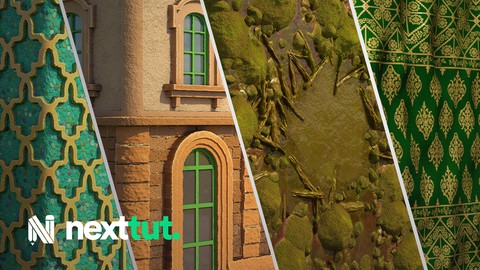
- Making building materials
- Making nature materials
- Making all kinds of fabric materials
- Making complex shapes inside Substance 3D Designer
How it compares
Against the other 545 rated Udemy courses in 3D Modeling on CourseDuck:
- Rating4.1 out of 5higher than 5% of them
- Reviews150#367 of 546 by number of reviews
- Length15.1 hourslonger than 80% of them
- Last updatedApril 2022earlier than 55% of them
 Course Description
Do you want to know how to make your own materials using Substance 3D Designer?
Then I welcome you to Nexttut education's Substance 3D Designer for beginners.
WHY SHOULD YOU LEARN FROM ME:
My name is Hamidreza Afshari and I have been a 3D Artist for animation and VFX for about 8 years now. I have worked on many short animations and a few long animated movies.
BENEFITS :
By the end of this course,
You'll be able to Work with Substance 3D Designer
Make various Materials
Knowing the procedural workflow
WHAT WILL I LEARN:
Substance 3D Designer interface and navigation
Making complex shapes inside Substance 3D Designer
Making building materials with Substance 3D Designer
Making nature materials using Substance 3D Designer
Making all kinds of fabric materials with Substance 3D Designer
Exporting SBSAR and texture passes
How to optimize your graph
Render using Nvidia Iray
COURSE PROJECTS:
We will start by knowing the Substance 3D Designer UI and navigation.
In chapter two, start making materials by knowing how to make basic and complex shapes.
In chapter three . we learn how to make building materials.
In chapter four, we learn how to make nature materials and combining multiple materials
Finally, in chapter five we are going to make a few fabric materials, basic and complex.
IS THIS COURSE RIGHT FOR ME:
This course is designed to teach you haw to e self-sufficient in making materials.
This is a starter course for beginners and it is designed to teach you whatever you need to start using Substance 3D Designer.
WHO IS NOT THE IDEAL STUDENT:
This course is not designed for absolute Substance 3D Designer beginners,
WHAT SHOULD I KNOW OR HAVE FOR THE COURSE:
I expect you to have some basic knowledge about texturing.
You should have Substance 3D Designer installed on your computer.
JOIN ME NOW:
Join me and learn how to use Substance 3D Designer in your future Projects.

 Udemy Discount
The discount is applied through our link. Open the course from here and Udemy's current promotional price is applied at checkout on most courses, no code to type.
Some courses are excluded from Udemy's promotions. If the price does not drop, clear your browser cookies and use the button again.
Instructor Details

- 4.1 Rating
 150 Reviews
Nexttut Education Pvt.Ltd.
Welcome to Nexttut Education, Myself Nalini Kanta Jena, I am the founder and director of Nexttut Education. I have been teaching and working in the game industry since 2008.
I have been teaching here on Udemy since 2017 and have created few bestseller courses. student seems to love my work and I love them as well. Everything was fine but except one problem and that is student's growing demand to create various courses for them. I realize that I can never fulfill such massive number of request to create different courses so that is when Nexttut Education took it's shape.
We only create courses with highly talented professionals who has at least 5+ years off experience working in the film and game industry.
The single goal of Nexttut Education is to help students to become a production ready artist and get jobs wherever they want. We are committed to create high quality professional courses for 3d students. If you are a student learning from any local institution or a 3d artist who has just started working in the industry or an artist who has some years of experience, you have come to the right place.
We love you and your feedback. Please give us feedback on how we can make better courses for you and how we can help you in any ways.
thank you for reading :)
Regards,
Director
Nalini kanta jena
 More courses by Nexttut Education Pvt.Ltd.


More 3D Modeling courses

3D Printing with " Ultimaker CURA Slicer- Start to finish" (2025)
4.9 (192 Reviews)
 Provider: Udemy
 Time: 1h
$34.99

Girl and the Dog Creation in Zbrush for Intermediate Level (2020)
4.9 (173 Reviews)
- Provider: Udemy
- Time: 48.8h
$59.99



Blender Character Creator for Video Games (2026)
4.8 (9,160 Reviews)
- Provider: Udemy
- Time: 34.3h
$159.99

Master SOLIDWORKS 3D CAD using real-world examples (2022)
4.8 (2,451 Reviews)
- Provider: Udemy
- Time: 18.9h
$69.99
 Reviews

By Kn0x on 12/17/2024
It is a "follow what I just did" course. You can learn how to oeprate the Substanced Designer as a beginner, but nothign more. The course is divded to several topics, and each topic is divided to several lessons. You can direclty jump to the section you are interested. Half of the time in each lesson was "let me experiment this and that button to demonstrate what they do." That's why each course is more than 30 mins long, the instructor didnt edit the video much. Whether this teaching method is good or bad depends on the you, in my opinion.
By namho Lee on 11/6/2024
처음 서브스턴스 디자이너를 배운다면 좋은 강좌라고 생각됩니다. 살짝 아쉬운건 실수한 부분을 포함해서 강좌를 넣어서 노드를 작업하다가 지우고 하는점이 있지만 덕분에 몇몇 부분들은 응용해서 쓰는 방법을 터득하게 되는 점이 좋았습니다.
By Remco Liqui lung on 12/10/2023
It was a good course, learned a lot, some areas of the tutorial felt like it was dragging out a bit, and the nature part the clips felt a bit too long but overall I was satisfied.
By Lorwald Solist on 10/20/2023
Just finished the course. For me, the pros and cons are : Pros : - Materials presented in this course are varied and overall look great - Instructor uses a lot of different nodes throughout the course so you'll have a good cover of them - Good logic when creating materials Cons : - Not much video editing : There's hardly any forward explanation on what steps the instructor will take to create the materials, so for the most part you'll create and delete nodes without knowing why you're doing it. Also, Instructor will sometimes create nodes, then change or delete them for a better result. This could've been cut on a video editing software so we get straight to the good way of doing it. - Not enough node explanation : At the beginning of the course, Instructor did a break once to explain different nodes that could achieve the expected result, and select one. We need more of those breaks in the course as it is a beginner course. - Rythm : The instructor rarely make breaks to show the current state of his graph and what should be achieved next. As all videos in this course are roughly 30 minutes long, you'll have to pause several times to catch up his pace. Overall, it's a course I'll come back to if I want a good quality material and I need to see the specific process the instructor used, but I can't recommend it for beginners, as there are too few explanations on basic material processing and nodes.
By Alfian Nurraihan on 9/5/2023
Slow and detailed explaination make it easy to understand the lecture.
By Elliott Kimmel on 6/1/2023
This course was fantastic! Starting from simple shapes and building up. I jumped from the first section to the fabric section as I was most interested in that but I look forward to watching the rest. What I enjoy very much is how you occasionally would try a method that didn't quite work for you and then showed another work-around. You use straightforward nodes, often the same again and again and I found myself following better than I usually do. Please make more Substance Designer courses. I also bought your kitchen SP course which is excellent as well.
By misodengaku81 UDM on 5/4/2023
私はSubstanceDesignerの初心者ですが非常に理解しやすかったです。
By PJ Mackinney on 3/19/2023
Does not explain nodes when going through what they relate to, moves rather quickly when selecting from properties. if made to follow along this moves too quickly, if made for an overview, it does well.
By Omar Hamed on 3/17/2023
The Introduction make it easy for me to continue The shapes section was step by step and I completed it exactly like the videos Such a great instructor till now
By Advait Satish on 3/25/2022
Nice course for beginners, awaiting the next advanced course on SD.
 Quality Score
No CourseDuck member has rated this course yet. Taken it? Give each part a thumbs up or down.
Overall Score : 82 / 100
- Video Duration:
 15.1h
15.1h - Price: See price on Udemy
- Provider: Udemy
- Updated:
 April 2022
 - Level:
 Beginner
 - Language:
 English
 - Certificate:
 Yes
Yes
30-day money-back guarantee on most paid courses
Udemy Coupon Price Tracker
