
 Web Development
 Data Science
 Python
 SQL
SQL JavaScript
 Artificial Intelligence
 IT & Software
 IT Certifications
 Hacking
 AWS
AWS Arduino
 DevOps
 3D Modeling
 Graphic Design
 Photoshop
 Drawing
 Digital Painting
 UX Design
 Business
 Data Analysis
 Communication Skills
 Project Management
 Leadership & Management
 Human Resources
 Digital Marketing
 Social Media Marketing
 Marketing
 SEO
SEO Google Analytics
 Branding
 Excel
Excel Office Productivity
 SAP
SAP PowerPoint
 Microsoft Access
 SharePoint
 Finance & Accounting
 Trading & Investing
 Accounting
 Bitcoin
 Personal Finance
 Video Editing & Animation
 Photography
 Adobe Premier Pro
 Adobe Lightroom
 Personal Development
 Productivity
 Career Development
 Life Coaching
 Health & Fitness
 Meditation & Mindfulness
 Yoga
Yoga Music
Music Music Production
 Guitar
 Piano
Piano Singing
 Language Learning
 Teaching & Academics
 Engineering
 Math
Math Lifestyle
The Complete Bipedal Rigging for Games in Maya Course (Udemy.com)
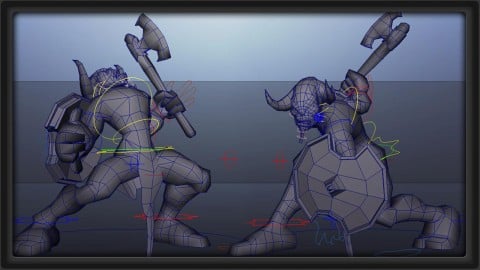
Learn the complete rigging and skinning process for bipeds using Maya with a focus on game characters!
Created by: 3dmotive LLC
Last updated April 2017
 What you will learn
- Learn the ins and outs of rigging a bipedal character - from absolute beginning to end
- Learn to build a rig, a skeleton, and controllers for your rig from the ground up
- Completely rig and skin a character to get it ready for animation
How it compares
Against the other 413 rated Udemy courses in Graphic Design on CourseDuck:
- Rating4.6 out of 5higher than 65% of them
- Reviews256#178 of 414 by number of reviews
- Length6.1 hourslonger than 59% of them
- Last updatedApril 2017earlier than 95% of them
 Course Description
In the Bipedal Rigging Series, we take a thorough look at the complete process of rigging, creating bones, skinning, and painting weights of a character from start to finish in Maya. Even if you’ve never rigged a box before, this tutorial breaks down a complex process in an amazingly thorough – and easy to understand way.
Included in this course is a copy of the character - both before and after - so that you can follow along, or compare your rig with the instructor.
About the Instructor:
Justin Harrison is a Character and Technical Animator with more than 7 years experience in the game development industry. Currently, he is working for Molten Games in Del Mar, CA on an unannounced title. Previously he has worked for for both Activision and Sony on titles such as The Bourne Conspiracy, Ghostbusters: The Game, as well as Transformers: War for Cybertron to name a few. Justin holds a BFA in Digital Art and Animation from the College for Creative Studies, and has a generalist skill set that ranges from artistic modeling and asset creation, to motion capture and keyframe animation, to technical rigging and character setup.

 Udemy Discount
The discount is applied through our link. Open the course from here and Udemy's current promotional price is applied at checkout on most courses, no code to type.
Some courses are excluded from Udemy's promotions. If the price does not drop, clear your browser cookies and use the button again.
Instructor Details

- 4.6 Rating
 256 Reviews
3dmotive LLC
3dmotive is High Quality 3d and Game Art Training by Industry Pros! Whether you are brand new to the world of Game Art, 3d, Architecture or Film - or maybe just interested in brushing up your techniques for intermediate or advanced levels of 3d with a focus on video games, 3dmotive is your one-stop-shop for all your 3d and Game Art related tutorials! Got questions? Interested in a new course topic? Let us know!
 More courses by 3dmotive LLC
Learn Advanced C# Scripting in Unity 5 for Games (2017)
4.6 (734 Reviews)
 Provider: Udemy
 Time: 5.5h
$64.99

Learn the "Hand-Painted" texturing style for video games (2016)
4.7 (594 Reviews)
- Provider: Udemy
- Time: 5.5h
$64.99

Model and Texture a Stylized Dungeon for Games (2016)
4.7 (483 Reviews)
- Provider: Udemy
- Time: 6.7h
$69.99
Introduction to KeyShot for Digital 3d Rendering (2017)
4.1 (364 Reviews)
- Provider: Udemy
- Time: 1.2h
Free
The Complete Unity 5 Intro - Learn to Build and Design Games (2016)
4.4 (284 Reviews)
- Provider: Udemy
- Time: 6h
$64.99
Building Modular Levels for Games with Unity and Blender (2016)
4.3 (267 Reviews)
- Provider: Udemy
- Time: 3.5h
$34.99
More Graphic Design courses

Adobe InDesign - From Basics to Professional Level Designs (2024)
4.9 (320 Reviews)
- Provider: Udemy
- Time: 11.4h
$84.99

Shop Drawing & Details-Autodesk Revit 2025- for BIM Modelers
4.9 (300 Reviews)
- Provider: Udemy
- Time: 30.9h
$10.99

The Adobe Illustrator CC Mastery Course: Basics to Pro + AI (2026)
4.9 (268 Reviews)
- Provider: Udemy
- Time: 30.8h
$19.99


Software Architecture & System Design Practical Case Studies (2026)
4.8 (2,584 Reviews)
- Provider: Udemy
- Time: 4h
$15.99

Graphic Design Masterclass: Design 40+ Projects in Photoshop (2025)
4.8 (668 Reviews)
- Provider: Udemy
- Time: 16.5h
$109.99
 Reviews

By Danik Y Tomyn on 3/13/2025
Thanks for taking the time to make this course! The course was great for covering all the fundamentals of rigging and providing me with the knowledge to break down and examine more advanced rigs to further my learning.
By André Martinez on 3/31/2022
Excellent course, even if it is a 10 year old course the knowledge is completely relevant to Maya 2022, you just got to Google some new menus here and there, but the general idea applies. Teacher is very knowledgeable and does explain everything concessive and to the point. Pushing my rigging skill from Blender to Maya! Cheers
By Elizabeth Sheldon on 5/31/2021
This course was a great walkthrough if you're new to rigging characters and need to know the basics of creating the skeleton, control handles, and customized keys that drive movement. I would definitely recommend that you familiarize yourself with Maya before taking on this material. There was some basic overview of different windows and editors, but it probably wouldn't be enough for someone who has never used the program before. Personally, I came to this course with modeling knowledge and the desire to learn how to pose my characters. As the course went along I tried to follow and reproduce the rig as the instructor shows. Most of the pacing and demonstrations are easy to follow. However, I think some supporting explanations were missing in several instances and it made it a bit difficult to fully grasp the reason behind certain steps. (There were also a few points where the instructor went back and changed part of the rig after-the-fact for one reason or another and it left me feeling a little lost.) I ended up with some missing functionality in my own rig and it seems that maybe some instructions were left out of some of the videos. Luckily, the instructor does provide the work files for each stage of the process, so if you have enough time, you'll probably be able to piece everything together by the end of the course. Despite some of the shortcomings mentioned above, I feel that I have a much better grasp of the overall rigging process after taking this course. So, I would still recommend that you try it if you're interested in learning how to rig characters.
By Shane Mitchell on 10/29/2019
Very clear and well produced course, which covers topics to a good technical level in an easy to understand manner. Concepts such as hierarchy / conncections/ constraints etc., are explained, and their uses in rigging covered. At the end of this course you'll have a really solid understanding of the core concepts of rigging.
By Erika Michell Zarate valdez on 10/18/2018
Rigging always sound like such a complex technical hability that scared me to try it, everytime it sounded like something only very Smart people could do, but this course allow me to do a full body rigging in 3 days!! The instructor explains everything, step by step, easy to follow, to understand, points out reason behind why you do that. Very good, highly recommended.
By Vincent Beauregard on 4/10/2018
Very nice. Speaks well. Goes straight to the point when explaining so no waste of time. You learn a lot if you are a beginner at rigging. As someone who's been working in the game industry for a long time, I would say that some choices in the building of his rig where questionable (controlling the feets and hands with a series of custom attributes instead of just controllers), and some small details about the techniques used would be problematic (he did not keep the arms planar, which makes the IK bends at a bad angle) but still, very good class to go from basic to advanced.
By Domenico Acito on 11/5/2017
It's one of the best courses that I could follow! THanks to it now I can make good rig for my characters. It's clear and you understand almost everything without problem! This course hasn't just one thing that for an animator can be important: there isn't the stretch rig! As an animator, I need to know hat my character can stretch his arms and legs, so it's easier to animate various thing, as falls, runs and similia. However, realy good job and thank you!
By Cog Vi on 5/16/2017
This was just what I was looking for to further my learning of Maya. Having only just finished an Intro course with Maya, I wanted to next learn rigging before I jump into animation. So many courses can be boring and take very long to explain simple things, and I end up falling asleep. This course was perfectly timed. I was able to go along with each video without having trouble keeping pace, or thinking it was too slow. After taking this course I'm now confident in dealing with skeletons and rigs. I've already made use of many things I've learned from this course in my own projects. I was using Maya 2016, if you're also using a newer version of Maya don't let this worry you. The main difference is that a few things have changed what menu they're located in, if you have problems finding a button it's probably just in a different menu, a quick google search will show you where it is.
By Game Circus on 8/18/2016
I had taken courses on rigging many years ago and this course really helped me remember some of the techniques I was taught as well as update me on some of the newer techniques. The bonus lesson at the end with the dynamic hair/joint chains was great. I plan on moving on to the Quadruped video next.
By Johnathan Rossitter on 12/20/2015
For the most part I learned a good bit of information from this tutorial, but there are some things the instructor assumes you may know, which he could have spent more time going over. In addition, there are some errors in the lessons which he addresses late in the series, which make it difficult to follow along properly
 Quality Score
No CourseDuck member has rated this course yet. Taken it? Give each part a thumbs up or down.
Overall Score : 92 / 100
- Video Duration:
 6.1h
6.1h - Price: $54.99
- Provider: Udemy
- Updated:
 April 2017
 - Level:
 All Levels
 - Language:
 English
 - Certificate:
 Yes
Yes
30-day money-back guarantee on most paid courses
Udemy Coupon Price Tracker
