
 Web Development
 Data Science
 Python
 SQL
SQL JavaScript
 Artificial Intelligence
 IT & Software
 IT Certifications
 Hacking
 AWS
AWS Arduino
 DevOps
 3D Modeling
 Graphic Design
 Photoshop
 Drawing
 Digital Painting
 UX Design
 Business
 Data Analysis
 Communication Skills
 Project Management
 Leadership & Management
 Human Resources
 Digital Marketing
 Social Media Marketing
 Marketing
 SEO
SEO Google Analytics
 Branding
 Excel
Excel Office Productivity
 SAP
SAP PowerPoint
 Microsoft Access
 SharePoint
 Finance & Accounting
 Trading & Investing
 Accounting
 Bitcoin
 Personal Finance
 Video Editing & Animation
 Photography
 Adobe Premier Pro
 Adobe Lightroom
 Personal Development
 Productivity
 Career Development
 Life Coaching
 Health & Fitness
 Meditation & Mindfulness
 Yoga
Yoga Music
Music Music Production
 Guitar
 Piano
Piano Singing
 Language Learning
 Teaching & Academics
 Engineering
 Math
Math Lifestyle
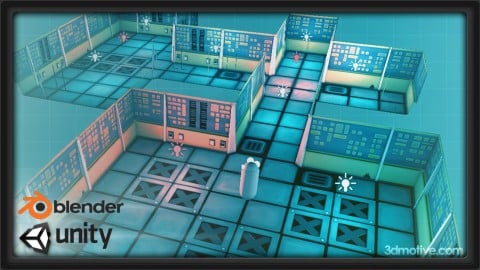
Building Modular Levels for Games with Unity and Blender (Udemy.com)
Learn the basics of using Blender and Gimp to build a modular 3d set inside of Unity!
Created by: 3dmotive LLC
Last updated September 2016
 What you will learn
- Learn the basics of building a modular set in Blender
- Understand UV Unwrapping and Texturing your modular assets
- Learn to use your modular set to build a sample level in Unity
How it compares
Against the other 100 rated Udemy courses in Blender on CourseDuck:
- Rating4.3 out of 5higher than 14% of them
- Reviews267#66 of 101 by number of reviews
- Length3.5 hoursshorter than 85% of them
- Last updatedSeptember 2016earlier than 96% of them
 Course Description
In this course, instructor Alan Thorn takes you through the basics of modeling inside of Blender, as well as texturing with the free image manipulation software Gimp. Using these tools, you'll learn his complete asset-creation pipeline for this modular set. We then follow it up by learning how to import those assets into Unity, and set up our own playable game environment.
(Students - please look under Section 1 / Lecture 1 downloads for the source files associated with the lesson.)
About the Instructor:
Alan Thorn is a freelance game developer and author with over 12 years of industry experience. He is the founder of London-based game studio, Wax Lyrical Games, and is the creator of award-winning adventure game Baron Wittard: Nemesis of Ragnarok. He has worked freelance on over 500 projects worldwide including games, simulators, kiosks and augmented reality software for game studios, museums and theme parks. He has spoken on game development at universities throughout the UK, and is the author of nine books on game development, including Teach Yourself Games Programming, Unity 4 Fundamentals and the highly popular UDK Game Development.

 Udemy Discount
The discount is applied through our link. Open the course from here and Udemy's current promotional price is applied at checkout on most courses, no code to type.
Some courses are excluded from Udemy's promotions. If the price does not drop, clear your browser cookies and use the button again.
Instructor Details

- 4.3 Rating
 267 Reviews
3dmotive LLC
3dmotive is High Quality 3d and Game Art Training by Industry Pros! Whether you are brand new to the world of Game Art, 3d, Architecture or Film - or maybe just interested in brushing up your techniques for intermediate or advanced levels of 3d with a focus on video games, 3dmotive is your one-stop-shop for all your 3d and Game Art related tutorials! Got questions? Interested in a new course topic? Let us know!
 More courses by 3dmotive LLC
Learn Advanced C# Scripting in Unity 5 for Games (2017)
4.6 (734 Reviews)
 Provider: Udemy
 Time: 5.5h
$64.99

Learn the "Hand-Painted" texturing style for video games (2016)
4.7 (594 Reviews)
- Provider: Udemy
- Time: 5.5h
$64.99

Model and Texture a Stylized Dungeon for Games (2016)
4.7 (483 Reviews)
- Provider: Udemy
- Time: 6.7h
$69.99
Introduction to KeyShot for Digital 3d Rendering (2017)
4.1 (364 Reviews)
- Provider: Udemy
- Time: 1.2h
Free
The Complete Unity 5 Intro - Learn to Build and Design Games (2016)
4.4 (284 Reviews)
- Provider: Udemy
- Time: 6h
$64.99
The Complete Bipedal Rigging for Games in Maya Course (2017)
4.6 (256 Reviews)
- Provider: Udemy
- Time: 6.1h
$54.99
More Blender courses

Low Poly Landscapes: Blender Bite Sized Course (2025)
4.9 (1,704 Reviews)
- Provider: Udemy
- Time: 6.2h
$99.99

Absolute Beginners 3D character in Blender course (2022)
4.9 (1,133 Reviews)
- Provider: Udemy
- Time: 14.5h
$94.99


Complete Blender Creator: 3D Modelling (Compatible with 4.3) (2026)
4.8 (69,132 Reviews)
- Provider: Udemy
- Time: 13.8h
$199.99

The Ultimate Blender 3D Sculpting Course (2026)
4.8 (3,904 Reviews)
- Provider: Udemy
- Time: 37.2h
$119.99

Blender Total! From Basic to Advanced 3D! (2025)
4.8 (2,407 Reviews)
- Provider: Udemy
- Time: 21.3h
$109.99
 Reviews

By Ann-Marie Ratcliffe on 11/30/2018
The first two parts of the course were very good, dealing with some handy tips and tricks to creating the modular level components, and dealing with GIMP for the texturing. Some people may complain about the instructor using the Maya controls, rather than Blender's default, but I've always found Blender's default control-set a pain to use, and Maya more closely matched previous 3D Modelling software I've used, so I actually felt a lot more comfortable with this course than some others. Unfortunately, by the time we get to Module 3, and dealing with exporting from Blender into Unity, the course suddenly becomes so outdated, you might as well fast-forward until the last handful. Considering the (hopefully) imminent release of Blender 2.8, perhaps now would be a good time to consider at update to this course, taking advantage of the (hopefully) better control-set of 2.8, and refining the course to remove some of the outdated aspects, and include some new tips and tricks, based on other viewer feedback?
By Peter Boos on 6/22/2018
Great course so far, just minor issues for me. A bit fast maybe, but you can always pause and rewind to solve that. Also I would've really preferred if the course was made using the default keys, I do so during the course and it's a bit tedious having to google the default keys quite often. But yes that's really minor disturbances for me personally, I can really recommend this course. Edit: After finishing the course I would like to add that the way working with materials is done in Unity seems to have changed since the production of this course. I had to do a bit of googling to get the textures on my imported .fbx-models.
By Christian Laursen on 10/12/2017
I am looking into constructing levels in Unity. And this course gave some good pointers and solutions for achieving this. The variation for the building blocks are endless (depending on your imagination). Now I "only" have to get this art thing down, the modelling part I am quite comfortable with. The instrutor is down to business like and dont waste time jumping here and there because he seems to just remember something. He is a bit fast when speaking, but hey I can rewind if something went too fast verbally. Usual it is possible to follow just by looking at the video at the same time. Try this course if you ae wondering how to bujild modular level pieces.
By Clive Thomas on 4/10/2016
While I managed to get a level working, it was difficult because: 1> In Blender he used the Maya key layout and not the standard short keys.. Thanks forr that... NOT! 2> The Gimp section was difficult to follow at times such that I resorted to using Photoshop. 3> Unity: He used an old version so things have changed and then he used professional features not available in the free version. In the last few lectures he sped up to the point that I wondered if he was still breathing as there were few if any pauses. 4> He doesn't explain stuff. Eg. collisions, you can generate colliders or use a box collider. He says to use a box collider but not why, and leaves it as if you never should use the generate colliders - why? 5> All that messing around with the axis in Blender, I could not get the same on import to Unity. In the end I imported the model as is and it worked. This course needs updating to Unity 5. To do justice to this subject the course should really be a bit longer with better explanations and use of standard shortkeys. However I am glad I took the course as I did learn something, just not as much as I thought I would.
By Chris Johnson on 3/30/2016
The book "Practical Game Development with Unity and Blender" goes very well with this video tutorial as this video course is supplemental to the book mentioned or stand alone. It really depends on if you prefer to read or watch. The content itself is accurate although there are some customization extras for the different tools used. I can see how this will be confusing for a novice that uses other sources associated with Blender for example. It boils down to time and resources. If you want to know how to use these tools instead of relying on add-on assets or 3rd party tools that specialize in singular aspects or workflows, which is neither good nor bad, this course is quite sufficient with providing you with enough knowledge to learn it and what you need to pursue further outside of the course. I would suggest this course targets intermediate game development or advanced software/artist disciplines that want to move into game development with no prior knowledge from another respective field. If you are a beginner I believe you will be inundated by all the knowledge the Instructor parts with you. This is not a failing of the Instructor or the course; this is simply the nature of game development with no prior knowledge. If you can appreciate this summary, as a beginner, for what it is then I would recommend this as an excellent road map to your growth at becoming intermediate level. For example layering UV islands is presented as shorthand to make the mechanics of producing an asset faster; nothing wrong with that. It also improves draw calls if you can keep your textures and materials down which is not covered in this video course but things are hinted at like light maps. My point is the Instructor has done an excellent job providing how to do something that later on becomes a best practice on more advanced topics when you have outgrown this course. Can you learn all of this free online via the Internet/Youtube, etc? Sure. I wouldn't recommend it though - I would buy this course. It is solid if the subject matter is of interest to you and you want to fast track yourself to moving ahead.
By Kevin Sundberg on 1/1/2016
This lesson was easy to follow and understand with very little previous knowledge required. He was not only clear about what he was showing but he was repetitive enough to be able to comprehend the content. In just a few hours I was able to follow the entire lesson from start to finish and only go back a few times to make sure i didn't miss anything. The lecture lengths were an easy to digest size where you could sit down for one or two at a time without needing to set aside an hour or so. However, I do feel a few of them could have been either combined or expanded upon. My only complaint was sound quality. It is not terrible, but I do not classify it as top level. There was a subtle echo and you could hear background sounds from time to time (mostly easy to ignore).
By Dario D'Aversa on 10/2/2015
I got into this course as a beginner to Blender, but came out of it with much more knowledge. For what it's worth I still consider myself a beginner, but I know much more about the tools that the software makes available to me, and the course also teaches some neat tricks to optimise your creations. I'm giving this course 4/5 stars; two reasons why I'm not giving it 5/5 is because 1) I sometimes found the pace of the lectures to be a bit rushed. There's plenty of knowledge passed on, but sometimes the instructor could have taken an extra minute to explain what we're dealing with. Take sharp edges for example: we're being told they are useful to stop Unity from blurring our faces together, but we're not being told much more. The cube example was also a bad one. A quick search through Blender's manual will give much more information, and their example will make you understand much quicker that it is simple a method of separating smooth shades. In any case, that's just a tiny complaint, just be prepared to pause here & there and look up things on your own, because the explanations are sometimes cut short. 2) The discussions seem dead. Many people ask questions, but the presenter doesn't seem to be answering any of them; that is quite disappointing. Then again, relatively speaking it's one of the best tutorial I've seen online in a long time. DO get this course, you will learn a lot, and it is totally worth your money.
By Andy De Meyer on 7/21/2015
This course is very well presented and gives clear information for beginners with both Blender and Unity. The instructor definitely provides a well thought out and structured course that I simply watched in one go. I recommend doing this to anyone and refrain from playing around until you have a clear idea of what is presented here. Afterwards try for yourself and it will be much easier to put what you've learned into practice (at least that's my opinion). A few minor remarks to improve on: I would have loved to see a little more on the concept of UV mapping and specifically on why/when seams or even later on sharp edges need to be either placed or not. Also, the choice of the instructor to go with the Maya keyboard settings made somewhat harder for me to follow certain key combinations as I had already played around in Blender with the default scheme. Apart from that, this course helped me a lot!
By Joshua Reeves on 7/4/2015
Alan is very knowledgeable and communicates with clarity and brevity. There is a bit of reverb and echo in the audio but it's good enough. I'm so glad I took this course. I now know how to create awesome, optimal models in Blender, unwrap them for painting in an image editor, reimport into blender, and finally correctly move the FBX versions of the models into Unity to build a game. Alan takes the time to explain extra, optimal methods like creating your own simple primitives instead of using the built-in collider generator when making collision data for game objects and levels in Unity. And also how to get rid of doubles and NGons in Blender to keep game performance up. A+
By Maryan Osman on 5/5/2015
This is a well explained course and the instructor is right to the point. This Blender/Unity course shows you how you can create professional looking models in blender, UV unwrap and create textures for them. You will learn many tips and tricks in blender. The teacher shows you how things are done and you have to learn and apply that knowledge to your projects. For example, he will fully explain how unwrap a model and expect you to do the same for the rest of the models. Also most of the course is about Blender and it is all good because that is what I was hoping to get out of the course anyways. If you are a Blender user and you are already familiar with Blender hotkeys, I would suggest you stick with it, instead of changing to Maya hotkeys. (He will talk about this in the first few videos). Thank you Mr Alan Thorn for this great course. :)
 Quality Score
No CourseDuck member has rated this course yet. Taken it? Give each part a thumbs up or down.
Overall Score : 86 / 100
- Video Duration:
 3.5h
3.5h - Price: $34.99
- Provider: Udemy
- Updated:
 September 2016
 - Level:
 Beginner
 - Language:
 English
 - Certificate:
 Yes
Yes
30-day money-back guarantee on most paid courses
Udemy Coupon Price Tracker
