
 Web Development
 Data Science
 Python
 SQL
SQL JavaScript
 Artificial Intelligence
 IT & Software
 IT Certifications
 Hacking
 AWS
AWS Arduino
 DevOps
 3D Modeling
 Graphic Design
 Photoshop
 Drawing
 Digital Painting
 UX Design
 Business
 Data Analysis
 Communication Skills
 Project Management
 Leadership & Management
 Human Resources
 Digital Marketing
 Social Media Marketing
 Marketing
 SEO
SEO Google Analytics
 Branding
 Excel
Excel Office Productivity
 SAP
SAP PowerPoint
 Microsoft Access
 SharePoint
 Finance & Accounting
 Trading & Investing
 Accounting
 Bitcoin
 Personal Finance
 Video Editing & Animation
 Photography
 Adobe Premier Pro
 Adobe Lightroom
 Personal Development
 Productivity
 Career Development
 Life Coaching
 Health & Fitness
 Meditation & Mindfulness
 Yoga
Yoga Music
Music Music Production
 Guitar
 Piano
Piano Singing
 Language Learning
 Teaching & Academics
 Engineering
 Math
Math Lifestyle
Unreal Engine 5 for Beginners: Building a tiny Resource Game (Udemy.com)
Dive into Game Development with Unreal Engine 5 Blueprints and write your very own little Resource Gathering Game!
Created by: Steffen Blass app affairs GmbH
Last updated November 2023
 What you will learn
- Basic understanding of Unreal Engine 5
- Implement custom behavior for game object using Unreal Engine 5 blueprints
- Using object orientation concepts in Unreal Engine 5 blueprints
- Importing and using assets like meshes and animations in Unreal 5
- Collision detection, handling of user Input in Unreal 5 using the new Enhanced Input System
- Building User Interfaces in Unreal 5
How it compares
Against the other 281 rated Udemy courses in Game Development Fundamentals on CourseDuck:
- Rating4.4 out of 5higher than 31% of them
- Reviews323#105 of 282 by number of reviews
- Length4.8 hoursshorter than 71% of them
- Last updatedNovember 2023earlier than 57% of them
 Course Description
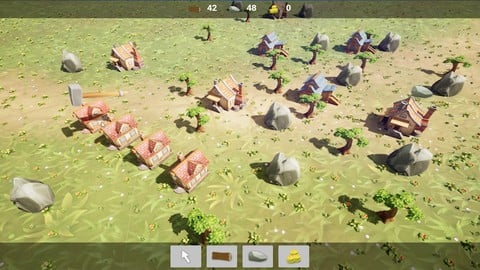
In this course, we will develop a tiny resource gathering game inspired by famous series like "Anno" or "The Settlers" using Epic’s fantastic Unreal Engine in Version 5.1. No worries: All lessons have been tested on Version 5.2 as well!
We will create a simple building placement system and we will have workers like lumbers and masons looking for resources, gathering them and bringing them back home for processing. The resources will be available to build more stuff and so on.
At the end, we will have 3 resources: gold, wood and stone - gold will be collected in form of taxes paid by citizens living in houses, wood will be collected by lumbers and stone will be collected by masons. Resources like a tree will deplete after some harvesting and the lumber will look for the next tree nearby to continue harvesting.
We will be using some nice, colorful 3D models from the permanently free section of Epic’s market place as well as animations available for free on Mixamo.
All programming will be done using Unreal’s blueprint editor system. All coding will be done from scratch and we will use highly flexible approaches to have a cool and expandable base system that can easily be extended to other resources, more complex multi-step production chains, etc.
There’s no prior coding or Unreal experience needed to follow and understand the lessons, some basic knowledge of programming concepts like collections, loops, if-branches and some understanding of vector math will surely help though.
You should have access to a reasonable modern and fast computer (running either Windows or Mac OS) as Unreal Engine need some decent computing power to run smoothly.

 Udemy Discount
The discount is applied through our link. Open the course from here and Udemy's current promotional price is applied at checkout on most courses, no code to type.
Some courses are excluded from Udemy's promotions. If the price does not drop, clear your browser cookies and use the button again.
Instructor Details

- 4.4 Rating
 323 Reviews
Steffen Blass app affairs GmbH
Ich habe meine Liebe zum Computer und zum Programmieren schon mit ca. 8 Jahren entdeckt und seitdem hat mich die Faszination nicht mehr losgelassen.
Klar, dass ich diese Leidenschaft auch zum Beruf gemacht habe und mich nach der Schule für ein Studium zum Wirtschaftsingenieur mit Fachrichtung Informatik entschieden habe.
Meine Karriere habe ich dann bei einem großen IT-Beratungsunternehmen begonnen und habe mich nach zwei weiteren Stationen in der Beratung im Jahr 2011 zusammen mit meiner Mitgründerin Susanne selbstständig gemacht und die app affairs GmbH gegründet.
Seitdem haben wir viele Apps, Backends und Software-Projekte für Kunden und aus eigenen Ideen heraus geschrieben.
Ich habe im Laufe der Zeit viele Programmiersprachen, -konzepte und Frameworks wie z.B. Basic, Turbo Pascal, Delphi, HTML, JavaScript, CSS, XML, JSON, C/C++, Java, PHP, Objective-.C, Swift, Kotlin, Angular, Ionic, VueJS, ReactJS, React Native, Flutter, NodeJS, Golang, Unreal, Unity und viele mehr ausprobieren und zum Großteil auch produktiv einsetzen dürfen und bin gespannt, welche neuen Konzepte und Sprachen noch kommen werden.
 More Game Development Fundamentals courses

The Ultimate 2D Top Down Unreal Engine Course (2026)
4.9 (1,468 Reviews)
 Provider: Udemy
 Time: 17.1h
$94.99

Blender Skill Builder: Modelling Challenges (2026)
4.9 (144 Reviews)
- Provider: Udemy
- Time: 6.5h
$19.99

Jumpstart to 2D Game Development: Godot 4 for Beginners (2026)
4.8 (4,398 Reviews)
- Provider: Udemy
- Time: 67.6h
$89.99

Create a Complete 2D Survivors Style Game in Godot 4 (2023)
4.8 (3,761 Reviews)
- Provider: Udemy
- Time: 17.2h
$59.99

Master Lua Programming and Create Amazing Games with LÖVE! (2023)
4.8 (3,199 Reviews)
- Provider: Udemy
- Time: 8.5h
$13.99

Complete Godot 2D: Develop Your Own 2D Games Using Godot 4 (2025)
4.8 (1,619 Reviews)
- Provider: Udemy
- Time: 11.3h
$94.99
 Reviews

By Susana Lopez on 12/3/2025
Fun and somewhat easy to follow guide! I say somewhat easy because it might be easy to miss a small check box here and there if you are trying to follow along as you watch the tutorial. Had a few of those missteps along the way but nothing I couldn't recover by simply rewatching! Nice in depth tutorial that covers blueprints, importing assets, creating UI elements, and incorporating skeletal meshes and animations! Truly a good all-around package.
By Michael Dannenberg on 12/24/2024
From my point of view, this is not a course if you have just started with Unreal Engine. Sometimes it is quite confusing and difficult to keep track of which function is being processed in which blueprint. Other than that, the course is pretty much exactly what it promises. You create a small construction game and get a good idea of how it can work. From my point of view, all in all, a highly recommended course!
By Tom H on 10/28/2024
Very good course. The intruction is clear and helpful and I was able to follow along without any confusion. I do think that despite the very basic overview of Unreal features which is aimed at beginners, the instructor goes on to instruct some very complicated concepts that are not ideal for a beginner. As an intermediate level user I went from listening to basic things that I already knew so well, straight into heavy blueprint coding that I found hard going. I still highly recommend this course however as it will teach a lot of fundamentals taught by somebody who is very proficient in the subject.
By Michael Dolan on 7/22/2024
This is a great compact course give you the basics of a city builder type game, but also some great ways to think about, plan and implement your game to scale. On the surface, by completing this 5 hour course you get a nice little resource gathering project to build off of, but the journey to get there gives you a lot more than that. Forget the 40 hour bloated courses. Here you get a lot of good knowledge in a short amount of time and in a serving size you might actually finish! I love the way he broke down the key systems into manageable parts. Each new blueprint built off the next and the later additions demonstrated how easy it is to add new content with the right base classes and some forethought. This in and of itself was a core education for new devs and I hope people realize what they were taught can be applied to all types of games in the future. The use of project management tools to track the tutorial was also really a great practice to share and something I have not seen in other tutorials. I think this inclusion of Trello did a great service to new game devs who might not be familiar with project management practices. (Note to some users- I think the checklist feature is a good replacement for the plugin $$ he uses to generate subtask cards.) My only critique is that some of the implementations could have used interfaces or actor components to reduce the complexity and provide even better ease of scalability but for a beginner tutorial, what is here is pretty good! Maybe he could make a part 2 and dive into those things. Thanks for the short and value packed course!
By Patryk Olejnik on 7/15/2024
I don't like the way the course is conducted, it is a few hours of a course about nothing. good practices of object-oriented programming were supposed to be shown, nothing is shown here that could be useful to someone who looks at unreal a little more seriously. I hope there will be fewer such courses. things I don't like: -naming of variables and functions. - approach to materials, instead of creating a function that colors red or green, we create 3 new instances for each model. -code readability is terrible -class architecture is unsatisfactory to say the least.
By Dan Alvarez on 3/8/2024
I'm new, but not a complete beginner and I enjoyed this course. the explanations are easy to follow. I was able to adapt the course to my liking, and make it work 99% using "Custom Events" rather than "Functions" (that's just how I prefer to do things.) I tried to use my own system to see if I could make it work without using variable "Maps", but honestly, the use of "Maps" is the most flexible and efficient technique to handle the input and output of resources. I've never used them before and I'm glad I understand them now. Overall, pretty good course.
By Piotr Walczak on 3/8/2024
Overall, a great course, though I feel like there are a few areas for improvement or expansion. I would love to see another tutorial that takes the Tutoville project to the next level. Improvement: 1. Some blueprints could be laid out more compactly to be visible on the screen. It was sometimes hard to tell where the lecturer was in the blueprint after video cut in one place and started in another. 2. Sometimes the lecturer goes very fast and I had to pause or rewind the video multiple times to make sure I found the options mentioned, or that I placed the specified blueprint and not one that just looks similar. 3. Maybe that's just me but in Section 11 Lecture 31 it would be worth spending a bit more time making the project look beautiful, teach how to place multiple actors to make a nice forest or multiple rocks for a quarry etc. 4. The BP_Worker loop could use an improvement, so that if no more resources are available, the building communicates that to the player or something. 5. The BP_Building_Manager blueprint should definitely include a check for resources nearby or the ones it's on top of. A, for collision detection when placing a building on top of a resource, and B, for tooltip to the player that would for example warn them about placing a quarry in an area with no rocks etc, which brings me to the final point... 6. Last but not least, I was actually quite shocked that the course did not include any UI relating to communicating with the player. There are no tooltips for building costs, no game menu, no target for the player to reach or victory screen when it's done. Those things are, I would argue, very much a part of a basic game and should be included in this course. This is the only major gripe I would honestly hold against this course, the rest are more so minor nitpicks. Stuff I would love to see added or expanded in another course 1. Pathfinding!!!! Having actors walk through buildings is fine for an extremely simple demo, but learning how to make an AI actor navigate between buildings, terrain and resources would be very beneficial both for this project and as a code base for any project that this tutorial kickstarts. 2. Rotating buildings. It's not a very complex thing and I was able to figure it out myself, but I wouldn't mind having it introduced in Section 5 or Section 11 3. Going a bit more in-depth with worker animations would be great. There are some great animations on the website used for equipping and stowing the tool. Learning how to transfer an asset between sockets mid-animation would be fantastic. Likewise, would be great how to use animation sequences. Overall I am very satisfied with this course. It took me way more than 5 hours, but that's probably because I was tinkering with the blueprints a lot and seeing what I can do or improve on my own.
By Edward Hess on 11/4/2023
Very enjoyable course. Nice, clear presentation; I only got stuck a bit and was able to sort it out myself. My only suggestions would be to use some kind of highlighter for the mouse pointer and to display key commands if possible. I also wouldn't mind some quizzes now and then to help reinforce some topics. Overall, very well done and recommended. Cheers!
By Rıza Han Yılmaz on 9/20/2023
My biggest prejudice before starting this training was the short duration of the training. I thought 5 hours was not enough. Now I am almost halfway through the training and I realized that I learned more in this short training than in trainings longer than 20 hours. The training content is really full. It is a result-oriented training that does not inflate the head with unnecessary information. My only criticism is that I have difficulty understanding the editing of Blueprint codes. I am not sure, but I think this is due to my poor English, I think it is not the fault of the instructor.
By Vincent G. on 8/7/2023
Outsanding course! ++ Great instructor ++ Good pace. ++ Gets harder as we go, which is a good thing. Most tutorials tend to oversimplify things and remain on a surface level. ++ Very dense, quite a lot of work packed in 5 hours. ++ The instructor shows his reasoning by breaking down the principles of the game in smaller tasks using Trello, which is a good way to see how a game developer would think about implementing new features in a game. ++ Really shows how classes are used in Unreal in a very concrete way. ++ The completed game looks and feels really good and not half-baked. -- Wished the recording was in 1080p. Still easy to follow in 720p though. -- I think some lectures would benefit from a basic presentation of certain principles (ex : grid for buildings, casting)... but you can easily find the information you need online anyway. Very pleased with the course, and it is definitely worth your time.
 Quality Score
No CourseDuck member has rated this course yet. Taken it? Give each part a thumbs up or down.
Overall Score : 88 / 100
- Video Duration:
 4.8h
4.8h - Price: $89.99
- Provider: Udemy
- Updated:
 November 2023
 - Level:
 Beginner
 - Language:
 English
 - Certificate:
 Yes
Yes
30-day money-back guarantee on most paid courses
Udemy Coupon Price Tracker
