
 Web Development
 Data Science
 Python
 SQL
SQL JavaScript
 Artificial Intelligence
 IT & Software
 IT Certifications
 Hacking
 AWS
AWS Arduino
 DevOps
 3D Modeling
 Graphic Design
 Photoshop
 Drawing
 Digital Painting
 UX Design
 Business
 Data Analysis
 Communication Skills
 Project Management
 Leadership & Management
 Human Resources
 Digital Marketing
 Social Media Marketing
 Marketing
 SEO
SEO Google Analytics
 Branding
 Excel
Excel Office Productivity
 SAP
SAP PowerPoint
 Microsoft Access
 SharePoint
 Finance & Accounting
 Trading & Investing
 Accounting
 Bitcoin
 Personal Finance
 Video Editing & Animation
 Photography
 Adobe Premier Pro
 Adobe Lightroom
 Personal Development
 Productivity
 Career Development
 Life Coaching
 Health & Fitness
 Meditation & Mindfulness
 Yoga
Yoga Music
Music Music Production
 Guitar
 Piano
Piano Singing
 Language Learning
 Teaching & Academics
 Engineering
 Math
Math Lifestyle
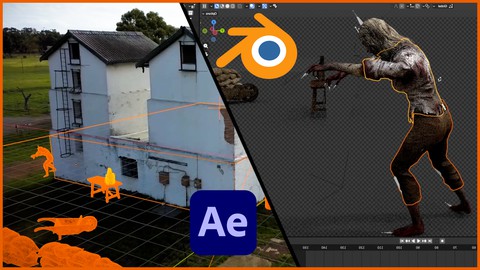
Blender and After Effects VFX Masterclass (Udemy.com)
Add 3D objects and characters to any live action footage
Created by: Ruan Lotter
Last updated March 2023
 What you will learn
- Adding 3D objects and characters into any live action scene
- Camera Tracking or Match Moving using Blender
- How to render an EXR Sequence containing multiple Render Passes
- Compositing Render Passes using Adobe After Effects
- How to use Cryptomattes when compositing
- How to Rotoscope in After Effects
- Basic Color Grading in After Effects
How it compares
Against the other 118 rated Udemy courses in Adobe After Effects on CourseDuck:
- Rating4.5 out of 5higher than 45% of them
- Reviews224#44 of 119 by number of reviews
- Length3.8 hourslonger than 60% of them
- Last updatedMarch 2023more recently than 68% of them
 Course Description
Welcome to this Blender & After Effects VFX Course
What you will learn?
3D Camera Tracking
Adding 3D objects and Animated Characters to your real world scene
Using Mixamo to import animated characters
Using Bridge to import Quixel Megascans into your scene
Match the lighting of the real world scene
Adding shadow catchers for compositing later
Adding an HDRI for realistic reflections and lighting
Using Render Passes and Cryptomattes
Rendering an EXR Image Sequence
Full Compositing workflow in After Effects
In this exciting course you will learn how to create fantastic worlds by adding 3D objects & characters into any live action scene. We will begin by going step by step through the Camera Tracking process, then we will look at how you can add 3D objects or characters to the scene. You will also learn how to add shadows and how to match the lighting in your 3D scene to the live action footage. Next we will focus on Render Passes and how to render a multilayer EXR sequence, and finally you will learn how to composite these different render passes together using Adobe After Effects.
You will also learn how to use Cryptomattes to easily mask objects to make specific adjustments without re-rendering from Blender. We will do some Rotoscoping, look at how to use TrackMattes, and finally we will color grade the shot, add some film grain to blend everything together, and render your final VFX Shot.
Here is a list of all the Lesson Topics in this course:
Creating a PNG Image Sequence using After Effects
Camera Tracking: Import PNG Image Sequence into Blender
Camera Tracking: Setup Camera Sensor Size + Focal Length + Color Management
Camera Tracking: Tracking Setup
Camera Tracking: Adding Trackers and Track footage
Camera Tracking: Solving the Camera Track
Camera Tracking: Refining your Camera Track if needed
Camera Tracking: Setup Scene, Orienting the Scene and Set Scene Scale
Test Objects: Viewport Render to ensure the Camera Track is good
Adding 3D Objects from Quixel to the Scene
Adding a Mixamo Character to the Scene
Shadow Catchers
Matching the lighting using an HDRI and / or Sun
Matching the Shadows
Configure Render Passes + Cryptomattes
Rendering EXR Sequences
After Effects: Import Plate & Render Passes & Setup the correct colour space
Setup Composition - The Comprehensive Way
Setup Composition - The Easy Way
Match and Adjust Shadows, Highlights and Reflections
Blur 3D Elements to Match Footage
Crytomattes and what you can do with them
Rotoscoping Foreground Elements
Using mist pass for adding mist / haze
Final Colour Grading
Matching Film Grain or Digital Noise
Final Render
Bonus Lesson (Adding grass around the well)
I'm including the footage and assets that you will require to follow along, but feel free to use your own footage if you wish.
I really hope that you will learn a lot during this course, and feel free to reach out if you have any questions, I will be more than happy to assist. Ready to create some amazing VFX shots? I will see you in the first lesson!

 Udemy Discount
The discount is applied through our link. Open the course from here and Udemy's current promotional price is applied at checkout on most courses, no code to type.
Some courses are excluded from Udemy's promotions. If the price does not drop, clear your browser cookies and use the button again.
Instructor Details
- 4.5 Rating
 224 Reviews
Ruan Lotter
Ruan Lotter is a VFX & 3D Artist, Online Teacher, Music Producer and Author from Cape Town, South Africa. He has worked on many short films and TV commercials for brands such as Hasbro, Lipton, RB, Ryobi and HP doing mostly camera tracking, general 3D work and compositing.
It all started in 1994 when he discovered 3dsmax for DOS! Back then it was called "3D Studio" and that changed everything... A few years later, 3dsmax for Windows was released and the world of online tutorials was born. Ruan instantly started binge watching online tutorials on a website called "3D Buzz" and dove deep into the world of 3D. Over the years he used many different VFX related software such as Adobe After Effects, Maya, Cinema4d, Modo, PFTrack, Boujou and Nuke to name a few and he fell in love with the world of Visual Effects and YouTube became his university of choice.
At the beginning of 2020, after many years of using Maya, he found Blender which quickly became his go-to application for anything 3D or VFX related. In mid 2022 he published his first book "Taking Blender to the Next Level" which is available on Amazon.
He currently works as a VFX Artist & 3D Generalist at Accenture, doing mostly 3D and VFX work on TV and Web content for well known brands.
He also runs a YouTube channel called TunnelvizionTV where he teaches VFX and Motion Graphics using a variety of applications.
 More courses by Ruan Lotter

After Effects Essentials: Complete VFX and Motion GFX Guide (2017)
4.3 (2,025 Reviews)
 Provider: Udemy
 Time: 2.6h
$54.99

Blender Masterclass: Learn Blender in only 6 Hours (2022)
4.6 (159 Reviews)
- Provider: Udemy
- Time: 6.2h
$13.99
VFX 101: Learn Adobe After Effects / PFTrack / 3ds Max (2017)
4.0 (103 Reviews)
- Provider: Udemy
- Time: 4.4h
$34.99
More Adobe After Effects courses

Motion Design & Animation Principles in Adobe After Effects (2025)
4.8 (1,594 Reviews)
- Provider: Udemy
- Time: 5.8h
$99.99


Futuristic HUD Motion Graphics in After Effects (2018)
4.7 (664 Reviews)
- Provider: Udemy
- Time: 1.5h
$69.99

Course Design - How to Create Impressive Text Animations (2017)
4.7 (207 Reviews)
- Provider: Udemy
- Time: 2.7h
$74.99

After Effects Masterclass: The Ultimate Guide for Beginners (2020)
4.7 (198 Reviews)
- Provider: Udemy
- Time: 9h
$74.99

 Reviews

By Pragnesh Solanki on 9/22/2025
Great skills of teaching. Loved it!
By ZulluBalti on 5/25/2025
really nice course if you want to deep dive into blender's motion tracking, the instructor explains each and every step that he does and give easy to understand explanations. Also using After Effects as compositor makes life easier.
By Sam Rao on 1/6/2025
Explained simply clearly, without rushing through, and although trainer has slight accent, not difficult to follow at all. Well worth the purchase!
By Harald Pizzinini on 9/20/2024
Interessante, potrebbe essere più tecnico, comunque da un bel po di spunti
By Aija Ulasa on 9/13/2024
Thank you! Its my second time trying VFX (first time was simple instructions from youtube video). I am glad I enrolled in your course - learned a lot! Now need to try modify some of my personal videos and lets see how much I can do now on my own :)
By Timothy Michael Brogoitti on 5/3/2024
Why are you not including the 3d assets and forcing me to go find my own? Do you have some sort of deal with Quixial? Well... their plugin won't connect to Blender for me because of a port issue and now I have to go research how to fix the port issue..to download the asset...that you should have included anyway... and its been a good 30 mins now of trying to figure this out. I'm literally done with you content for the day and likely won't come back.
By Björn Sondermann on 3/6/2024
Great Course! Thank you very much! The Camera tracking Tutorial is super! It's the first time i get a perfect result for working with the camera track in Unreal Engine. Very Happy to found this Course!
By Carlos Cárdenas on 3/5/2024
Me gustó el curso. Recomendado para quienes quieren empezar con el tracking en Blender
By Carlos Rabanal on 9/13/2023
This is sincerely the BEST COURSE I HAVE EVER TAKEN ON UDEMY! Straight to the point, you certainly explain everything in an easy, understandable way. If you want to learn how to implement 3D and reality, this is definitively the course for you! I enjoyed it from start to finish! Saludos from México!
By Peter Sundvor on 7/12/2023
This is just perfect, exactly what i was looking to learn. Concise and to the point, but with enough explanation to understand why and what you are doing. Fantastic starting point to camera tracking and composition and I feel like i am hitting the ground running.
 Quality Score
No CourseDuck member has rated this course yet. Taken it? Give each part a thumbs up or down.
Overall Score : 90 / 100
- Video Duration:
 3.8h
3.8h - Price: $12.99
- Provider: Udemy
- Updated:
 March 2023
 - Level:
 All Levels
 - Language:
 English
 - Certificate:
 Yes
Yes
30-day money-back guarantee on most paid courses
Udemy Coupon Price Tracker
