
 Web Development
 Data Science
 Python
 SQL
SQL JavaScript
 Artificial Intelligence
 IT & Software
 IT Certifications
 Hacking
 AWS
AWS Arduino
 DevOps
 3D Modeling
 Graphic Design
 Photoshop
 Drawing
 Digital Painting
 UX Design
 Business
 Data Analysis
 Communication Skills
 Project Management
 Leadership & Management
 Human Resources
 Digital Marketing
 Social Media Marketing
 Marketing
 SEO
SEO Google Analytics
 Branding
 Excel
Excel Office Productivity
 SAP
SAP PowerPoint
 Microsoft Access
 SharePoint
 Finance & Accounting
 Trading & Investing
 Accounting
 Bitcoin
 Personal Finance
 Video Editing & Animation
 Photography
 Adobe Premier Pro
 Adobe Lightroom
 Personal Development
 Productivity
 Career Development
 Life Coaching
 Health & Fitness
 Meditation & Mindfulness
 Yoga
Yoga Music
Music Music Production
 Guitar
 Piano
Piano Singing
 Language Learning
 Teaching & Academics
 Engineering
 Math
Math Lifestyle
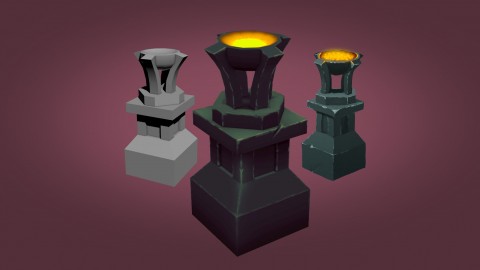
Create a game asset from start to finish (Udemy.com)
Start from scratch and end with a game asset ready to be imported into your game.
Created by: Marco Vale
Last updated January 2015
 What you will learn
- Design their own game assets
- Model them using low poly modeling tecniques
- Create the texture coordinates
- Hand paint a beautiful texture for your model
How it compares
Against the other 281 rated Udemy courses in Game Development Fundamentals on CourseDuck:
- Rating4.3 out of 5higher than 20% of them
- Reviews24#277 of 282 by number of reviews
- Length2.2 hoursshorter than 90% of them
- Last updatedJanuary 2015earlier than 99% of them
 Course Description
This game art course is perfect for those who are starting out making their own games. If you have a passion for game development but lack in the art department, then you should take this course.
You will learn skills to improve the game assets you create, from concept design, modeling and texture painting

 Udemy Discount
The discount is applied through our link. Open the course from here and Udemy's current promotional price is applied at checkout on most courses, no code to type.
Some courses are excluded from Udemy's promotions. If the price does not drop, clear your browser cookies and use the button again.
Instructor Details

- 4.3 Rating
 24 Reviews
Marco Vale
I have been working in the games industry as an amateur since 1998. In 2003 I started as a professional. My projects range from all forms of game art, from 3d low-poly to 2d pixel art, vector or even animation. I've also taught illustration, 3d modeling, Flash animation and Photoshop at a professional school. I am currently working in mobile gaming
 More courses by Marco Vale

More Game Development Fundamentals courses

The Ultimate 2D Top Down Unreal Engine Course (2026)
4.9 (1,468 Reviews)
 Provider: Udemy
 Time: 17.1h
$94.99

Blender Skill Builder: Modelling Challenges (2026)
4.9 (144 Reviews)
- Provider: Udemy
- Time: 6.5h
$19.99

Jumpstart to 2D Game Development: Godot 4 for Beginners (2026)
4.8 (4,398 Reviews)
- Provider: Udemy
- Time: 67.6h
$89.99

Create a Complete 2D Survivors Style Game in Godot 4 (2023)
4.8 (3,761 Reviews)
- Provider: Udemy
- Time: 17.2h
$59.99

Master Lua Programming and Create Amazing Games with LÖVE! (2023)
4.8 (3,199 Reviews)
- Provider: Udemy
- Time: 8.5h
$13.99

Complete Godot 2D: Develop Your Own 2D Games Using Godot 4 (2025)
4.8 (1,619 Reviews)
- Provider: Udemy
- Time: 11.3h
$94.99
 Reviews

By Estevan Lopez on 6/20/2019
I love the way Marco shows his processes! The course is short but I like how to-the-point it is. this course game me a solid starting point to begin with.
By Fausto D Chalas on 2/3/2019
This tutorial is easy to follow and I learned new tricks along the way.
By Frederico Brgida on 4/25/2018
Great for who wants to create their first assets!
By Marcus on 1/4/2018
was a good course. made hand painted textures easier to understand.
By Jon Malinowski on 9/13/2017
I took this course with the hopes of learning how to build game assets. However, I learned so much more in regards to concept design and ideation.
By Otis Davon on 5/27/2017
Very good course. The trainer speaks clearly and the model is interesting.
By Ruth Andrews on 4/5/2017
From the beginning I really liked the simplicity and that it's hands on approach, without drowning us in theory.
I would recommend for amateur artists, and even though you might not have the 3D package that the instructor does, then the techniques can be applied to whatever 3D software you might have because the project is simple. I don't have 3D Max, and use Modo indie, and most things that were being done in 3D Max I knew how to apply in Modo.
By Sainte-Catherine Geoffroy on 11/10/2016
Very good tutorial, however it would be really nice to see the whole screen. Would it be possible to have a more in depth tutorial on textures (normal map, pbr and stuff...) ?
By Lorenzo Di Pietro on 11/18/2015
This course discusses the fundamentals of creating game assets with 3ds Max and Photoshop, with a special attention for the hand painted texturing workflow. I wish that there were more courses like this. I find it very informative.
By Tiago Franco on 3/18/2015
A very insightful and well structured course. Marco always explains the rational behind each decision in a clear way and breaks down each problem into smaller tasks using multiple solutions that you can use in multiple situations. Having the whole process from creative thinking and concept to final 3D model makes for a very complete course.
I totally recommend it.
By Ivo Alves on 2/3/2015
This is a good and well structured course, it gives you exactly what the title promises you. I would recommend this to all game developers, specially if you'r just starting. Also it's very easy to understand the tutor's speech.
By Wilson Almeida on 1/2/2015
Good course to get a general idea and the key concepts about building a game asset. If you want to follow along I suggest that you give Photoshop and 3DS Max a test drive, so you don't get lost.
 Quality Score
No CourseDuck member has rated this course yet. Taken it? Give each part a thumbs up or down.
Overall Score : 86 / 100
- Video Duration:
 2.2h
2.2h - Price: $34.99
- Provider: Udemy
- Updated:
 January 2015
 - Level:
 Beginner
 - Language:
 English
 - Certificate:
 Yes
Yes
30-day money-back guarantee on most paid courses
Udemy Coupon Price Tracker
