
 Web Development
 Data Science
 Python
 SQL
SQL JavaScript
 Artificial Intelligence
 IT & Software
 IT Certifications
 Hacking
 AWS
AWS Arduino
 DevOps
 3D Modeling
 Graphic Design
 Photoshop
 Drawing
 Digital Painting
 UX Design
 Business
 Data Analysis
 Communication Skills
 Project Management
 Leadership & Management
 Human Resources
 Digital Marketing
 Social Media Marketing
 Marketing
 SEO
SEO Google Analytics
 Branding
 Excel
Excel Office Productivity
 SAP
SAP PowerPoint
 Microsoft Access
 SharePoint
 Finance & Accounting
 Trading & Investing
 Accounting
 Bitcoin
 Personal Finance
 Video Editing & Animation
 Photography
 Adobe Premier Pro
 Adobe Lightroom
 Personal Development
 Productivity
 Career Development
 Life Coaching
 Health & Fitness
 Meditation & Mindfulness
 Yoga
Yoga Music
Music Music Production
 Guitar
 Piano
Piano Singing
 Language Learning
 Teaching & Academics
 Engineering
 Math
Math Lifestyle
Dreamweaver - Coding your first website using Dreamweaver (Udemy.com)
Create a beautiful, responsive website and publish it with the newest and most useful tricks from Dreamweaver.
Created by: Daniel Walter Scott
Last updated January 2025
Our take
Based on the ratings of 743 students, a sample of their written reviews and the syllabus, as the course stood in January 2025. No course pays to be reviewed.
This is a short, hands-on build in Adobe Dreamweaver. Daniel Walter Scott, who is a Dreamweaver Certified Instructor, walks through one responsive site in 14 lectures and about 2.2 hours: a mobile friendly page, a burger style navigation, the page content, then publishing. Exercise files come with it, plus a finished copy at the end of each video to compare against. It is aimed at creatives and entrepreneurs who want a first site, and it covers HTML and CSS basics along the way.
Students rate it 4.4 from 743 reviews, and most of the sample is four or five stars. People like the gentle, easy to follow teaching and say it makes coding feel less scary. The complaints repeat. Several reviewers say he moves fast, so they paused and rewound. One found the intro music louder than the speech, and another had trouble with his accent at times. Two got stuck, one on the burger menu and one on the grid, and the first of them gave up. Another says a question went unanswered.
The course dates from 2016 and was last updated in January 2025, though it is still built around Dreamweaver CC 2017 or newer. The slicknav site it mentions has been taken down, but the needed files are in the downloads, so that is not a blocker. At just over two hours it is a quick way to get a real site online. It suits Dreamweaver users who are happy to pause often. Anyone wanting quizzes or live help should look elsewhere.
Pros
- Short at about 2.2 hours, so a finished responsive site is within easy reach
- Exercise files plus a finished copy after each video to compare against your own
- Gentle, clear teaching that reviewers say makes coding feel less scary
- Covers the full path from first page and burger menu to publishing online
Cons
- Moves fast, and several reviewers paused and rewound to keep up
- Two reviewers could not get the burger menu or grid working, and one gave up
- Little support: one reviewer got no reply to a question, and slicknav is outdated
Once again Daniel uses his impressive skill set to easily teach a very useful course for web design. His gentle teaching style makes coding seem much less scary than the majority of other sources.
Beginner label fits web newcomers, but basic design knowledge and a copy of Dreamweaver CC 2017 or newer help.
 What you will learn
- Build a responsive website
- Use Dreamweaver CC 2017 proficiently
- Understand HTML and CSS basics
- Create a mobile friendly website
Course content
6 sections · 14 lectures · 2.2 hours of video 1 article
- 1Overview 2 free previews2 lectures · 7 min
- 2Building our first mobile friendly web page 1 free preview2 lectures · 21 min
- 3Creating a navigation3 lectures · 38 min
- 4Creating the content for your website3 lectures · 41 min
- 5Publishing1 lecture · 5 min
- 6Conclusion3 lectures · 20 min
Who it is for
The instructor says it suits
- This course is for creatives who want to implement their design knowledge into the web industry
- Entrepreneurs
- Dreamweaver users that want to update their skills to the newest release
- This course is suited for people that want to learn the basics of coding a website
What you need before you start
- You'll need a copy of Dreamweaver CC 2017 or above. A free 30 day trial can be download from Adobe.
- Basic design knowledge will be helpful
- If you're not sure if this course is right for you. Email me what you’re trying to do and check if you’re on the right track.
How it compares
Against the other 53 rated Udemy courses in UI Design on CourseDuck:
- Rating4.4 out of 5higher than 49% of them
- Reviews743#14 of 54 by number of reviews
- Length2.2 hoursshorter than 86% of them
- Last updatedJanuary 2025more recently than 60% of them
 Course Description
Hi - my name is Dan and I’ll be leading you through this course on how to code responsive websites using Dreamweaver CC.
These are the skills you’ll need to become a professional web designer. You’ll learn how to make responsive websites in Dreamweaver.
We cover everything you need to build your first website. From creating your first page through to uploading your website to the internet. Creating mobile, tablet and desktop versions.
I’m a Dreamweaver Certified Instructor and an Adobe Certified Web Specialist.
With exercise files you can download and work along with me. At the end of each video I have a downloadable version of where we are in the process so you can compare your project with mine making it easy to see where you might have a problem.
I’ll be showing you how to work with Dreamweaver to easily create HTML & CSS websites. How to create mobile and tablet versions of your design and how to test your website on your phone.
I’ll be teaching you how to create navigation bars using the ever so popular 'burger menu' style.
This course is full of the foundation techniques to be a front end web developer. By completing this, you'll have an excellent insight to what it takes to take a step into the wonderful career of Web Design!
Now it’s time to upgrade your skills, get that better job and impress your clients.
Note: A piece of the course that references the website 'slicknav' is now no longer accurate as the slicknav site has been taken down, however the files needed to complete the course are a part of the exercise files so you won't be missing out on anything!

 Udemy Discount
The discount is applied through our link. Open the course from here and Udemy's current promotional price is applied at checkout on most courses, no code to type.
Some courses are excluded from Udemy's promotions. If the price does not drop, clear your browser cookies and use the button again.
Instructor Details

- 4.4 Rating
 743 Reviews
Daniel Walter Scott
Sharing is who I am, and teaching is where I am at my best, because I've been on both sides of that equation, and getting to deliver useful training is my meaningful way to be a part of the creative community.
I've spent a long time watching others learn, and teach, to refine how I work with you to be efficient, useful and, most importantly, memorable. I want you to carry what I've shown you into a bright future.
I have a wife (a lovely Irish girl) and kids. I have lived and worked in many places (as Kiwis tend to do) – but most of my 14+ years of creating and teaching has had one overriding theme: bringing others along for the ride as we all try to change the world with our stories, our labours of love and our art.
I'm a certified Adobe instructor (ACI) in Ireland. I'm also an Adobe Certified Expert (ACE) and have completed the Adobe Certified Associate training (ACA). And I don't just do Adobe. Remember, media is a very broad term – digital blew out the borders, so we are all constantly learning.
I've been teaching for 14+ years. I come from being a media designer and content creator – so I understand exactly where you're at now. I've been there. I love this stuff. Print, digital publishing, web and video. I can see how it all connects. And I can see how we can share those connections.
 More courses by Daniel Walter Scott


User Experience Design Essentials - Adobe XD UI UX Design (2025)
4.7 (46,830 Reviews)
 Provider: Udemy
 Time: 9.7h
$189.99

Adobe Photoshop CC – Essentials Training Course (2025)
4.8 (36,753 Reviews)
- Provider: Udemy
- Time: 11.6h
$189.99

Adobe InDesign CC - Essentials Training Course (2026)
4.7 (19,611 Reviews)
- Provider: Udemy
- Time: 11.9h
$149.99

UX Design & User Experience Design Course - Theory Only (2025)
4.3 (11,988 Reviews)
- Provider: Udemy
- Time: 2.5h
$109.99

Adobe Premiere Pro CC – Essentials Training Course (2025)
4.7 (11,647 Reviews)
- Provider: Udemy
- Time: 15.8h
$129.99
More UI Design courses


Build eCommerce websites with WordPress & WooCommerce (2025)
4.7 (889 Reviews)
- Provider: Udemy
- Time: 28.8h
$84.99

UX / UI Web Design in Figma | Advanced Level | Eng (2026)
4.7 (155 Reviews)
- Provider: Udemy
- Time: 12.3h
$19.99


DESIGN RULES: Principles + Practices for Great UI Design (2025)
4.6 (16,991 Reviews)
- Provider: Udemy
- Time: 4.9h
$129.99

Master Figma for Web Design & Freelancing: Learn UI/UX (2026)
4.6 (1,047 Reviews)
- Provider: Udemy
- Time: 12.8h
$79.99
 Reviews

By Jennifer Martinez on 11/25/2022
I like it very much; however, in order to retain the information better I was making a study guide for myself which entailed doing screen shots, but for some reason when I go in to make screen shots using the snip tool, the instructors screen turns totally black and does not allow me to make screen shots anymore. I have been typing out the code but sometimes it is best to actually capture some examples using screen shots.
By Allison Burris on 8/18/2020
Dan, for the life of me I cannot get the grid to work! I am not happy right now and quite disappointed.
By Rana Shahin Khmur on 5/31/2020
Honestly, you’re a great instructor, I liked your way of teaching; that’s why I bought a few courses of you and I’m excited to learn more. I saw different tutorials online but I liked yours the most, coz you make things clearer and more simple. Other courses are complicated and too much detailed. Yours is straight to the point and just what we need to know! My only comment is that when you explained how to make a navigation menu, I got completely lost! I felt like there’s a gap in between; as I thought we’ll learn to do everything from scratch without using other ppl’s resources (codes)! Maybe it’s not something you can do anything about, coz obviously Javascript turned out to be way more difficult than I thought!! Which slowed down my urge to move forward!! I’m telling you that so that you might think of a way to fix that. Anyway, Thanks for what you do :)
By Emagnus Lopez on 5/24/2020
Just because you know an application doesn't mean you know how to teach. Daniel Walters knows how to teach a course. He sets up his courses for you to succeed in whatever application you're trying to learn. It should be mandatory for other instructors to take/review his teaching style and preparation work to make their classes as smooth and beneficial as Mr. Walters makes his.
By Abd-Al-Rahim Al Sanhaji on 4/10/2019
Thanks, jumping from the InDesign essentials course to this one was no struggle I found the same Dan with his great accent and his wonderful teaching skills!!! I've tried to learn to code in the past but I always got stuck at some point... With this course now I love coding!! Don't hesitate a second, learn from someone who is passionate about what he is doing (i.e: Dan).
By Jacki Kellum on 11/21/2018
I am a 69-year-old painter with NO prior Dreamweaver experience. I have been able to follow the entire tutorial--except the preview on my mobile device. That should be made clearer. I cannot understand what is wrong. Otherwise, this is an excellent intro to Dreamweaver for visual creatives--taught by a dynamic an generally thorough instructor
By Alice Barry on 10/21/2018
For a short course, as an absolute beginner in web application, I feel that I now have basic understanding of what Dreamweaver does and coding seems somewhat less scary! I did battle somewhat with the exercises though, so I half way through I decided to just finish watching and I will now start again from the beginning - I feel confident that I'll get it all to work for me second time around. I do think it would be much easier to have an extra monitor so that I can follow my preview though, working on just a laptop is definitely a drawback. I also found the downloads a little confusing, I think it would be easier to have them all together at the beginning.
By Timothy Gray on 9/17/2018
Im not a coder by any means but I decided to tackle the job and to my supprise this instructor was who i needed. Heexplains just enough to get you going with out information overload. This kind of detail control is so different then grrabing a wordpress template and slapping up a website. With what you learn in this course you will be able to create a one of a kind master piece.
By Jeffrey Withrow on 12/28/2016
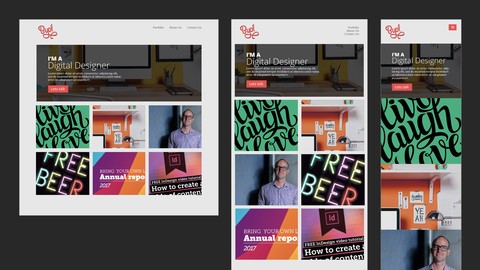
Based on the screen shot for the code web page to be built I was a bit uncertain the benefit of taking this course. It is a bit heavy with js on the front end...sort of wonder if some of that could be skipped over, just have the code in the page, then gone over later and explained. Thus allowing a newbie to complete less complex beginning coding. At any rate, as you can see from my rating, this is a good DWCC17 intro plus I did not see any other such classes for this cloud software on udemy site. Instructor was very good and if you take good notes there is a lot of tips for DW, especially at the end with the DW cheat sheet he goes over. As happens a lot on this site, I picked this class up on sale so for that aspect of it would have to give it almost 5 stars. Nice pacing, good audio voice over and screen images and curser movements. Would recommend the instructor for other courses.
By Cara2510 on 11/23/2016
Although at times the instructor presentation was to fast for me to follow while entering the code or to find the function or Dreamweaver feature etc. I just stopped the presentation and continued as needed. I am totally a beginner with Dreamweaver. The course taught me the basics and I can now navigate through Dreamweaver. Very GOOD instruction. Thank you.
 Quality Score
No CourseDuck member has rated this course yet. Taken it? Give each part a thumbs up or down.
Overall Score : 88 / 100
- Video Duration:
 2.2h
2.2h - Price: $84.99
- Provider: Udemy
- Updated:
 January 2025
 - Level:
 Beginner
 - Language:
 English
 - Certificate:
 Yes
Yes - Lectures:14 in 6 sections
- Students:3,924
- Subtitles:1 language
30-day money-back guarantee on most paid courses
Udemy Coupon Price Tracker
