
 Web Development
 Data Science
 Python
 SQL
SQL JavaScript
 Artificial Intelligence
 IT & Software
 IT Certifications
 Hacking
 AWS
AWS Arduino
 DevOps
 3D Modeling
 Graphic Design
 Photoshop
 Drawing
 Digital Painting
 UX Design
 Business
 Data Analysis
 Communication Skills
 Project Management
 Leadership & Management
 Human Resources
 Digital Marketing
 Social Media Marketing
 Marketing
 SEO
SEO Google Analytics
 Branding
 Excel
Excel Office Productivity
 SAP
SAP PowerPoint
 Microsoft Access
 SharePoint
 Finance & Accounting
 Trading & Investing
 Accounting
 Bitcoin
 Personal Finance
 Video Editing & Animation
 Photography
 Adobe Premier Pro
 Adobe Lightroom
 Personal Development
 Productivity
 Career Development
 Life Coaching
 Health & Fitness
 Meditation & Mindfulness
 Yoga
Yoga Music
Music Music Production
 Guitar
 Piano
Piano Singing
 Language Learning
 Teaching & Academics
 Engineering
 Math
Math Lifestyle
Instagram Firestore App Clone | Swift 5 + iOS 14 | MVVM (Udemy.com)
Build an Instagram iOS App Clone with Cloud Firestore, Swift 5, iOS 14 & No Storyboards
Created by: Stephan Dowless
Last updated October 2020
 What you will learn
- Build an Instagram clone with iOS 14, Swift 5 & Firestore without the use of storyboards
- Modified MVVM Architecture
- Build a social network (Posts, Notifications, Following, Likes etc.)
- Engineer a backend using Cloud Firestore
- Advanced auto-layout and programmatic UI skills with Swift
- Register and authenticate users using Firebase
- Advanced UI/UX development to build a clean and visually appearing user interface
- Advanced Object Oriented Programming skills
How it compares
Against the other 160 rated Udemy courses in iOS Swift on CourseDuck:
- Rating4.7 out of 5higher than 87% of them
- Reviews537#60 of 161 by number of reviews
- Length16.9 hourslonger than 65% of them
- Last updatedOctober 2020more recently than 55% of them
 Course Description
What are we building?
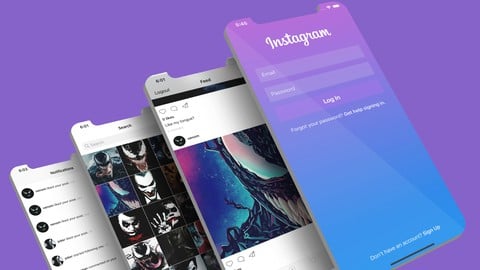
In this course, you will learn how to build a complete version of Instagram ready to be published on the App Store. We will be building all the core components of a social network. This includes following users, making posts, liking/commenting on posts, in-app notifications, creating a user profile, and registering users. Throughout the process, you will develop high level programming, app design and app development skills. We will be building this without the use of storyboards, fully programmatically.
Prior Experience?
Some programming and basic Xcode experience is preferred. The course will move a little fast if you're a complete beginner, but you will pick things up along the way.
Why take this course?
Learning advanced development skills should be taught using real world examples. This course will teach you how to build a fully functional social network, from complete scratch. You will be learning advanced front and backend development skills, from a real life professional developer. You will learn how to code like a pro, and everything will be explained in detail along the way. This will teach you to build production ready applications, that are easily scalable and maintainable. This also makes for a great project to add to your portfolio, which you can use to show off to potential employers if you're trying to become a pro.
What will you learn?
Comprehensive knowledge and understanding of Swift 5 & Xcode 11
Implement Model View ViewModel (MVVM) architecture
How to engineer a backend server using Cloud Firestore
How to authenticate and register users with Firebase
How to communicate with a database (read/write)
How to monitor events in a database
How to upload images to Firebase Storage
How to structure data for optimum performance in Cloud Firestore
How to build a fully functioning social network (likes, comments, follow, posts, notifications)
How to programmatically construct views and controllers
How to parse incoming JSON data from database
How to use CocoaTouch classes, UIKit, UserNotifications and more
How to use CocoaPods and custom third party APIs
How to implement/use protocols
How to implement custom subclasses for clean and reusable code
How to dynamically size collection view cells
How to create extensions and functions for clean and reusable code
Advanced level programming and app development skills
Advanced level User Interface Design
Advanced level back end engineering
What features are included?
Create users
Create a user profile
Authenticate users with Firebase
Search for users
Upload posts
Home feed with posts from followers
Like posts
Comment on posts
In app notifications for following, post likes and post comments
Follow/Unfollow users from profile
Follow/Unfollow user from notifications screen
Go to post or profile from notifications screen
Display timestamp on posts and notifications
Logging in and logging out

 Udemy Discount
The discount is applied through our link. Open the course from here and Udemy's current promotional price is applied at checkout on most courses, no code to type.
Some courses are excluded from Udemy's promotions. If the price does not drop, clear your browser cookies and use the button again.
Instructor Details

- 4.7 Rating
 537 Reviews
Stephan Dowless
Stephan is a seasoned technology expert with a passion for software engineering and a remarkable journey of self-discovery. With a decade of hands-on experience in the field, Stephan has established himself as a distinguished figure in the world of software development.
Formerly a Senior Software Engineer at Meta (formerly known as Facebook), Stephan played an instrumental role in crafting innovative solutions that drove the company's technological advancements. His tenure at one of the tech industry's giants allowed him to gain deep insights into the intricacies of large-scale software systems and the ever-evolving landscape of modern technology.
What sets Stephan apart is his unconventional path to mastery. With a remarkable story of being entirely self-taught, he demonstrates the power of determination and relentless pursuit of knowledge. Starting from scratch, Stephan embarked on a journey to understand the inner workings of code, algorithms, and software architecture. Through countless hours of experimentation, learning from failures, and seeking out the best resources, he honed his skills to a professional level that caught the attention of industry leaders.
 More courses by Stephan Dowless

Twitter iOS Clone | Swift 5/Firebase | No Storyboards | MVVM (2020)
4.6 (602 Reviews)
 Provider: Udemy
 Time: 20.3h
$74.99

Programmatic Uber Clone App |Swift /Firebase| No Storyboards (2020)
4.6 (439 Reviews)
- Provider: Udemy
- Time: 18.5h
$59.99
Instagram SwiftUI Clone | MVVM | Cloud Firestore (2021)
4.5 (379 Reviews)
- Provider: Udemy
- Time: 13.7h
$59.99
Twitter SwiftUI Clone | iOS 14 & Swift 5 | Firestore | MVVM (2020)
4.6 (376 Reviews)
- Provider: Udemy
- Time: 13.3h
$49.99
iOS 13 & Swift 5: Chat App With Firestore | MVVM (2020)
4.6 (286 Reviews)
- Provider: Udemy
- Time: 8.8h
$59.99
SwiftUI WhatsApp Clone | MVVM | Cloud Firestore | iOS 15 (2022)
4.5 (157 Reviews)
- Provider: Udemy
- Time: 10h
$54.99
More iOS Swift courses

iOS 12 Swift 4.2 - The Complete iOS App Development Bootcamp (2021)
4.9 (562 Reviews)
- Provider: Udemy
- Time: 55.4h
$109.99

Noob to App Store - iPhone Apps with Swift, SwiftUI & iOS 15 (2021)
4.9 (342 Reviews)
- Provider: Udemy
- Time: 7.8h
$69.99

Deep Dive iOS 27 & SwiftUI 6: 90-Hour Project-Based Course (2026)
4.8 (983 Reviews)
- Provider: Udemy
- Time: 88.7h
$79.99

The Swift Arcade Data Structures and Algorithms Bootcamp (2022)
4.8 (839 Reviews)
- Provider: Udemy
- Time: 7.2h
$84.99

How To Make An App For Beginners (iOS/Swift - 2019)
4.8 (658 Reviews)
- Provider: Udemy
- Time: 4.3h
Free

SwiftUI iOS13 Coffee Shop Application, Order Products Online (2020)
4.8 (158 Reviews)
- Provider: Udemy
- Time: 8.2h
$109.99
 Reviews

By Anonymized User on 11/5/2024
A well-structured Swift 5 course provides an excellent foundation for both beginners and experienced developers looking to master iOS and macOS app development. The best courses offer a comprehensive breakdown of Swift's core features, starting with the basics—such as variables, data types, and control flow—before diving into more advanced topics like closures, optionals, and protocols. What sets a great Swift 5 course apart is its focus on modern Swift features. Swift 5 introduces key improvements such as the Result type, Property wrappers, and function builders, which are essential for building efficient and maintainable applications. A good course will cover these new additions in depth, explaining their use cases and best practices, especially for developing with frameworks like SwiftUI or Combine. The teaching style should strike a balance between theory and practical application. A well-paced course will break down complex topics into digestible segments, with clear, step-by-step explanations and real-world examples. Hands-on exercises are crucial, as they help solidify concepts and give learners the opportunity to apply what they've learned in real projects. This is especially important for Swift, where understanding nuances like memory management and error handling can significantly impact code quality. In addition to Swift syntax and features, a high-quality course should emphasize best practices for writing clean, maintainable code and optimizing app performance. Integration with APIs, using Swift's concurrency model, and understanding how Swift fits into the broader iOS development ecosystem are all valuable learning outcomes. Lastly, an excellent Swift 5 course will offer ongoing support, such as access to community forums or mentorship, ensuring learners can continue to grow their skills after completing the course. In conclusion, a good Swift 5 course combines expert instruction, real-world examples, and hands-on coding to equip learners with the skills they need to succeed in iOS development.
By 사탕 사탕맛 on 5/28/2024
아직 초반부분밖에 보지않았지만 코드스타일이 깔끔하고 보고 배울점이 많다고 느꼈다. 후반부분이 기대되는 강의다. ------ 중간까지 진행하고 작성하는 후기다. API통신 및 MVVM패턴, Delegate패턴, 코드컨벤션 등등 많은 정보들을 얻을 수 있고 지금까지 본 강의중에 거의 유일하게 질리지 않고 흥미있게 본 강의다. 영상을 보며 코드를 따라치지만 말고 미리 코드를 자신만의 방법으로 구현해놓고 그다음 영상을 보고 나랑 무엇이 다른지 확인하면서 학습하면 더욱 기억에 남는것같다. ----- 강의를 다 보고 작성하는 후기다. 일단 여기서 배우는 내용들은 배경지식이 없는상태라면 이 지식들을 온전히 습득하기가 어려울것이라고 생각한다. 완전초보가 보고 배우기에는 어렵지만 어느정도 배경지식이 있는 중급자정도라면 더할나위없는 최고의 강의이다.
By Raúl R.- on 8/26/2023
PS: Read the whole text. I really liked the course and if i was you searching for a course i would buy this and stop wasting my time looking in other places. That being said i would like to warn that if you are new as a developer in general im afraid that you might wont be able to finish the course as the course has some bugs caused by the changes in IOS through this 3 years, that doesn't mean its outdated, it means that if you don't have the knowledge necessary to sense why theres some bugs happening you wont be able to find the solution because IOS development as well as Android development are a totally different flex, React or angular are easier compared to UIKIT and IOS in general. In the other hand there could be the case that you finish the course but the app would have some bugs but you could really don't care as the course is really well constructed for my taste so its worth doing it and for the price is the best option out there. So, in conclusion the course is worth it and it really teaches you how to do programmatically UIKIT and more important than that it gives you a insight on how to develop and app from scratch and I like Steven as instructor, he feels like a real g and a more organic teacher. -Peace
By Ankit gaur on 2/11/2023
At starting I was struggling to follow up the Stephan because his coding speed feel little fast to me but I followed him and watched half of the course 2 times to understand about the content. I was little slow in the beginning xD. But later I got my speed and watched the remaining lectures at 1.75x and still I was able to get everything. Thanks to Stephan for this improvement in me. My coding ability has improved a lot. He really done a nice job. It was really nice following and coding with you. Great experience man. Peace!!
By Sean Chao on 12/21/2022
You can learn something. Right. But this project isn't finish! Details not done. Finally, you want to buy source code... It's not very well. And, this is not a full MVVM architecture. Maybe confuse some people...
By James Edwards on 4/20/2021
I previously only knew SwiftUI and knew for my next app I couldn't launch it with SwiftUI's current state. I was definitely overwhelmed with UIKit programmatically and UIKit in general compared to SwiftUI's reactive programming. BUT WOW this tutorial caught me up to speed. I can mentally differentiate between the two and feel so much more comfortable diving deeper in UIKit. Amazing course man
By Long Nguyen on 2/28/2021
Excellent course that really takes my coding skill to a new level. Learn tons of cool features and also organize my code neatly. TAKE NOTICE that this is not a beginner course, a beginner may be able to finish the course, but he will not understand anything. Gotta be familiar with Swift and Xcode and Firebase in order to digest all information Stephan gives out.
By Eugene L on 1/31/2021
Stephen did a great job explaining all significant aspects of the architecture and design patterns. I really enjoyed the course and would recommend it to anyone, from complete beginners in Swift to experienced developers, who want to expand their horizons and learn iOS development by example. Bear in mind, though, it's not a zero-to-hero course, and you need to have some prior programming experience. The resulting app looks and works great, I've fixed a couple of minor UI bugs and did some refactoring, but apart from that, you're getting what's advertised in the course demo. Stephen asked for constructive feedback so here's something I think can be improved: - Unit tests and IU tests. I know it's tedious and time-consuming, but it's a good practice, so I thought it would be great if you could include a couple of examples and shared best practices. - Programmatic UI, constraints and alignment. It would have been helpful if you'd briefly explained anchors, constraints, alignment and programmatic layouts. - ViewModel and access control. It just seemed wrong making variables public and allowing to modify them via ViewModel. A ViewModel could have had a mutating function to update its private variable instead (i.e. increment/decrement likes, toggle isFollowed etc.). Overall, I believe this was a good investment in myself. I recommend this course to everyone and looking forward to purchasing more from Stephen.
By Ahmad Mustafa on 1/9/2021
I completed the course and my review: As one who works a full job as an iOS Developer, I saw this's the best course ever made in Udemy and includes a lot of features. Stephan is really professional, he expands my thought in code and improved my code structures, I faced the problem and wasn't sure the right solution but Stephan answered with a nice organization way. I highly recommend this course, defiantly I'll buy more courses for you especially in SwiftUI. I'm excited to see what upcoming from you next, Thank you, Stephan
By Brian Harp on 11/17/2020
Great course must better than his Twitter and original Instagram one. His og insta one does have more stuff, but none useful. This version has almost everything you need and he does a much better job of explaining the code in this. It is missing a few features but it's forgivable, if you check his youtube channel or do his twitter course for some extras.
 Quality Score
No CourseDuck member has rated this course yet. Taken it? Give each part a thumbs up or down.
Overall Score : 94 / 100
- Video Duration:
 16.9h
16.9h - Price: $64.99
- Provider: Udemy
- Updated:
 October 2020
 - Level:
 Intermediate
 - Language:
 English
 - Certificate:
 Yes
Yes
30-day money-back guarantee on most paid courses
Udemy Coupon Price Tracker
