
 Web Development
 Data Science
 Python
 SQL
SQL JavaScript
 Artificial Intelligence
 IT & Software
 IT Certifications
 Hacking
 AWS
AWS Arduino
 DevOps
 3D Modeling
 Graphic Design
 Photoshop
 Drawing
 Digital Painting
 UX Design
 Business
 Data Analysis
 Communication Skills
 Project Management
 Leadership & Management
 Human Resources
 Digital Marketing
 Social Media Marketing
 Marketing
 SEO
SEO Google Analytics
 Branding
 Excel
Excel Office Productivity
 SAP
SAP PowerPoint
 Microsoft Access
 SharePoint
 Finance & Accounting
 Trading & Investing
 Accounting
 Bitcoin
 Personal Finance
 Video Editing & Animation
 Photography
 Adobe Premier Pro
 Adobe Lightroom
 Personal Development
 Productivity
 Career Development
 Life Coaching
 Health & Fitness
 Meditation & Mindfulness
 Yoga
Yoga Music
Music Music Production
 Guitar
 Piano
Piano Singing
 Language Learning
 Teaching & Academics
 Engineering
 Math
Math Lifestyle
Intermediate Game Asset Creation - 3D Modeling in Blender (Udemy.com)
Learn intermediate 3D modeling, texturing, and rendering with Blender and 3D-Coat by creating AAA ready game assets
Created by: Concept Courses
Last updated November 2017
 What you will learn
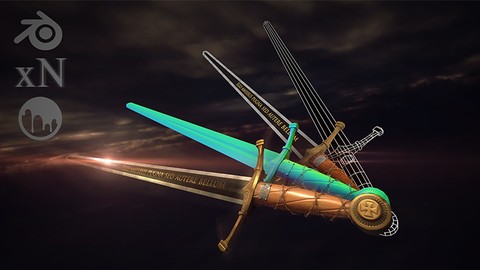
- Use 3D modeling in Blender to create a practical, real world game asset that you can use in your own creations or expand upon into other game assets.
- Make awesome, AAA game assets by utilizing just the right tools and techniques of the software that you need.
- Save time and money by creating your own 3D models, quickly and efficiently.
- Learn 3D modeling, texturing, rendering, and exporting with Blender, the world's premiere 3D application for creating amazing game assets.
How it compares
Against the other 100 rated Udemy courses in Blender on CourseDuck:
- Rating4.5 out of 5higher than 29% of them
- Reviews235#68 of 101 by number of reviews
- Length4.2 hoursshorter than 82% of them
- Last updatedNovember 2017earlier than 92% of them
 Course Description
Get up to speed on the techniques and pipelines used to create high quality, AAA ready game assets!
This online course will teach you how to use Blender and 3D-Coat to create a PRACTICAL REAL WORLD project for your game asset ideas!
- Do you want to take your 3d modeling, texturing, and rendering, skills to the next level?
- Have you spent time and energy Googling Blender tutorials online, only to find out that it never covers exactly what you need?
- Do your 3D renders look plain and boring, and you want to know how to take your 3D models to the next level?
If you answered yes to any of these questions, you're in the right place!
I know it can be frustrating watching other people post gorgeous looking renders and game assets online, while always wondering how they did it. You can spend hours or even days trying to find the right tutorial online to recreate a 3D asset. Even then they don't always cover the complete pipeline from start to finish.
That's why we created this course - to teach people just like you how to easily get started with Blender.
This course has been specifically designed with you in mind and we have developed a system to allow you to learn just what you need to know, only when you need it.
Have fun while learning! Learn by actually doing!
After enrolling in this course, you'll be taken through a complete intermediate project that will show you how to recreate a 3D game asset from start to finish. Follow along and practice while learning!
Downloadable project files make it easy to follow along and practice.
The best part about a course like this is that you won't waste time learning tools and functions inside of Blender that you will never use. Most courses will tell you about every little part of the program, which is daunting to most people.
Intermediate Game Asset Creation - 3D Modeling in Blender will show you the necessary tools as you apply them.
This course will cover every aspect of:
- Blender and 3D-Coat's Interface and How to Navigate It
- 3D Modeling a Complicated 3D Game Asset
- UV Unwrapping and Understanding How UVs Work
- How Normals Work and How to Bake Textures Into Your Model
- Texturing Your Game Asset with Smart Materials
- Exporting Your Model to Unity, the Number One Game Engine
- and so much more!
Whether you want to create game assets just for fun, or you work in a production studio and need this information done right this instant, this course is for you. We will guide you every step of the way and are here to make sure you succeed in your ventures. We are always available to answer any messages, discussions, questions, or feedback that you have.
Get a Certificate of Completion when you finish the course!
With our 30-Day 100% money back guarantee, there's no reason hesitate!
ENROLL NOW

 Udemy Discount
The discount is applied through our link. Open the course from here and Udemy's current promotional price is applied at checkout on most courses, no code to type.
Some courses are excluded from Udemy's promotions. If the price does not drop, clear your browser cookies and use the button again.
Instructor Details
- 4.5 Rating
 235 Reviews
Concept Courses
What would you like to learn today?
Concept Courses is a leading international provider of educational content in development, business, design, and more. Our goal is to make quality content so that you can learn a new skill, grow your expertise, and dominate your career!
You will find courses on professionals who are experts in their field. These courses are available in high definition (HD) and are available at any time for you to study. With a wide range of topics to choose from and an easy platform to navigate, Concept Courses strives to make sure that you are getting the most out of your education.
Our experts have the right course for you.
Development
Software development, technology, robotics, artificial intelligence, machine learning, and so much more is where the world is headed. We currently live in an age of electronics and computer helping us with everything from driving to telling us what we should eat for dinner.
This category is only on the rise and is a main focus for our brand. We have gone through lengths to find the best online instructors to teach development to you, in a way that you can understand.
 More courses by Concept Courses

Game Asset Crash Course - 3D Modeling in Blender and 3D-Coat (2019)
4.5 (453 Reviews)
 Provider: Udemy
 Time: 2.5h
$11.99

The Total Kotlin Course : Learn Kotlin Today (2017)
4.0 (333 Reviews)
- Provider: Udemy
- Time: 3.6h
$19.99

Advanced Prop Modeling - 3D Modeling in Blender (2018)
4.5 (103 Reviews)
- Provider: Udemy
- Time: 6.1h
$54.99
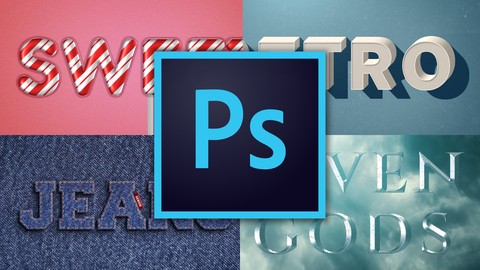
Photoshop Effects - How to Create Text Effects (2018)
4.7 (89 Reviews)
- Provider: Udemy
- Time: 1h
$54.99
More Blender courses

Low Poly Landscapes: Blender Bite Sized Course (2025)
4.9 (1,704 Reviews)
- Provider: Udemy
- Time: 6.2h
$99.99

Absolute Beginners 3D character in Blender course (2022)
4.9 (1,133 Reviews)
- Provider: Udemy
- Time: 14.5h
$94.99


Complete Blender Creator: 3D Modelling (Compatible with 4.3) (2026)
4.8 (69,132 Reviews)
- Provider: Udemy
- Time: 13.8h
$199.99

The Ultimate Blender 3D Sculpting Course (2026)
4.8 (3,904 Reviews)
- Provider: Udemy
- Time: 37.2h
$119.99

Blender Total! From Basic to Advanced 3D! (2025)
4.8 (2,407 Reviews)
- Provider: Udemy
- Time: 21.3h
$109.99
 Reviews

By Lucas Henrique ferreira da silva on 8/25/2020
This course has the total work flow of video-game asset creation. 3D modelling using Blender 2.7 I believe, 3D coat a paid texture program and Xnormals a free normal map creator software. All of it is explained well and taken at a very nice pace. Even though Blender has aged and much has changed, I believe that a 2.8+ users, that have some experience, will be able to translate certain functions that seemed changed or removed. I loved the course and it has taught me a great deal.
By Carl Swann on 2/10/2020
Not compatible with Blender 2.8. Only managed to cover half the course due to functionality differences between 2.7 and latest version. The parts I was able to cover were really good but it was frustrating not to be able to create the separation of LoRes and HiRes models (Section 4 onwards uses the LoRes, of which is not possible to know how to do this in 2.8)
By Sean Robert Pickersgill on 3/13/2019
Good information but feels at a beginner to intermediate stage rather than what you described as advanced. Author definitely understands what they are doing and has a very good workflow, though I would suggest a little more speed if this is supposed to be an advanced class. If you're having to take a minute to introduce the knife tool, this probably isn't an advanced class.
By Mike Crane on 11/10/2018
Tim is a very informative, clear and concise instructor. This course is amazing. As a newbie modeler, Tim's attention to the small details on the high resolution meshes just blows me away! Wow. I can definitely see why he won the "Best Art" award from the IEEE GameSIG competition two years in a row!
By Philip Hall on 8/29/2018
My experience with this course is honestly the best, most beautifully explained I've ever had. Look at the rating bar and you'll see that people agree with me! There has been no 1-3 star reviews made for this, and for good reason. I am blown away by this talented instructor. Concise, informative, and helpful! I had 1 issue with the normal mapping that was a complete goof on my end, and the instructor personally helped me out with my problem!
By Dimitris Kokkaliaroglou on 8/18/2018
Mind you, this is my first ever course on Udemy. I am a self-taught, self-characterized intermediate game developer Blender user, and while I could create most of the things I had in mind, I seriously lacked when it came to workflow. This course is suitable exactly for that, and the instructor is conscious about it. There are no unnecessary ramblings, no novel techniques simply to impress, and surprisingly very few distracting mistakes - which are unavoidable. I'd recommend this course both to intermediate modelers who'd like a guide to streamline their creation process, and the newbie who wants to go through the creation of a simple yet high quality prop, step by step. Overall, the course is useful both as a 'seminar' and a future guide for your projects. The instructor is very consise, goes in depth about every single keystroke, and is engaging. The narration is crystal clear and I got an answer to a question within 24 hours.
By Omar Makke on 8/13/2018
I have good experience with blender, but I was never able to make "professionally" looking materials. This course takes you through the workflow from beginning to the end. I did learn new techniques and concepts. I used the asset in UE4, so last chapter was a bit different, but the principle is the same.
By Michael Marsden on 3/28/2018
Good course. Videos where quite short and usually apart from a couple of exceptions well edited which I really like as no video felt like it was dragging. The instructor explains everything well and it's quite easy to follow. Would recommend this course to anyone with basic blender experience and anyone who wants to go on to create game assets. Only negative is the use of 3D coat. I would have preferred Substance Painter as this seems to be the industry standard or at least a guide on basic texturing in blender. Overall really good course plus the best sword making tutorial i have managed to find.
By Michele Larini on 12/19/2017
This is a very good introductory course to Blender, xNormal and 3D Coat. I wouldn't have called it 'Intermediate' as the subject is not challenging in any aspect but I have learnt some things about Blender that I didn't know and 3D Coat Smart Materials are well explained and used. It has been an interesting course for me.
By Scott Longuevan on 11/29/2017
I am really impressed with this tutorial. The instructor is not only telling us what to do, but why we should do it and in what order. This is usually absent in many tutorials I have seen. Many of the times I have used Blender it involved much trial and error as it seemed that many of functions were a little arbitrary. Try this and it works this time but next time it might not. This instructor is explaining why it works and what might cause it to work differently dispelling much of the confusion I have had using this software. I look forward to finishing this and applying it to several projects I am currently working on and going back and reworking some of the ones I have done in the past.
 Quality Score
No CourseDuck member has rated this course yet. Taken it? Give each part a thumbs up or down.
Overall Score : 90 / 100
- Video Duration:
 4.2h
4.2h - Price: $59.99
- Provider: Udemy
- Updated:
 November 2017
 - Level:
 Intermediate
 - Language:
 English
 - Certificate:
 Yes
Yes
30-day money-back guarantee on most paid courses
Udemy Coupon Price Tracker
