
 Web Development
 Data Science
 Python
 SQL
SQL JavaScript
 Artificial Intelligence
 IT & Software
 IT Certifications
 Hacking
 AWS
AWS Arduino
 DevOps
 3D Modeling
 Graphic Design
 Photoshop
 Drawing
 Digital Painting
 UX Design
 Business
 Data Analysis
 Communication Skills
 Project Management
 Leadership & Management
 Human Resources
 Digital Marketing
 Social Media Marketing
 Marketing
 SEO
SEO Google Analytics
 Branding
 Excel
Excel Office Productivity
 SAP
SAP PowerPoint
 Microsoft Access
 SharePoint
 Finance & Accounting
 Trading & Investing
 Accounting
 Bitcoin
 Personal Finance
 Video Editing & Animation
 Photography
 Adobe Premier Pro
 Adobe Lightroom
 Personal Development
 Productivity
 Career Development
 Life Coaching
 Health & Fitness
 Meditation & Mindfulness
 Yoga
Yoga Music
Music Music Production
 Guitar
 Piano
Piano Singing
 Language Learning
 Teaching & Academics
 Engineering
 Math
Math Lifestyle
Photoshop In-Depth: Master all of Photoshop's Tools Easily (Udemy.com)
Learn the many tools in Adobe Photoshop with in-depth lectures that explain the tool uses, options + modes in Photoshop.
Created by: Chad Neuman, Ph.D.
Last updated January 2024
 What you will learn
- Master the various Photoshop tools and describe how they are used in Photoshop.
- Use the many tools in Photoshop and adjust their settings and options.
- Describe the applications in which you would use certain tools.
- Use tools in conjunction with one another.
How it compares
Against the other 188 rated Udemy courses in Photoshop on CourseDuck:
- Rating4.6 out of 5higher than 75% of them
- Reviews8,041#6 of 189 by number of reviews
- Length5.3 hourslonger than 59% of them
- Last updatedJanuary 2024more recently than 74% of them
 Quality Score
Overall Score : 92 / 100
 Course Description
In this Photoshop course, I introduce, explain, and demonstrate the various tools in Photoshop. Every single tool is covered, with the exception of 3D tools. I also go over the various ways to make selections in Photoshop, including techniques that do not use a tool. Advanced modes and options are also covered. By the time you've finished this course, you will be an expert at Photoshop's tools. However, some students may option not to complete the entire course and instead use this as a reference to learn about specific tools. If that's the case, jump around to which tool you have questions about, even though you might be missing some helpful content by not completing all the lectures. The lectures are ordered in the order they are located in the Tools panel.
Students can follow along in Photoshop and practice adjusting the various tools’ options and use them in conjunction with each other, whether it’s the Type Tools, the Pen Tools, or the Shape Tools, or digital darkroom tools like the Clone Stamp Tool, the Sponge Tool, and so on.
There are 11 lectures on the various selection tools. This could normally be a course by itself, but it is included as one section in this course. If you complete this course, you will be an expert at making selections in Photoshop!
I have years of experience using Photoshop, including doing web and advertising design at a newspaper, an advertising design firm, a library system, and freelance work for about two decades. I’ve also been managing editor at two international graphic design magazines (helping run Photoshop World in Las Vegas), and I’m currently a full-time professor of graphic design and digital media. I’ve taken classes on digital production and design during my undergraduate and graduate work.
Enroll today and let’s learn about Photoshop’s tools and their neat uses and effects.

 Udemy Discount
The discount is applied through our link. Open the course from here and Udemy's current promotional price is applied at checkout on most courses, no code to type.
Some courses are excluded from Udemy's promotions. If the price does not drop, clear your browser cookies and use the button again.
Instructor Details
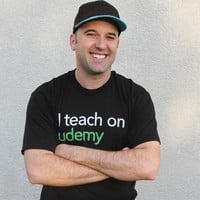
- 4.6 Rating
 8,041 Reviews
Chad Neuman, Ph.D.
I love seeing students succeed in their designs, photos, productions, artistic work, and careers.
Do you want to learn become a better designer or communicator? Do you want to learn industry-standard editing and effects in Photoshop? Do you want to create logos for your brand or for clients? Do you want to learn new skills that are in demand in the new digital economy?
I'm passionate about communication, writing, art, and design education, and I'm currently a full-time professor of communication and digital media. I've developed curriculum and taught classes on design, photography, and writing for over a decade. My university students have become full-time, award-winning photographers, web designers, creative specialists, reporters, and layout designers. And now, you can learn from me as well!
Get started by enrolling in my courses, learning new skills and knowledge, and asking me questions in the courses and forums.
My Three-Part Qualifications to Teach You (Professional Experience, Education, and Experience Teaching):
 More courses by Chad Neuman, Ph.D.

Photoshop for Beginners: Zero to Hero in Photoshop (2025)
4.3 (6,623 Reviews)
 Provider: Udemy
 Time: 3.1h
$124.99
The Complete Drawing Masterclass: From Beginner to Advanced (2020)
4.5 (3,359 Reviews)
- Provider: Udemy
- Time: 19.8h
$109.99
Graphic Design Masterclass: Learn Graphic Design in Projects (2020)
4.4 (2,749 Reviews)
- Provider: Udemy
- Time: 3.9h
$109.99
Adobe Illustrator CC Mastery: Zero to Hero in Illustrator (2020)
4.5 (2,172 Reviews)
- Provider: Udemy
- Time: 3.3h
$84.99

Logo Design Masterclass: Logo Design, Illustrator, Dimension (2025)
4.6 (1,930 Reviews)
- Provider: Udemy
- Time: 7.8h
$17.99

Learn Adobe InDesign: Design a Magazine and More in InDesign (2026)
4.7 (1,688 Reviews)
- Provider: Udemy
- Time: 8.8h
$79.99
More Photoshop courses


Adobe Photoshop CC: For Complete Beginner (Sinhala Medium) (2026)
4.9 (110 Reviews)
- Provider: Udemy
- Time: 8.4h
$59.99

Adobe Photoshop CC – Essentials Training Course (2025)
4.8 (36,753 Reviews)
- Provider: Udemy
- Time: 11.6h
$189.99


47 Graphic Design Projects for Photoshop Beginners (2025)
4.8 (466 Reviews)
- Provider: Udemy
- Time: 7.9h
$99.99

Photoshop Efficiency - Techniques For Consistent Marketing (2025)
4.8 (144 Reviews)
- Provider: Udemy
- Time: 1.4h
$49.99
 Reviews

By sumer dauzencar on 3/10/2026
Yes, it helped me learn at my own pace, rather than rushing in a typical offline classroom. I can also rewind the video countless times if i failed to grasp what is being taught, as sometimes the mind wanders off! At first i thought i had to go to an institute and pay a big fee to learn. But now i can learn at my own terms and at a very affordable price. All i need is my PC, internet and the determination to learn! Thank You so much Udemy!
By Raphaëlla M'bemba on 6/6/2021
I was a complete beginner, not knowing where to start, until I came accross this very detailed, complete, starter guide on the different tools within Photoshop. A real interactive library to have in hand to refresh or to guide you on the multitude of possibilities of PS. Most of all THANKS for being so generous with with your tip and tricks. Course Well done! Good job.
By Brian Watson on 1/6/2021
I had only a rudimentary knowledge of Photoshop before taking this course. Thanks to Chad's clear explanations and comprehensive coverage of the many features of each of Photoshop's tools, I now have an in-depth knowledge of what each of these tools can do and how to use them. The challenge for me now is to put all this new knowledge into practice i.e. to start using all these tools to develop projects in Photoshop such that using them becomes second nature to me.
By Dennis Valentin on 4/22/2019
As a complete novice to photoshop, I found myself overwhelmed with the number of tools available. Chad is clear, concise & easy to follow. This course is great for individuals not familiar at all with the software and wants a general understanding of the tools to perform & edit their future work. The value of this course thus far has exceeded my expectations.
By SYED ATTA E RASOOL BOKHARI on 3/7/2019
Yes,it is good,but you need to improve more,Like your Photoshop version was 2015 and I'm using 2019,in refine edge session,i saw completely different options,instructor maybe forget to teach one option while working,I follow him in practising,but did not like in video,and i realize to press ALT and in slice tool,i got nothing,and all other videos was best,overall good practise Thanks :-)
By R Lev on 5/6/2018
It was great to have an introduction to the various tools. However explanation of some fundamentals such as layers were assumed and it would have been helpful to the beginner to explain these (and saved frustration!). Also explaining more as to why you would use selection tool vs other tools etc. Thanks for the course!
By De Shourn Barrington on 1/1/2018
I found this course very thorough. It has been very effective in helping me learn the various Photoshop tools. What would have been even more helpful, is adding some exercises to help apply and master the use of the tools. But, if you're simply interested in learning the software or getting a refresher, this course delivers. Excellent!!
By Moon Lee on 6/27/2017
Video too long... not straight forward. Video blur using Udemy app, hard to view small objects trainer clicking. Hope display text form for shortcut keys in screen. Downloaded few huge (MB) files. Different from yours, sceenshot images from your videos for practice.
By Lucy McLoughlin on 6/12/2016
This is an excellent course. I'm surprised it's free, because the quantity and quality of the content is similar to other paid courses. Chad is very knowledgeable and his explanations are clear without being condescending. This course is an ideal way for beginners to learn the Photoshop interface before jumping into actual graphic design.
By Lollo14 on 2/28/2015
Everyone loves free stuff, but this course is simply amazing! the teacher speaks really clearly (I'm learning English and I could understand almost all!!!) There are all the basics to know and start to use this program (and the author has other course for free, with a lot of lessons!) Thanks Chad for the hard work you do for us! I really admire you!!
- Video Duration:
 5.3h
5.3h - Price: $89.99
- Provider: Udemy
- Updated:
 January 2024
 - Level:
 All Levels
 - Language:
 English
 - Certificate:
 Yes
Yes
30-day money-back guarantee on most paid courses
Udemy Coupon Price Tracker
