
 Web Development
 Data Science
 Python
 SQL
SQL JavaScript
 Artificial Intelligence
 IT & Software
 IT Certifications
 Hacking
 AWS
AWS Arduino
 DevOps
 3D Modeling
 Graphic Design
 Photoshop
 Drawing
 Digital Painting
 UX Design
 Business
 Data Analysis
 Communication Skills
 Project Management
 Leadership & Management
 Human Resources
 Digital Marketing
 Social Media Marketing
 Marketing
 SEO
SEO Google Analytics
 Branding
 Excel
Excel Office Productivity
 SAP
SAP PowerPoint
 Microsoft Access
 SharePoint
 Finance & Accounting
 Trading & Investing
 Accounting
 Bitcoin
 Personal Finance
 Video Editing & Animation
 Photography
 Adobe Premier Pro
 Adobe Lightroom
 Personal Development
 Productivity
 Career Development
 Life Coaching
 Health & Fitness
 Meditation & Mindfulness
 Yoga
Yoga Music
Music Music Production
 Guitar
 Piano
Piano Singing
 Language Learning
 Teaching & Academics
 Engineering
 Math
Math Lifestyle
Program a Media-Player in C# (Udemy.com)
Create a video and audio-player using C# and the Windows Presentation Foundation (WPF)
Created by: Huw Collingbourne
Last updated August 2019
 What you will learn
- Understand how to design using the WPF.
- Develop a functional and useful media-playing tool.
- Add styles and effects to controls
- Read and write XML data to and from disk
- Use Windows Shell functions to obtain file metadata
- Implement file drag-and-drop
How it compares
Against the other 194 rated Udemy courses in C# on CourseDuck:
- Rating4.3 out of 5higher than 26% of them
- Reviews62#169 of 195 by number of reviews
- Length2.2 hoursshorter than 85% of them
- Last updatedAugust 2019earlier than 70% of them
 Course Description
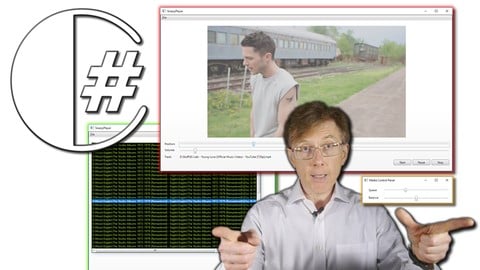
In this course you will follow the development of a complete project from the ground up. It explains how to use design and code a WPF program in Visual Studio. You will end up with a utility that plays audio and video, controls playback volume, balance, position and speed.
In this course you will develop programs that do all the following:- Play video and audio files
- Load single media files or entire folders of files
- Drag-and-drop files direct from the Windows Explorer
- Create named playlists that can be saved and loaded to and from disk
- Change the volume, position, speed and balance of a playing track
- Use styles and effects to change the user interface appearance
- Use Timers to respond to tick events
- Use file dialogs to save and load files
- Read and write structured XML files to and from disk
- Create applications with multiple windows
- Use Windows Shell functions to obtain file metadata
This is a project-based course that comes with all the source code ready-to-run. It provides a great way for C# programmer to move beyond the basics to explore the development of more complex C# applications using the WPF (Windows Presentation Foundation).

 Udemy Discount
The discount is applied through our link. Open the course from here and Udemy's current promotional price is applied at checkout on most courses, no code to type.
Some courses are excluded from Udemy's promotions. If the price does not drop, clear your browser cookies and use the button again.
Instructor Details

- 4.3 Rating
 62 Reviews
Huw Collingbourne
Huw Collingbourne is the technology director at SapphireSteel Software, developers of programming tools for Microsoft Visual Studio. He is author of The Little Book Of C, The Little Book Of Pointers and The Little Book Of Recursion from Bitwise Books and of The Book Of Ruby from No Starch Press. He runs Bitwise Courses and teaches courses on a range of programming topics.
Huw has been a programmer for more than 30 years. He is a well-known technology writer in the UK. For over ten years he wrote the Delphi and Java programming column for PC Plus Magazine. He has also written numerous opinion and programming columns (including tutorials on C#, C++, Smalltalk and Ruby) for a number of computer magazines, such as Computer Shopper, PC Pro, and PC Plus.
In the 1980s he was a pop music journalist and interviewed most of the New Romantic stars, such as Duran Duran, Spandau Ballet, Adam Ant, Boy George, and Depeche Mode. He is now writing a series of 1980s murder mysteries.
 More courses by Huw Collingbourne



Learn C# Programming (In Ten Easy Steps) (2023)
4.4 (2,005 Reviews)
 Provider: Udemy
 Time: 7.5h
$18.99
Learn To Program with Delphi and Object Pascal (2024)
4.5 (1,071 Reviews)
- Provider: Udemy
- Time: 7h
$89.99

More C# courses

C# Developers: Double Your Coding Speed with Visual Studio (2018)
4.7 (4,035 Reviews)
- Provider: Udemy
- Time: 2.2h
$13.99
Object Oriented Programming with C# - Beginner to Advanced (2020)
4.7 (2,063 Reviews)
- Provider: Udemy
- Time: 5.6h
$64.99


Learn Game Development with C# Programming and MonoGame! (2025)
4.7 (1,094 Reviews)
- Provider: Udemy
- Time: 6.6h
$12.99

 Reviews

By Erland Matz on 11/2/2024
Amazing Course. But I will not use WPF so much I think. Most of programming I do I do for myself and then it is easier to use Window Form Applications. But I will give it more chanses while I goes thru this part 2 of the Media Player
By Haris Abbasi on 10/31/2024
The course project is very interesting. However, the course content isn't structured properly. The instructor used already written code in the videos and just explained it like a boring theory class presentation which is difficult to follow. Also, I feel a lot of important concepts are still missing; so if someone wants to take this course then he/she should also learn from other materials in order to master WPF.
By Barry Grant on 9/1/2023
love the course; learnt a lot; excellent job; thank you.
By Mike Hummel on 5/31/2020
Instructor has an excellent grasp of the subject matter and his delivery is excellent, clear, straightforward and easily understood. Great course.
By D W on 4/29/2020
A great presenter and and clearly an expert. Excellent detail given and every step is related with useful additional information. Great for learning c# with a real world application. I'm sure I will return to this course many times for reference material.
By Kurella Satya Narayan on 9/20/2019
The course teaches some good stuffs but is faster and is more like a powerpoint presentation rather than an interactive session where trainer and trainee can write code simultaneously. The instructor seems to be moving fast by just showing already written code instead of writing it while teaching. It would have been better if there was an introductory lesson on the WPF project walk through to understand a WPF project structure, contents, files etc. The course covers most of the topics which are actually available free online. It doesn't mean that the instructor lack knowledge, but expected a lot more deep dive into WPF.
By Timur Makimov on 4/14/2019
For OpenFolder_Click event you can use Ooki.Dialogs Nuget package that provides VistaFolderBrowserDialog which is better than the old one. Great course - used it as a WPF crash course. Thanks!
By Russell Hathaway on 1/19/2019
I am impressed with the depth of knowledge Huw conveyed, in such an easily understand manner. Explaining each of the capabilities, suggesting improvements, and identifying the strengths/weaknesses of the language/program/project. Grateful for the lesson!
By Raimundo Torres on 10/15/2018
So far, the explanations are very well done and very clear. But I thought that a single project was being built as you progress through the lessons, which for me it would have been more rewarding and easier to follow.
By Wstewlin@yahoo.com on 5/28/2018
Just getting started, but I can say it is well presented and easy to understand. I have learned some worthwhile things already.
 Quality Score
No CourseDuck member has rated this course yet. Taken it? Give each part a thumbs up or down.
Overall Score : 86 / 100
- Video Duration:
 2.2h
2.2h - Price: $49.99
- Provider: Udemy
- Updated:
 August 2019
 - Level:
 Intermediate
 - Language:
 English
 - Certificate:
 Yes
Yes
30-day money-back guarantee on most paid courses
Udemy Coupon Price Tracker
