
 Web Development
 Data Science
 Python
 SQL
SQL JavaScript
 Artificial Intelligence
 IT & Software
 IT Certifications
 Hacking
 AWS
AWS Arduino
 DevOps
 3D Modeling
 Graphic Design
 Photoshop
 Drawing
 Digital Painting
 UX Design
 Business
 Data Analysis
 Communication Skills
 Project Management
 Leadership & Management
 Human Resources
 Digital Marketing
 Social Media Marketing
 Marketing
 SEO
SEO Google Analytics
 Branding
 Excel
Excel Office Productivity
 SAP
SAP PowerPoint
 Microsoft Access
 SharePoint
 Finance & Accounting
 Trading & Investing
 Accounting
 Bitcoin
 Personal Finance
 Video Editing & Animation
 Photography
 Adobe Premier Pro
 Adobe Lightroom
 Personal Development
 Productivity
 Career Development
 Life Coaching
 Health & Fitness
 Meditation & Mindfulness
 Yoga
Yoga Music
Music Music Production
 Guitar
 Piano
Piano Singing
 Language Learning
 Teaching & Academics
 Engineering
 Math
Math Lifestyle
The Ultimate Guide to Blender 3D Rigging & Animation (Udemy.com)
Tank tracks to characters Learn how to 3D animate and rig anything in this massive 17 part Ultimate Blender guide.
Created by: 3D Tudor
Last updated April 2025
 What you will learn
- • Creating 15 different animation projects including but not limited to grass, wheels, trees, fish, tank tracks, fire, light, and clouds, and adventure trapst
- • Learning how to animate tank tracks so that they stick to any type of terrain
- • Mastering the art of character rigging and animating walk cycles
- • Finding how to make moths move around a light source using Blender’s particle boid system
- • Enjoying a full introduction to animating in Blender with 16 animation projects of increasing difficulty
- • Using Blender 3 and understanding its new interface and shortcuts
- • Completing an introduction to the basics of animation in Blender and learning how to animate with nothing but key frames
- • Creating create handles and drivers to have your tank tracks move realistically
- • Maximising the benefits of animated textures to create flames and fire streams
- • Smoothing out animations with interpolation modes
How it compares
Against the other 545 rated Udemy courses in 3D Modeling on CourseDuck:
- Rating4.5 out of 5higher than 37% of them
- Reviews400#192 of 546 by number of reviews
- Length8 hourslonger than 57% of them
- Last updatedApril 2025more recently than 76% of them
 Course Description
Course Description
Have you ever wanted to breathe life into the 3D assets you create, moving their limbs, letting them swing to the wind or morphing them into different shapes?
'The Ultimate Guide to Blender 3D Rigging and Animation’ is very different to any other Blender course out there! Most Blender courses show you 3D modelling, texturing, and rendering tips and tricks. 'The Ultimate Guide to Blender 3D Rigging and Animation’ focuses on creating a variety of animations from basic, to intermediate, to advanced, all completely made in Blender - one of the top open-source and free 3D modeling software out there.
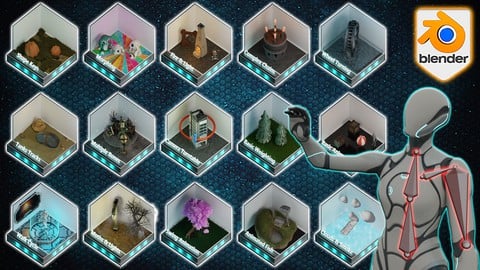
We will not be using any other software to animate all that you see in the thumbnail, except Blender. You will also learn about multiple armatures, walk cycles, and turntables, and as an added plus, you will learn about how to animate a full scene reminiscent of adventure films with different deadly traps.
This is great because it means you will get to see how we animate organic and inanimate objects from scratch for video games. I am sure 'The Ultimate Guide to Blender 3D Rigging and Animation’ will be the one course that you will want to keep handy anytime you need animate an asset.
Our 'The Ultimate Guide to Blender 3D Rigging and Animation’ top 6:
1. Following through a full introduction to animating in Blender with basic animations;
2. Learning how to animate tank tracks so that they stick to any type of terrain;
3. Creating create handles and drivers to have your tank tracks move realistically;
4. Mastering the art of character rigging and animating walk cycles;
5. Finding how to make moths move around a light source using Blender’s particle boid system;
6. Maximising the benefits of animated textures to create flames and fire streams.
Now, there are courses out there that can show you how to animate specific assets from start to finish, but there is nothing that covers the entire process from grass to wheels, to trees, to fish, to tank tracks, to fire, to light, and clouds, and even deadly adventure game traps. 'The Ultimate Guide to Blender 3D Rigging and Animation’ is intended to be the complete guide to animating in Blender.
Stage 1: Basic Animation
This part of 'The Ultimate Guide to Blender 3D Rigging and Animation’ will cover the basics of animation. No bones or rigs, just key frames. We will also be looking into interpolation modes and how we can use them to smooth out animations.
· Move - Rotate - Scale
· Interpolation modes
· Basic simulations
Stage 2: Swing Animation
Using the skills we learn from stage 1, we take this up a notch by creating our first rig and single bones. This is the basis of most animations. This part of 'The Ultimate Guide to Blender 3D Rigging and Animation’ will teach you why a root bone is important.
· Swing Animation
· Simple Rig
· Root Bone
Stage 3: Wheel Turning
When working with anything that can spin, it is important to understand how frames and keys work. In this stage, we will be explaining how to create a spinning wheel. Our goal is for its movement to look realistic. The best thing about wheel animations is that this can be achieved in the shortest amount of time.
· Key Frames
· Blank Frames
· Linear Interpolation
Stage 4: Basic Weighting
In this part of 'The Ultimate Guide to Blender 3D Rigging and Animation’, we will be looking at how weighting works and you will learn how to add weight to bones. This is important for creating a certain level of realism. We will also be looking at when and how to use bendy bones.
· Bendy Bones
· Tree Swaying
· Weight Chart
Stage 5: Shape Keys
Shape keys are a very powerful animation tool that we have at our disposal. We can not only change the shape of objects in ways that rigs simply cannot do but we are also able to combine multiple shape keys.
· Shape Keys
· Animated Texture
· Growth Animation
Stage 6: Multiple Bones
As a 3D artist, at some point or another, you will have models that will need a lot more than just one single bone. In this part of the course, we learn how we can create animations with multiple bones working independently.
· Multiple Bones
· Combining Keyframes
· Timelines
Stage 7: Animated Fish
Realistically animating wildlife can be difficult. Luckily, we have a fair amount of Blender that can speed up your workflow and enhance the realism of an animation. Within the graph editor, we will look at modifiers and how to combine them with displacement.
· Noise Modifier
· Animated Paths
· Displacement
Stage 8: Morphing
Morphing is the process of taking one object and turning it into another over a set number of keyframes. Now, this is not as simple as clicking a button. In this part of 'The Ultimate Guide to Blender 3D Rigging and Animation’, we will look at how to set up this process and how to change the textures along with the object.
· Shrink Wrapping
· Morphing
· Texture Setup
Stage 9: Tank Tracks
In my opinion, tank tracks are the number one asked-for animation, coming second after character rigs. This is why it is included in the course. We will be going through how to stick our tracks to any terrain. You will finish this part with the skills to create handles and drivers to have your tank tracks move realistically.
· Drivers
· Handles
· Curve Modifier
Stage 10: Fire & Light Flicker
There will always be an abundance of models that require flames in some shape or form. This means that knowing how to animate flames is a key component of 'The Ultimate Guide to Blender 3D Rigging and Animation’. You will not only learn how to create flames from scratch, but you will also learn how to animate them. Empties and displacement will be the key to creating realistic flames without the need for complex simulations.
· Texture Coordinates
· Animated Lighting
· Moving Flames
Stage 11: Moths & Light

 Udemy Discount
The discount is applied through our link. Open the course from here and Udemy's current promotional price is applied at checkout on most courses, no code to type.
Some courses are excluded from Udemy's promotions. If the price does not drop, clear your browser cookies and use the button again.
Instructor Details
- 4.5 Rating
 400 Reviews
3D Tudor
Neil Bettison is the founder of 3D Tudor, a Blender and game art education studio created in 2019. He is a professional 3D artist, environment artist, instructor, and bestselling Blender author whose work focuses on practical, project-based training for artists who want to build real 3D skills.
Through 3D Tudor, Neil and the team have taught over 250,000 students worldwide across Blender, Unreal Engine 5, Geometry Nodes, 3D modelling, texturing, lighting, environment art, and game-ready workflows. His courses are known for clear structure, practical projects, and direct step-by-step teaching that helps beginners and intermediate artists build confidence without feeling overwhelmed.
Neil is also co-author of a #1 Amazon Best Seller in Rendering & Ray Tracing, published by Packt. His published work and online courses are built around the same goal: helping students move from theory to finished portfolio-ready scenes, assets, and environments.
3D Tudor courses are designed for learners who want more than isolated tips. Many courses take students through full workflows, from planning and modelling to UVs, materials, lighting, rendering, and final presentation. Common themes include medieval and Tudor environments, fantasy buildings, modular game assets, stylized scenes, sci-fi props, Geometry Nodes systems, and Blender-to-Unreal Engine workflows.
 More courses by 3D Tudor
Unreal Engine 5 Beginners Guide to Building an Environment (2025)
4.5 (388 Reviews)
 Provider: Udemy
 Time: 18.4h
$99.99
Blender 4 Creator Course Stylized 3D Models (2026)
4.5 (237 Reviews)
- Provider: Udemy
- Time: 19.9h
$19.99
Blender to Unreal Engine 5 The Complete Beginners Guide (2025)
4.5 (90 Reviews)
- Provider: Udemy
- Time: 18.1h
$84.99
Unreal Engine 5 creating an ARPG Game from Scratch (2026)
4.1 (85 Reviews)
- Provider: Udemy
- Time: 31.4h
$69.99
More 3D Modeling courses

3D Printing with " Ultimaker CURA Slicer- Start to finish" (2025)
4.9 (192 Reviews)
- Provider: Udemy
- Time: 1h
$34.99

Girl and the Dog Creation in Zbrush for Intermediate Level (2020)
4.9 (173 Reviews)
- Provider: Udemy
- Time: 48.8h
$59.99



Blender Character Creator for Video Games (2026)
4.8 (9,160 Reviews)
- Provider: Udemy
- Time: 34.3h
$159.99

Master SOLIDWORKS 3D CAD using real-world examples (2022)
4.8 (2,451 Reviews)
- Provider: Udemy
- Time: 18.9h
$69.99
 Reviews

By Jared Schuette on 1/23/2026
The course does a great job at teaching, but there are some errors in the lessons and some of the information is outdated. There are errors like the speaker saying he'll add a visual description in the bottom right of the video that isn't there, or discrepancies between the practice file and the file used in the video. For example, there were some issues with keyframes already being present in the "Animating Material Nodes" section that the learner is supposed to do themselves. There is also outdated information, like how the shortcut for keyframes has changed to "K" and the lighting bloom effects are completely changed and no longer work the way illustrated in the course. There is a lot to learn from this course, but the course comes with some issues.
By Christopher Davis on 11/27/2024
Very good course. Was exactly what i was expecting / wanted. However i will say that for complete beginner it may go a little fast and for someone really advanced it is probably not what you want but if like me you know about rigs and weights but have mainly animated characters and such and want to do hard surface animating like me then this is a great course for you. however if you want to know about characters specifically then i would say look elsewhere. This course is a mashup sort of jack of all trades master of none type deal where you get a little bit of everything
By William Pulos on 7/20/2024
There is much here I have learned and I'm sure Ill be back to review sections here and there. This course is worth working through and battling hitches and glitches along the way, what more can I say. Take the course and absorb what you can then do as I plan and review as needed!
By Dimitri Suz on 3/9/2024
It was a good introduction into animation and rigging in blender. It shows how to use key frames and rigging. Many different examples awaiting you where you can see the usage of the bones for rigging. For me it was a great start into the topic and it opens new ways and challenges to work on on my own. The good part is that it shows some of mistakes happening on the way and how to solve them. All together is it a great course and i would recommend to get it :) Big thanks to Neil for sharing his experience with us :)
By Helena du Toit on 1/28/2024
I've done a few 3d courses on Udemy, but this one is by far the clearest and most thought-out course that I've had the pleasure to do. 10/10 would recommend this course to anyone interested in learning animation. Lessons are short and sweet, straight to the point. Easy to follow.
By Clement Chapelle on 1/23/2024
A big bravo to the teacher, everything is already in place to concentrate solely on the animation. The lessons are straight to the point, neither too slow nor too fast. The explanations are excellent, and the teacher's voice is clear and very well recorded. I recommend this course 100%.
By Tom Williamson on 9/22/2023
There's a wealth of information about rigging and animation in this course, but the presenter talks so fast and presents the information in such a "streamlined" fashion, that I had to set the speed to .75 just to follow what he was doing. Additionally you should be prepared to stop the course and look up Blender features and commands since several key steps in each course go by in the blink of an eye, causing you to be mystified as how the presenter got from "Point A" to "Point B" in his lesson. Still, even with all that, it contains a lot of valuable information.
By Tolga Ates on 6/26/2023
I like the way you explain the lessons; your voice has a clean and enjoyable style. You always seem to have fun with Blender, and your voice never gets boring. That, for me, is the most important thing because I am German and often have to pause the video to understand it. But with your style, it's very comfortable.
By S Ryan on 6/1/2023
Good introduction to methods for rigging and animation. The provided models (two large scenes) make for a quick progress and a lot of practice. Lessons were about the right length but could use a little editing to better align with the lesson name and to remove a couple of cases where backtracking was required.
By Troy Sprague on 4/10/2023
This course will level up your understanding of animation. I learned a ton and it revealed many of the aspects of animation that weren't clear to me. After taking the course, I feel prepared to move on to more complex concepts that I wouldn't be able to grasp prior. I really enjoyed it.
 Quality Score
No CourseDuck member has rated this course yet. Taken it? Give each part a thumbs up or down.
Overall Score : 90 / 100
- Video Duration:
 8h
8h - Price: $79.99
- Provider: Udemy
- Updated:
 April 2025
 - Level:
 All Levels
 - Language:
 English
 - Certificate:
 Yes
Yes
30-day money-back guarantee on most paid courses
Udemy Coupon Price Tracker
