
 Web Development
 Data Science
 Python
 SQL
SQL JavaScript
 Artificial Intelligence
 IT & Software
 IT Certifications
 Hacking
 AWS
AWS Arduino
 DevOps
 3D Modeling
 Graphic Design
 Photoshop
 Drawing
 Digital Painting
 UX Design
 Business
 Data Analysis
 Communication Skills
 Project Management
 Leadership & Management
 Human Resources
 Digital Marketing
 Social Media Marketing
 Marketing
 SEO
SEO Google Analytics
 Branding
 Excel
Excel Office Productivity
 SAP
SAP PowerPoint
 Microsoft Access
 SharePoint
 Finance & Accounting
 Trading & Investing
 Accounting
 Bitcoin
 Personal Finance
 Video Editing & Animation
 Photography
 Adobe Premier Pro
 Adobe Lightroom
 Personal Development
 Productivity
 Career Development
 Life Coaching
 Health & Fitness
 Meditation & Mindfulness
 Yoga
Yoga Music
Music Music Production
 Guitar
 Piano
Piano Singing
 Language Learning
 Teaching & Academics
 Engineering
 Math
Math Lifestyle
Unreal Engine 5 - Realistic Environment Design for Beginners (Udemy.com)
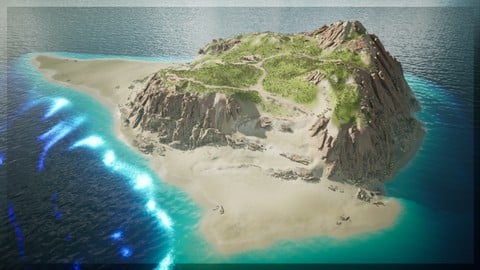
Learn video game level design in UE5 by creating an entire playable island step by step, even as a complete beginner!
Created by: Gavin Eisenbeisz
Last updated July 2021
 What you will learn
- UE5 basics, like installing the engine, importing assets, and navigating the engine
- Custom sculpted landscapes
- Landscape painting
- Foliage painting
- Level editing
- Editing collision to create a fully playable world
- Basic lighting, post processing, fog, and atmospheric effects
How it compares
Against the other 70 rated Udemy courses in Unreal Engine on CourseDuck:
- Rating4.5 out of 5higher than 47% of them
- Reviews1,168#16 of 71 by number of reviews
- Length4.3 hoursshorter than 78% of them
- Last updatedJuly 2021earlier than 77% of them
 Course Description
If you're new to Unreal, or want to get started creating highly detailed and professional outdoor landscapes, then you've come to the right place!
In this course I'll teach you all the amazing tools in UE5 that can be utilized to create levels and landscapes, and we'll put that knowledge to use by creating an entire island level, step by step!
---------------------------
If you don't have any experience in Unreal Engine 4, or 5, I've got you covered! I've dedicated part of this course to teaching the basic knowledge needed to complete this course. You'll learn how to install the engine, how to add objects to your new projects, and even how to navigate the engine and edit levels!
Once you learn the basics, or if you already have some experience, we'll hop into learning all of UE5s landscape tools! I'll teach you how to sculpt terrain, by going in depth into all the parameters available in the engine, as well as how to create a custom landscape material that we'll use to paint highly detailed textures onto our island. I'll even show you how to paint realistic foliage onto your levels.
But we won't just stop after having created our island! I'll even show you how to implement some of UE5s realistic water system, and how to set the mood of your scene with lighting, post processing, fog, and volumetric clouds.
After that, I'll even teach you how to make your level playable by customizing object collision, and adding invisible walls to keep players on the right path.

 Udemy Discount
The discount is applied through our link. Open the course from here and Udemy's current promotional price is applied at checkout on most courses, no code to type.
Some courses are excluded from Udemy's promotions. If the price does not drop, clear your browser cookies and use the button again.
Instructor Details

- 4.5 Rating
 1,168 Reviews
Gavin Eisenbeisz
Hi, I'm Gavin!
I own Two Star Games, an award winning indie game studio, and I have been creating my own games since 2013. Since then I've published games like Cloud Climber, and My Beautiful Paper Smile, and am currently developing Choo-Choo Charles. My games have been played by hundreds of thousands of people, been featured by PC Gamer, have been on the front page of sites like Steam, Itch and Gamejolt, and have been played by popular influencers like Markiplier, and FGTeeV.
I've accumulated extensive knowledge of game art, storytelling, design, and of tools like Unreal Engine over the years. It's my goal here on Udemy to provide some of that knowledge to you, in a complete and comprehensive way, so that you can start creating the experiences that you want to create.
 More courses by Gavin Eisenbeisz
Unreal Engine 5 - Learn to Create Professional Cinematics (2021)
4.4 (1,501 Reviews)
 Provider: Udemy
 Time: 2.5h
$89.99
Unreal Engine 5 Beginner Blueprints: Make your first game! (2021)
4.6 (756 Reviews)
- Provider: Udemy
- Time: 6.3h
$74.99
Unreal Engine 5- Beginner Lighting, Fog, and Post Processing (2021)
4.1 (730 Reviews)
- Provider: Udemy
- Time: 2.6h
$64.99
Unreal Engine 5 - Learn to Make a Professional Main Menu (2021)
4.3 (627 Reviews)
- Provider: Udemy
- Time: 1.5h
$69.99
More Unreal Engine courses

Unreal Engine 5: One Course Solution For Material (2026)
4.9 (1,774 Reviews)
- Provider: Udemy
- Time: 14.1h
$99.99

Unreal Engine 5 Blueprints - The Ultimate Developer Course (2026)
4.8 (4,636 Reviews)
- Provider: Udemy
- Time: 41.6h
$19.99

The Ultimate Unreal Engine 2D Game Development Course (2026)
4.8 (3,290 Reviews)
- Provider: Udemy
- Time: 12.1h
$99.99


Unreal 5 Materials - Part 1 Environments (2024)
4.8 (221 Reviews)
- Provider: Udemy
- Time: 14.4h
$79.99

Unreal Engine 5 - Gameplay Ability System - Top Down RPG (2026)
4.7 (3,529 Reviews)
- Provider: Udemy
- Time: 105.8h
$24.99
 Reviews

By Nathan Brimson on 8/28/2026
I was able to learn how to create landscapes through this course. I have had experience with creating them in the past, but this taught me some key skills such as how to smooth down landscapes, how to paint textures onto a landscape using a landscape material and how to create one, and how to implement realistic water with the help of a plugin. If I am stuck, I will always look back to this course, but it's been a pleasure going through it!
By Itzhak Yo on 6/21/2024
I think this is an excellent beginner course, short and concise, I would have liked to see some more water options maybe a river and waterfall(with sounds?), and also a day and night cycle with maybe how to configure a timer, I know that he made another lighting course and i will try it also and see if it's in there. other than that I think this course is a very good start for beginners like me.
By Edward James Brink on 12/2/2023
This is a nice hands on course that lets you dive right into all the basics of map creation. If you want everything explained then this probably isnt the course for you but if you're a hands on learner you will most likely appreciate this 4 hour tutorial lesson. There are a few issues with the course UE5 version being older and some things not exactly lining up with the latest UE5.03 stuff and some minor glitches that the students are experiencing because of that. Also unfortunately the teacher is not responding to these issues in the Q&A. However, I still finished the course with everything mostly working fine and I feel ready to move forward and keep expanding my knowledge and skills to eventually get to work on my own maps.
By Kenneth Bordes-Hollon on 7/10/2023
It's a good course to get you Started, but in my opinion, it doesn't really get into the specifics of certain settings, which may be good because it won't scare you away, however you may find yourself doing some extra research for have things explained even further. I think this course is good if you've taken another Unreal Engine Course previous to this one, maybe not from this instructor, but from someone on Youtube, like Unreal Engine Sensei. What I did was that I took his free course, and then I took this one. That way, I can focus on the creation process of this course, while not really worrying how settings work, because Unreal Engine Sensei covered that. However, you can take this Course by itself and I think you'll be fine, but do plan to research certain settings on your own. What I do appreciate are the little tips he provides during the Course, such as creating the landscape material, like setting the Sampler Source to Shared:Warp, because UE won't recognize more than 5 textures unless it's Shared:Warp. This was really helpful, and they're other tips like that along this tutorial. All in all, I'll rate this course a 4.5 out of 5 stars. Thank you for taking the time to create this lesson for us. I hope you make more in the future.
By Yann Guyt on 9/10/2022
Enjoyed this course a lot ! The unreal Editor is pretty overwhelming and my own attempts to just see how far I get led to a lot of stumbles: the checkbox inside the selection for the foliage you wish to use is invisible unless you hover over it, for example. Gavin cleared up a lot of mysteries and gave me a solid foundation , sorry : tropical island, from which to venture out into the Unreal Universe. His calm demeaner is pleasant throughout yet keeps up the pace !
By Yevgeniy Glavnik on 8/19/2022
I mean, it was allright. I've completed the island, even though there were a lot of unexplained hiccups along the way. For example, once the textures are blended with a blend node, it will not show up in the preview (it would simply be black). Also, at one point, I could not paint texture or sculpt for some reason at all... I could not figure out why, possibly because there were too many textures used at the same time. Then, out of nowhere, a good chunk of landscape disappeared (which I had to rebuild), but it fixed the problem and I could paint/sculpt again. Really weird. There were lots of terminology used that may not be familiar to a complete beginner, with no explanations. However, it will not affect the tutorial process that much. 80% of the whole course was watching him sculpt/paint the island, with almost no learning benefit. It was basically a Bob Ross style painting with lots of fillers - "this is your world, you can put the rock over here, or you can put it over there, or maybe you don't need it at all" type of a thing. But he did go over every element and function in the landscape/foliage modes, and he did guide and provide various tips. Ultimately, I'm happy with how my island turned out and it was good practice. I will probably consider the cinematic tutorial in the future.
By Sarah Marie on 7/3/2022
The course was okay, I learned a lot of useful things but many many things (about materials, specific terms that were used without explanation, lighting...) were left unexplained that a total beginner will simply not understand (luckily I wasn't one). Even if there is a separate course about lighting, it's still necessary to explain some basic things so that a beginner will not just copy the work but actually understand what the instructor is doing. It was also a bit disappointing that half of the time was just the instructor placing assets, painting the island etc... instead of him explaining things. Again, it was an okay course but not entirely satisfying. I will definitely have to watch other courses in addition to that one.
By Jack Beven on 6/22/2022
This is a good overview of the landscape tools and methods in Unreal Engine. It's a good bang for buck - no time wasted and straight to the point. The course covers everything fairly briefly so doesn't go into detail about the nuances of the tools or material creation. The result is still very high quality, though. To juice up my own project, I opted for procedural foliage instead of painted foliage.
By Robert Bates on 5/26/2022
It's a good course to stimulate some ideas of how to use the various tools in UE5 to create beautiful, interesting environments for your games. It is taught by an experienced instructor illustrating the order of use, some of those intricate artistic touch ups, some different techniques and adjustments to settings which you can use to develop your own personal style. The instructor gives tidbits of information of how to do something, but you'll actually have to use your artistic talents, and then develop your personal touch, with the tools that he shows you.
By Samantha Knight on 8/22/2021
This class is informal and doesn't spend a lot of time explaining things, though there is a lot of insight. The instructor knows what he is talking about and I learned some new tricks. Well worth the time and I will take more of his courses. My only real complaint with the material is I feel that there could have been more talk about optimization.
 Quality Score
No CourseDuck member has rated this course yet. Taken it? Give each part a thumbs up or down.
Overall Score : 90 / 100
- Video Duration:
 4.3h
4.3h - Price: $84.99
- Provider: Udemy
- Updated:
 July 2021
 - Level:
 Beginner
 - Language:
 English
 - Certificate:
 Yes
Yes
30-day money-back guarantee on most paid courses
Udemy Coupon Price Tracker
